.jpeg)
Every tool on this list performs the same basic function: it places a small piece of code, known as a script, on your website. This script must load before the page becomes usable and must comply with your privacy notice; otherwise, your company could face a lawsuit.
No other list covering this topic mentions these details, because the authors of those lists sell the tools themselves rather than the websites where they are used.
This article presents sixteen tools organized into six categories (listed alphabetically) and includes a column found in no other list: information on exactly what each tool requires from your website.
Every Tool On This List Is A Script On Your Website
What The Other Lists Leave Out
Keep the following facts in mind for each of the listed tools. A lead generation tool is essentially JavaScript, a small program that runs in the visitor's browser and is embedded in the "head" or "body" section of your webpage's code.
This code must load before the page becomes functional for the visitor. It must only be activated after the visitor agrees to tracking (i.e., provides consent); otherwise, your company risks a lawsuit. Also, the tool competes for bandwidth with other page elements, including your hero image.
Ask three questions about each tool you are considering: What does it require from the site to function? How much time does it add to page loading? Does your consent banner prevent it from running before the user gives their consent? For more on how AI-related marketing tools fit into this picture, see our roundup of AI tools for B2B marketing.
The 2025 To 2026 Consolidation, With Dates
Three tools that still appear on "best lead generation tool" lists as active, standalone products are, in fact, no longer such. It is important to know this before creating a shortlist.
Clearbit has become HubSpot Breeze Intelligence. The standalone version was discontinued on April 30, 2025. As of June 2025, billing is handled via HubSpot credits (approximately $45 per month for 100 credits), and a paid HubSpot subscription is also required.
Drift was sold to Salesloft in February 2024 and subsequently integrated into Clari in December 2025. The tool was taken out of service following a supply chain security breach (an attack where hackers compromise shared software used by many companies) known as UNC6395, which affected over 700 organizations, including Cloudflare, Palo Alto Networks, and Zscaler.
The shutdown of the Drift service was announced on March 6, 2026, with a tool named 1mind designated as the replacement. New user onboarding has been suspended. Two of the five articles we found ranking well for this specific query still recommend Drift as a viable option.
Qualified was acquired by Salesforce (the process concluded on April 1, 2026) and is now being integrated into Salesforce's Agentforce product.
How This List Is Organised
This list is divided into six categories, with items arranged alphabetically within each and no overall ranking. The categories are: forms and data collection, chat and conversation, visitor identification and intent, data enrichment, scheduling and routing, and website personalization.
You might notice that some well-known names are missing from the list: Google Ads, Zapier, and Mailchimp. Here is why.
Google Ads is an advertising platform. It drives traffic to your site but does not collect visitor data after they arrive. Zapier is automation software that transfers data between different tools. Mailchimp is an email communication tool designed to nurture leads whose data you have already collected.
None of these three tools performs the task of capturing leads from your website, which is precisely what this list focuses on.
Sixteen Tools By Category
The Comparison Table
Below are sixteen tools, alphabetical within each of the six categories, with pricing marked as vendor-published (V) or third-party estimated (T), and a column showing what each tool needs from your website to function.
A few notes: this table runs alphabetically within each category, not ranked. Every V or T marker reflects what we found as of this check, and pricing should be reconfirmed directly with each vendor. The "what it needs" column is the actual point of this article, so we didn't shorten it to save space.
Form, Chat, And Visitor Identification
HubSpot Forms is a free form builder that embeds on your site and syncs directly to HubSpot's CRM. Limitation: full functionality assumes you're already using the rest of HubSpot's tools.
Typeform builds conversational, one-question-at-a-time forms, priced from $25 a month. Limitation: response volume is capped, and high-traffic forms can hit that cap fast.
Unbounce is a landing page builder with built-in lead capture, from $99 a month. Limitation: pages live on a separate domain from your main site, so you're maintaining design consistency in two places.
Intercom is a chat widget for live conversations with website visitors, with AI resolution features on top. Limitation: pricing needs to be checked directly, since current published rates weren't confirmed for this article.
6sense identifies companies (not individuals) visiting your site and layers in purchase-intent data, with paid plans starting around $50,000 a year. Limitation: it's a serious commitment, typically a two-year contract, so it fits established demand gen teams more than early-stage ones.
Breeze Intelligence is HubSpot's own visitor enrichment tool, around $45 a month on top of a paid HubSpot plan. Limitation: its form-shortening feature actively rewrites your forms when it loads, so test that behavior before turning it on.
RB2B identifies individual visitors on US traffic, using LinkedIn data among its sources, with a free tier and paid plans from $79 a month. It only works for US-based traffic and deliberately excludes the EU. Limitation: because it identifies people rather than companies, it carries real legal exposure, covered later in this article.
Vector identifies individual contacts visiting your site. Pricing isn't public; you'll need to request a quote. Limitation: without published pricing, it's harder to budget against upfront.
Warmly identifies individual visitors and includes optional chat, with a free tier and paid plans around $700 a month. Limitation: same consent exposure as RB2B, since it identifies people, not just companies.
ZoomInfo offers visitor tracking through its WebSights pixel, with entry pricing around $14,995 a year for three seats. Its newer AI features are billed separately. Limitation: this is enterprise-level pricing, not a starter tool.
A quick note on how visitor identification works, since it matters for evaluating any tool in this category. There are three general methods:
- Reverse IP lookup (matching a visitor's internet address to a company, which is getting weaker as more people work remotely)
- Behavioral and identity-graph matching (comparing browsing patterns against known profiles)
- Third-party identity data (buying access to data from other sources, which is how RB2B leans on LinkedIn profiles specifically)
The split that matters most: tools like 6sense that identify companies carry lower legal risk, while tools like RB2B and Warmly that identify individual people carry meaningfully more, which is covered in detail further down this article.
Enrichment, Scheduling, And Personalisation
Apollo is a sales database and enrichment tool that adds contact and company details to leads you've already captured, with a free tier and paid plans from $49 a user per month. It doesn't need anything installed on your website at all, which is worth noting since most tools on this list do. Limitation: data quality issues have been reported at scale, so spot-check results before relying on them heavily.
Clay enriches lead data by checking it against more than 150 outside data sources in sequence, priced around $167 a month on an annual plan. Like Apollo, it needs nothing on your site itself. Limitation: with that many data sources involved, results can vary in consistency from lead to lead.
Calendly is a scheduling tool that embeds a simple link or widget for booking meetings, free to start with paid plans from $10 a seat a month. Limitation: routing incoming meeting requests to the right rep automatically requires the $16 Teams tier, not the base plan.
Chili Piper handles meeting scheduling and lead routing together, with pricing starting at $15,000 a year for 15 seats. It needs to intercept a form submission on your site in order to route and book, which means the order your scripts load in matters here, a detail your site's builder needs to account for. Limitation: this is a meaningfully bigger commitment, both in price and in setup complexity, than Calendly.
Mutiny personalizes your website content based on who's visiting, with a free tier, paid plans from $50 a month, and enterprise pricing from $40,000 a year. It works by hiding page elements until visitor data loads, which can cause visible flicker on a slower site, especially on the pages that matter most for conversion. Limitation: performance depends heavily on how fast your site already is.
Webflow Optimize offers similar personalization but built natively into Webflow, avoiding the third-party script and the flicker problem entirely, from $299 a month. It can also be deployed on non-Webflow sites through a code snippet. Limitation: the fully native experience is specific to Webflow.
For more on tools that support the enrichment side of this work, see our AI sales tools roundup, and for scheduling specifically, our piece on demo page design.
What It Costs The Page
Script Weight And Core Web Vitals
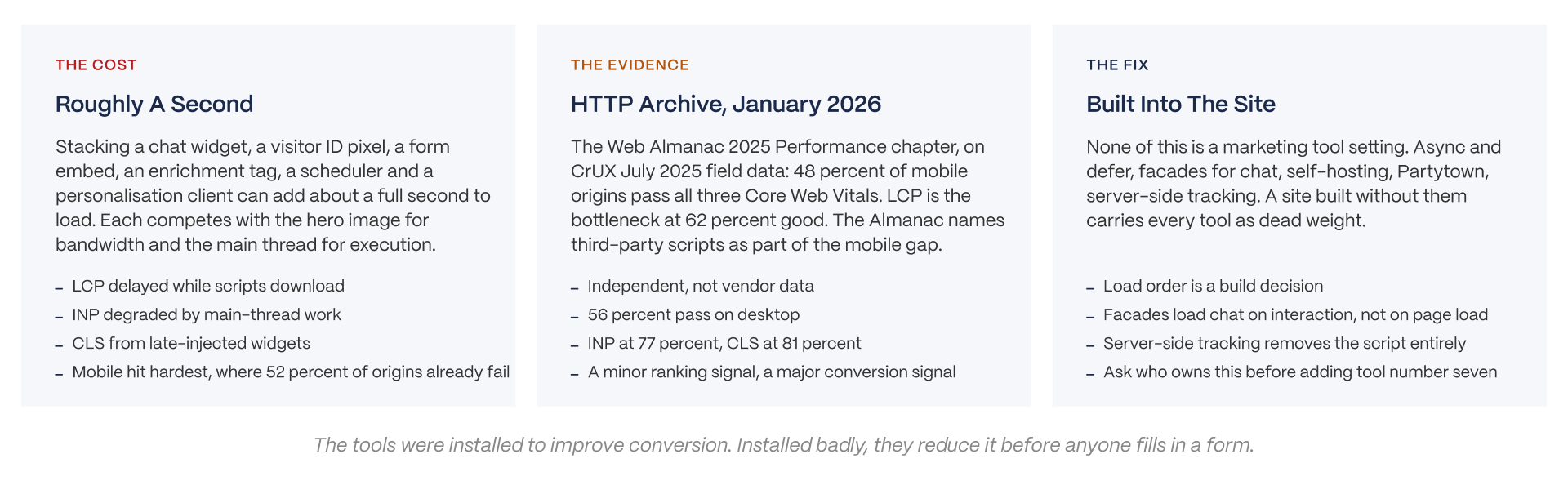
Here's a cost almost nobody prices out loud. Every tool above runs as JavaScript on your site, and stacking five or six of them together can add roughly a full second to your page's load time.
The HTTP Archive, an independent group that studies real-world website performance, found in its 2025 Web Almanac report (published January 15, 2026, using data collected through July 2025) that only 48 percent of mobile websites pass all three of Google's Core Web Vitals tests, a standard set of speed and stability measurements. The biggest bottleneck is a measurement called LCP (how fast the main content loads), which only passes on 62 percent of mobile sites. The report specifically names third-party scripts, like the ones covered in this article, as part of that gap.
Worth being honest about the ranking impact: Google's own John Mueller has said Core Web Vitals is a real but minor factor in search rankings. The bigger cost is to your visitors directly, in the form of higher bounce rates and lower conversion, which is ironic, since these tools were installed to improve conversion in the first place. For more on measuring your site's traffic and speed, see our guides on connecting GA4 to Webflow and AI traffic analytics.
Where The Script Goes And Why It Matters
Where you place a script depends on your platform. On Webflow, it goes in Project Settings, under Custom Code, in the Head Code section. On WordPress, it typically goes through a header plugin or directly in your theme's header file. On a custom-built site, you have full control to place it directly in the HTML head and decide exactly when it loads relative to everything else.
A few fixes that belong in the build itself, not in any marketing tool's settings:
- using async and defer attributes (which tell the browser it's okay to keep loading the rest of the page while that script finishes)
- using a lightweight "facade" that only loads a chat widget once someone clicks it instead of on every page load
- self-hosting scripts where the vendor's license allows it
- offloading scripts to a background process using a tool like Partytown
- tracking visitor data server-side instead of through a browser script at all
The takeaway: these are engineering decisions rather than marketing settings. A site built without them will carry every tool you add as dead weight.
Embed Or Build It Native
This is the actual build decision behind most of this article. An embedded form loads an external script, often inside an iframe (a little window loading content from another site), adds weight to your page, and depends on the vendor's own uptime to keep working.
A form built natively into your site's own code and connected directly to an API is lighter, faster, fully within your control for consent handling, and costs real development time to build properly.
The honest trade-off: embed a form to launch quickly, then consider building it natively once the form is proven out and your traffic justifies the investment. For more on how this plays out on real landing pages, see our B2B landing page examples.
Does Any Of It Work
The One Independent Chat Study
There's exactly one rigorous, independent, peer-reviewed study comparing chat tools to forms, and it's worth knowing about specifically because almost every other number in this category comes from a vendor trying to sell you something. Isabella and colleagues, published in the Journal of Business Research (volume 201, 2025), ran a field experiment with more than 9,500 people who clicked on an ad. A WhatsApp chatbot converted 42 of them, a rate of 0.85 percent. A standard web form converted 7, a rate of 0.15 percent. That's roughly five to six times better for chat.
Compare that to vendor claims. Companies like Wonderchat, Conferbot, and Drift have all published their own chatbot conversion figures in the 15 to 40 percent range, numbers that obviously serve their own sales interest. The independent number is a fraction of that, at 0.85 percent, and chat still meaningfully beat the form.
Form Conversion, Honestly Ranged
Here's the range you should plan around. Unbounce, a landing page vendor, publishes a benchmark claiming a 6.6 percent median conversion rate across all industries, which is a vendor's own number covering a very broad mix of businesses.
Ruler Analytics, an independent source, puts B2B specifically at 1.9 to 2.6 percent depending on channel. First Page Sage puts B2B marketing-qualified-lead conversion around 3.6 percent.
Put together, a defensible range for a B2B lead capture form is 2 to 4 percent. If any tool or agency promises to double that number, ask them for the actual sample size behind the claim.
What Visitor Identification Actually Resolves
Every match rate quoted in the visitor identification category comes directly from the vendor, not from an independent source. Warmly claims it identifies 65 percent of companies and 15 percent of individual people visiting a site. RB2B claims 5 to 20 percent person-level identification on US traffic. Vector claims 15 to 30 percent at the contact level.
Here's what those numbers mean in practice. On 10,000 monthly website visitors, a tool like RB2B might name somewhere between 500 and 2,000 actual people, and most of those named people still won't be real buyers. These tools are a signal to work with, not a finished lead list, and the outreach that gets triggered off that signal is exactly where the legal questions in the next section become real rather than theoretical.
The Consent Problem Nobody On This SERP Mentions
The Banner That Displays After The Pixel Fires
Here's a failure pattern worth understanding plainly. Under GDPR (Europe's privacy law), scripts that set cookies or process personal information are only allowed to run after a visitor gives consent.
Under various US state privacy laws, the live risk is a script that sends visitor data to a third party before consent is ever given. A consent banner (the popup asking visitors to accept tracking) is only as good as its actual ability to stop those scripts from running, and the most common failure we see is a banner that displays on screen while the tracking pixel underneath it has already fired.
California now also expects sites to honor something called Global Privacy Control, a browser-level signal that communicates a visitor's privacy preference automatically.
The mechanical point worth remembering: this is fundamentally a load-order problem, meaning it comes down to which script runs first, which makes it a build problem, not a marketing settings problem. For more on who's responsible for this configuration, see our piece on website governance.
CIPA, And What It Costs
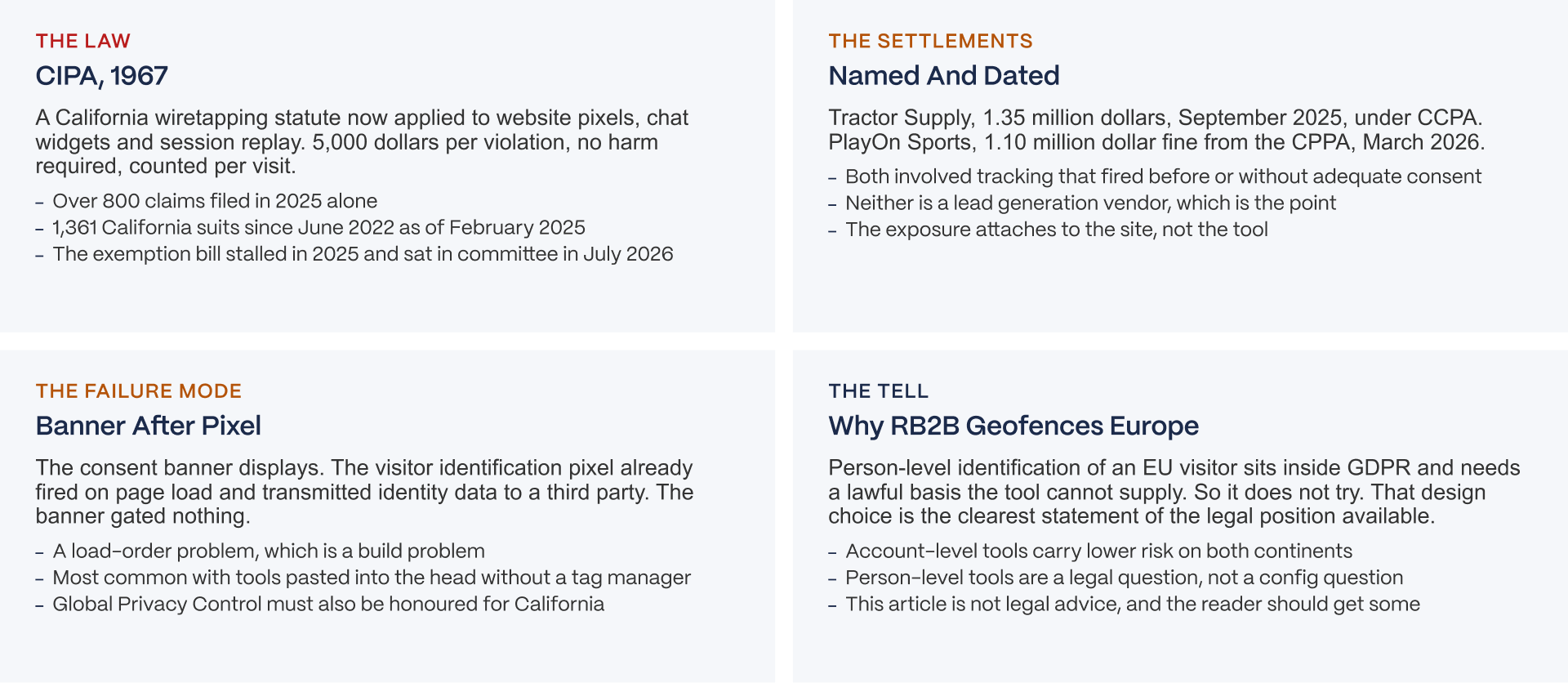
The California Invasion of Privacy Act, known as CIPA, is a wiretapping law originally written in 1967, and it's now being applied to modern tools like tracking pixels, chat widgets, and session replay software (tools that record how visitors interact with a page). Statutory damages run $5,000 per violation, no proof of actual harm required, and violations are counted per website visit, which can add up fast.
According to OneTrust, more than 800 CIPA claims were filed in 2025 alone. Fisher Phillips, a law firm, counted 1,361 CIPA lawsuits filed in California since June 2022, as of February 2025.
Two named, dated settlements worth knowing: Tractor Supply paid $1.35 million in September 2025 under a related California privacy law (CCPA), and PlayOn Sports was fined $1.10 million by California's privacy regulator in March 2026.
A bill called SB 690, which would have carved out an exemption for ordinary business purposes, stalled in 2025 and was still sitting in committee as of July 2026. The exposure is very much still live.
Why Person-Level Tools Geofence The EU
Here's a design decision that quietly reveals a lot about the legal landscape. RB2B only identifies individual visitors on US traffic, and it deliberately excludes the EU entirely, a practice called geofencing. That's not a technical limitation, it's a compliance boundary. Identifying a specific EU individual falls squarely under GDPR, and RB2B has no legal basis it can supply to justify doing that.
Account-level identification, meaning identifying a company through its internet address rather than a specific person, is generally lower risk on both sides of the Atlantic. The practical split worth remembering: account-level tools are mostly a consent-configuration question, while person-level tools are genuinely a legal question.
This article isn't legal advice, and if you're considering a person-level identification tool, it's worth getting real legal advice specific to your situation.
Choosing
Decision By Situation
DECISION BY SITUATION
No tool on this list is best. Here is how to narrow by where you are.
SITUATION 1: JUST LAUNCHING, NEED CAPTURE FAST
- What you need: HubSpot Forms free plus Calendly free, both embedded
- Why: zero cost, fifteen minutes, and both are light enough not to matter yet
The verdict: embed now, revisit native capture when the form is proven and traffic justifies the build
SITUATION 2: TRAFFIC IS MEANINGFUL AND NOBODY KNOWS WHO IS VISITING
- What you need: account-level identification first, 6sense free tier or similar
- Why: company via IP is a consent configuration question. Person-level is a legal question. Start with the one that is not.
The verdict: account-level before person-level, every time
SITUATION 3: US-ONLY TRAFFIC AND A SALES TEAM THAT WILL ACT ON NAMES
- What you need: RB2B or Warmly, after counsel reviews the consent setup
- Why: person-level identification is where the CIPA exposure lives, and the tool vendor does not carry it. You do.
The verdict: only with the banner verified to gate the pixel, and only after someone with a law degree has looked
SITUATION 4: ENTERPRISE ABM WITH NAMED TARGET ACCOUNTS
- What you need: website personalisation that does not flicker
- Why: Mutiny hides elements until visitor data returns. On a slow site that is a visible delay on the pages meant to convert. Webflow Optimize is native and avoids it.
The verdict: Webflow Optimize if the site is on Webflow, Mutiny plus enrichment if it is not, and read the ABM platforms article first
SITUATION 5: FIVE SCRIPTS ALREADY, AND THE SITE IS SLOW
- What you need: an audit, not a sixth tool
- Why: 48 percent of mobile origins pass Core Web Vitals. Yours is probably not one of them. Adding a tool to a page that already fails is paying to make it worse.
The verdict: measure what is there before adding anything
PRINCIPLE
Every tool on this list is a script on your website. The vendor sells the script. Nobody sells you the site that can carry it, the consent setup that gates it, or the load order that keeps the page fast. Those are build decisions, and they are the ones that decide whether any of this works.
No single tool on this list is "the best." Here's how to narrow things down based on where you are.
Just launching, and you need capture fast
Go with HubSpot Forms (free) plus Calendly (free), both embedded. Zero cost, about fifteen minutes of setup, and both are light enough on your site that they won't matter yet. Revisit building something native once the form is proven out and your traffic justifies it.
Traffic is meaningful, and you have no idea who's actually visiting
Start with account-level identification, something like 6sense's free tier, before touching anything person-level. Company-level identification is a consent-configuration question. Person-level is a legal question. Start with the one that's simpler to get right.
Your traffic is US-only, and your sales team will actually act on real names
RB2B or Warmly, but only after your legal counsel has reviewed the consent setup. Person-level identification is exactly where CIPA exposure lives, and the tool vendor doesn't carry that risk for you, you do.
You're running enterprise ABM (account-based marketing) with named target accounts
You need website personalization that doesn't flicker. Mutiny hides elements until visitor data returns, which shows up as a visible delay on a slower site, right on the pages meant to convert. Webflow Optimize is native and avoids that problem if you're on Webflow. If you're not, Mutiny plus a solid enrichment tool is the alternative.
You already have five scripts running, and the site is slow
What you need is an audit, not a sixth tool. Only 48 percent of mobile sites pass Core Web Vitals, and yours is probably one of the ones that doesn't. Adding another tool to a page that's already struggling just makes it worse. Measure what's already there before adding anything else.
The underlying principle worth remembering: every tool on this list is a script sitting on your website. The vendor sells you the script. Nobody sells you the site capable of carrying it, the consent setup that gates it, or the load order that keeps the page fast. Those are all build decisions, and they're the ones that ultimately decide whether any of this works.
The Questions To Ask Before Installing Anything
Six questions worth asking before you add any tool from this list to your site:
Where does the script go, and who's placing it?
Does it fire before or after consent, and who's verifying that?
What does it measurably add to load time? What does it need from your CRM, and who owns maintaining that connection?
What's the cost of switching away from it later?
Specifically for visitor identification tools: is it account-level or person-level, and has your legal counsel reviewed it? See our marketing attribution tools article next, since measuring what these tools deliver follows directly from these questions.
The Close
Back to where this article started. These tools were installed to improve conversion. Installed carelessly, they reduce it before a visitor ever reaches a form, and installed without proper consent gating, they create legal exposure the tool vendor never carries for you.
The real question isn't which tool is best. It's whether the website these tools sit on was built to carry them. If you want help figuring that out, see our web design services.
Closing
The vendor sells the script. Nobody sells you the site that can carry it.
Every tool above installs as JavaScript on a page you own. Whether it fires after consent, what it does to load time, and whether the form it feeds is an embed or a native build, those are decisions the tool vendor doesn't make and doesn't carry the cost of.
We build B2B SaaS websites, and the first thing we look at on any site with a lead generation stack already in place is what those scripts are doing to the pages they were meant to improve. If yours already has five and the site feels slow, that's the place to start.
Work With Veza / See Our Case Studies
FAQs
What is the best lead generation tool?
Depends on the situation, and the honest list is alphabetical. What matters more than the tool is whether your site can carry it: every one installs as a script that competes with your page for load time and has to fire after consent. Pick by category, then check what it needs from the site.
What are the best tools for B2B lead generation?
Six categories, not one answer. Forms and capture (HubSpot, Typeform, Unbounce), chat (Intercom), visitor identification (6sense, RB2B, Warmly), enrichment (Apollo, Clay), scheduling (Calendly, Chili Piper) and personalisation (Mutiny, Webflow Optimize). Most B2B SaaS teams need one from three or four categories.
Is Drift still available?
No. Clari and Salesloft announced Drift's sunset on 6 March 2026 after a supply-chain breach compromised over 700 organisations. It is closed to new customers with 1mind named as successor. Two of the five articles ranking for this term still recommend it, which is worth remembering when reading any tool list.
What happened to Clearbit?
It became HubSpot Breeze Intelligence. Standalone Clearbit was sunset on 30 April 2025 and pricing moved to HubSpot credits in June 2025, roughly 45 dollars a month for 100 credits on top of a paid HubSpot plan. No new standalone accounts can be created.
Do lead generation tools slow down your website?
Yes, measurably. Each installs as JavaScript, and stacking five or six can add about a second to load. HTTP Archive's 2025 Web Almanac found only 48 percent of mobile origins pass Core Web Vitals, with third-party scripts named as part of the gap. The fix is in the build: async, defer, facades and load order.
Are website visitor identification tools legal?
Account-level tools that identify the company are generally lower risk. Person-level tools that name the individual are where the exposure sits: over 800 wiretapping claims were filed under California's CIPA in 2025 alone, with 5,000 dollars per violation. RB2B geofences the EU out entirely because GDPR makes person-level identification untenable there. Get legal advice before installing one.
Does chat convert better than forms?
The one peer-reviewed study says yes, by a wide margin at a low base. Isabella et al, Journal of Business Research 2025, found a chatbot converting at 0.85 percent against 0.15 percent for a form across over 9,500 visitors. Vendor claims of 15 to 40 percent chatbot conversion are self-serving and should be discounted.
Can ChatGPT do lead generation?
Not as a tool on your website. It can draft outreach, research accounts and write form copy, which is useful. It cannot capture a visitor, identify a company or route a demo request. The tools on this list do those things and ChatGPT does not replace any of them.
What is the 5-minute rule for leads?
The finding, from Harvard Business Review research, that responding to an inbound lead within five minutes dramatically raises contact and qualification rates compared to waiting an hour. It is the argument for scheduling and routing tools like Chili Piper and Calendly, which book the meeting at the moment of capture instead of after a rep sees the notification.
Should I embed a form or build one natively?
Embed to launch, build native once it is proven. An embedded form loads an external script and often an iframe, adds weight and depends on the vendor. A native form is lighter, faster and fully controllable for consent, and costs development time. The trade-off shifts as traffic grows.