.jpeg)
If a marketing team got a task to check how much traffic comes from ChatGPT, right now it’s questionable whether the answer would be right. Not because marketing teams can’t find it, but because there’s If your boss asked "how much traffic comes from ChatGPT?" right now, could you give an honest answer? Most marketing teams can't, not because they haven't looked, but because a huge portion of traffic is hidden.
Since this has its purpose, in this article we explored what could be measured in 2026, and what can’t. We also explored which numbers are the most accurate and reliable to use.
One thing we don’t do in this article is to show you how to get your brand mentioned by AI tools like ChatGPT. That’s a completely different topic we covered in our guide to optimising for AI search agents.
What You Can Actually Measure
Two Different Questions
Two terms frequently confuse people: AI traffic tools and AI visibility tools. While they both sound similar, what they answer falls under different categories.
Measuring traffic
When it comes to measuring traffic, people often ask: “How many people visited my website after using AI?”
You check this in Google Analytics (GA4), or by looking at your website’s server logs that record every visit your site gets.
Measuring brand visibility
Measuring brand visibility answers a completely different question: “Does my company even gets mentioned when someone asks an AI assistant a question?”
This can be checked with tools like Profound, Peec, or Otterly. But keep in mind that these tools don’t count your website visitors, but just your AI mentions.
This article deals only with measuring traffic, and if you want to know more about AI tools, we recommend our AI brand visibility tools guide.
The GA4 Setup, In Five Minutes
Proven tools we’re using daily to check traffic recently made checking AI visitors easier. On May 13, 2026, GA4 added a built-in category (“channel”) that’s dedicated to AI search. Now, GA4 can automatically recognize visitors coming from ChatGPT, Gemini, Deepseek, Copilot, and Grok.
Even if this gives us some kind of information, it still has a gap.
First, GA4 doesn’t include Perplexity visitors, meaning this group is stored somewhere else. Second, which is more important, GA4 only counts visits where a “referrer” was sent. Referrer is a little digital note that says “the visitor came from this other website”. But if that note never gets sent, like it often doesn’t, GA4 has no way to be precise about how AI agents were involved.
In practice, there’s a way to build your own category to catch more AI tools, including Perplexity. However, there’s a setup mistake that most people make: your new category has to be placed above the "Referral" category in your settings list, or it will never catch anything.
Since the categories get checked in order, from top to bottom, and if Referral get checked first, it grabs the AI visit before your new category ever gets a chance to show something.
For Webflow users, our guide to connecting GA4 to Webflow explains the platform-specific setup.
What You Cannot Measure
Most Of It Arrives Anonymous
This is the tricky part: a large amount of AI traffic never gets identified as AI traffic. Instead, it’s showing as regular, random traffic without further explanation.
This isn't something we guessed, but found out from the two companies that measured it.
Loamly studied 20,428 AI-related visits in February 2026 and found that 14,413 of them (that's 70.6 percent) arrived with no referrer note attached at all. Clickport looked at 371,847 website sessions in April 2026 and found a smaller, but still large, number: 35.7 percent arrived with no referrer.
Why does this happen?
When someone taps a link inside the ChatGPT mobile app, the app often opens it without sending that referrer note. Sometimes people just copy a website address out of an AI's answer and paste it into their browser directly, which also erases any trace of where it came from.
When Google's AI Overviews (the AI summaries that appear above regular search results) send someone to your site, that visit usually just gets counted as regular Google traffic, with no way to tell it apart.
The takeaway: whatever number GA4 shows you for AI traffic, treat it as the smallest possible amount, not the real total. The real number is almost certainly higher.
Search Console Sees Impressions, Not Clicks
Google Search Console is a free tool that shows you how your website performs in Google's search results. On June 3, 2026, Google added a new report specifically showing when your pages appeared inside AI Overviews and AI Mode. It finished rolling out to everyone worldwide by August 31, 2026. The report breaks things down by page, country, device, and date, but the data only goes back to May 18, 2026, with nothing before that.
Here's the catch: this report only shows "impressions," meaning how often your page appeared. It does not show clicks, it does not show click-through rate (the percentage of people who clicked after seeing you), and it doesn't show what people typed to trigger that appearance.
There's one more limitation worth knowing, especially if your team uses automated reporting tools. As of September 7, 2026, this AI data is not available through Google's Search Analytics API or its BigQuery export, which are the two ways companies normally pull Search Console data automatically into their own dashboards.
Right now, the only way to get this data out is manually downloading a spreadsheet by hand. That could change, so it's worth checking again before you build a permanent reporting process around it. For more on why impressions and clicks are two very different numbers, see our article on impressions versus clicks.
The Numbers Worth Knowing
It Is Small And It Converts Well
There are two patterns that show up again and again in the research, and both are worth knowing, along with exactly how they were measured.
On overall size: Conductor studied 13,770 large company websites and 3.3 billion total visits in 2026, and found that AI-driven traffic made up just 1.08 percent of all website visits, with 87.4 percent of that coming from ChatGPT specifically. In other words, it's still a small slice of total traffic, but it's growing fast.
On how well it converts (meaning how often those visitors take a valuable action, like filling out a form): Seer studied 1,370 AI-driven conversions against roughly 14 million regular Google search visits, and found ChatGPT converting at 15.9 percent compared to just 1.76 percent for regular Google search. Microsoft Clarity studied 1,277 different websites and found visits from Copilot converting 17 times better than visits that came directly to the site with no source at all. One other company, Ahrefs, reported a 23-times improvement, but that number came from just one single company, so it's more of an interesting story than something you should expect to repeat.
The safe, defensible summary you can put in practice: AI traffic tends to convert something like four to five times better than regular organic search traffic in B2B. The more extreme numbers usually come from just one company's results, not a broad study.
Do Not Mix Up The Click-Through Figures
Here's a mistake worth watching out for, because it shows up constantly in articles about this topic.
Pew Research found in July 2025 that only 1 percent of people click on a link shown inside a Google AI Overview (the AI summary box above regular search results). That's a real, useful number, but it only applies to AI Overviews specifically. It gets misquoted constantly as if it applies to ChatGPT too, and it doesn't. Independent measurements of ChatGPT traffic show click behavior considerably higher than that 1 percent figure.
Why this matters: if you assume that 1 percent number applies everywhere, you might decide AI traffic isn't worth measuring at all, and stop paying attention to it. But if you measure your own AI traffic properly, you'll find a small channel that converts noticeably better than your regular search traffic, not worse.
For more on tools that track this, see our guides of B2B AI analytics tools and AI Overview monitoring tools, and our take on the difference between SEO, GEO, AEO and LLM optimization if you want to understand how traffic measurement differs from visibility measurement.
What To Put In The Board Deck
Three Signals, Three Confidence Levels
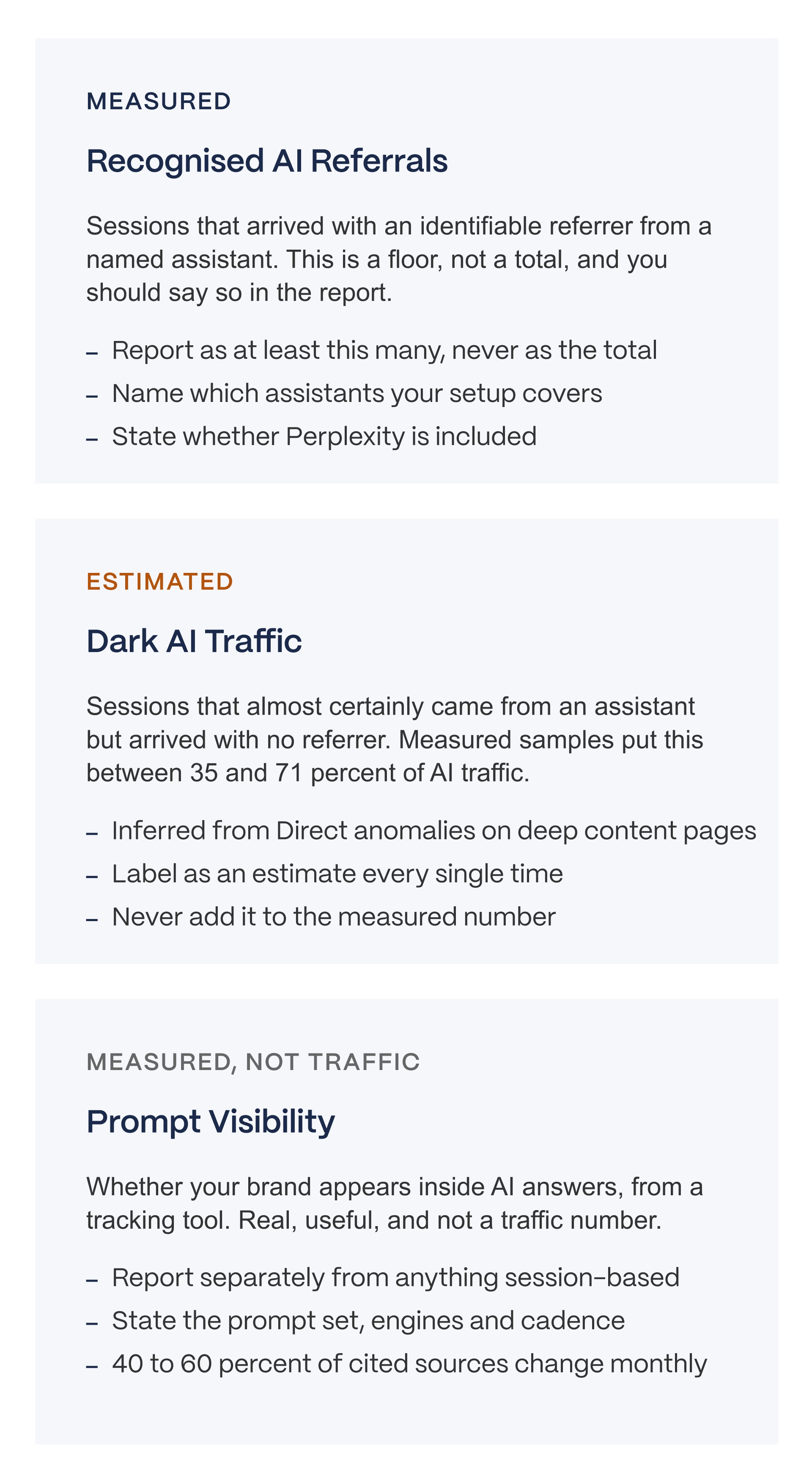
Here’s one of the key questions: what should you tell your leadership team? Keep three separate numbers separate, and label how confident you are in each one.
- Recognized AI referrals are measured - This is a real, countable number, but remember it's a floor (the minimum), not the full total.
- Dark AI traffic is estimated - This is your best guess at the AI traffic that hid itself, based on unusual patterns in your "Direct" traffic numbers. Always call it an estimate out loud.
- Prompt visibility is measured, but it isn't traffic at all - It just tells you whether your brand shows up in AI answers, not how many people visited your site because of it.
Here's why keeping these three separate matters so much: if you blend all three into one impressive-sounding number, and someone on your leadership team questions any single piece of it, your entire report loses credibility. Keep them labeled separately, and one shaky number doesn't sink the whole report.
What Overclaiming Looks Like
A few specific mistakes to avoid when you're putting this in front of leadership.
Don't present the GA4 AI traffic number as if it's the complete, total picture. It's a floor, remember, not a ceiling. Don't blend your measured numbers, your estimated numbers, and your visibility numbers into one single figure, since they're answering three different questions.
Don't claim you know how AI Overviews affected your clicks using Search Console's new report, since that report doesn't show clicks at all, only impressions.
Be careful quoting a single "AI visibility score" as if it's a stable, precise fact, since research shows 40 to 60 percent of the sources AI tools cite can change from month to month.
Bottom line: the real answer to "how much traffic comes from AI" is a floor and a direction, not one clean, precise number. Anyone giving you an exact total is confidently measuring something they genuinely cannot see in full.
If you want help figuring out what your current numbers are counting, that's exactly the kind of work covered in our AI search visibility audit.
Closing
The final answer is a floor and a direction, not a precise number.
Set up the channel group, read whatever number GA4 gives you, and report it as "at least this many," never as the full total.
Somewhere between a third and two thirds of the traffic you're trying to count arrives without telling you where it came from, and Search Console's new AI report shows how often you appeared, with no record of who clicked. None of that makes this channel unimportant. It just means precise claims about it should make you a little suspicious.
We work with B2B SaaS teams on the measurement layer underneath the dashboard, which usually starts with figuring out what your current numbers are counting in the first place.
Work With Veza / See Our Case Studies
FAQs
Does Google Analytics track AI traffic?
Partly. GA4 added a native AI Assistant channel in May 2026 covering ChatGPT, Gemini, Deepseek, Copilot and Grok. It excludes Perplexity and every session that arrives without a referrer, which measured samples put at between 35 and 71 percent of AI traffic.
How much traffic actually comes from AI?
Around 1 percent of total sessions for most sites, per Conductor's 2026 benchmarks across 13,770 domains and 3.3 billion sessions, with 87.4 percent of it from ChatGPT. It is small, it is growing fast, and it converts several times better than organic in B2B.
Why does AI traffic show as Direct in GA4?
Because the referrer was never sent. Mobile ChatGPT opens links in-app, users copy and paste URLs out of answers, and Google AI Overviews bundle clicks into google organic with no distinct signal. Loamly measured 70.6 percent of AI visits arriving with no referrer.
Can Search Console show me AI traffic?
It shows impressions, not traffic. The generative AI report launched in June 2026 and covers AI Overviews and AI Mode, but contains no clicks, no click-through rate and no queries. As of September 2026 the data is not available through the API or BigQuery export either.
What is the difference between AI traffic tools and AI visibility tools?
They measure different things. GA4 and server logs measure how many visits arrived from an assistant. Profound, Peec and Otterly measure whether your brand appears inside an assistant's answer. Buying one expecting the other is the most common mistake in this category.
Does AI traffic convert better than organic?
In B2B, usually yes. Seer measured ChatGPT at 15.9 percent against Google organic at 1.76 percent, though from a small absolute base. Microsoft Clarity measured Copilot at 17 times direct across 1,277 domains. A four to five times lift is the defensible summary.
How do I separate AI crawlers from AI-referred humans?
Server logs, using user agent strings. GPTBot, ClaudeBot, PerplexityBot and similar identify themselves as crawlers. A human arriving from an assistant sends a normal browser user agent with a referrer. GA4 alone cannot make this distinction reliably.
What should I report to my executives?
Three numbers kept separate with a confidence level on each: measured AI referrals as a floor, estimated dark AI clearly labelled as an estimate, and prompt visibility reported separately because it is not traffic. Never add them together.