.jpeg)
TL;DR
ChatGPT is the fastest junior strategist a B2B SaaS marketing team can hire, and a confident inventor of facts if you let it guess. Used well, it drafts, summarizes, varies and analyzes faster than anyone on the team; used badly, it invents statistics and makes up claims about your product and your competitors. This guide shows how to use it well. Start with setup: a team plan (ChatGPT Business costs $20 per user per month billed annually, minimum two seats), written rules on what never goes into a prompt, and a shared library of tested prompts. Then run four workflows: positioning, content, campaigns, and research and reporting, each with a human check before anything ships. The 20 prompts below are built the same way: they give ChatGPT a role, context and limits, and force it to use only the facts you paste or to cite its sources. Finally, treat ChatGPT as a channel as well as a tool: buyers now ask it which vendors to shortlist, and whether your brand appears depends on your website, not your prompts.
What ChatGPT Does Well for Marketing Teams, and Where It Fails
ChatGPT works best as a fast junior strategist. Give it material to work from and it produces first drafts, summaries, variations, and analysis in minutes, work that otherwise queues behind a busy team. It is strongest where the input is yours: call notes, review quotes, transcripts, analytics exports, a messaging document.
It is weakest where it has to guess. It will state numbers with confidence that nobody can source, describe your product inaccurately when it was not given the facts, and make claims about competitors that nobody has checked. For B2B teams these failures cost more than most, because the readers are technical and skeptical, and one invented statistic in a published article undermines the credibility of everything around it. The most-copied advice in this area, asking ChatGPT to suggest statistics, is how invented numbers reach published pages. This guide uses a different rule: ChatGPT finds sources, and a person opens them before anything is reused.
That rule shapes the rest of the article. The setup section covers the plan and the data rules to put in place first. The four workflows show where ChatGPT saves the most time, and each ends with a human check. The prompt library applies one principle in every prompt: use only the facts pasted in, cite sources, and flag gaps. If you're still deciding between assistants, read our Claude vs ChatGPT comparison.
Set Up ChatGPT for Your Marketing Team First
Pick the Plan and Write the Data Rules
| Plan | Price | Built for | Use it for marketing work? |
|---|---|---|---|
| Free | $0 | Individuals trying ChatGPT for everyday tasks | No, individual plan |
| Go | $8/month (US; priced by region) | Individuals who need more access than Free | No, individual plan |
| Plus | $20/month | Individuals doing advanced, reasoning-heavy work | No, individual plan |
| Pro | From $100/month | Power users who hit Plus limits | No, individual plan |
| Business | $20/user/month billed annually, $25 monthly (2+ users) | Teams that need a shared, secure workspace and admin controls | Yes, for team work |
| Enterprise | Custom pricing | Large organizations with security and compliance needs | Yes, for team work |
Paste freely
- Published content
- Anonymized survey results
- Public competitor pages
- Your own aggregated analytics exports
- Approved messaging
Never paste
- Customer names and emails
- Credentials and API keys
- Unreleased financials
- Contracts and anything under NDA
- Health or HR data
For teams, ChatGPT Business is the way to go.
The cost is $25 per user per month, or $20 if you pay annually, with a minimum of two users. OpenAI actually lowered the price by $5 on April 2, 2026. With this plan, you get a shared workspace, and according to OpenAI's business page, it doesn't use your business data for training by default. You also get single sign-on, multi-factor authentication, and dedicated workspaces.
The sales and marketing page mentions that you can connect your company's Google Drive to get customized answers, so make sure to check the current list of connectors before making any plans. If you're an individual, there are personal plans available, but keep in mind they don't come with a shared workspace or the same data terms as the business plan. Always review OpenAI's terms on the day you decide, because the plan will only do what they say it will. Having a plan is just the starting point. You also need to have clear rules in place for handling sensitive information.
This includes things like customer data, login credentials, and confidential financial information: anything that's not meant to be shared publicly. It's also important to remember that anything under a non-disclosure agreement, or NDA, should never be included in a prompt. To ensure everything runs smoothly, it's a good idea to have a specific person review and approve any AI-generated content before it's made public.
Setting these guidelines from the outset is crucial, as it's much easier to establish good habits from the beginning rather than trying to correct them later on. When people first start working with AI, they often rely on whatever information is readily available, so it's essential to have these rules in place to avoid any potential issues.
Projects, Custom GPTs and a Shared Prompt Library
To keep a team's work consistent, there are three key setup choices to consider. First, it's a good idea to keep each workflow in its own project, along with the necessary background files, such as the messaging document, glossary, and persona notes. This way, everyone is working from the same set of facts, and nobody has to waste time duplicating information. By having all the context in one place, team members can focus on their tasks without having to search for the information they need. Second, creating a custom GPT for brand voice can be really helpful. This involves loading it with three approved examples, so that when edits are made, they sound like they're coming from the company, not some generic assistant. This ensures that the tone and language used are consistent across all communications. Third, storing tested prompts in a shared library is a great way to keep everything organized. It's also important to have an owner who keeps the library up to date, so that everyone can access the latest information and prompts. By following these three setup choices, teams can work more efficiently and maintain a consistent tone and style in their work.
When it comes down to it, the person in charge is more important than the tools they use. If you have a collection of prompts without someone to oversee it, you'll end up with a bunch of untested variations that the team won't trust. And let's be real, things like feature names and plan availability are always changing, so you need to double-check them on the day you're setting everything up. This includes figuring out which plans include projects, custom GPTs, and in-depth research. It's all about staying on top of things.
Four B2B SaaS Marketing Workflows
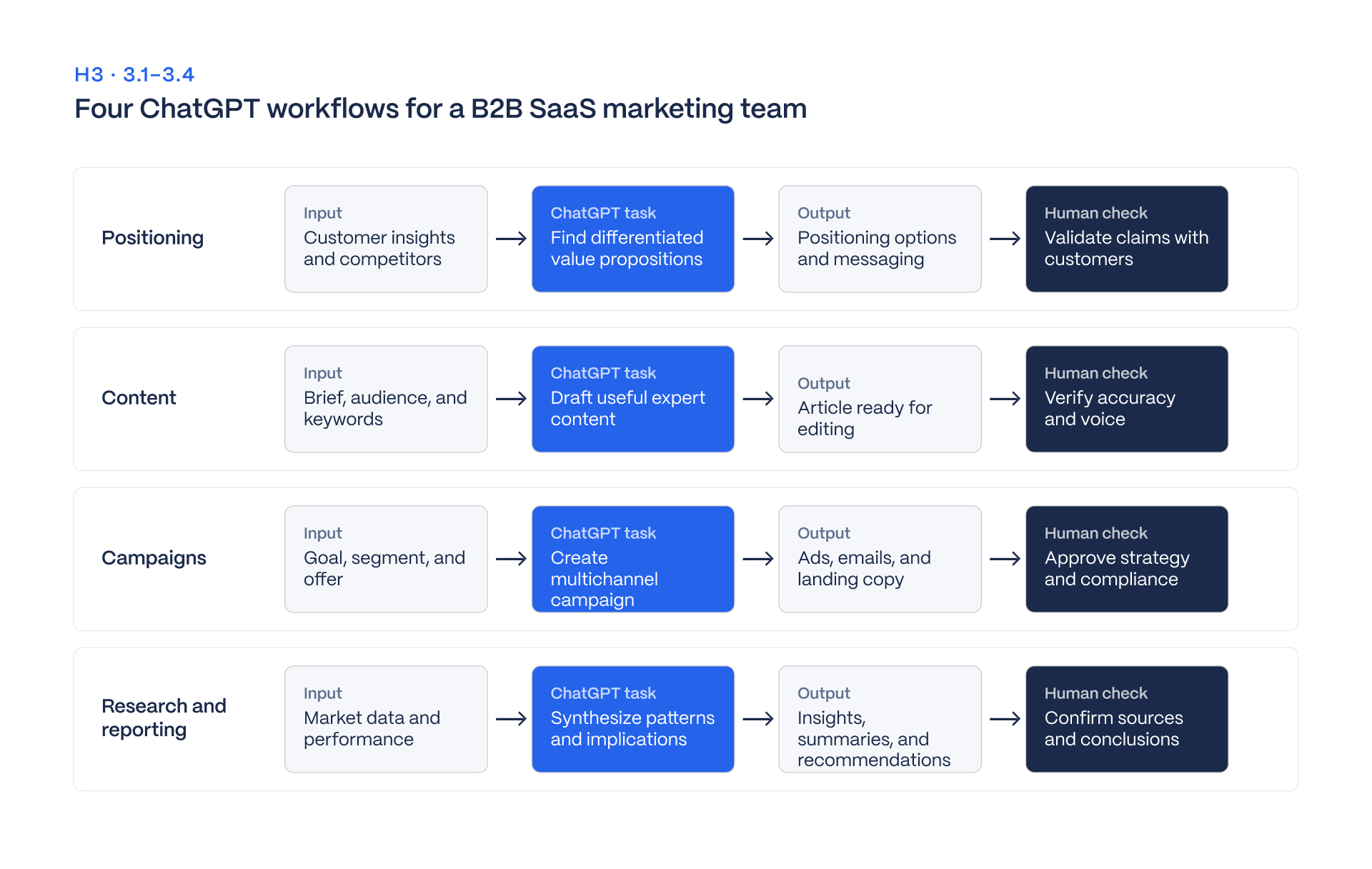
Here's how a B2B SaaS team works: they have four main workflows: positioning, content, campaigns, and research and reporting. Each workflow follows the same steps: you give input, ask for something, get an output, and then a human checks it before it's finalized. The numbers in brackets refer to more detailed prompts that you can find in the library below.
Positioning and Marketing Strategy
Input
Win and loss notes, sales call summaries, and review site quotes. Everything here comes from customers and prospects, which is why positioning is the right starting point: every later workflow inherits it.
The ask
When working with a large amount of information, like fifty pages of notes, it can be really helpful to use a messaging matrix and positioning drafts. This involves writing down quotes from the sources and marking any gaps in the information. Tools like ChatGPT can be super useful here because they can quickly find patterns in the notes that a person might miss when reading them one by one. However, it's also important to remember that while ChatGPT can find these patterns, it can't tell which one is actually true. That's why it's crucial to include quotes from the sources in the prompts, so you can verify the information and make sure it's accurate.
Output
A matrix of pains, alternatives, differentiators, proof points, and objections, plus positioning statements, a ranked objection list, and headline variants.
Human check
Product marketing signs off, and anything without a quote is cut. A claim with no source line is a guess, and positioning built on guesses spreads into every page the team writes next.
Content Marketing, Content Creation and SEO
Input
A keyword and persona, internal links to include, and for repurposing, a transcript or draft.
The ask
Briefs, outlines, repurposed pieces, and edits in brand voice, plus title tags and meta descriptions for search engine optimization (prompts 6 to 10). In the brief prompt, ChatGPT lists the statistics the writer should look for and never supplies the statistics itself, which keeps invented numbers out of published pages. Our guide to the AI content production stack covers how this workflow fits with the other tools a content team uses.
Output
A usable brief or draft in minutes, and an edit with a list of what changed, so the editor can review changes and not re-read everything.
Human check
An editor opens every cited source, confirms every number links to something a reader can open, and reads the draft against the brand voice examples. Anything ChatGPT cannot source is removed or replaced by a verified figure.
Campaigns: Email, LinkedIn and Social Media Marketing
Input
The offer, the persona, and the proof points the company has approved. Campaign work is where the proof-point rule matters most, since ad copy tempts any tool to add claims.
The ask
Campaign plans, nurture sequences, ad copy variants, and LinkedIn posts for executives (prompts 11 to 15). ChatGPT drafts volume, and the team picks and tests. That division suits the tool: producing ten headlines is cheap, and choosing between them is a judgment about the buyer.
Output
A six-week plan with a calendar and one KPI per channel, a four-email nurture sequence, headline and intro variants, an executive post, and a skeptical-buyer critique of a landing page.
Human check
The owner of each channel approves its copy, every claim is matched against an approved proof point, and executives approve posts in their own voice before publishing. Social media marketing for B2B means LinkedIn first, and a post that sounds unlike the executive reads as ghostwritten in the worst way.
Market Research, Competitor Analysis and Reporting
Input
Pasted competitor pages, GA4 and Search Console exports, customer interview transcripts, and the month's results table.
The ask
Deep research with cited sources, competitor homepage teardowns, analysis of analytics exports, and monthly summaries for the CEO that use only the numbers provided (prompts 16 to 20). Competitor analysis works well on pasted pages, because ChatGPT compares what is in front of it and does not rely on memory.
Output
A research summary that separates facts from opinions and ends with what it could not verify, a positioning-gap list, the biggest changes in an export with calculations shown, and a one-page CEO summary.
Human check
Every cited source is opened before reuse, and every calculation is rechecked in a spreadsheet. Asking ChatGPT to show its work makes errors visible, and it does not make them impossible.
For teams that want these workflows set up for them, our AI content strategy service covers it.
20 ChatGPT Prompts for Marketing You Can Copy Today
Every prompt below follows the same structure: a role, context, a task, a format, and limits. They share one rule, which is to use only the facts you paste, cite sources, and flag gaps. Replace the bracketed placeholders with your own material, and run each prompt on the plan your team uses before relying on it.
Positioning
1. Messaging matrix
You are a B2B SaaS product marketer. Using the win/loss notes and customer quotes below, build a messaging matrix for [persona] with columns: pain, current alternative, our differentiator, proof point, objection. Quote the source line for every cell and write "no evidence" where none exists. [paste notes]Human check: Check that every quoted line exists in your notes, and treat each "no evidence" cell as a real gap.
2. Positioning statements
Write three positioning statements for [product] in this structure: For [target customer] who [need], [product] is a [category] that [key benefit]. Unlike [alternative], we [differentiator]. Use only the facts below and flag any claim you cannot support. [facts]Human check: Verify every flagged claim against a source before it goes anywhere public.
3. Review mining
Here are [N] reviews of us and [competitor]. Group praise and complaints into themes, count mentions per theme, and quote one review per theme. Do not estimate counts you cannot see. [reviews]Human check: Spot-check the theme counts by searching the reviews yourself.
4. Objection handling
List the ten objections a [role] at a [company size] company raises before buying [category], ranked by how likely each blocks a deal. Answer each in two sentences using only these proof points: [proof].Human check: Confirm every answer uses only the proof points you supplied.
5. Headline testing
Rewrite this homepage headline five ways: outcome-led, pain-led, category-led, proof-led and contrarian, each under 10 words. [headline]Human check: Check that each version still makes a claim you can back up.
Content
6. Content brief
Create a content brief for [keyword] aimed at [persona]: search intent, a working title, an H2 outline, questions to answer, internal links from this list [URLs], and the statistics we should look for. Do not write any statistics yourself.Human check: Find the statistics yourself from real sources, and check that every internal link resolves.
7. Repurposing
Turn this webinar transcript into one LinkedIn post (150 words, first person, no hashtags), three email subject lines and five pull quotes with timestamps. Keep our terms from this glossary: [glossary]. [transcript]Human check: Check the timestamps against the recording and the pull quotes word for word.
8. Brand voice edit
Edit this draft to match the voice in the three examples below. Keep every fact. Cut filler, passive voice and unsourced claims. Return the edit, then a list of what you changed. [examples] [draft]Human check: Compare the change list with the original draft to confirm no fact was altered.
9. SEO metadata
Write five title tags under 60 characters and three meta descriptions under 155 characters for this page about [topic], using [keyword] once and naturally. [page summary]Human check: Count the characters yourself and preview the results in a search snippet tool.
10. FAQ for AI answers
Write eight questions a [persona] asks about [topic], each answered in 40 to 60 words with the direct answer first. Use only these facts: [facts]Human check: Check every answer against your source facts and confirm the word counts.
Campaigns
11. Campaign plan
Plan a six-week campaign for [offer] aimed at [persona]: core message, three angles, channels (LinkedIn, email, paid search), a week-by-week calendar and one KPI per channel. Ask me for anything you need before you start.Human check: Test the calendar against real team capacity and budget.
12. Nurture sequence
Write a four-email sequence for trial users who have not [activation event]: one goal per email, under 120 words, one CTA, with a subject line and preview text for each.Human check: Confirm each email matches the real path to activation in your product.
13. Ad copy variants
Write ten LinkedIn ad headlines under 70 characters and five intros under 150 characters for [offer], half pain-led and half proof-led, using only these proof points: [proof].Human check: Check the character limits in the ad platform and that every proof point is approved for use.
14. Executive LinkedIn post
Draft a LinkedIn post for our [role] on [topic]: 180 words, first person, one concrete example from this note, no emojis or hashtags, ending with a question. [note]Human check: Have the named executive confirm the example is true and the voice is theirs.
15. Landing page critique
Read this landing page as a skeptical [persona]. List the five biggest reasons you would not convert, quote the line behind each, and suggest a rewrite. [copy]Human check: Check each quoted line is really on the page, and decide which critiques are fair.
Research and reporting
16. Deep research
Research how [category] buyers evaluate vendors. Use sources from the last 12 months, link every claim, separate facts from opinions, and end with what you could not verify.Human check: Open every link and confirm it supports the claim it is attached to.
17. Competitor teardown
Compare the homepages below for [competitor A], [B] and [C]: headline promise, target persona, proof shown, primary CTA and what each avoids saying. Then list three positioning gaps we could own. [pasted pages]Human check: Check each claim against the live competitor page, as pages change.
18. Analytics export
Here is a [GA4 or Search Console] export for the last 90 days. Find the five biggest month-over-month changes, suggest likely causes, list what to check next, and show your calculations. [CSV]Human check: Recalculate the changes in a spreadsheet and treat the causes as hypotheses.
19. CEO summary
Write a one-page summary of this month's marketing results for our CEO: three wins, two problems, one decision we need. Use only the numbers in the table, and no adjective without a number. [table]Human check: Check every number in the summary against the source table.
20. Interview synthesis
Summarize these customer interview transcripts: the jobs they hired us for, the words they use for the problem, and any request mentioned more than once, with quotes. [transcripts]Human check: Check quotes against the transcripts and confirm each repeated request really was repeated.
ChatGPT Is Also a Channel: Getting Your Brand Into Its Answers
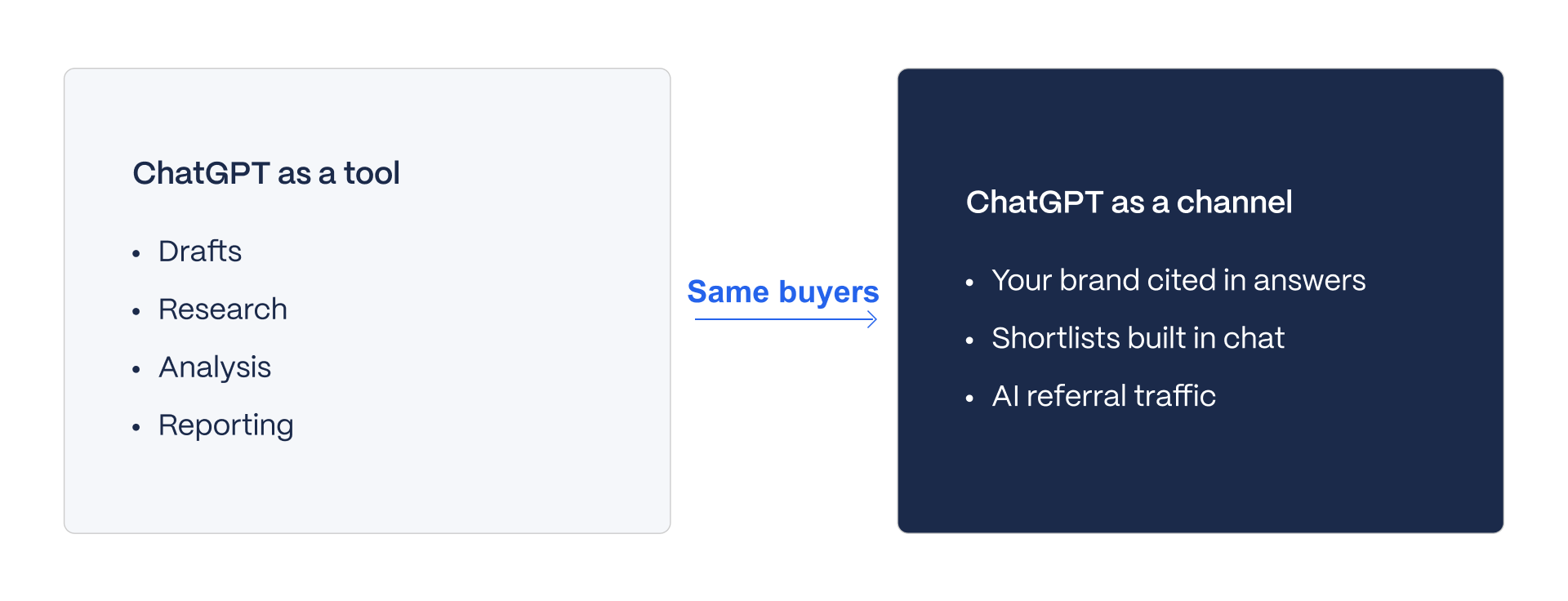
When it comes to ChatGPT, people often think of it as just a tool for teams to use. But buyers are now using it too, and they're asking it to suggest which vendors to consider. So, ChatGPT is also a kind of channel that your brand can appear in, or not.
The thing is, whether or not your brand shows up has less to do with the prompts that are used, and more to do with your website. You see, AI systems like ChatGPT need to be able to read, extract, and trust the information on your website's pages. If they can do that, then your brand is more likely to appear in the results. It's not just about the prompts, it's about having a website that's AI-friendly.
That is the job of answer engine optimization and of WAIO, the framework every Veza site is built on. As published on our Concordium case study, LLM sessions grew 363 percent, verified in GA4.
That figure is our own client result and not an industry benchmark. The point is that the work happens on the site, and no amount of prompt writing inside your own ChatGPT account changes what it says about you to a buyer.
Measurement comes before any of this. Tools exist to track whether and where a brand is cited, and our guide to AI brand visibility tools covers the options. Treat the two uses as separate budgets and separate owners. The team that writes prompts is improving its own productivity, and the team that fixes the website is improving how buyers meet the company.
Prompts Make Your Team Faster. They Do Not Make ChatGPT Recommend You.
Using prompts can speed up your team's workflow. However, they don't necessarily influence ChatGPT's suggestions or recommendations. It's more about streamlining your team's processes and getting things done efficiently.
We help B2B SaaS teams create content that works with AI. We also build websites that AI systems can understand and reference. Our framework, WAIO, makes it all possible.
If you want both, let's talk: Work With Veza
FAQs
How can I use ChatGPT for marketing?
Four workflows: positioning, content, campaigns, research and reporting, with a human check on every output.
Which AI is best for marketing?
It depends on the job. ChatGPT is strong across all four workflows in this guide. For a wider view of the options, see our guide to AI tools for B2B marketing.
What should you not tell ChatGPT?
Customer personal data, credentials, unreleased financials, anything under NDA. Use a team plan and written rules.
What are the best ChatGPT prompts for marketing?
Prompts that give ChatGPT a role, context, a task, a format and limits, and force it to cite sources or use only the facts you paste. The 20 prompts in the library above all follow that structure.
What are good ChatGPT prompts for product advertising?
Prompts 13 and 15: ad variants from approved proof points and a skeptical-buyer critique.
Can ChatGPT replace a marketing team?
No. It speeds drafting and analysis; positioning, judgment and accountability stay with people.
Does ChatGPT make up statistics?
It can. Ask it to find sources, open every source yourself, and publish only numbers you can link.
How do I get my brand mentioned in ChatGPT answers?
Through your website: structured, citable pages that AI systems can read and trust. That is the work of answer engine optimization.