.jpg)
In recent years, both Cursor and Windsurf have moved past the role of AI-assisted code editors and into agentic development environments capable of tackling complex engineering work.
The challenge for most teams lies in exploring the way each of these fits into how they operate. In this guide, we compare Cursor and Windsurf across developer control, agent delegation, billing, compliance, migration, and team fit, to help determine which is the best fit for your team..
The Axis That Actually Separates Them
Cursor and Windsurf might exist in the same AI coding category, but the crucial distinction between the two lies in how much control developers want to have while AI is working. Cursor is key for individual changes, while Windsurf is more geared toward delegating larger units of work.
This is a distinction that becomes more important as coding tools begin to evolve into AI agents that are capable of planning and carrying out multi-step tasks. For the AI companies we work with, the better platform is more dependent on how engineering teams choose to divide responsibility between developers and agents.
What Happened to Windsurf, Accurately?
Windsurf’s corporate history changed dramatically within a matter of days in July 2025, and understanding the sequence matters because much of the comparison content surrounding the platform still describes it inaccurately.
OpenAI had been in acquisition discussions with Windsurf during the first half of 2025, but those talks collapsed amid concerns involving Microsoft and intellectual property. Google hired Windsurf’s founders and several key researchers on 11 July 2025, via a reverse-acquihire arrangement, reportedly worth ~$2.4 billion.
Three days later, Cognition acquired the remainder of the Windsurf business, including the product and brand, roughly 200 employees, and a business that was generating more than $82 million in annual recurring revenue.
The practical consequence is that Windsurf continued as a product under Cognition following Google’s hiring agreement. Under Cognition, Windsurf also managed to regain access to Anthropic models and continued to develop its own model infrastructure.
This now includes Windsurf’s fast agent model SWE-1.5, which provides the platform with another option alongside the third-party frontier models.
For a comparison in 2026, it is important to evaluate Windsurf as the product that exists now under Cognition.
Control Versus Delegation
The most notable difference between Cursor and Windsurf can be found in the way each approaches developer control.
Cursor is closer to the control end of the spectrum, and is built around approving diffs. Windsurf, on the other hand, leans more toward the delegation of tasks.
This is a distinction that impacts five different areas: developer role, change granularity, review pattern, ideal workflow, and failure mode. Cursor typically favors tighter developer supervision, while Windsurf favors broader task delegation.
The trade-off here is most clearly seen in the failure modes. With Cursor, extensive changes can lead to approval fatigue. Developers keep visibility, but constantly reviewing and approving changes can create friction. With Windsurf, the opposite problem is true. Greater autonomy can reduce interruptions, but developers might find the agent has gone in the wrong direction much later in the process.
Neither failure mode is inherently better or worse than the other. You have to make the decision about which cost your engineering team is better equipped to be able to manage: frequent intervention, or potentially more expensive correction after greater autonomy.
The Five Questions That Decide It
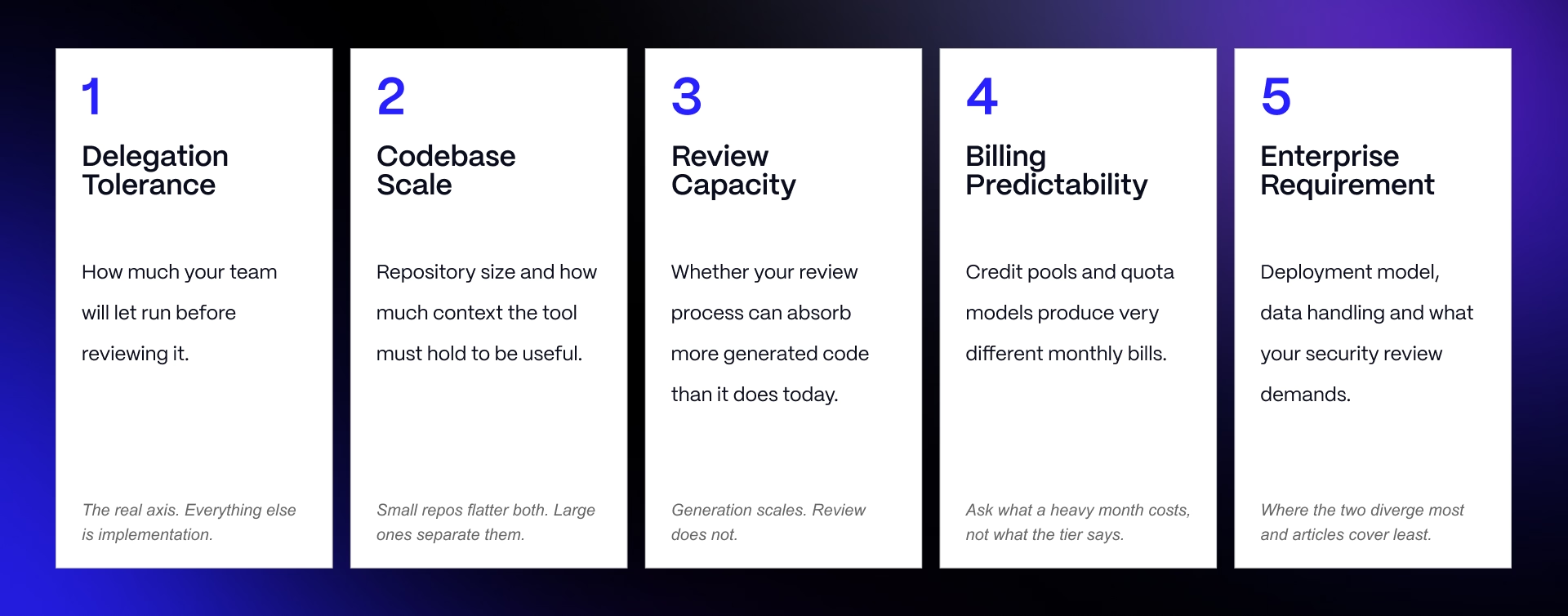
The Windsurf vs Cursor decision can be reduced to five questions:
Delegation Tolerance: How much autonomy are developers comfortable giving an agent before reviewing its work?
Codebase Scale: How large and interconnected is the codebase the platform needs to understand and modify?
Review Capacity: Does your team have the capacity to review changes incrementally, or does it need agents to complete larger blocks of work independently.
Billing Predictability: How important is it to forecast AI coding expenditure before usage occurs?
Enterprise Requirement: What security, compliance, deployment, and procurement requirements should the platform satisfy before developers can use it?
These criteria are more durable than comparing individual features. Cursor and Windsurf are able to reach feature parity in one quarter, and diverge again in the next as both vendors can ship new models, agents, integrations, and workflows.
This article goes deeper than our guide to AI coding tools. This guide maps the wider category and helps teams build a shortlist. This comparison focuses on the two platforms that many teams need to choose between, and uses organizational questions that stay relevant as feature sets evolve.
Product State in 2026
Both products have moved considerably beyond AI autocomplete. Cursor and Windsurf are now agentic development environments capable of operating across codebases, executing multi-step tasks, and continuing development work beyond the initial editor session. The difference here is found in the way in which these capabilities are assembled around the developer, as opposed to whether either platform actually has them.
That’s why this comparison is the perfect companion piece to our guide to AI coding tools. The parent guide maps the wider category, while this one helps to establish the current capabilities of the platforms, while comparing where their approaches differ.
Cursor Today
Cursor’s development through 2026 has evolved to focus on running more agentic work, without compromising developer involvement in the review process.
Background agents are able to work asynchronously in cloud-hosted virtual machines, allowing developers to delegate longer-running tasks without having to keep active local sessions open. Parallel subagents extend this model by allowing multiple tasks to run concurrently. This helps reduce the amount of engineering work that is waiting on AI execution.
Bugbot applies the same principle to code review, automatically reviewing pull requests for potential issues, while proposing fixes and moving AI assistance beyond writing code.
Cursor also expanded past its VS Code foundation with JetBrains support across 2026, making the platform relevant to engineering teams with existing IDE workflows that previously created a barrier to adoption.
Underneath those workflows sits a broader model layer. Cursor provides its own Composer family while also routing work to models from Anthropic, OpenAI, and Google, which provides teams with greater flexibility, instead of anchoring the environment to a single model provider. Model Context Protocol support allows for external tools and data sources to connect to agent workflows.
The result is increasingly an orchestration environment as opposed to merely an AI-enhanced code editor.
Windsurf Today
Under Cognition, Windsurf continues to build around Cascade, its agentic engine for working across multiple files with a codebase-wide context.
Cascade is designed to take broader development instructions and carry work across the relevant parts of a project, as opposed to requiring every edit to be prompted independently. Cloud sessions extend this beyond the active editor, allowing development tasks to carry on in the background, while engineers move onto other work.
Windsurf has also regained access to Anthropic models, while Model Context Protocol support provides agents the opportunity to interact with external tools and context.
Its proprietary SWE-1.5 model provides the clearest example of Windsurf’s product philosophy. In vendor-published SWE-Bench Pro results, windsurf reports SWE-1.5 scoring 40.08% compared with 43.60% for Sonnet 4.5, with a speed advantage of around 13.8x speed.
These are Windsurf-reported figures, but the tradeoff is meaningful. Windsurf explicitly accepts around a 3.5 percentage-point benchmark deficit in exchange for faster agent execution.
This reflects product decisions surrounding what developers value during agentic work: maximum benchmark performance, or strong performance delivered significantly faster.
Head-to-Head Reference
The reference table brings the major product differences into a single place, but it’s crucial to understand two details before making a decision.
First, both products have roots in the VS Code ecosystem, but that doesn’t guarantee perfect extension compatibility. Teams that are dependent on particular extensions need to validate their own required stack, instead of assuming that VS Code compatibility translates into complete parity.
Second, the products approach paid usage in different ways. Cursor’s usage pool and Windsurf’s quota system differ structurally from billing mechanisms, so similar subscription prices don’t necessarily provide equivalent agent capacity. Section 3 will examine this distinction in greater detail.
For teams looking to compare the underlying frontier models, our AI assistant comparisons provide additional context on how the wider landscape continues to evolve.
Billing, Where Teams Get Surprised
Cursor and Windsurf might appear very similar when comparing subscription prices, but once you begin to use the included allowance, the differences between the platforms becomes more obvious.
Teams need to understand what gets used, when allowances rest, and what happens when usage is exceeded before they can model either platform accurately.
Credit Pool Versus Quota
Cursor operates around a usage pool. The $20 Pro plan includes roughly $20 of frontier-model API usage, alongside unlimited Tab and Auto. Pro Plus increases subscription cost to $60. Ultra costs $200 and includes around $400 of usage.
The important distinction is how different models consume that allowance. Cursor’s own models draw from a more generous usage pool, while third-party frontier models consume a dollar-based pool according to their underlying usage. The practical result here is that model choice can change how fast the included allowance disappears.
Windsurf moved in a different direction on 19 March 2026, retiring its previous credit system in favor of using daily and weekly quotas that automatically reset. Tab autocomplete remains unlimited and sits outside the quota. Instead, this allowance is consumed by premium-model interaction through Cascade and chat.
Existing subscribers from before the change remain grandfathered at $15 per month. But the underlying mechanism is more important for new customers than the legacy price.
Cursor gives developers something closer to a spendable pool of usage, with consumption varying according to what they use. Windsurf provides a recurring allowance of eligible interactions, with capacity returning once the quota resets.
Neither mechanism is inherently cheaper. One meters the consumption economically, while the other meters access operationally. This is a difference that grows in importance as usage becomes less predictable.
A Five-Person Team, Modelled
The headline economics look identical at a glance.
A five-person engineering team on Cursor Teams Standard at $40/user/month will pay:
5 x $40 = $200/month
A five-person engineering team on Windsurf Teams at $40/user/month also pays:
5 x $40 = $200/month
And it’s this example that illustrates why comparing subscription prices alone can be problematic. Both teams can put 5 developers onto an AI coding platform for $200 per month, but this does nothing to reveal the amount of productive agent usage that is supported by the subscription.
Cursor, on the other hand, offers Teams Premium at $120 per user, providing five times the usage. For the same five-person team, this would bump the base subscription up to:
5 x $120 = $600/month
Both vendors offer savings of around 20% with annual billing, meaning that commitment length is a further variable that should be accounted for.
The true cost difference here only emerges once the team begins consuming its allowance. Two identical $200 invoices can result in very different economic outcomes depending on model selection, and how frequently developers hit the built-in limits of each platform.
What Happens When You Run Out?
The biggest difference here occurs when developers exceed what their subscription includes.
With Cursor, third-party model usage beyond the included pool can continue as usage-based overage billed in arrears. This provides developers with flexibility once demand suddenly grows, but it also means that the final monthly bill might exceed what was originally budgeted.
Windsurf creates a harder boundary. When developers have used up their quota they can either wait for a reset, or purchase add-on credit at $10 for 250. This allows teams to continue using the premium model rather than having to wait for the reset.
The practical choice here is therefore partly about the shape of the engineering workload.
Cursor is more suited to bursty usage, where a team pushes agents heavily during a migration, release, or demanding sprint, but may consume significantly less the following week. Paying for additional consumption helps preserve this flexibility.
On the other hand, Windsurf is more well suited to steady usage, with predictable expenditure, and teams that feel more comfortable operating with and using recurring quotas
This is where the hidden costs of AI are more important than the advertised subscription. The cheapest-looking seat can wind up as the most expensive platform if the metering model is not well matched to the way your developers work.
Compliance and Deployment, The Real Divergence
For the majority of B2B SaaS teams, both Cursor and Windsurf certainly meet security requirements. The difference comes when procurement requirements go beyond typical enterprise controls and into regulated workloads, government environments, data residency, or infrastructure ownership.
This is where the control-versus-delegation question becomes secondary. For many enterprise engineering teams, deployment and compliance requirements can eliminate one option before developers ever compare the coding experience.
Where They are Equivalent
The comparison here begins with substantial common ground.
Both Cursor and Windsurf hold SOC 2 Type II and support Model Context Protocol, while both enable bring-your-own-key capabilities in some form. Organizations operating with healthcare data also have a HIPAA path through either vendor.
Around mid-2026 Cursor introduced an Enterprise BAA with eligibility requiring Privacy Mode to be locked across the organization. Windsurf similarly offers a BAA for considerable deployments, and documents an existing healthcare customer using the platform under those requirements.
Those controls ensure that neither of the platforms should be classed as unsuitable for enterprise adoption simply because AI-generated code and proprietary repositories introduce additional security considerations. For most commercial organizations, both provide crucial baseline controls necessary to progress through security review.
One certification should be left out for comparison. ISO 27001 could not be verified for either Cursor or Windsurf, and therefore is not claimed here.
The divergence starts when a company’s requirements extend beyond this shared baseline.
Where Windsurf Goes Further
Windsurf stands out much more in heavily regulated and infrastructure-sensitive environments.
The vendor has achieved FedRAMP High authorization through Palantir FedStart, although the scope should be stated precisely. The authorization is documented for Windsurf Extensions. Procurement teams evaluating the standalone Windsurf Editor should verify whether their intended deployment falls within the authorized scope, as opposed to assuming that certification automatically extends across the whole product.
Windsurf states support for ITAR and DoD IL5. Together, these capabilities open procurement paths for government, defence, and regulated organizations that cannot treat compliance as something that needs to be resolved following product selection.
Data posture also differs. Zero data retention is the default for Teams and Enterprise. At Enterprise using bring-your-own-key can point Windsurf toward customer-owned model endpoints through Amazon Bedrock, Azure OpenAI, or Vertex AI. This gives organizations greater control over where model access occurs and how AI infrastructure fits within an existing cloud environment.
Deployment presents the more consequential distinction.
Windsurf supports a hybrid self-hosted configuration, where retention components reside inside the customer’s tenant, as well as a fully self-hosted configuration where compute and retention remain inside the customer’s own GPU tenant. The latter approaches an air-gapped architecture and substantially reduces the amount of infrastructure an organization must allow outside of its own environment.
These aren’t just additions to compliance, they actually transform which organizations can procure the platform. A conventional SaaS company might never need FedRAMP, ITAR, IL5, or customer-controlled inference. Defence contractors, government suppliers, or organizations operating under stringent data-boundary requirements might find that one of those controls is an essential, as opposed to merely being a differentiator.
Where Cursor’s Limits Bind
Cursor’s limitations should be interpreted against those requirements rather than treated as evidence of weak enterprise security.
Cursor doesn’t offer FedRAMP or ITAR support, and doesn’t provide fully self-hosted model inference. Its self-hosted agent runners allow tool execution to occur within its customer-controlled infrastructure, but the model inference itself isn’t self-hosted. This is a distinction that stands out when procurement requirements specify where execution and inference occur.
Cursor supports bing-your-own-key, but requests still have to route through Cursor’s backend. There’s also a trade-off that comes with this: enabling bring-you-own-key voids zero data retention with model providers. For businesses considering BYOK specifically as a way of being able to increase data control, this interaction is essential to understand before deployment.
Codebase indexing presents another boundary. Indexing isn’t performed locally. Code is uploaded in chunks so embeddings can be computed, after which the plaintext is discarded and only the resulting embeddings are retained.
Cursor’s Privacy Mode provides a stronger privacy posture for organizations that remain comfortable with its cloud architecture. It can be administratively enforced across an organization and, when enabled, prevents training on customer data and provides zero data retention with model providers.
The verdict here is narrower than simply saying that Windsurf is more secure. For a defence organization, public-sector buyer, or company operating under ITAR requirements, Windsurf’s additional compliance and deployment options make the decision decisive in its favor.
For the majority of B2B SaaS businesses, these capabilities might provide little to no practice value. Cursor’s security posture can be completely sufficient for enterprise deployment, making developer workflow, billing, and team preferences essential for the decision-making process.
This is a crucial distinction during enterprise delivery, where the pertinent question is not which vendor has the longest list of security controls, but whether or not the platform satisfies the specific requirements that procurement will actually enforce.
Migration Reality
Being able to switch between Cursor and Windsurf might look simple enough because both share their foundations with VS Code. However, sharing an editor lineage doesn’t mean every configuration or workflow necessarily moves cleanly between them.
Engineering teams that are considering a switch need to evaluate migration risk separately from product capability. Platforms can look strong on pricing and features while still becoming expensive if adoption is disruptive to the environment a team already depends on.
Both Are VS Code Forks, And That Is Not The Same As Compatible
Both Cursor and Windsurf are VS Code forks, which gives teams a substantial degree of compatibility from the start. Most VS Code extensions available through the Open VSX registry can be installed and work as expected, while settings and keybindings can generally migrate without issue.
The problems arise with a smaller number of extensions that have dependencies extending beyond the open VS Code ecosystem.
Extensions that rely on proprietary Microsoft marketplace components can create issues surrounding compatibility. C# tooling, Pylance, and remote development components are among the areas where teams can encounter issues. For developers whose workflows rely on these extensions, a seemingly minor incompatibility can become a much larger obstacle when it comes to migration.
There are parts of the environment that basic settings migration doesn’t reproduce. Agent-specific interface configurations don’t transfer cleanly between Cursor and Windsurf, and moving a large repository means allowing time for the new platform to reindex the codebase before its agents have equivalent context.
The practical instruction is straightforward: identify the handful of extensions that are genuinely load-bearing for your engineering team, and test each one individually before committing to either of the platforms.
Don’t assume that extensions work because both products are based on VS Code. This is one of the most predictable migration failures in the category, and it can typically be prevented by compatibility testing before wider rollouts happen.
IDE Reach Beyond VS Code
The comparison here is more consequential for teams that aren’t standardizing exclusively on VS Code-style environments.
Windsurf extends beyond its standalone editor through plugin support for JetBrains, with multiple 2026 comparisons also documenting reach into other editors that include Vim and Neovim. Cursor expanded its own IDE footprint during 2026 by adding JetBrains support, but its core product experience is centered on the VS Code-based Cursor editor.
This is an area that changed materially during 2026, and it should be checked against current vendor documentation before settling on a final recommendation.
Mixed-editor engineering organizations should treat IDE support as a primary feature. If one of the platforms is unable to accommodate an editor that the team is reliant on, the broader Cursor vs Windsurf comparison might effectively be decided before pricing, agents, or workflow preferences can be considered.
What Does Not Transfer
The much larger switching cost comes in the part that cannot be exported at all.
Over time, engineering teams accumulate rules files, prompt conventions, custom agent configurations, and working practices designed around specific platform behavior. Developers learn how much context an agent requires, which tasks need to be delegated, and how to structure instructions to produce reliable results.
Those habits and configurations become part of the team’s development infrastructure.
After 12 months of tuning Cursor or Windsurf around a particular codebase and engineering process, switching means more than simply replacing one software licence with another. Some configurations can be recreated, but the accumulated knowledge of how the team works well with that specific product does not always translate correctly.
This switching cost can easily matter more than the difference between the two subscription prices.
For this reason, teams looking to evaluate Cursor and Windsurf need to run a genuine parallel trial using the same developers, repositories, extensions, and representative tasks before standardizing. Measure the migration friction along with agent performance and cost.
A comparison article can narrow the decisions, including this one, but it can’t reproduce the development environment your team has spent months building, and this environment is where the real switching cost can be found.
Making the Decision
By this stage of the process, the decision between Cursor and Windsurf needs to be about determining which of the platforms fits the way that your engineering team is already operating.
For teams switching from one platform to the other, this means evaluating the migration itself instead of starting from a blank-slate purchasing decision. Existing extensions, review practices, codebase complexity, editor preferences, and security requirements can all matter more than whichever feature either vendor has shipped the most recently.
Pre-Migration Evaluation Checklist
Before migrating from Cursor to Windsurf, or vice versa, you need to answer six questions:
Current Constraint: What specific problem with your existing platform is significant enough to justify a switch?
Load-Bearing Extensions: Which extensions does your engineering team depend on, and you need to confirm that each works correctly in the alternative environment?
Review Capacity: How much agent-generated work are your developers realistically able to review without creating a bottleneck?
Delegation Tolerance: How long are developers comfortable allowing an agent to work independently before checking its direction?
Usage Pattern: Is your AI coding usage steady enough to suit recurring quotas, or bursty enough to benefit from more flexible consumption?
Enterprise Requirements: Does security or procurement need controls like FedRAMP, ITAR, self-hosted deployment, or specific data-handling arrangements?
The second question strands more migrations than any of the others. VS Code lineage helps create an expectation of compatibility, but a single load-bearing extension that fails to work correctly can outweigh much bigger differences in agent capability.
Run this checklist against the environment you’re using, rather than the one demonstrated in either vendor’s product tour.
Anti-Patterns
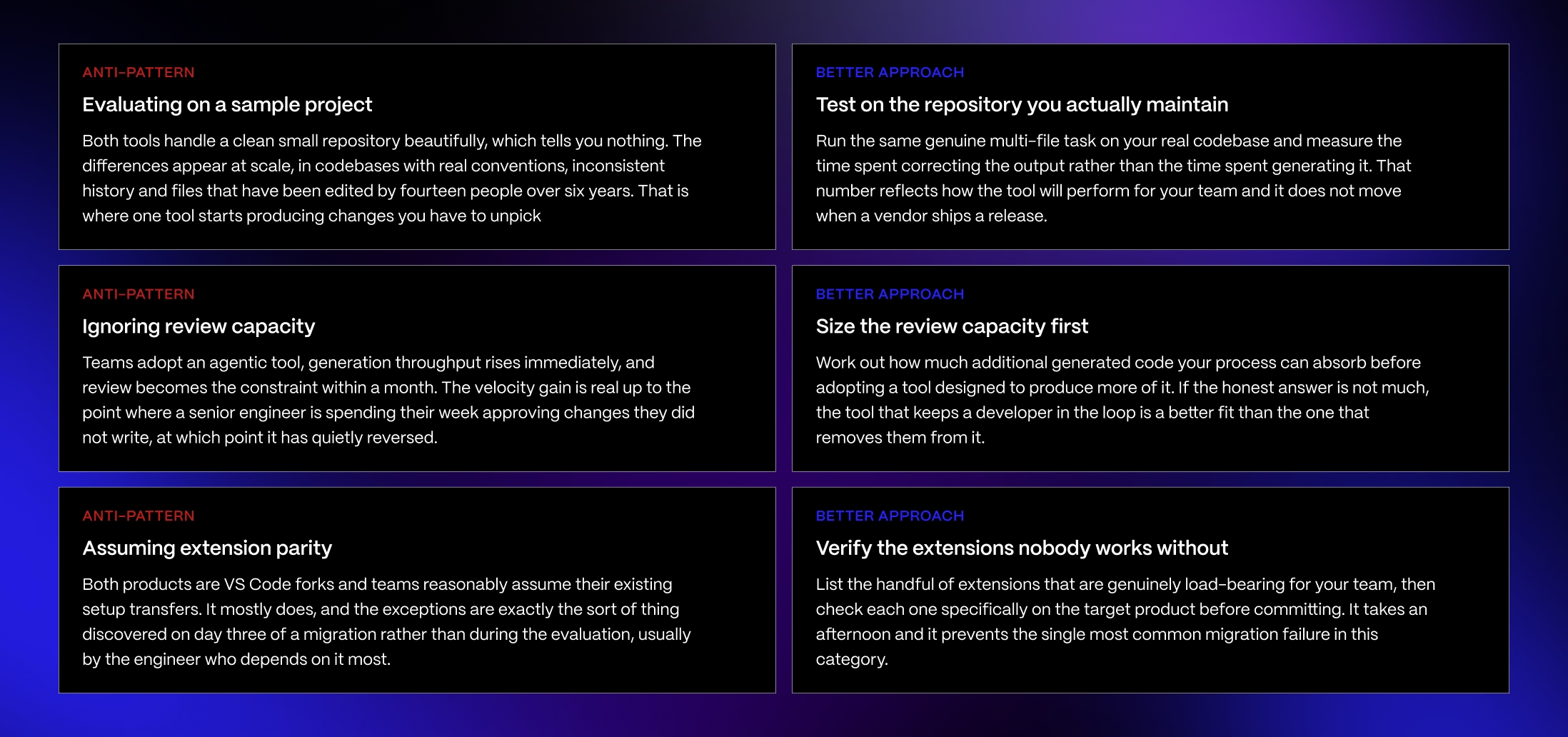
Three evaluation mistakes can result in a successful trial period winding up in the wrong purchasing decision.
Evaluating on a sample project: A clean repository doesn’t reproduce the dependencies, conventions, technical debt, or context requirements of the production codebase where the tool is actually going to operate.
Ignoring review capacity: Higher agent output looks like greater engineering velocity until such a time as developers are unable to review this output at the same rate. This is the expensive failure mode because it can look like success for the first month. Once the review queue grows, the bottleneck then shifts from producing code to validating code, which reverses the velocity gain that platforms create.
Assuming extension parity: Shared VS Code foundations don’t guarantee that every extension is going to behave identically. Compatibility needs to be tested instead of just inferred.
These anti-patterns share the same mistake, evaluating the AI coding tool separately from the engineering system that exists around it. The better platform isn’t necessarily the one that completes a singular task the quickest, but one whose output your team can absorb reliably.
Decision by Team Profile
DECISION BY TEAM PROFILE
Use this as a starting point, not a binding answer. The five-point framework is the real evaluation tool. The team profile gets you to the right default.
PROFILE 1: STRICT REVIEW CULTURE
- Profile: every change reviewed, regulated or high-consequence codebase, small senior team
- Top constraints: nothing lands unexamined, audit trail on what was generated
- Recommended starting point: Cursor
- Why: the diff-and-approve loop matches a process you already run rather than fighting it. Adoption is easier because the tool asks permission at the same points your team already expects to give it, and nothing arrives that somebody has not looked at.
The verdict: the tool that matches your existing process beats the one that requires you to change it.
PROFILE 2: HIGH-THROUGHPUT PRODUCT TEAM
- Profile: shipping fast, tolerant of iteration, clear specifications, decent test coverage
- Top constraints: velocity, developer time spent on routine work
- Recommended starting point: Windsurf
- Why: the delegation model pays off when tasks can be specified well and the safety net underneath is real. Test coverage is the thing that makes this work. Without it, delegated multi-file changes become a source of quiet defects rather than throughput.
The verdict: strongest fit, conditional on the tests actually existing.
PROFILE 3: LARGE LEGACY CODEBASE
- Profile: hundreds of thousands of lines, long history, inconsistent conventions
- Top constraints: context handling, avoiding changes that violate local patterns
- Recommended starting point: test both, and weight the result heavily
- Why: this is where the products separate most and where published comparisons help least. A large codebase with accumulated conventions is a genuinely hard context problem, and how each tool handles yours is not predictable from anyone else's evaluation.
The verdict: the one profile where a two-week parallel trial is not optional.
PROFILE 4: MIXED EDITOR TEAM
- Profile: some VS Code, some JetBrains, some Vim
- Top constraints: coverage across editors, consistency of experience
- Recommended starting point: whichever currently supports your editors, verified today
- Why: plugin availability outside VS Code differs and changes. This is a practical constraint that can decide the question outright, and it is worth checking before any capability evaluation rather than after.
The verdict: availability beats capability when half your team cannot use the tool.
PROFILE 5: ENTERPRISE WITH A SECURITY REVIEW
- Profile: procurement process, data handling requirements, possibly air-gapped or VPC needs
- Top constraints: deployment model, certifications, telemetry and local indexing controls
- Recommended starting point: start with the deployment requirement, then evaluate what clears it
- Why: the two diverge more on enterprise deployment than on features, and this is the area comparison articles cover least. Establish what your security review demands before evaluating anything, because it may reduce the shortlist to one.
The verdict: the requirement decides this, not the product.
PRINCIPLE
Both of these tools are good, both improve monthly, and the feature gap between them closes and reopens with every release. Choosing on today's feature list is choosing on a snapshot. The stable question is how much of the work your team is willing to let run before somebody looks at it, because that is a property of your team rather than of either product, and it will still be true after the next four releases.
Overall, there is no universal winner. But different profiles can make the trade-offs much clearer.
Strict Review Culture: If developers need close visibility into changes, and incremental approval, Cursor is the right choice. Its control-oriented workflow makes more sense when human review is intentionally close to AI execution.
High-Throughput Product Team: Lean toward Windsurf if your team is comfortable with delegating larger units of work and values strong and sustained agent execution. Cascade’s autonomy is more useful when developers require completed work to review, as opposed to frequent interventions.
Large Legacy Codebase: Run a parallel trial. Codebase, understanding, reindexing rules, extension dependencies, and established workflows matter too much for just a generic verdict.
Mixed-Editor Team: Start with IDE compatibility. Windsurf’s broader plugin reach has advantages, but support for load-bearing editors and extensions need to be confirmed prior to migration. When it comes to scaling teams, forcing developers into a new environment can erase gains that occur in other places.
Enterprise With a Security Review: Let procurement requirements act as the gate. Windsurf has the strongest position where FedRAMP, ITAR, or self-hosted deployment is necessary. Where conventional enterprise controls are sufficient, both of them remain viable and the workflow decision returns to the foreground.
The same principle applies when you are choosing AI project management tools, AI tools for startups, or the wider design and build services surrounding the development stack: fit is more crucial than feature count.
Both Cursor and Windsurf are strong products, and both of them are improving. The feature gap will close and reopen with successive releases. The more stable question lies in how much work your team will allow an agent to complete before somebody looks at it.
The tool is the easy decision. The rollout is not.
Most teams pick one of these in an afternoon and then spend three months discovering what it changed. Review capacity becomes the bottleneck. A load-bearing extension turns out not to work. The security review asks a question nobody prepared for. We work with B2B SaaS engineering and marketing teams on the layer underneath the tool choice: what it costs at real volume, what procurement will approve, and whether the process around it can absorb what it produces. If you are making this decision now, we should talk before the rollout rather than after.
FAQ
Which is better, Windsurf or Cursor?
Neither, consistently. The stable difference is working style: Cursor is built around approving diffs, Windsurf around delegating tasks. Cursor tends to win on inline speed and autocomplete, Windsurf on autonomous multi-file work and IDE reach. For regulated or government work, Windsurf's compliance envelope decides it outright.
Who owns Windsurf now?
Cognition, the maker of Devin, which acquired the company on 14 July 2025. Three days earlier Google had hired the founders and key researchers in a reverse-acquihire, after OpenAI acquisition talks collapsed. Cognition acquired the remaining product, brand, staff and roughly eighty two million dollars of annual recurring revenue. Many comparisons stop at the Google deal and get this wrong.
How much do Cursor and Windsurf cost?
Both run twenty dollars for individual paid tiers and forty dollars per user for team tiers, so base cost is identical for a five-person team at two hundred dollars a month. The difference is metering. Cursor uses a usage pool with overage billed in arrears; Windsurf uses quotas that reset, with add-on credits at ten dollars per two hundred and fifty.
What happens when I run out of usage?
On Cursor, third-party model usage beyond your included pool bills as overage at the end of the period. On Windsurf, you wait for the quota reset or buy add-on credits. Cursor suits bursty usage; Windsurf suits steady usage where predictable spend matters more than peak capacity.
Is either FedRAMP authorised?
Windsurf holds FedRAMP High authorisation, achieved via Palantir FedStart, and states ITAR support and DoD IL5. The authorisation is documented for Windsurf Extensions, so confirm the scope for your specific deployment. Cursor has neither FedRAMP nor ITAR. For government and defence work this is usually decisive.
Can I self-host either one?
Windsurf offers genuine self-hosted deployment where compute and retention sit in your own GPU tenant, approaching air-gapped, plus a hybrid option. Cursor does not offer self-hosted inference; its self-hosted agent runners handle tool execution only. Cursor's bring your own key still routes requests through Cursor's backend and voids zero data retention with providers.
Will my VS Code extensions work?
Most will, since both are VS Code forks pulling from the Open VSX registry. The exceptions are extensions that depend on the proprietary Microsoft marketplace or Microsoft-signed components, with certain C Sharp, Pylance and remote development pieces the usual casualties. List your load-bearing extensions and verify each one before migrating.
Do both support JetBrains and Vim?
Windsurf has broader reach outside VS Code, including JetBrains and, per 2026 reporting, Vim and Neovim. Cursor added JetBrains support during 2026 but its core experience remains VS Code-based. This shifted during the year, so verify current plugin status before deciding, particularly for a mixed-editor team.
Which handles large codebases better?
The evidence is thin and mostly single-practitioner. One disclosed-methodology test on a forty thousand line TypeScript monorepo scored Cursor slightly higher overall while Windsurf's Cascade won on autonomous multi-file discovery. That is one data point on one stack, not a verdict. Run a parallel trial on your actual repository.
Can we run both during evaluation?
Yes, and it is cheap to do. Both install alongside each other, so a genuine two-week parallel trial with different engineers on the same tasks costs little and produces better information than any comparison, including this one. For large legacy codebases it is close to mandatory.