.jpg)
Introduction
AI tools aren’t the problem for startups in 2026. In fact, they are a crucial part of running a successful modern brand. The issue comes with overuse.
Founders aren’t struggling to find tools, but instead they have to deal with the challenges when choosing the right ones without burning runway on overlapping subscriptions. What starts as a few helpful tools quickly turns into a fragmented stack that costs hundreds per month without delivering proportional value.
This guide fixes that. Instead of a list of flat tools, it shows you precisely what to use at each stage of the startup process, from pre-revenue to growth, allowing you to stay lean, move fast, and avoid subscription sprawl.
Abstract
AI subscription spend among startups is growing in 2026. Most of that spending is inefficient, with multiple tools solving the same problem, adopted in isolation as teams scale. The issue here is knowing which AI tools you need right now, as opposed to gaining access to them.
This guide breaks down the best AI tools for startups by stage: pre-revenue ($0/month), seed ($50-100/month), Series A ($200-250/month), and growth ($500-1,000/month). Each stage includes a minimum viable AI stack, with the smallest set of tools that covers coding, content, design, automation, and analytics with zero overlap.
We recommend 10 tools across these stages and explicitly reject 3 that are unnecessary or overhyped for early teams. Every recommendation is grounded in real startup workflows, not vendor bias.
The goal here is a simple focus on getting more output and extending runway in the process, while spending less on AI tools as you go.
The AI Subscription Sprawl Problem (and How to Fix It)
Most startups fail because they use too many of the wrong tools at the wrong time. AI adoption in startups is happening quickly, but it’s often not intentional. Tools get added reactively as opposed to strategically, and the result is a bloated stack that costs more than it delivers. Fixing that begins with understanding where waste comes from, as well as what a lean alternative looks like.
Most Startups Are Paying Too Much for AI
AI adoption usually starts small. One tool for writing, another for design, another for automation. But over time, that is a stack that grows unchecked.
A typical founder setup might include ChatGPT for writing, Midjourney for images, Jasper for marketing copy, Notion AI for planning, and Zapier for automation. Before long, that’s 5-8 subscriptions costing several hundred dollars per month, typically with significant overlap.
The problem here is redundancy.
- Canva can replace Midjourney for non-specialist design
- ChatGPT can handle most of what Jasper does
- Notion AI overlaps with both writing and planning tools
But because each of the tools is adopted in isolation, nobody steps back to consolidate. The result is subscription sprawl; multiple tools solve the same problem, each adding cost without adding proportional value.
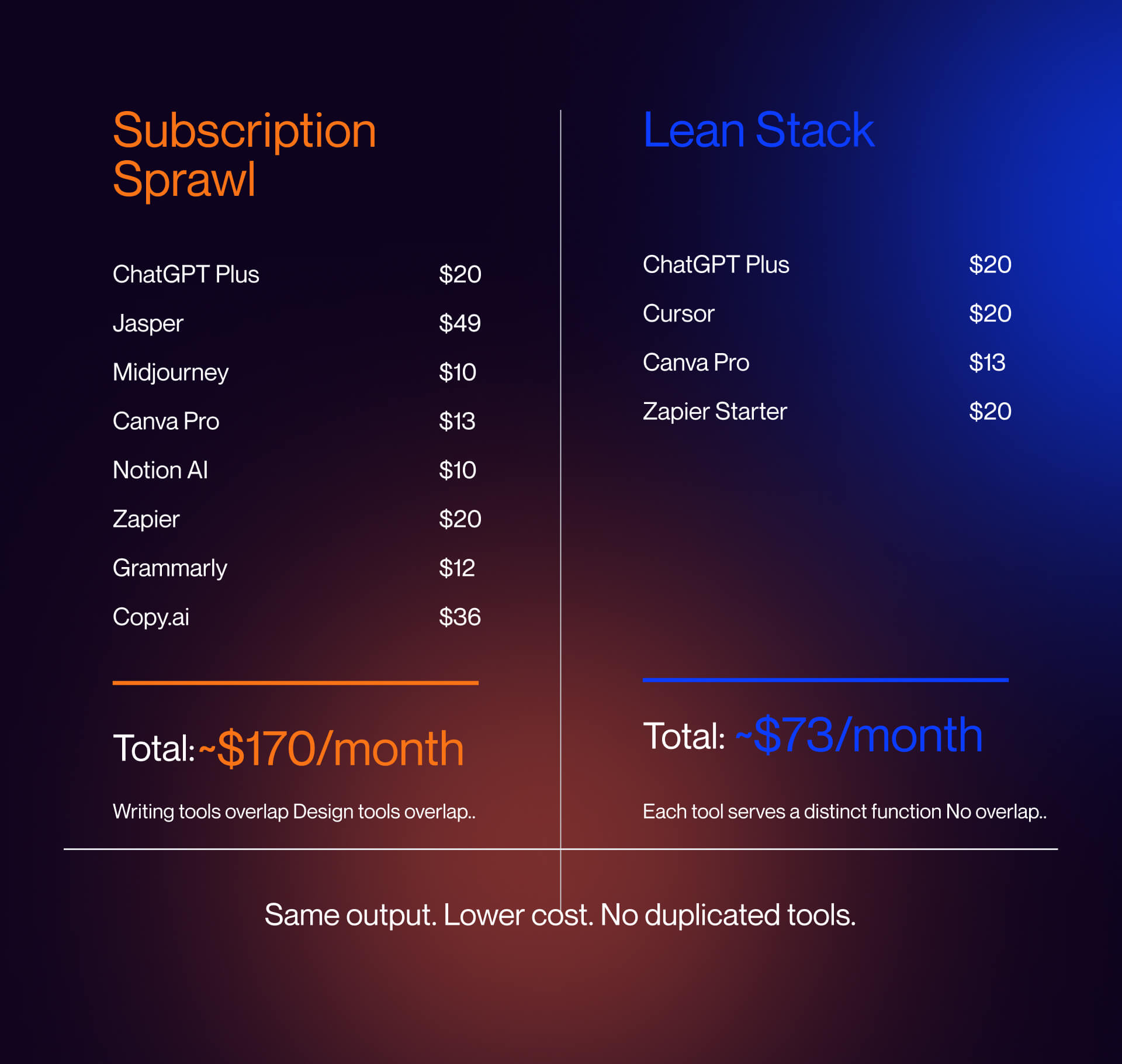
We see the same patterns across broader stacks, such as ChatGPT, Midjourney, Jasper, Notion AI, and Zapier.
If you want a broader view of how these tools fit into marketing specifically, see our guide to AI tools for B2B marketing.
The Minimum Viable AI Stack Concept
The solution is not a case of choosing more tools, it is about being able to use fewer tools, but selecting better ones. A minimum viable AI stack is the smallest set of tools that covers your core startup functions:
- Coding (building product)
- Content (writing + images)
- Design (brand, decks, assets)
- Automation (ops, workflows)
- Analytics (data and insights)
At each stage of your startup, your needs will evolve, but at every stage, overlap should be zero. Instead of stacking multiple tools that do similar things, you have to consolidate around the strongest option for each job. This reduces cost, simplifies workflows, and increases actual usage across your team.
The 4 Stages We Cover
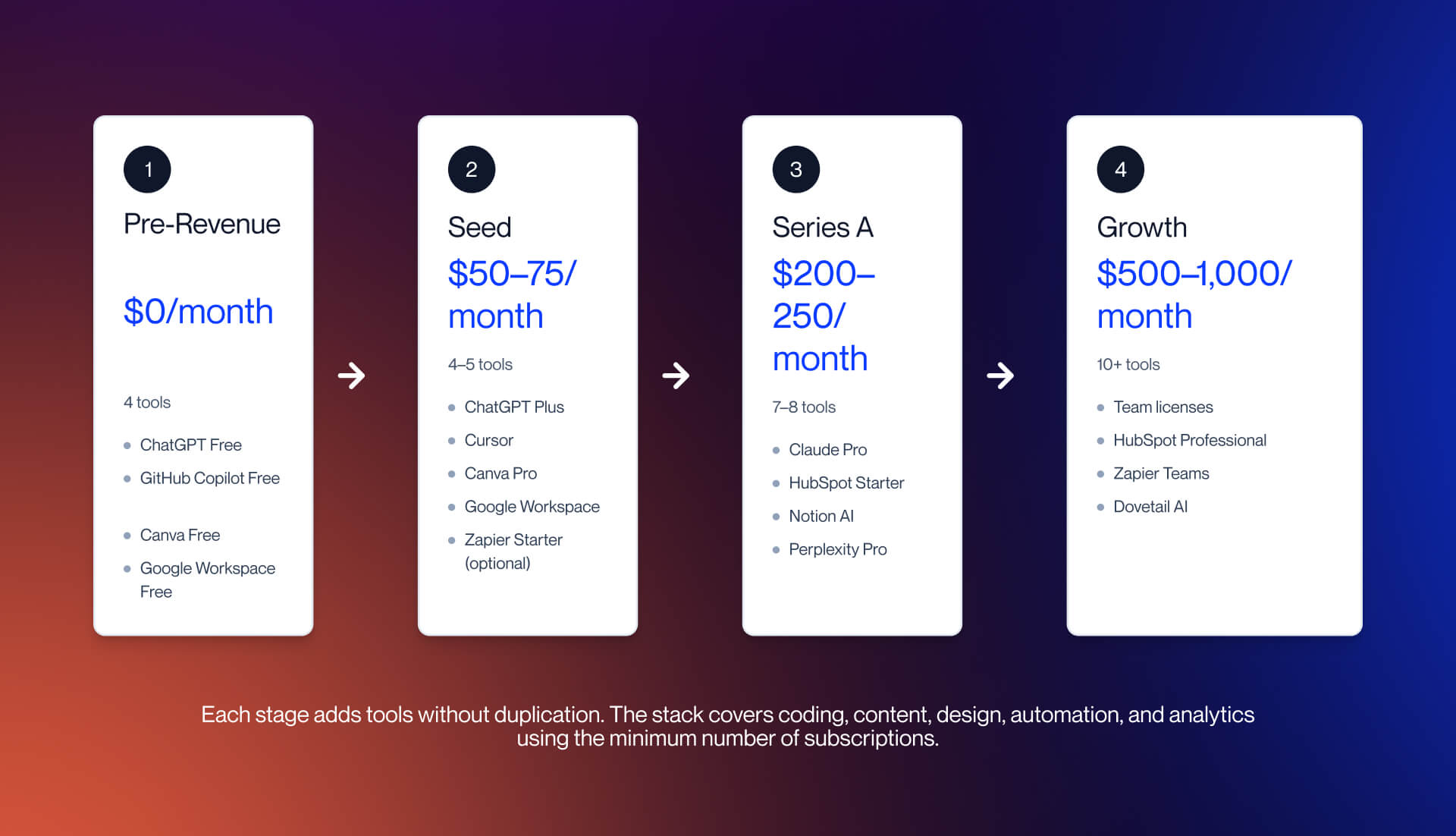
We structure this guide around four different startup stages, and each of them has a different budget and set of priorities:
1. Pre-revenue ($0/month) - Free tools only. Focus on building and validating.
2. Seed ($50-75/month) - First paid tools that meaningfully increase output.
3. Series A ($200-250/month) - Collaboration, structure, and analytics become critical.
4. Growth ($500-1,000/month) - Team-wide adoption, governance, and integration matter the most.
Each stage includes a complete, stage-appropriate AI-stack, so you are never paying for the tools you don’t need yet.
Pre-Revenue AI Stack: Free Tools That Actually Work
At a pre-revenue level, cash is the bigger constraint here. Every tool that is added needs to justify itself immediately, and paid subscriptions rarely achieve that at this stage. The goal is to build, test, and get to first revenue, and to do so using only free tools that genuinely work.
The Rules at This Stage
No budget means no paid subscriptions. This is why every tool in your stack needs to have a genuinely useful free tier, as opposed to a limited trial that forces an upgrade after a few days. At this stage, your stack only needs to cover four different functions.
- Coding (building your product or MVP)
- Content (writing, messaging, basic research)
- Design (brand, landing pages, simple visuals)
- Basic automation (light workflows, not full systems)
The analytics comes later, because right now there is not enough data in order to justify dedicated tools. And this is where founders tend to go wrong because they adopt tools that are designed to scale before they have anything to scale.
If you are still validating your product or early positioning, your focus needs to be on execution as opposed to tooling. This is exactly where our startup marketing services approach is built, making it fast, lean, and stage-appropriate.
Recommended Stack
At pre-revenue, four tools are enough, but anything else can prove unnecessary. Here are some of the options that you need to consider.
- ChatGPT (Free)
Your primary engine for writing, brainstorming, customer research synthesis, and basic coding help. It is the most versatile free AI tool on the market, and can cover multiple functions at once.
Limitation: No image generation on the free tier and a smaller context window compared to paid plans.
- GitHub Copilot (Free tier)
GitHub handles coding assistance, autocomplete, and basic function generation inside your IDE. This is ideal for technical founders building quickly without needing to write everything from scratch.
Limitation: Less capable than paid Copilot tiers or tools like Claude Code for complex refactors.
- Canva (Free)
Cover designs, social content, simple landing visuals, and basic presentations are a core part of what Canva provides. The free tier is strong enough for early-stage needs with templates and drag-and-drop design.
Limitation: Advanced AI features like Magic Design and full brand kits require Pro.
- Google Workspace (Free tier)
Docs, Sheets, and Slides with built-in AI via Gemini. This serves as your collaboration layer, document system, and lightweight presentation tool.
Limitation: Gemini AI capabilities are more limited compared to paid Workspace plans.
Total: $0/month
This stack provides coding, content, design, and basic workflows. This is ideal for a solo founder or small team, and is adequate for helping them to reach first revenue.
What NOT to Buy at Pre-Revenue
One of the biggest and most common mistakes at this stage of the process is wasting money on tools that are designed to solve problems you do not have yet.
- Do not buy Jasper ($59/month)
ChatGPT already takes care of things like writing, ideation, and marketing copy. Templates aren’t valuable until after you have a defined brand voice.
- Do not buy Midjourney ($10+/month)
The majority of startups will be fine using Canva for 90% of design needs without reliance on prompt engineering or additional cost.
- Do not buy CRM (e.g. HubSpot paid tiers)
You don’t have enough of a customer base or pipeline to justify a CRM at this stage. Just use a spreadsheet until you have real deal flow.
- Do not buy analytics tools
You don’t have enough traffic or user data to analyze meaningfully. Using free tools like Google Analytics when needed is definitely important.
At pre-revenue, unnecessary subscriptions shorten your runway. The goal is to build a lean stack that is going to help you get to traction as fast as possible.
Seed Stage AI Stack: First Paid Tools That Earn Their Place
At seed stage, the constraint shifts. You no longer need to operate at zero budget, but you have no room for inefficiency. Every paid tool now has to prove ROI quickly, either by helping you to ship faster, generate revenue, or remove manual work. This is where your stack evolves from “free and functional” to becoming lean and leveraged.
What Changes at Seed
At this stage, you typically have initial revenue or seed funding, along with a small team of 1-3 people. The priorities shift from validation to execution speed.
You need to ship product faster, produce higher-quality content, and introduce basic automation. But it’s also important to understand that what hasn’t changed is just as important. You still don’t need enterprise tooling. Overbuilding your stack here creates the same subscription sprawl problem, but at a higher cost. Instead, the idea here is to upgrade as selectively as possible.
Recommended Additions
At seed stage, you move from free tools only to high-leverage paid upgrades. The stack stays small, but each addition needs to meaningfully increase output.
ChatGPT Plus (~$20/month)
This is the first upgrade that immediately earns its place. It provides better models, image generation, and web browsing, alongside deeper research capabilities.
Importantly, it replaces the need for multiple tools across writing, ideation, and basic research.
For the majority of startups, this the highest ROI $20/month spend that is available.
Cursor (~$20/month)
Cursor replaces basic coding assistants with a true AI-first development environment. It provides multi-model support, Codebase-aware suggestions, and agent-style workflows for faster iteration.
For technical founders, this directly translates to faster shipping cycles - faster product iteration - faster learning.
Canva Pro (~$12.99/month)
Making the upgrade to Canva Pro unlocks Magic Design, brand kits, and premium templates. At this stage, design quality starts to matter, particularly for features like landing pages, pitch decks, and marketing assets.
This removes the need for separate design tools or freelancers early on.
When paired with strong website infrastructure or AI website builders, Canva Pro becomes a core part of your growth stack. It’s also highly effective for building high-conversion pages inspired by strong SaaS landing page examples.
Optional: Zapier Starter (~$19.99/month)
Make sure you only add this if you actually require automation. Use cases include lead capture (CRM or email tool), form submissions (notifications), and basic onboarding workflows.
If you’re still manually handling everything, skip this. Automation only pays off when volume exists.
Stack Summary:
- ChatGPT Plus
- Cursor
- Canva Pro
- Google workspace (free tier)
Optional:
- Zapier Starter
Total: ~$53/month (core)
Including automation: ~$73/month
This stack covers coding, content, design, and automation with zero overlap and minimal waste.
What Still Does Not Earn Its Place
At this stage, the biggest mistake lies with premature optimization through tooling.
Do not buy dedicated AI writing tools, such Jasper and Copy.ai. There is no need as ChatGPT Plus already covers this. Templates are not a substitute for strategy, and you don’t need another subscription to solve the same issue.
Do not buy enterprise CRM (HubSpot paid tiers). You don’t have enough pipeline complexity yet. Instead, you should use HubSpot free or a structured spreadsheet. Paid CRM is only valuable when deal flow increases.
Do not stack multiple coding tools; instead pick one out of Cursor or Claude Code. Using both creates overlap and confusion, as opposed to speed.
Series A and Growth AI Stacks: Scaling Without Subscription Sprawl
By the time you reach Series A and beyond, the challenge evolves again. You are no longer asking which tools you need, but rather, how you can scale without creating chaos.
Teams are larger, with more complex workflows, and without structure, your AI stack can quickly turn into the same subscription sprawl problem, across a larger scale.
At this stage, your focus should be on introducing coordination, governance, and clear ownership across the stack.
Series A Stack ($200-400/month)
At Series A, teams generally sit between 5-15 people, and this is where individual productivity tools need to evolve into shared systems. Content is no longer written solely by one person, and decisions aren’t made in isolation. Data matters in a way it never did at pre-revenue or seed.
The key shift here lies in the fact that one tool is no longer enough, and it is essential to start layering tools with clear roles.
Claude (Pro $20/month)
Claude is one of the first additions that earns its place here. While ChatGPT is the most versatile tool in the stack, Claude can excel as an option for long-form thinking. Strategy documents, detailed analysis, and anything that requires handling large amounts of context are far better with Claude. But, ultimately, using both is what will help improve output quality.
HubSpot Starter ($20/month per seat)
HubSpot Starter excels for visibility across deals, basic automation for follow-ups, and a single place to track interactions. This is the threshold where a CRM stops being overhead and instead becomes leverage.
Notion AI (Free tier / $10/per user)
Notion AI comes to the forefront when internal coordination becomes the next bottleneck, and scattered documents and disconnected planning slow things down. Notion excels as a shared operating layer, replacing fragmented documentation with a central system that holds knowledge and workflows in a single place.
Perplexity AI ($20/month)
Perplexity fills the research gap that ChatGPT and Claude cannot fully solve. It helps provide source-backed answers and real-time information, which is crucial to making decisions surrounding positioning, competitors, and market direction.
Taken together,this stack now looks like an evolution of your seed setup as opposed to a replacement. You can add capability without having to introduce redundancy.
Total: ~$180-250/month, depending on team size
At this stage of the process, AI is no longer solely about output. It is shaping the direction of the business, and how it thinks. This ties into your long-term marketing strategy approach, because tools influence decisions and not just execution.
Growth Stack ($500-1,000/month)
Once you arrive at the growth stage, typically between 15-50+ people, the problem changes again. At this point it’s not to do with which tools should be added, but about ensuring everyone is using the systems in the same way.
Standardization becomes the main pillar of importance. And engineering is a clear example, with early stages allowing individuals to use whatever works for them, while this approach breaks down at growth stage. This is why teams need to have a shared baseline. Whether it’s Cursor or Claude Code, the important thing is choosing one as the default and developing workflows around it.
HubSpot Professional (~£700/$800/month) is justified here because you have enough volume for reporting and attribution to matter. At early stages, analytics is noise, while at growth stage it is key to how you make decisions.
Zapier or n8n (Team plan $69/month) are essential for automation as they are cross departmental, connecting marketing, sales, and operations. This is crucial when your website and growth infrastructure, often managed via a Webflow agency setup, needs time to integrate with your backend.
In some cases, research tooling also becomes specialized. If you are running frequent user interviews or product discovery, tools like Dovetail AI justify their cost.
Total: ~$500-1,000/month
At this stage, the real risk is waste, and this is why stack management is such an important discipline. A simple rule to employ is, if a tool isn’t used by at least half the team a month, it’s not worth your while.
Tools We Tested and Did Not Recommend for Startups
Some tools look as though they should fit into this stage, but they don’t hold up in practice.
Jasper is an excellent example of this. It positions itself as a dedicated AI writing platform, but the fact is that ChatGPT and Claude combined offer far more flexibility, as well as higher quality output. Jasper might have useful templates but at the startup stage, it constrains more than it helps.
Salesforce falls into a different category. It’s not a bad product, but it’s the wrong fit at this stage. For teams with less than 20 people, this adds unnecessary complexity, and the overhead slows more than accelerates. HubSpot achieves the same outcome with less friction.
Finally, multi-model aggregators, such as AiZolo ($10) might sound appealing, but they rarely actually justify themselves. Accessing multiple AI models in one interface feels efficient, but most teams rely on one to two tools consistently, and adding another layer doesn’t improve output.
The Full Cost Math: AI Subscription Spend by Stage
By this point, the pattern should be an obvious one: AI tools become expensive when overlap compounds across stages.
A lean stack prevents that, and the difference is clear to see.
Monthly Cost Summary Table
The simplest way of being able to understand AI spend is to break it down by stage:
- Pre-revenue ($0/month)
- Seed (~$50-75/month)
- Series A: 5 people (~$200-250/month)
- Growth: 15+ people (~$500-1,000/month)
These numbers are deliberately constrained. They reflect a minimum viable AI stack with zero overlap, not a fragmented toolset.
The majority of startups do not operate this way. Early-stage teams looking for off-the-shelf AI tools can expect to pay anything from $0-500/month range, mostly because of duplicated functionality across tools adopted in isolation.
Most startups don’t operate this way. Even early-stage teams often drift into higher price ranges without realizing how much of that spend is duplicated across similar tools.
The difference compounds quickly. Saving $200/month on redundant subscriptions equates to around $2,400 annually. For early-stage startups, that extends runway by 1-2 months, and this can often be the margin between traction and failure.
The takeaway is simple, with cost discipline at early stages outsizing impact later.
The Quarterly Audit Rule
Even with the correct stack, inefficiency comes back unless it is actively prevented.
Tools get added reactively and teams experiment independently. Within six months, the majority of the startups accumulate subscriptions that don’t serve a clear purpose.
The solution here is an operational one.
Run a full AI stack audit every quarter.
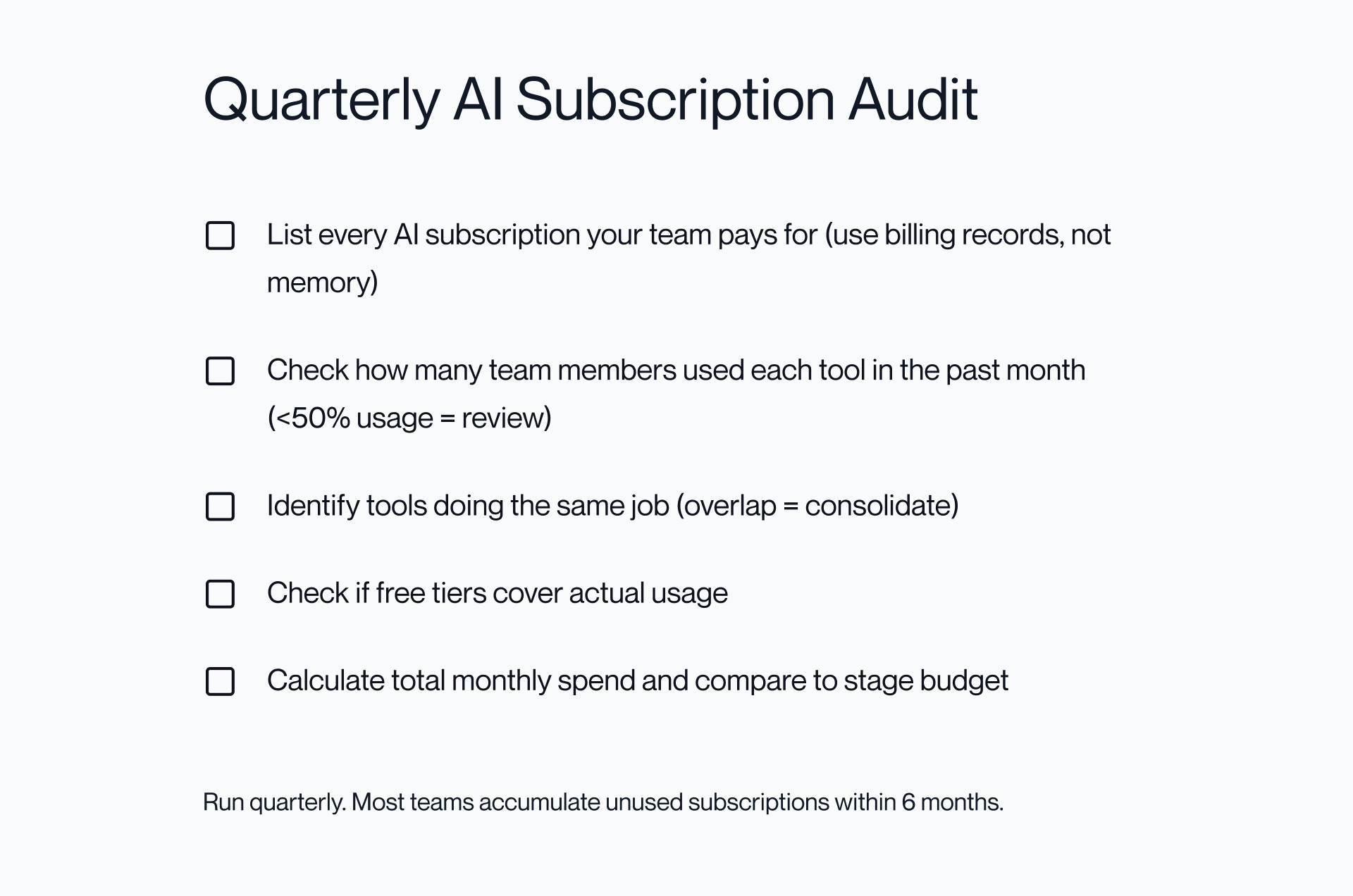
This process forces a shift from intention to behavior. Tools are only valuable if they’re actively used and clearly justified.
The straightforward rule to consider is that if fewer than 50% of your team used a tool in the past 30 days, you should remove it.
This helps prevent zombie subscriptions within the first 6 months of AI adoption, as well as ensuring your stack evolves with actual usage, as opposed to merely assumptions.
Primary CTA: If your current stack feels bloated, it’s worth stepping back before adding another tool. The fastest way of fixing subscription sprawl is a clearer system, and you can talk to our team for helping build a lean, stage-appropriate stack.
Secondary CTA: If you want to see how we approach this in practice, explore our work and see how we build growth systems for SaaS teams.
FAQs
What are the best AI tools for startups in 2026?
The best tools depend on your stage: pre-revenue uses free tools like ChatGPT, GitHub Copilot, and Canva, while seed and beyond add ChatGPT Plus, Cursor, and Canva Pro. The goal is to use the smallest stack that covers coding, content, automation, and design, without the risk of overlap.
How much should a startup spend on AI tools?
Pre-revenu should be $0, seed around $50-75/month, Series A ~$200-250/month, and growth $500-1,000/month depending on team size. Most startups overspend by layering overlapping tools instead of consolidating.
What is the best free AI tool for startups?
ChatGPT Free is the most versatile, covering writing, research, and basic coding in one place. Pair it with GitHub Copilot Free for coding and Canva Free for design to cover all core needs.
Should startups use ChatGPT or Claude?
Start with ChatGPT as the all-rounder, then add Claude at Series A when you need stronger long-form thinking and analysis. They complement one another, but you don’t have to rely on both early on.
Is Jasper worth it for startups?
Not for most early-stage teams. ChatGPT Plus and Claude together are more flexible and cost-effective than Jasper, while templates and brand voice tools only become valuable once your positioning is already defined.
What AI coding tools should startups use?
Using GitHub Copilot Free at pre-revenue, then make sure to upgrade to Cursor at seed stage for faster iteration and agent-style workflows. Pick a primary tool to avoid overlap and confusion.
What should a startup add to CRM?
Add a CRM when you have consistent pipeline to manage, and until then, a structured spreadsheet is faster and simpler to maintain.
How do I avoid AI subscription sprawl?
Use one tool per function, adding new tools, while removing anything with low usage over time. Many sprawls occur from stacking tools that solve this issue.
