.jpeg)
AI presentation tools save time on the parts no one likes to do: layout, formatting, visual selection, and slide transitions. However, none of them will save you time where it counts the most: your message, your story, and your data.
This distinction matters because most roundups oversell the automation and ignore the substance.
Abstract
We compared some of the most popular AI presentation tools in 2026 based on what needs to be accomplished:
- Pitch decks for investors
- Sales decks for prospects
- Internal reports for leadership
- Training decks for teams
We tested 12+ tools and recommend 9 across these use cases, plus 3 tools we explicitly rejected.
All of our recommendations include the honest limitations of each tool. We have also included pricing information (verify prices before purchasing, as AI pricing changes frequently) and export-quality notes. A deck that looks good in the tool but falls apart when exported to PowerPoint is not a viable solution.
What AI Presentation Tools Actually Do (and What They Don't)
AI presentation tools are generating a solid first draft - the basic structure and layout, placeholder images and text, within 30-120 seconds, after receiving a text-based input.
Then there’s the editing process (typically 20-40 minutes), which includes:
- Correcting the content
- Changing the flow
- Replacing generic images
- Ensuring the deck matches the company's branding
The Honest Tradeoff
The honest question: Iis it faster to use AI tools to create a solid draft, then spend another 30 minutes editing it, compared to creating a blank slate from scratch? In general, B2B SaaS teams can save about 1-3 hours per deck through this method. However, no one claims that AI takes away the workload. Instead, it simply shifts where you do the work, from creating a blank slate, to editing a draft.
If someone promises you they'll create "the perfect pitch deck in 60 seconds," don't believe them. You're going to have to edit whatever comes out of their system. So, the real question is: Is editing a draft of something created by AI better than starting over at the beginning?
For broader AI tool context, see AI tools for B2B marketing.
What to Evaluate Before Choosing
Three key things that matter far more than what features each product has:
- Export quality - Does the final deck render correctly when you export it into PPTX or Google Slides? Export issues are typically reported as the number-one issue among users. Test export quality before investing in anything else.
- Brand control - Are you allowed to set consistent branding (i.e., colors, fonts, etc.) across every single slide? Brand consistency is crucial to B2B SaaS companies who require the same branding throughout every deck.
- Content quality - Does the AI-generated content make sense, or is it simply generic copy that you end up rewriting entirely? If you wind up rewriting 80% of what came out of the AI generator, the tool is essentially nothing but a template engine and not an actual AI assistant.
The 4 Use Cases This Guide Covers
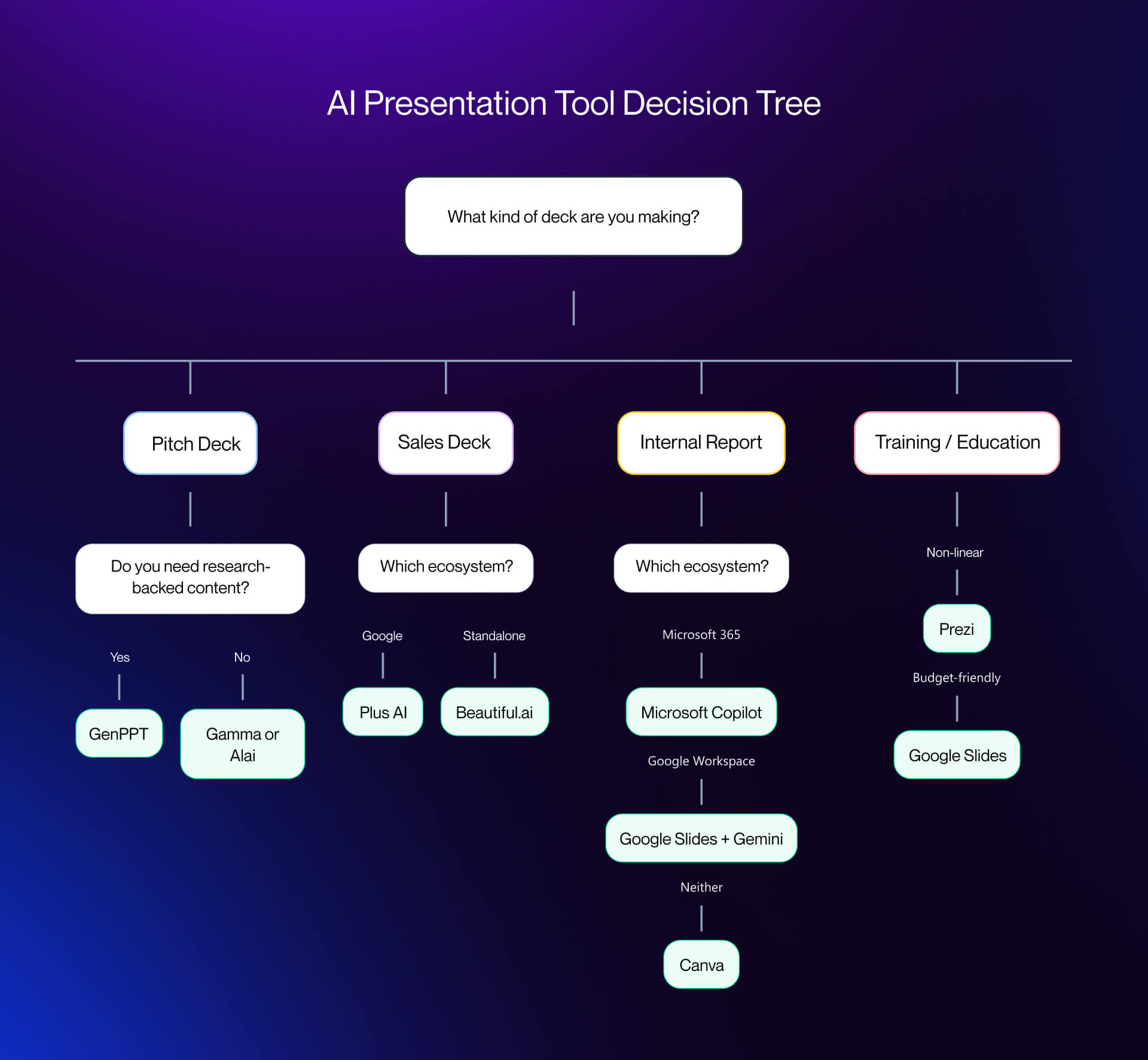
- Pitch decks: investor fundraising, board updates
- Sales decks: prospect presentations, product demos
- Internal reports: quarterly updates, strategy presentations, all-hands
- Training and onboarding: product training, workshops, new-hire decks
Each tool wins at a different "job" in this process. We organize by Job.
Best AI Presentation Tools for Pitch Decks and Investor Updates
What Pitch Decks Actually Require
Pitch Decks require an appropriate narrative structure (Problem, Solution, Market, Traction, Ask) and high-quality data visualization (Market Sizing, Growth Charts, Financial Projections). The deck also needs to have a high level of premium visuals. An investor sees hundreds of Pitch Decks; low quality or unpolished design indicates that you will be similarly unpolished in executing your business plan.
AI tools for pitch decks must produce polished, professional output with clean data slides. For GTM strategy context alongside your deck, see our
For GTM strategy context alongside your deck, see our marketing strategy services.
Recommended for Data-Driven Presentations: Julius AI
Julius AI turns prompts, documents, PDFs, spreadsheets, and raw data into editable presentations. The main advantage is that it can handle the research and analysis layer before creating the deck, which makes it especially useful for business reviews, investor updates, market analyses, and data-heavy internal reports.
- Pricing: Free tier (daily credits), Plus ($20/mo), Pro ($45/mo), Max ($200/mo)
- Best for: Teams that need to turn research, files, or spreadsheet data into polished slides
- Export: PPTX, PDF, PNG, and Google Slides
- Honest limitation: Julius doesn’t use a traditional PowerPoint-style editor, but that also means you can refine slides by simply prompting for changes.
Recommended: Gamma
Gamma is a web-native presentation tool built around modern design principles. Generation from a text prompt typically completes in under 60 seconds and produces layouts with interactive elements - embedded videos, live charts, nested cards. The output feels contemporary in a way that legacy PowerPoint templates do not.
- Pricing (verify at gamma.app): Free tier (400 credits), Plus $8/month, Pro $18/month, Ultra $90/month
- Best for: Founders and small teams who want modern, web-native pitch decks without design skill
- Export: PDF and PPTX work; the web version consistently looks better than the export
- Honest limitation: The scroll-based format can feel awkward for live presenting in front of an audience. PPTX export is sometimes less flexible than building natively in the tool.
Recommended: Alai
Alai is AI-native and generates four distinct layout variants per slide, which means you pick the visual approach rather than accepting whatever the AI defaulted to. The visual depth - gradients, shadows, layered elements - trends toward investor-grade polish.
- Pricing (verify at getalai.com): Subscription tiers; check current pricing before committing
- Best for: Founders who want high visual quality without hiring a designer
- Export: Solid; verify with your specific content before relying on it
- Honest limitation: Newer player with a smaller community and less testing history than Gamma or Canva.
Also Consider: GenPPT
GenPPT uses more recent AI models - including Gemini Pro and Claude Opus - to do deeper content research before generating slides. If your pitch deck needs market data, competitive landscape analysis, or sourced statistics baked into the first draft, GenPPT handles more of that research step than most tools do.
- Pricing (verify at genppt.co): Subscription; verify current tiers
- Best for: Pitch decks requiring research-backed content (market sizing, competitive positioning)
- Honest limitation: Newer tool with less testing history. Always verify export quality before committing.
Best AI Presentation Tools for Sales Decks and Internal Reports
What Sales Decks Actually Require
Sales decks need brand consistency (every slide matches company identity), modular structure (AEs customize per prospect), and strong PPTX export. Prospects and internal teams live in PowerPoint and Google Slides - your sales deck will be forwarded as a file. Speed matters too: AEs need to customize decks quickly before calls.
For brand-aligned client-facing design beyond slides, see our SaaS web design services.
Recommended: Beautiful.ai
Beautiful.ai's auto-formatting engine is its core differentiator. You type content and it instantly rearranges into professional layouts using Smart Slide templates. The result is brand-consistent decks produced at volume without requiring any design skill from the team creating them.
- Pricing (verify at beautiful.ai): Pro $12/month, Team $40/month, Enterprise custom
- Best for: Sales and marketing teams producing high volumes of decks that must stay on brand
- Export: Strong - among the most reliable PPTX exports tested
- Honest limitation: The auto-formatting is intentionally inflexible - you cannot freely move elements. Some users love the constraints; others find them limiting. Design output can feel template-driven.
Recommended: Plus AI
Plus AI plugs directly into Google Slides and PowerPoint as an add-on. There is no new tool to learn, no new login, no new workflow. It generates content, suggests layouts, and edits existing slides inside the platform your team already uses.
- Pricing (verify at plusdocs.com): Subscription; verify current tiers
- Best for: Enterprise teams on Google Workspace or Microsoft 365 who will not adopt another platform
- Export: Native to Google Slides and PowerPoint - export is the format, not an afterthought
- Honest limitation: One of the slower AI generators per independent testing. Output is solid but not visually striking.
Recommended for Internal Reports: Microsoft Copilot for PowerPoint
If your organization already pays for Microsoft 365, Copilot is the most friction-free option for internal reports. It generates decks from prompts, summarizes existing Word documents into slide format, suggests design improvements, and drafts speaker notes without leaving PowerPoint.
- Pricing (verify at microsoft.com): Requires Microsoft 365 subscription plus Copilot add-on (~$30/user/month - verify current pricing)
- Best for: Large organizations already on M365, especially for quarterly reports and board updates
- Export: Native PowerPoint - no export step needed
- Honest limitation: Struggles with vague prompts; performs well with structured input (existing outline or Word doc). Default templates look dated without additional effort.
Also Consider: Canva Magic Design
Canva Magic Design generates AI presentations inside the Canva ecosystem, which most marketing teams already use for other design work. The template library is wide, brand kit support is strong, and stock image access is built in.
- Pricing (verify at canva.com): Free tier available; Canva Pro ~$12.99/month, Canva Teams ~$14.99/month per user
- Best for: Marketing teams already using Canva for design work who want presentations in the same workflow
- Export: Strong - reliable PPTX and PDF export
- Honest limitation: Presentations are a feature within Canva, not the core product. AI generation output can feel template-driven rather than custom.
AI Tools for Training Decks, Plus the Tools We Tested and Rejected
Recommended for Training and Education: Prezi
Prezi uses a non-linear, zoomable canvas rather than a fixed slide sequence. You build a high-level map of the content and then zoom into each detail during the presentation. This spatial structure is particularly effective when teaching complex processes where showing relationships between concepts matters as much as showing the concepts themselves.
- Pricing (verify at prezi.com): Free tier available; Plus ~$7/month, Premium ~$19/month, Teams custom
- Best for: Trainers and educators explaining complex, multi-layer processes where spatial relationships matter
- Export: Weak - Prezi is designed for its own format; PPTX export is limited
- Honest limitation: The zoomable format is polarizing. Some audiences find it dynamic and engaging; others find the motion disorienting. Test with your specific audience before committing.
Recommended for Training and Education: Google Slides + Gemini AI
Google Slides with Gemini AI integration is the default choice for teams on Google Workspace and for anyone with a tight budget. Gemini AI generates slides from prompts, summarizes content, and creates images directly in the sidebar. The total cost for existing Google Workspace users is effectively zero.
- Pricing (verify): Free for personal use; included with Google Workspace from ~$12/user/month
- Best for: Schools, universities, budget-conscious teams, and anyone already working in Google Workspace
- Export: Acceptable - Google Slides exports to PPTX and PDF, but complex formatting can break
- Honest limitation: Fewer templates than Canva, less formatting precision than PowerPoint. Import/export of complex PPTX files can produce broken layouts.
Tools We Tested and Did Not Recommend
"Did not recommend" means these tools did not earn a slot for B2B SaaS use cases specifically. They may work well in other contexts.
Tome - Interesting narrative-driven concept, but outputs feel more like scrollable web pages than presentation decks. Export to standard formats is difficult. Best suited for creative exploration, not for B2B SaaS deliverables that will be presented live or shared as files.
STORYD - Data-focused with an interesting angle on data storytelling. However, the editing experience is severely constrained: you cannot freely move elements between slides or select a text box and type directly. The inflexibility is too extreme for most B2B SaaS use cases where AEs and marketers need to customize quickly.
Manus AI - Strong on research-backed content generation. Good at producing outlined, well-sourced text for slides. However, it prioritizes content depth over visual polish. If you need a presentation that looks professional out of the tool, Manus produces an outline, not a deck.
Export Quality Reality Check
Every AI presentation tool looks good inside the tool. The question is what happens when you export to PPTX or Google Slides. If your deliverable must be a .pptx file - which describes most B2B SaaS sales decks - weight export quality heavily before choosing.
Strong export: Beautiful.ai, Plus AI (native), Microsoft Copilot (native), Canva
Acceptable export: Gamma (PDF/PPTX work but web version is better), GenPPT (verify before relying)
Weak export: Prezi (designed for its own format), Tome (web-native, export is an afterthought), STORYD (limited export options)
When evaluating how your AI presentation output fits into broader prospect conversion, see our SaaS landing page examples for reference on what happens after the presentation.
Reference Stacks: Which AI Presentation Tool for Which Team
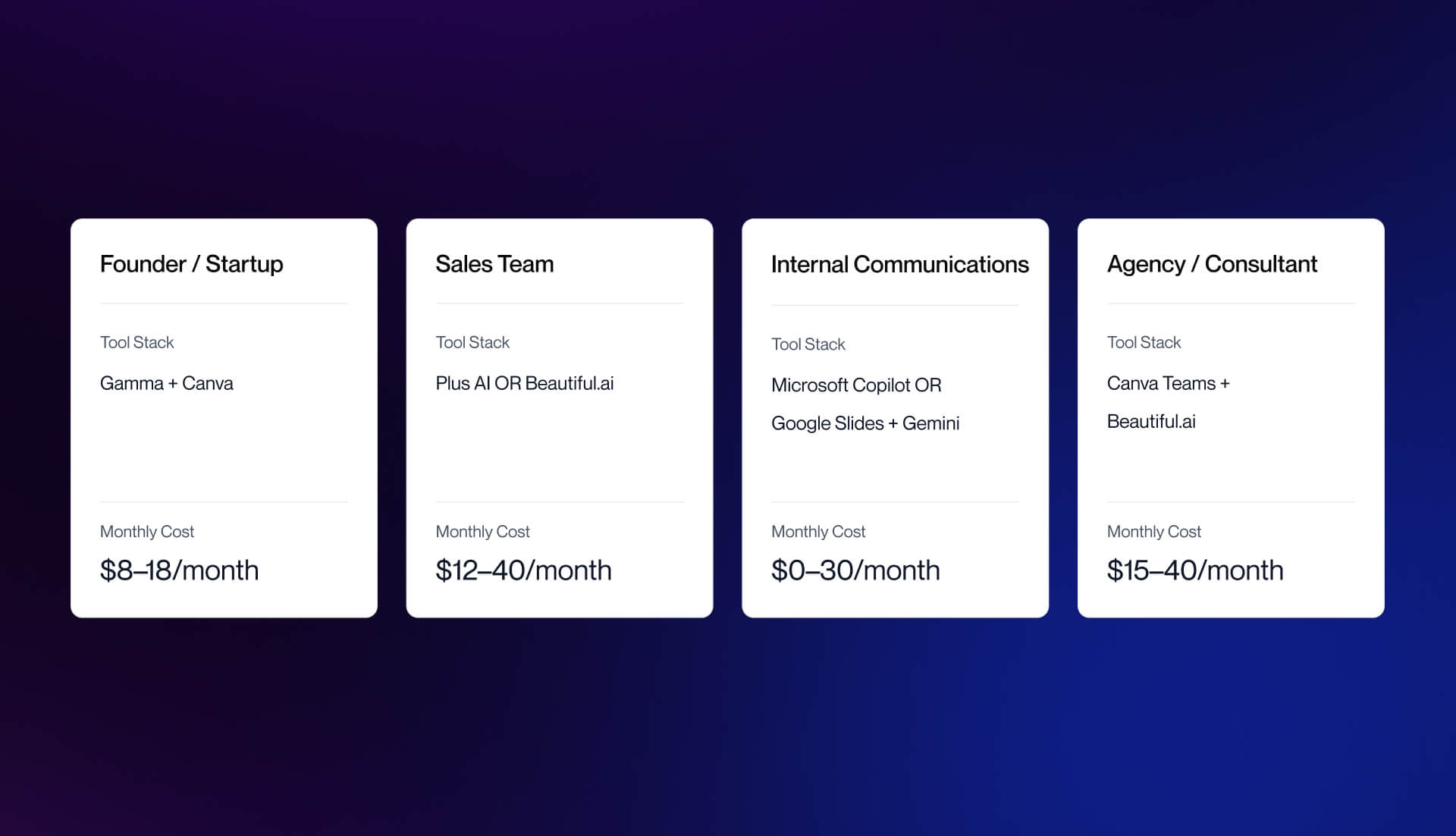
Skip the feature comparison. Here is what to use based on your team's situation:
Founder / Startup Stack
- Primary: Gamma - fast deck generation, modern layouts, web-native sharing
- Supplementary: Canva - custom brand assets, images, social graphics that feed into the deck
- Estimated cost: $8-18/month
Sales Team Stack
- Option A (Google Workspace teams): Plus AI - stays inside Google Slides, no workflow change required
- Option B (standalone): Beautiful.ai - guarantees brand consistency at scale, strong PPTX export
- Deciding factor: Whichever produces the cleanest PPTX on export, because sales decks get forwarded
- Estimated cost: $12-40/month per user
Internal Communications Stack
- Option A (Microsoft 365 orgs): Microsoft Copilot for PowerPoint - native, no new tools
- Option B (Google Workspace orgs): Google Slides + Gemini - free if you already pay for Workspace
- Recommendation: Use what your organization already pays for
- Estimated cost: $0-30/month depending on existing subscriptions
Agency / Consultant Stack
- Primary: Canva Teams - brand kit per client, easy switching between client identities
- Supplementary: Beautiful.ai - if presentation volume is high and formatting consistency matters
- Estimated cost: $15-40/month
For teams building client-facing web assets alongside presentations, our Webflow agency work covers the full digital stack. You can also see our work or talk to our team about your specific situation.
For adjacent AI tools beyond presentations, see our roundup of AI website builders.
Frequently Asked Questions
What is the best AI presentation tool in 2026?
There is no single best - the right tool depends on your use case. Gamma and Alai lead for pitch decks. Beautiful.ai and Plus AI lead for sales decks. Microsoft Copilot is the practical choice for enterprise internal reports. Canva wins for marketing teams already in its ecosystem. Google Slides with Gemini is the best option for budget-conscious teams or anyone on Google Workspace.
Can AI make a presentation from a prompt?
Yes. Most AI presentation tools generate a full deck from a text prompt in 30-120 seconds - structure, content, imagery, layout included. The output always needs 20-40 minutes of editing for accuracy, narrative flow, and brand alignment. AI creates a usable starting point; you finish it.
What is the best free AI presentation tool?
Google Slides with Gemini AI is the strongest free option if you have Google Workspace. Gamma offers a free tier with 400 credits. Canva has a free tier with limited AI features. Microsoft PowerPoint is included with many existing Microsoft 365 subscriptions. The best truly free option depends on which ecosystem you already use.
What is the best AI tool for pitch decks?
Gamma for modern, web-native pitch decks. Alai for investor-grade visual quality with multiple layout variants per slide. GenPPT for research-backed content generation where market data matters. If your investors expect a .pptx file, test export quality before committing to any tool.
Do AI presentation tools export to PowerPoint?
Most do, but quality varies dramatically. Beautiful.ai, Plus AI, and Microsoft Copilot have the strongest PowerPoint export. Gamma exports work but the web version consistently looks better. Prezi and Tome have weak PPTX export - both are designed for their own native format. Always test export quality with your actual content before committing.
What is the best AI presentation tool for sales teams?
Plus AI if your team uses Google Slides - no new tool to learn, works inside existing workflow. Beautiful.ai if you need auto-formatting and brand consistency across a team producing many decks. Microsoft Copilot if you are on Microsoft 365. The deciding factor: which tool produces the cleanest PPTX export, because sales decks get forwarded as files.
How much do AI presentation tools cost?
Free options exist (Google Slides + Gemini, Gamma free tier, Canva free tier). Mid-range: $8-20/month per user (Gamma Plus/Pro, Canva Pro, Beautiful.ai Pro). Enterprise: $30-45/month per user (Microsoft Copilot add-on, Beautiful.ai Team). Most B2B SaaS teams spend $10-20/month per user on their primary presentation tool. Pricing changes frequently - verify on vendor websites before purchasing.
Will AI presentation tools replace designers?
No. AI handles layout, formatting, and visual selection - the mechanical production work. Designers handle narrative structure, data storytelling, brand identity, and the strategic decisions that make a presentation persuasive. AI saves designers 1-3 hours per deck on production work, freeing them for higher-value strategy work. The work changes; it does not disappear.
Pricing note: All pricing listed is based on information available at time of writing (April 2026) and is subject to change. Verify all pricing directly on vendor websites before making purchasing decisions. AI tool pricing and feature sets change frequently.