.jpg)
The AI coding market in 2026 has evolved into two distinct paradigms. The first is Copilot Mode, where AI assists the developer by suggesting code while the human remains responsible for meaningful decisions. GitHub Copilot, Codeium, Tabnine, and Amazon Q Developer are the greatest examples of this approach. The second is Agent Mode, where AI plans and executes multi-step coding tasks overseen by developers. Cursor, Claude Code, Windsurf, and Cline represent this newer category.
The mistake many engineering teams make is to evaluate these platforms based on autocomplete quality. Autocomplete has become something of a commodity. The real procurement decision comes from determining how much autonomy developers are comfortable delegating and which workflow best supports the team’s engineering practices.
This guide reframes AI coding tool selection around that paradigm shift. Rather than ranking vendors on feature lists, we evaluate them through a five-point framework covering Paradigm Fit, Codebase Awareness, Model Access, IDE Integration Depth, and Enterprise Posture. We then apply that framework across eight leading platforms before recommending the right approach for solo developers, startups, enterprise engineering organizations, and AI-first companies.
Two Paradigms of AI Coding in 2026
The AI coding market has expanded rapidly over the last two years, but the terminology surrounding it has become increasingly confusing. Products described as AI coding assistants, AI developers, coding agents, code completion tools, and autonomous software engineers are often discussed as though they belong to a single category, even though they don’t.
The best way to understand the market is to separate it into two fundamentally different development paradigms.
The Category Split (Copilot Mode vs Agent Mode)
The defining question in AI coding in 2026 has become, how much responsibility should developers delegate to AI?
Copilot Mode places the developer firmly in control. AI suggests code, explains functions, generates tests, and accelerates routine work, while all meaningful decisions stay with the engineer. The developer drives while AI acts as an intelligent co-pilot. Agent Mode changes that relationship.
Instead of generating isolated suggestions, the AI is able to reason across multiple files, plan implementation steps, modify large sections of a codebase, execute workflows, and return completed work for review.
This is a distinction that reflects the same evolution taking place across the broader AI agent landscape. Instead of simply responding to prompts, modern AI systems increasingly execute structured tasks under human supervision.
The categories are not entirely exclusive. GitHub Copilot has expanded into agent-style workflows through Copilot Workspace, while Cursor still supports traditional copilot-style coding when developers prefer a more hands-on workflow.
The difference here lies in default operating philosophy. Cursor begins with autonomous execution and human supervision. GitHub Copilot begins with human control and AI assistance. Being able to understand this distinction is more valuable than comparing autocomplete quality.
The Paradigm Question - Autonomy Tolerance and Workflow Fit
Once the market is viewed through the lens of coding paradigms, vendor comparisons are significantly easier to interpret.
Both paradigms use familiar terminology such as code completion, AI assistance, chat interfaces, and code generation, but they diverge across almost every practical workflow decision. Copilot Mode prioritizes direct developer control, incremental suggestions, and reduced operational risk. Agent Mode prioritizes delegation, multi-step execution, and far greater automation.
Neither approach is necessarily better, and the right choice depends on the task at hand, governance requirements, and your team’s tolerance to autonomy.
This broader shift mirrors the evolution happening across AI tools shaping B2B marketing, where AI is increasingly shifting beyond isolated features, and toward workflow-level automation. Software engineering is following the same trajectory, albeit with higher technical requirements.
The Five-Point Framework for Choosing an AI Coding Tool
Every platform in this guide is evaluated using the same five-point framework as opposed to feature-count comparisons.
Paradigm Fit assesses whether the tool naturally supports the way the engineering team wishes to work.
Codebase Awareness measures how effectively AI understands repositories, project structure, and developmental context.
Model Access examines flexibility across frontier AI models and deployment options.
IDE Integration Depth evaluates how naturally the platform is able to fit into existing engineering workflows.
Enterprise Posture measures governance, security, compliance, deployment flexibility, and procurement readiness.

These five dimensions create a more useful procurement framework than simply comparing coding features because they begin with the team’s operating model rather than the vendor’s marketing. The same systems-first thinking helps shape AI for B2B SaaS growth, where sustainable competitive advantage comes from complementing existing workflows.
CTA: The best AI coding tool is the one whose operating philosophy aligns with how well your engineering team is able to build software.
Agent-Mode Tools Part 1 - Cursor and Claude Code
Agent-mode platforms are designed around different assumptions than traditional coding assistants. Rather than helping developers with their next line of code, they attempt to complete meaningful portions of the development workflow itself. Cursor and Claude Code represent the strongest examples of this philosophy, although they approach it from different angles.
Cursor - Dominant Agent-Mode IDE
Cursor has become the benchmark for agent-mode development because it was designed around AI-first software engineering rather than traditional code completion. Its default posture encourages developers to describe objectives in natural language before allowing AI to reason across an entire repository, modify multiple files, and return a cohesive implementation for review.
That whole-codebase awareness remains Cursor’s biggest differentiator. Combined with support for leading frontier models including Claude and GPT families, developers can move past isolated suggestions, and towards coordinated implementation across an existing project. The platform’s rapid release cadence has also helped it maintain its position at the front of the agent-mode category.
The trade-offs are just as clear. Agent workflows need a different engineering approach, and developers often need time to build confidence overseeing AI-driven execution. Pricing also scales more noticeably as engineering teams increase.
Pricing: $20/month (Individual), $40/month (Teams)
Verdict: Cursor is the category leader in agent-mode IDEs because it fully embraces autonomous development workflows. Organizations that adopt this operating model typically understand why it commands premium pricing.
Claude Code - Anthropic’s CLI Agent
Claude Code reaches the same destination but through a very different interface.
As opposed to embedding AI inside of a dedicated IDE, Anthropic built a terminal-native agent for developers who already spend much of their day working from the command line. This makes Claude Code feel more like an experienced engineering partner that’s capable of reasoning through complex implementation tasks.
Its biggest strength is reasoning quality. Complex debugging, large-scale refactoring, implementation planning, respiratory exploration, and multi-step engineering work benefit from direct access to Anthropic’s Claude models. For experienced developers, the terminal-first workflow can feel more natural than moving to a new editor.
Limitations stem from the same philosophy. Developers who prefer visual IDE workflows might find the CLI experience less approachable.
Pricing: $20/month (Pro)
Verdict: Claude Code is the strongest option for terminal-native developers who prioritize reasoning depth and engineering flexibility over a graphical IDE experience.
When Agent-Mode Workflow Wins
Agent Mode delivers its greatest value when engineering work extends beyond individual files into broader implementation tasks. Large-scale refactoring, greenfield feature development, unfamiliar codebase exploration, and rapid prototyping all benefit from AI that can plan and execute coordinated multi-step actions.
This additional capability demands greater trust. Teams adopting agent-mode platforms are delegating meaningful engineering work instead of just accepting code suggestions, making review processes more significant.
Moving toward workflow-level automation is shaping AI for B2B SaaS growth, where competitive advantage is achieved by redesigning complete systems instead of accelerating isolated tasks.
Agent-Mode Tools Part 2 - Windsurf, Cline, and the Autonomy Tolerance Questio
Cursor and Claude Code demonstrate what mature agent-mode development looks like, but they aren’t the only platforms pushing this category. Windsurf and Cline are also compelling alternatives, and each reflect different philosophies surrounding openness, flexibility, and developer control.
Windsurf - Codeium’s Agent-Mode IDE
Windsurf has emerged as Cursor’s closest competitor by combining an AI-native IDE with its Cascade agent workflow. While the two platforms share many of the same objectives, Windsurf has carved out its own identity via strong codebase awareness, multi-model flexibility, and a familiar migration path for organizations already invested in the Codeium ecosystem.
Like Cursor, Windsurf enables developers to work at the repository level instead of the file level. AI can interpret natural-language objectives, navigate large codebases, coordinate changes across multiple files, and return coherent implementations for developers to review. This workflow increasingly reflects how agent-mode development operates.
The platform’s primary limitation is maturity. Windsurf continues to evolve rapidly, but its ecosystem, documentation, and enterprise adoption remain smaller than Cursor’s. Workflow capabilities are also still developing as the product matures.
Pricing: $20/month (Pro)
Verdict: Windsurf is Cursor’s strongest competitor at enterprise agent-mode scale, and is worthy of evaluation where organizations are considering agent-first development workflows.
Cline - Open-Source vs Code Agent Extension
Cline’s approach to agent-mode development comes from the opposite direction. Instead of offering a proprietary IDE, it extends Visual Studio Code with open-source agent capabilities, while allowing developers to bring their own AI models and API providers. That flexibility made Cline especially attractive to those valuing transparency, customization, and control.
The platform’s greatest strength is openness. Developers retain freedom to choose models, manage infrastructure, and adapt workflows without becoming tightly coupled to a commercial ecosystem. An active open-source community also contributes to rapid iteration and experimentation.
These advantages come with additional complexity, with initial configuration requiring more technical involvement, while feature depth and enterprise administration remain less mature than platforms like Cursor or Windsurf. Running the platform also introduces API costs that depend on the models selected.
Pricing: Free & Enterprise tiers
Verdict: Cline remains one of the strongest open-source agent-mode options available for technically confident teams that seek flexibility.
The Autonomy Tolerance Question
The most integral decision in agent-mode development is deciding how much autonomy your engineering team is prepared to delegate.
The fact is that solo developers and technical founders tend to have the highest autonomy tolerance because decision-making is concentrated. Enterprise engineering organizations operate differently. Governance, compliance, peer review, and software delivery processes limit how much autonomous execution can occur without oversight. AI-first companies are somewhere in the middle of the two.
This is why successful adoption is so essential for team maturity as much as technological maturity. The same relationship exists across AI project management tools, with automation producing the best value for organizations that already have a disciplined operational process.
Copilot-Mode Tools Part 1 - GitHub Copilot and Codeium
While agent-mode platforms redefine how developers delegate their engineering work, copilot-mode platforms are the preferred choice for teams that want AI to accelerate existing workflows without changing them. GitHub Copilot and Codeium represent the strongest examples of this, prioritizing developer control over autonomous execution.
GitHub Copilot - Copilot-Mode Incumbent
GitHub Copilot remains the default choice for a lot of businesses due to the fact that it integrates naturally into development workflows revolving around GitHub. Instead of asking for developers to supervise autonomous agents, Copilot is focused on improving the work they’re doing via intelligent code completion, inline suggestions, and repository-aware development.
Its greatest advantage lies in its ecosystem integration. Copilot extends beyond code completion into pull requests, issues, documentation, and the broader GitHub development lifecycle, meaning engineers can adopt AI without changing existing workflows. It has become the safest procurement decision for large organizations.
GitHubcontinues expanding its agent capabilities, and the platform’s default experience centers on developer-led coding as opposed to autonomous implementation. Feature availability varies across Individual, Business, and Enterprise subscriptions, making it important
Pricing: Pro - $10/month
Verdict: GitHub Copilot remains the enterprise default because of the way it combines predictable developer workflows with mature governance, deep GitHub integration, and a procurement model that large engineering organizations are already au fait with.
Codeium - Copilot-Mode Free-Tier Competitor
Codeium established its reputation through high-quality AI coding assistance widely accessible through one of the strongest free offerings on the market. Individual developers and smaller teams will benefit from the lower barrier to experimenting with AI-assisted development before committing to paid enterprise platforms.
The experience focuses on the fundamentals of copilot-mode coding: reliable autocomplete, conversational coding assistance, and broad IDE compatibility. It provides strong productivity to alternatives without the need for a subscription.
Limitations become more obvious as businesses look to scale. Enterprise governance and workflow depth are stronger within GitHub Copilot’s enterprise ecosystem. Codeium’s strategic direction has moved toward Windsurf, meaning organizations need to evaluate both products when choosing.
Pricing: Pro - $15/mont
Verdict: Codeium remains the strongest free-tier copilot-mode option and the perfect starting point for solo developers and smaller engineering teams assessing AI-assisted coding.
When Copilot-Mode Wins
Copilot Mode works best when developers want AI to accelerate coding without new engineering practices. Incremental implementation, disciplined code review, and environments with strong governance all benefit from keeping developers responsible for decisions while AI contributes targeted assistance.
This fits organizations where auditability and review processes are non-negotiable. Every suggestion remains a discrete decision, making AI easier to supervise within existing compliance requirements.
A lot of engineering teams find copilot-mode’s ability to balance productivity and control to be a major advantage. Instead of replacing established software engineering practices, this improves them via faster execution while preserving review discipline.
Copilot-Mode Enterprise Options - Tabnine, Amazon Q Developer, and Combining Paradigms
Not every engineering organization evaluates AI coding tools on developer productivity alone. For regulated industries, enterprise governance, and cloud specific engineering teams, procurement priorities tend to shift towards security and ecosystem integration. Tabnine and Amazon Q Developer illustrate how copilot-mode platforms can differentiate through enterprise context rather than purely AI capability.
Tabnine - Enterprise Privacy-Focused Copilot
Tabnine occupies a unique role within the copilot-mode market by placing enterprise privacy ahead of feature breadth. Instead of directly competing on AI capabilities, the platform is designed for organizations where protecting proprietary code and satisfying compliance is crucial.
Enterprise customers can use Tabnine’s flexibility to introduce AI assistance without exposing sensitive code outside of approved environments. For organizations opening in defence, financial services, healthcare, and other highly regulated sectors this can be a decisive factor.
Innovation velocity is the core trade-off here, and Tabine continues to improve coding assistance, and broader workflow capability generally trail category leaders like GitHub Copilot. Enterprise pricing also follows a bespoke procurement model.
Pricing: Code Assistant - $39/month
Verdict: Tabnine is the strongest copilot-mode platform for organizations where compliance. Privacy, and deployment control have to take priority over AI adoption.
Amazon Q Developer - AWS Ecosystem Integration
Amazon Q Developer approaches AI coding from different perspectives. It focuses on helping engineering teams that are already building inside the AWS ecosystem.
Contextual awareness is the greatest advantage here, and Amazon Q understands AWS services, infrastructure, and development workflows in ways coding assistants can’t replicate. Whether developers work with Lambda, CloudFormation, IAM, or broader AWS tooling, the platform complements existing cloud practices.
Limitations reflect this specialization, and teams building across multiple cloud providers might receive less value than those committed to Amazon’s ecosystem. Product evolution follows AWS’s broader platform roadmap, instead of faster release cycles.
Pricing: Pro - $19/month
Verdict: Amazon Q Developer is the natural copilot-mode choice for AWS-native engineering teams, but isn’t quite ideal for broader multi-cloud requirements.
When Combining Paradigms Wins
A lot of organizations assume that all engineers need to use the same AI coding workflow, while the reality is that the opposite tends to be true.
Founder-CTOs, principal engineers, and platform teams frequently benefit from agent-mode workflows that boost experimentation, large-scale refactoring, and greenfield development. Meanwhile, engineering teams that are responsible for production delivery might prefer copilot-mode assistance.
Instead of enforcing paradigm uniformity, mature engineering organizations increasingly standardize where consistency matters while allowing flexibility where different workflows create measurable value. Choosing the right operating model for your team helps produce better outcomes than trying to select a single tool.
The same principle shapes broader AI tools for entrepreneurs, where competitive advantage emerges from combining specialized AI workflows instead of forcing problems through a single platform.
CTA: The strongest engineering organizations standardize on the workflows that allow teams to build software more effectively.
Audit, Anti-Patterns, and Decision by Team Profile
Choosing AI coding platforms is not solely a technical decision, and things like engineering culture and developer workflow can have a strong impact on whether adoption is a success. The final stage of evaluation needs to focus on operational fit, while similar implementation questions increasingly shape AI and website design, where tech decisions only thrive when aligned with broader workflows
The 10-Question Pre-Purchase Evaluation
Successful engineering organizations rarely purchase AI tooling instantly after demonstration. Instead, they validate each shortlisted platform against production workflows before making a long-term commitment.
Questions 1-3 establish the fundamentals, such as does the team’s preferred coding paradigm, how effectively does it understand a real production codebase, and does model access match with engineering requirements.
Questions 4-6 evaluate IDE integration, enterprise governance, and pricing structure at team scale.
Questions 7-10 explore code privacy, vendor direction, collaboration features, and customer references.
The questions that are most commonly skipped can also prove to be the most revealing. Teams can often assume paradigm fit before testing, overestimate codebase awareness, and leave privacy discussions until procurement. However, these are issues that only tend to emerge once the implementation process has started, and this makes them more expensive to deal with.
Anti-Patterns and Better Approaches
Despite the AI coding market having matured in recent times, there are many procurement mistakes that occur across engineering businesses.
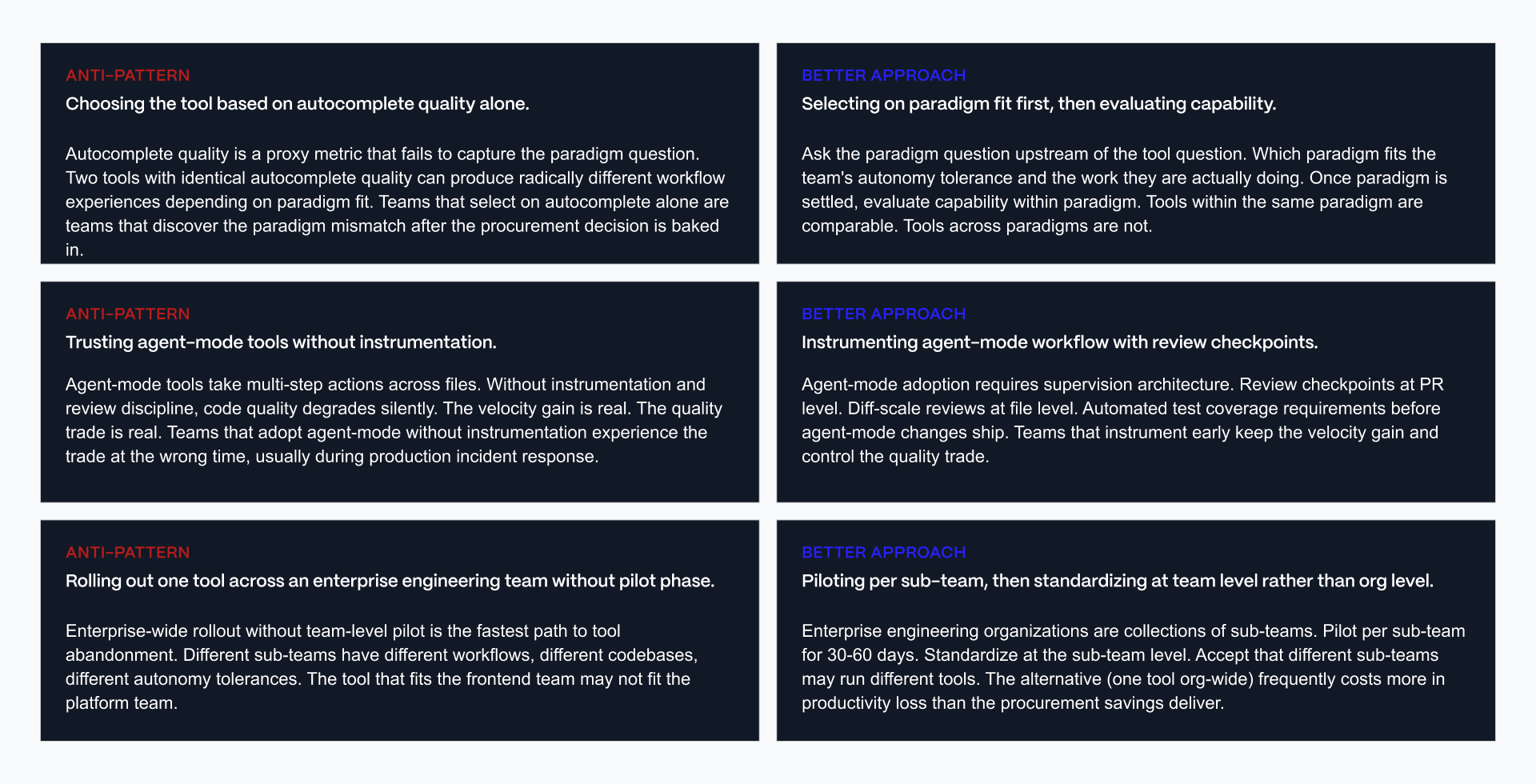
The first mistake is choosing platforms based on autocomplete quality, as opposed to going by which coding paradigms are best for your team. The second issue comes with trusting autonomous agents without introducing structured review checkpoints and developer supervision. The third mistake lies in deploying platforms across the engineering organization before you understand the way different teams work.
These are understandable mistakes, and the stronger approach is to choose the paradigm before the vendor, instrument agent workflows with clear review checkpoints, and starting off with focused pilot teams before expanding successful practices across the wider organisation.
Decision by Team Profile
The right AI coding platform is dependent far more on which team is using it as opposed to which product scores highest.
DECISION BY TEAM PROFILE
Use this as a starting point, not a binding answer. The five-point framework
(Asset 1) is the real evaluation. The team profile recommendation gets the
team to the right paradigm and tool shortlist.
PROFILE 1: SOLO DEVELOPER OR FREELANCER
- Context: individual productivity optimization, cost-conscious, high
autonomy tolerance, working across multiple projects or client codebases
- Top constraints: monthly subscription cost, project switching speed,
learning curve across unfamiliar codebases
- Top use cases: greenfield feature work, unfamiliar codebase exploration,
rapid prototyping, client project delivery
- Recommended paradigm: Agent mode
- Featured tools: Cursor (individual pricing at accessible tier), Claude
Code (terminal-native workflow, generous free usage)
- Why: solo developers benefit most from agent-mode velocity across
unfamiliar codebases. Cost of paradigm switching is low. Autonomy
tolerance is high by definition.
The verdict: pick one agent-mode tool as primary. Cursor if IDE-native
workflow matters. Claude Code if terminal-native workflow matters. Keep
GitHub Copilot as backup if familiar with copilot-mode workflow.
PROFILE 2: SMALL TEAM STARTUP (2-15 DEVELOPERS)
- Context: velocity focus, cost-manageable stack, founder-CTO tolerates
agent autonomy, senior engineers may prefer copilot-mode diffs
- Top constraints: velocity per developer, code review discipline
maintenance, individual preference variance across the team
- Top use cases: greenfield product work, feature velocity, technical
debt management, code review efficiency
- Recommended paradigm: mixed. Agent mode for founder-CTOs and greenfield
work, Copilot mode for team members maintaining reviewable diffs.
- Featured tools: Cursor (agent primary), GitHub Copilot (copilot
alternative for team members preferring diffs)
- Why: small teams benefit from paradigm flexibility. Founder-CTOs get
agent velocity. Team members preserve code review discipline through
copilot-mode workflow.
The verdict: allow paradigm choice within the team. Standardize on 2
tools (one agent, one copilot). Do not force paradigm uniformity in
small teams where developer preferences vary meaningfully.
PROFILE 3: ENTERPRISE ENGINEERING TEAM (20+ DEVELOPERS)
- Context: compliance requirements, established code review discipline,
autonomy tolerance bounded by governance, procurement complexity real
- Top constraints: SOC 2 and enterprise compliance, data handling
policies, code privacy, procurement approval cycles
- Top use cases: incremental feature work, code review efficiency,
legacy codebase maintenance, security scanning integration
- Recommended paradigm: Copilot mode as default, Agent mode piloted in
controlled contexts
- Featured tools: GitHub Copilot Enterprise (default), Tabnine (privacy-
first alternative), Amazon Q Developer (if AWS-native stack)
- Why: enterprise engineering teams need paradigm predictability, review
discipline, and enterprise procurement posture. Copilot mode delivers
these consistently. Agent-mode tools may pilot in specific sub-teams
but are rarely enterprise-wide default in 2026.
The verdict: standardize on GitHub Copilot Enterprise as the enterprise
default. Add Tabnine or Amazon Q Developer if compliance or ecosystem
integration requires. Pilot agent-mode tools (Cursor, Claude Code) in
specific sub-teams before considering broader rollout.
PROFILE 4: AI-FIRST COMPANY OR AGENCY
- Context: company or agency built around AI velocity as core competitive
advantage, agent mode is the workflow, multiple agents running in
parallel across projects
- Top constraints: agent orchestration across the team, code quality
supervision at velocity, differentiation from teams using traditional
copilot-mode tools
- Top use cases: rapid client delivery, greenfield product velocity,
agent-orchestrated workflows across the team
- Recommended paradigm: Agent mode across the entire team
- Featured tools: Cursor, Claude Code, Windsurf, Cline (frequently
multiple in parallel depending on use case)
- Why: AI-first companies compete on velocity. Copilot mode caps velocity
at developer typing speed. Agent mode uncaps it. The trade is
supervision discipline, and AI-first companies have already built
supervision architecture as core competency.
The verdict: pick 2-3 agent-mode tools across the team based on use case
fit. Cursor for IDE-native work. Claude Code for terminal-native
workflows. Windsurf for teams migrating from Codeium. Cline as free
open-source complement or fallback.
CROSS-PROFILE: TECHNICAL FOUNDER AT PRE-REVENUE VALIDATION STAGE
- Context: solo technical founder building MVP or validating product
idea, no team yet, no revenue
- Top constraint: velocity per calendar day, cost minimization until
revenue arrives
- Recommendation: Cursor free tier or Claude Code with generous free
usage. GitHub Copilot free tier as fallback if student or open-source
contributor status applies.
- Why: pre-revenue technical founders cannot justify paid subscriptions
yet. Free tiers of agent-mode tools produce enough velocity to reach
first revenue.
The verdict: use free tiers aggressively. Upgrade to paid when revenue
or funding arrives.
PRINCIPLE
The AI coding tool buying decision in 2026 is not which tool has the best
autocomplete. Almost all tools have adequate autocomplete. The decision is
which paradigm fits the team's autonomy tolerance and workflow, and which
tool within that paradigm serves the team's specific use cases. The five-
point framework, the paradigm split, the four archetypes, and the ten-
question evaluation are the instruments that produce a defensible decision.
Solo developers and freelancers typically thrive from agent-mode platforms like Cursor or Claude Code because its rapid iteration outweighs formal governance. Startups achieve the greatest balance by mixing paradigms, and allowing technical founders to adopt agent-mode workflows. Enterprise engineering companies benefit from defaulting to Copilot Enterprise, and being complemented by platforms like Tabnine or Amazon Q. AI-first companies get the greatest value from embracing agent-mode workflows while maintaining a more organized review process.
Team-first thinking is essential for shaping AI project management tools, AI tools for startup founders, AI tools for entrepreneurs, and Veza’s approach to startup web infrastructure, where technology decisions succeed because they match operating models.
AI coding tool selection in 2026 is not an autocomplete competition. It is a paradigm decision. Copilot mode or agent mode. Choose based on team autonomy tolerance, not vendor demo polish.
Copilot-mode tools (GitHub Copilot, Codeium, Tabnine, Amazon Q Developer) keep the developer in the driver's seat with lower risk and predictable workflow. Agent-mode tools (Cursor, Claude Code, Windsurf, Cline) uncap velocity through multi-step autonomous action with developer supervision. Neither paradigm is universally better. The paradigm question is upstream of the tool question. Solo developers and technical founders frequently choose agent mode. Enterprise engineering teams frequently standardize on copilot mode. Small teams frequently benefit from paradigm flexibility. Veza Digital works with technical-founder-led B2B SaaS across the operational stack that surrounds AI coding tool decisions. If you are scoping the strategic operating layer, we should talk.
See how Veza works with technical founders
Frequently Asked Questions
What are the best AI coding tools in 2026?
The AI coding tools category splits into two paradigms. Agent-mode tools (Cursor, Claude Code, Windsurf, Cline) take multi-step actions across files with developer supervision. Copilot-mode tools (GitHub Copilot, Codeium, Tabnine, Amazon Q Developer) suggest code the developer accepts or rejects. The right tool depends on the team's autonomy tolerance and the work the team is actually doing, not on autocomplete quality alone.
What is the difference between Copilot mode and Agent mode AI coding tools?
Copilot mode: AI suggests code, developer reviews and accepts each suggestion. The developer stays in the driver's seat. GitHub Copilot is the incumbent example. Agent mode: AI takes multi-step actions across files with developer supervision at checkpoints. The AI executes, developer supervises. Cursor is the category leader. Copilot mode has lower risk. Agent mode has higher velocity ceiling but requires developer trust.
Which AI coding tool is best, Cursor or GitHub Copilot?
Neither is universally best. Cursor wins on agent-mode workflows, whole-repo codebase awareness, and multi-file autonomous editing. GitHub Copilot wins on incumbent enterprise adoption, deep GitHub ecosystem integration, and predictable copilot-mode workflow. Small teams and technical founders frequently prefer Cursor. Enterprise engineering teams frequently standardize on Copilot. The choice depends on paradigm preference and team scale, not on which is objectively better.
How much do AI coding tools cost?
Copilot-mode tools typically run $10-$40 per user per month. GitHub Copilot Individual around $10, Business around $19, Enterprise around $39. Agent-mode tools typically run $20-$60 per user per month. Cursor individual around $20, Pro around $40. Claude Code uses usage-based pricing that varies with task complexity. Enterprise tiers with governance features (Tabnine, Amazon Q Enterprise) are pricing-on-request. Free tiers cover solo developers and pre-revenue validation.
Can enterprise engineering teams use AI coding tools securely?
Yes, with proper vendor selection. GitHub Copilot Enterprise, Tabnine, and Amazon Q Developer offer SOC 2 compliance, code privacy guarantees, and audit logs. Tabnine offers on-premise and air-gapped deployment for regulated industries. Verify data handling policies before deployment. Confirm code is not used for model training or that opt-out is available. Enterprise procurement should filter on compliance posture before evaluating feature capability.
What is codebase awareness and why does it matter?
Codebase awareness is the AI coding tool's ability to understand the entire repository, not just the file being edited. Tools with strong codebase awareness see cross-file dependencies, function usage across the codebase, and architectural patterns. Tools with weak codebase awareness see only the current file and produce suggestions that break when applied across files. Codebase awareness is the defining feature separating elite 2026 tools from 2024-era tools.
Is Claude Code better than Cursor?
Neither is universally better. Claude Code wins on reasoning depth for complex tasks, terminal-native workflow, and direct Anthropic model access. Cursor wins on IDE-native workflow, model flexibility across multiple providers, and broader developer adoption. Developers who prefer terminal workflows and want maximum reasoning depth for complex tasks choose Claude Code. Developers who prefer IDE workflows and want a mainstream agent-mode experience choose Cursor. Many teams use both.
Do AI coding tools work with all programming languages?
Most AI coding tools cover the top 15-20 programming languages well (JavaScript, TypeScript, Python, Java, Go, Rust, C#, C++, Ruby, PHP, Swift, Kotlin, and others). Coverage depth varies by tool. GitHub Copilot has the broadest language coverage from its GitHub training data. Newer agent-mode tools (Cursor, Claude Code) have strong coverage for mainstream languages but may lag for niche languages. Verify language coverage during pilot for team-specific stacks.
Which AI coding tool has the best free tier?
Codeium has the strongest free tier for copilot-mode workflows. Cursor and Claude Code offer generous free tiers with usage limits for agent-mode workflows. GitHub Copilot offers free access for students and open-source maintainers. Cline is open-source with bring-your-own-API pricing. Solo developers and pre-revenue technical founders can build production applications on free tiers of these tools.
Should my startup use agent-mode or copilot-mode AI coding tools?
Depends on team composition and workflow. Founder-CTOs and technical founders benefit from agent-mode velocity. Small teams with established code review discipline may prefer copilot-mode for reviewable diffs. Many startups run both paradigms in parallel. Founder-CTOs on agent mode (Cursor or Claude Code). Team members preserving code review discipline on copilot mode (GitHub Copilot). Paradigm flexibility frequently outperforms paradigm uniformity at small team scale.
