.jpg)
Abstract
AI agents are the defining technology shift of 2026, but the majority of articles about them focus on which tools exist, not which ones actually survive production. This guide does both. We break down the leading AI agents across six different categories: coding, customer service, sales, workflow, IT operations, and browser/computer use. Most importantly, we go beyond demos to show what happens when these systems meet real users and live environments.
The largest gap in most roundups is what breaks. Hallucinations on edge cases, multi-step workflows that lose state, rate limits that spike costs, and security risks and governance failures as agents proliferate. Gartner predicts that AI agents will become ubiquitous, yet fewer than 40% of sellers will report productivity gains.
The gap here is not capability, but execution.
We cover the agents earning their place, including Claude Code, Sierra, HubSpot Breeze, and Lindy, as well as emerging browser agents like Anthropic Computer Use, and those that require caution. We’ll also provide a practical deployment framework for shipping your first agent without destroying trust. The goal here is simple: stop chasing demos, and start choosing agents that work properly in production.
What Counts as an AI Agent in 2026?
AI agents are no longer conceptual, but are already being deployed across real workflows. Before you compare tools, it is crucial to understand and define what counts as an agent in production.
Agent vs Chatbot vs Workflow Tool
By 2026, the definition of an AI agent isn’t theoretical anymore, but operational. A true agent is not just tasked with generating text. It reasons, plans, uses tools, and takes action across multi-step workflows with minimal human intervention.
It is important to understand the major distinction:
- Chatbots are reactive, responding to prompts but not acting on them
- Workflow tools are predefined. They execute fixed rules
- AI agents are adaptive. They interpret goals, break them into steps, call tools, and iterate until the task is complete
This shift from response to execution is why agents are treated as infrastructure as opposed to features. According to Gartner, 40% of enterprise applications will feature task-specific AI agents by 2026, up from less than 5% in 2025.
The implication here is straightforward: the majority of software will no longer require users to navigate interfaces. Instead, users define outcomes and agents handle how this is achieved. The difference between tools that assist and agents that execute is now the line between experimentation and production.
The 6 Categories We Cover
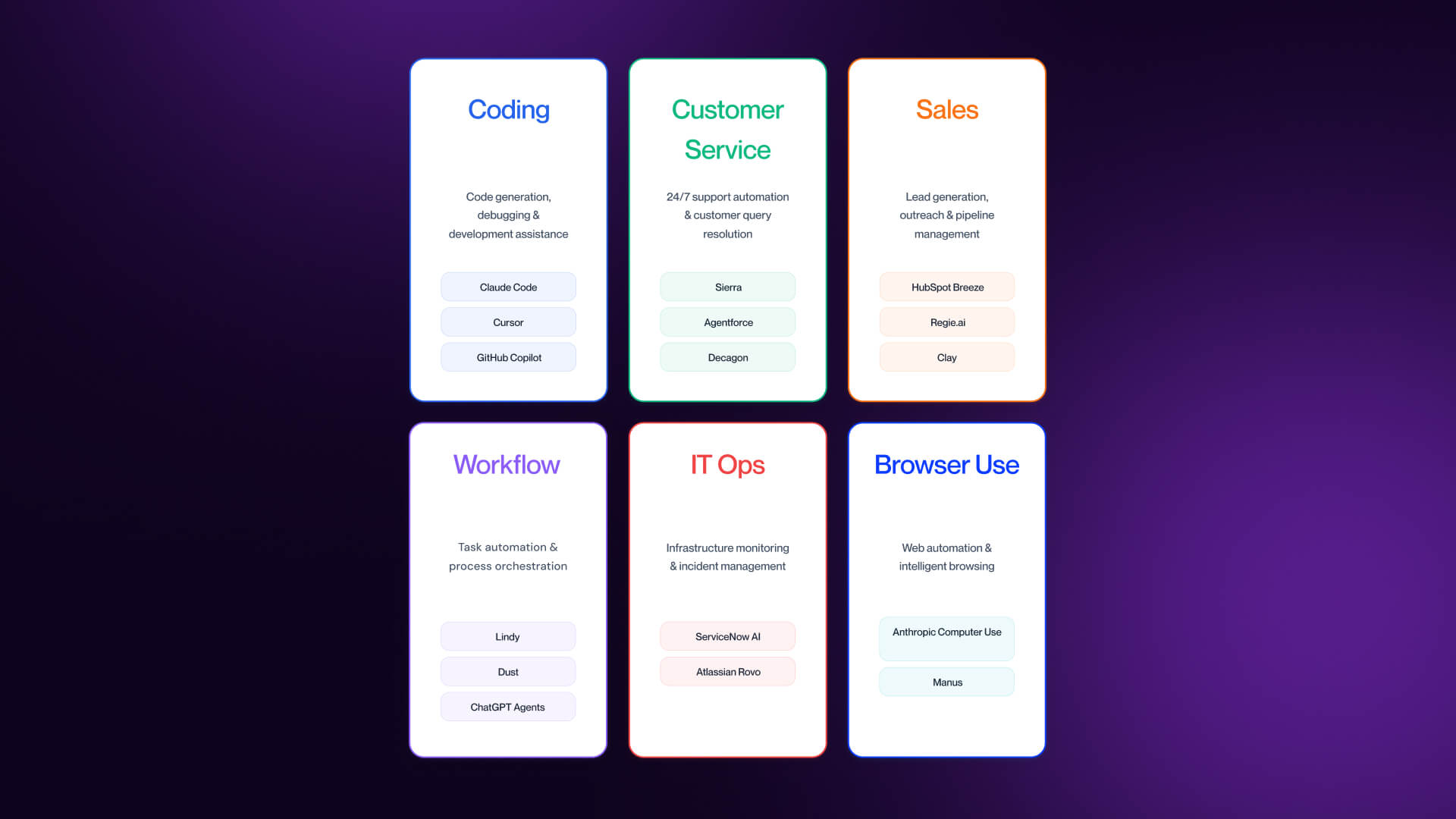
To understand a rapidly expanding market, this guide helps to break AI agents into six functional categories, each with a distinct type of work:
- Coding Agents - Write, refactor, test, and ship code across full repositories.
- Customer Service Agents - Resolve support queries, manage tickets, and handle end-to-end support workflows.
- Sales Agents - Qualify leads, automate outreach, and maintain CRM accuracy.
- Workflow & IT Operations Agents - Automate cross-system processes and incident resolution.
- Browser/Computer Use Agents - Interact with interfaces like a human (clicking, typing, or navigating).
- General Workflow/Horizontal Agents - Automate cross-functional business tasks by coordinating actions across multiple tools, systems, and data sources without being tied to a single domain.
Each of these categories reflects a different unit of work as opposed to just a different tool. The rest of the article evaluates the strongest agents in each group, where they perform, and where they break. For adjacent tools, check out our breakdown of the best AI tools for B2B marketing.
What Breaks When You Actually Ship an Agent?
The majority of AI demos work flawlessly because they’re designed around clean inputs, short tasks, and controlled environments. Production works differently, with messy data, long-running workflows, and real consequences exposing where agents actually fail.
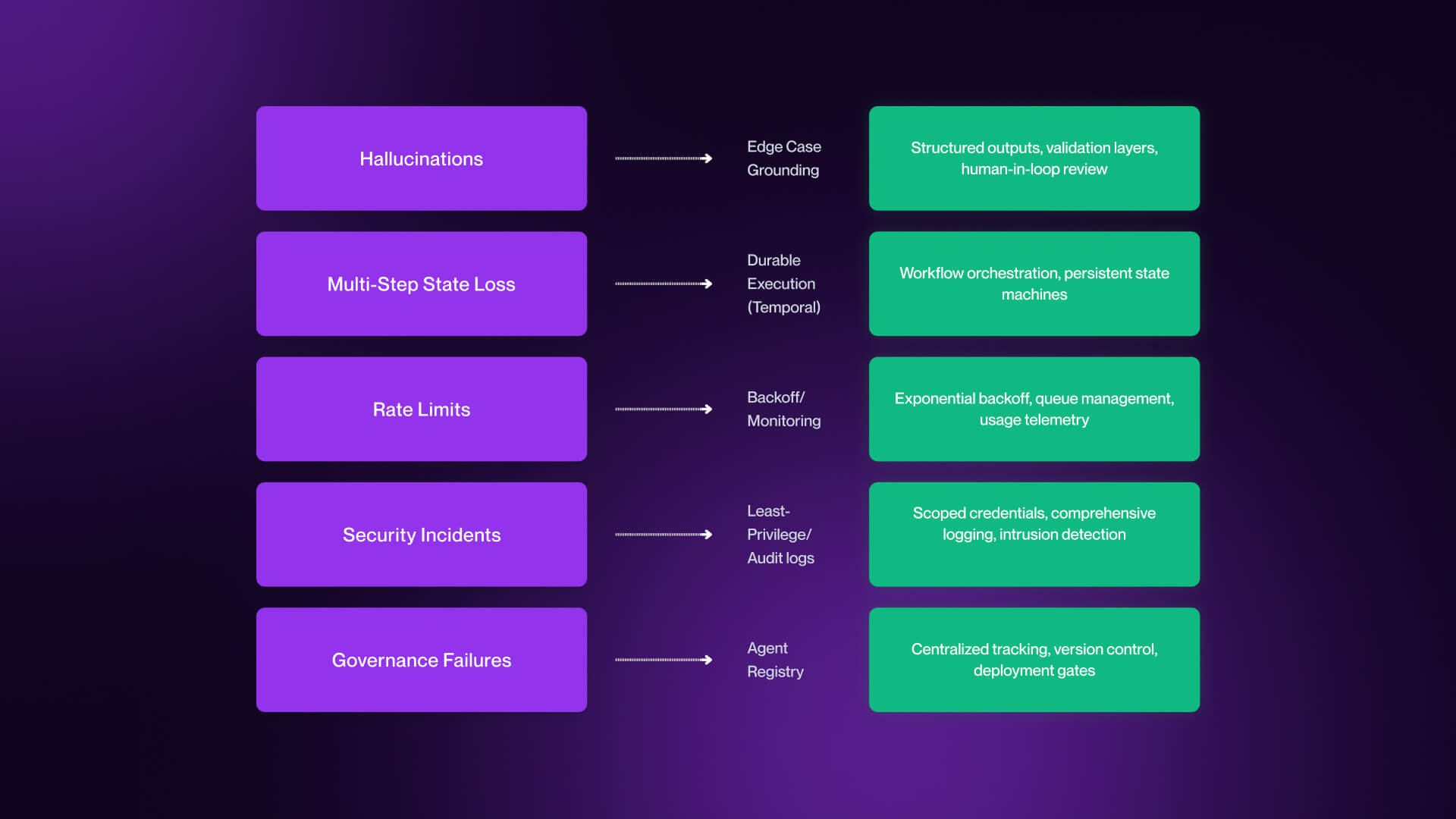
Hallucinations on Edge Cases
The most visible failure mode is also often the most misunderstood, and that is hallucinations.
In demos, agents are given well-structured prompts with predictable outcomes. In production, inputs are incomplete, ambiguous, or entirely novel. This is where agents tend to fail, and not quietly.
Common examples include:
- A customer service agent invents a refund policy that does not exist
- A coding agent hallucinates an API method or library
- A sales agent fabricates a customer use case or metric
These are not edge cases in production, but they are inevitable. The key shift is helping to understand that hallucinations are not solved problems, but they’re managed.
Production teams mitigate this in three ways:
- Grounding in verified data: systems like Sierra implement a “trust layer” approach which helps ensure outputs are based on real company data.
- Human-in-the-loop controls: especially for high-stakes actions such as refunds, code deployment, and outbound messaging.
- Output validation and confidence thresholds: rejecting or flagging low-confidence responses before they reach users.
The takeaway here is that if your agent is operating without guardrails, it will hallucinate. The question isn’t if, but how often and how damaging those failures can be.
Multi-Step State Loss
Single-step tasks are rarely the problem, while multi-step workflows are the place where agents break.
In production, agents rarely complete tasks in a single pass. They call APIs, retrieve data, execute actions, and iterate. Along the way, things can go wrong, including:
- APIs time out
- Rate limits interrupt execution
- Context is lost between steps
- Long-running tasks fail mid-process
When this happens, a lot of agents don’t recover, but instead they restart, duplicate work, or fail silently. For this reason, state management becomes critical.
Platforms like Temporal are emerging as a core layer in agent infrastructure. As highlighted in the Fast Company Most Innovative Companies 2026 coverage, Temporal provides a durable execution layer which allows workflows to resume from where they left off instead of starting over.
This is not an optional extra. Instead, it’s the difference between a demo that only works a single time and a system that works repeatedly.
This is something enterprise teams design for from day one, to achieve persistent state across steps. SMB teams generally don’t, and this is where most early failures occur.
Rate Limits, Cost Overruns, and Governance Failures
Even when agents work, they can fail economically or organizationally.
Rate limits are the first constraint. Agents making repeated API calls (in particular to LLM providers) will reach limits quickly, which causes partial executions or degraded performance.
Cost overruns follow closely behind. Agents that retry inefficiently, mishandle context, or loop unnecessarily can consume large volumes of tokens in a short period of time. In reality, teams have seen workflows burn through monthly LLM budgets in days.
But the most underestimated failure mode is governance.
As agents proliferate across teams, organizations face “shadow agent sprawl,” which sees multiple agents deployed without visibility, ownership, or control.
This is an area in which enterprise approaches are emerging. Credo AI pioneered the concept of an Agent Registry. This is a system for registering all deployed agents, tracking what data they access, monitoring actions in real time, and maintaining audit trails for compliance.
For smaller teams, the equivalent is simpler but still essential. Document what agents are deployed, assign clear ownership, and track what systems and data they touch. Without this, agents will multiply to a faster degree than teams are able to manage them.
Best AI Coding Agents in 2026
AI coding agents are the most mature and widely adopted category, as well as the easiest place to mix up momentum and impact.
The Coding Agent Category
Coding agents are the first category to reach true production relevance. By the end of 2025, around 85% of developers were using AI tools in their workflows.
But what’s changed in 2026 is not adoption, but capability.
The shift here happens from suggestion to execution. Earlier tools focused on autocomplete and chat-based assistance.
Today’s agents understand entire repositories, plan and execute multi-file changes, run tests and debug issues, and open pull requests and iterate on feedback. Essentially, they don’t just help developers to write code, but they help finish work.
This is a shift that completely changes the way developers evaluate tools. Instead of asking, is this model smart?, the question then becomes, does this actually make me faster across the entire workflow?
The concept of net productivity here is crucial, and a tool that generates code quickly but requires heavy correction or introduces maintenance debt can end up reducing overall output.
Across developer communities, the most valued traits are first-pass correctness, strong repository-level context awareness, minimal friction within existing workflows, and predictable cost and token usage. This results in a more disciplined market, with teams standardizing as opposed to experimenting.
Top Coding Agents - Honest Reviews
Below are the coding agents that are actually earning adoption in 2026, as well as where they perform well and where they fall short.
Claude Code (Anthropic)
Claude Code is widely regarded as the strongest coding brain on the market today. It operates in the terminal, providing direct interaction with repositories, test suites, and system tools.
The biggest advantage it provides is first-pass correctness. Developers consistently trust it with debugging, architectural changes, and multi-file edits where the other agents struggle. Large context windows allow it to maintain awareness across entire codebases.
Pricing: Free / Pro $17/month / Max from $100/month
Best for: Complex refactors, large codebases, deep reasoning tasks
Limitation: The terminal-first UX is a barrier for teams accustomed to visual IDEs. Though powerful, it is not always approachable.
Cursor
Cursor has become the default entry point for many developers. Built as a VS Code fork, it integrates agent capabilities directly into a familiar environment.
The strength here is flow. Tasks like refactoring, writing tests, and fixing bugs can be handled quickly without leaving the editor. It also supports multiple models, including Anthropic, OpenAI, and Google, giving teams greater flexibility.
Pricing: Free tier + paid plans ranging from $20/month
Best for: Developers who want an AI-native IDE with multi-model flexibility
Limitation: Model selection and credit usage can become complex. For teams without strong preferences, this can introduce friction instead of reducing it.
GitHub Copilot Coding Agent
Copilot’s coding agent extends beyond autocomplete into full issue-to-PR workflows. Developers can assign tasks, and the agent will write code, run tests, and open pull requests.
Its biggest advantage is integration, which fits directly into GitHub workflows and supports enterprise controls, such as SSO, RBAC, SAML, and audit logs.
Pricing: Paid plans from $10/user/month
Best for: GitHub-native teams with enterprise compliance requirements
Limitation: It doesn’t learn persistently from private repositories beyond session context, and its reasoning depth falls behind more advanced agents, such as Claude Code.
OpenAI Codex
Codex has re-emerged as a true agent platform as opposed to just a model. It can run tasks in cloud environments, execute code, and manage multi-step workflows across repositories.
Its strength is structured execution, allowing it to handle coordinated changes and parallel tasks more effectively.
Pricing: Included in ChatGPT Plus / Pro / Enterprise - Prices start at $20/month for Plus
Best for: Teams already operating within OpenAI’s ecosystem.
Limitation: It is still less mature than leading alternatives for long-running autonomous workflows, especially when compared to Claude Code.
Devin (Cognition)
Devin represents the most ambitious vision of coding agents: a system that can take a high-level prompt and independently research, plan, code, and test a solution.
It can operate in a sandboxed environment with access to a browser, terminal, and code editor, which makes it one of the most autonomous tools available on the market.
Pricing: Plans from $20, Enterprise Plans available
Best for: Fully autonomous execution of well-defined tasks
Limitation: In practice, performance degrades on ambiguous or poorly scoped tasks. Execution times can be long, and there are increasing reports of reliability concerns with Devin at scale. Devin is impressive, but no longer the clear leader that its early positioning suggested it would be.
Cline
Cline is the preferred option for developers who want full control over their agent stacks. It integrates into VS Code and allows users to select models, manage prompts, and control execution behavior.
Its strength is flexibility. Teams can optimize cost, performance, or privacy depending on their setup.
Pricing: Free (Open Source) / Enterprise (Custrom)
Best for: Developers who want control, flexibility, and open-source tooling.
Limitation: It requires more setup and ongoing management than commercial tools. It rewards experienced users, but can frustrate those looking for simplicity.
Best Customer Service AI Agents in 2026
Customer service is where AI agents stop looking like demos and start behaving like brand infrastructure. The best systems do more than answer questions: they read tickets, check account context, and take action across multiple steps.
What Customer Service Agents Actually Do
The real shift is from chatbot behavior to agent behavior. Chatbots respond inside a conversation, then lose context. Customer service agents retain context across interactions, operate against verified company data, and execute actions such as refunds, account updates, and handoffs. This is why Sierra frames its product less as a support bot, and more as a long-term brand representative. For context on where these agents sit in the customer journey, see our guide to SaaS homepage design.
Top Customer Service Agents - Honest Reviews
Sierra
Sierra is less of a support tool, and more of a relationship layer for customer experience. What differentiates Sierra is memory. It is built around the idea that customer service agents should retain context across time, not just inside one ticket. That makes it one of the strongest fits for premium brands where continuity is essential.
Pricing: No pricing page / Enterprise custom
Best for: Large brands that need consistent voice across long customer relationships.
Limitation: Enterprise-only. For the majority of SMB and mid-market teams, it will be out of reach.
Salesforce Agentforce
Salesforce positions Agentforce around its Atlas Reasoning Engine and CRM-native grounding. Salesforce reports Agentforce is currently used by 18,000 active companies across 121 countries.
That scale is meaningful, but the real advantage is tighter access to customer and workflow data inside Salesforce.
Pricing: Flex Credits ($500/100k credits), Conversations ($2/per conversation) / Different buying models available.
Best for: Existing Salesforce customers
Limitation: Strong ecosystem lock-in. If you aren’t already deep in Salesforce, the value proposition will weaken.
Decagon
Decagon has built a strong reputation for reasoning quality and voice retention, which is why it keeps showing up in enterprise evaluations.
Pricing: No public pricing page / custom pricing
Best for: High-volume B2C and B2B SaaS support
Limitation: Pricing isn’t public, and the model is clearly enterprise-oriented, which puts it out of SMB reach.
Intercom Fin
Fin is one of the most practical adoption paths because it works well inside existing support environments, and has clear outcome-based pricing.
Pricing: $0.99 per outcome (50 outcomes per month minimum) / Pro $99
Best for: Existing Intercom customers and mid-market gradual rollout
Limitation: It works best in Intercom-native workflows, meaning flexibility is lower if your stack lives elsewhere.
Ada
Ada remains relevant because it has long experience in support automation and enterprise deployment.
Pricing: No public price plan
Best for: Large support organizations with established infrastructure
Limitation: More legacy DNA than newer entrants, which can make it feel less modern than the strongest agent-native platforms.
The Trust Layer Reality
Customer service agents speak as your brand. Sierra and Salesforce both lean heavily on a “trust layer” model: agents grounded in verified company data, operating within policy, and maintaining consistent voice. Without that, the failure modes include hallucinated policies, bad resolutions, and sensitive information leaks. Customer service agents are not fire-and-forget systems, instead they require monitoring, escalation logic, and regular review.
Best Sales AI Agents in 2026 (with Honest Hype Calibration)
Sales is where AI agent hype is the loudest, and where it breaks the fastest in production. The promise of fully autonomous AI SDRs is compelling, but in practice, the majority of teams continue to figure out where agents actually create value.
The SDR Replacement Hype Cycle
The idea that AI agents will replace SDRs completely is aggressively pushed in the agent space, but it is the least proven element at scale.
AI undoubtedly performs well on the mechanical parts of the sales process, such as account research, personalization at scale, follow-up sequencing, and drafting outbound emails. However, it struggles when it comes to making judgments, such as when to push vs. back off, handling nuanced objections, recognizing bona fide buying signals, and adapting tone across long cycles.
The most effective model for most enterprises will be a hybrid model. AI agents, along with tools like AI website builders, can handle top-of-funnel volume and repetitive outreach, while human SDRs step in at the qualification stage. Skipping this could result in diminishing returns for your business.
For a greater overview of how this fits into go-to-market strategy, see our guide to marketing strategy.
Top Sales Agents - Honest Reviews
Below are the sales agents that are actually seeing adoption in 2026, along with where they create value, and where they fall short. A core consideration across all of them is how well they are able to connect into your stack, particularly via Webflow integrations, CRM systems, and downstream automation.
HubSpot Breeze Agents
HubSpot has embedded AI agents directly into its platform via Breeze, positioning them as an extension of the CRM and marketing stack.
The biggest advantage is native integration, with agents operating directly on CRM data, automating outreach, and assisting with pipeline management without the need for additional tooling.
Pricing: Bundled within HubSpot tiers / Professional & Enterprise tiers available
Best for: Existing HubSpot customers looking for native agent functionality.
Limitation: while convenient, Breeze is still less mature than specialist tools in reasoning and autonomy. It works best as an extension of HubSpot, not as a standalone agent layer.
Regie.ai
Regie.ai focuses on augmenting the SDR teams rather than replacing them. It helps generate outbound messaging, prioritize accounts, and guide sequencing based on engagement signals.
The strength here is positioning, and Regie.ai is designed to sit alongside human reps, which improves output without removing human judgement.
Pricing: AI SEP $180/user/month, Force Multiplier Rep $499, Enterprise (custom)
Best for: SDR teams looking to scale outbound while also maintaining control.
Limitation: Regie.ai lacks in not being a fully autonomous agent. Teams hoping to end automation will find this more useful as a tool that enables rather than replaces.
Clay (with AI agents)
Clay is typically positioned as an AI sales agent, but it’s actually closer to a data orchestration platform that has AI layered on top. It allows teams to enrich data, build workflows, and trigger AI-generated outputs across highly customized pipelines.
Pricing: Free / Launch $167/month / Growth $446/month / Enterprise
Best for: Technical teams looking to build custom outbound and enrichment workflows.
Limitation: This is not a truly autonomous agent, and instead requires technical setup and ongoing management, making it more adequately suited to RevOps teams than traditional sales teams.
Tools We Considered and Did Not Recommend
This category is evolving quickly, but not all tools marketed as AI SDR replacements are actually production ready.
11x.ai
11x positions its “AI workers” as full replacements for human sales roles (Alice for SDR, and Jordan for phone). However, there has been growing public criticism in late 2025 and early 2026 around customer count claims, as well as churn, and real-world performance.
The concept is directionally interesting, but right now it requires rigorous piloting before being trusted in production environments.
Artisan
Artisan’s AI BDR, Ava, has been one of the most aggressively marketed sales agents in the space. While the positioning is compelling, some claims around performance and autonomy have not consistently held up under scrutiny, with more than a few red flags.
The same as 11x, this is a category that should be monitored as opposed to being blindly adopted.
Workflow, IT Operations, and Browser/Computer Use Agents
This category is where AI agents become operational infrastructure. It spans everything from simple cross-tool automation to early-stage agents that can operate full interfaces, with maturity varying significantly across different layers.
Workflow Agents (General-Purpose)
Workflow agents are the most flexible and widely used category. They automate multi-step tasks across tools, such as reading emails, extracting data, updating CRMs, sending Slack messages, and scheduling meetings in sequence.
For the majority of non-developer teams, this is the first place agents create value, because they sit directly inside existing processes as opposed to requiring new systems. For adjacent context on how these workflows connect into web infrastructure, see our breakdown of AI website builders to understand how these workflows connect to front-end systems.
The biggest setback in this category comes in the form of integration depth, specifically the way in which agents connect into CRMs, internal tools, and front-end systems via Webflow integrations and other system-level connectors.
Lindy
Lindy fulfils the role of a personal AI assistant that can execute tasks through natural language.
Pricing: Plus $49.99/month, Pro $99.99/month, Max $199.99/month
Best for: Solo operators and very small teams
Limitation: Primarily personal-scope, and lacks enterprise-grade coordination.
Dust
Dust is focused on enterprise-grade agents operating across teams with shared context and permissions.
Pricing: Pro €29/month, Enterprise
Best for: Cross-department deployments
Limitation: Enterprise-focused, but not accessible for smaller teams.
ChatGPT Agents
General purpose AI agents that are capable of executing web-based tasks and workflows.
Pricing: Included in Plus £20/month / Pro £89/month / Enterprise
Best for: Experimentation and individual productivity
Limitation: Slower and more error-prone on complex multi-step workflows.
Microsoft Copilot
Deeply embedded across Microsoft 365 tools, Copilot enables workflow automation within documents, email, and collaboration tools.
Pricing: ~£25/user/month
Best for: M365-native teams
Limitation: Limited model flexibility, and advanced workflows require Copilot Studio.
n8n / Zapier (with AI agents)
Traditional workflow tools that add agent capabilities.
Pricing: Tiered subscriptions including Starter, Pro, Business, Enterprise
Best for: Existing users who are layering AI into workflows
Limitation: Still closer to rule-based automation than true autonomous agents.
Open Source
Self-hosted frameworks for building custom agents.
Pricing: Free / self-hosted
Best for: Engineering-led teams, EU data residency requirements
Limitation: Significant engineering investment, and no vendor support.
IT Operations Agents
IT operations is one of the most natural environments for agent deployment. Workflows here are structured, repeatable, and tied to crucial systems including monitoring, ticketing, and incident response.
ServiceNow AI
ServiceNow embeds agent capabilities directly into its ITSM platform, which allows agents to triage tickets, achieve resolution, and automate internal workflows across enterprise systems.
In practice, the strength here comes from deep integration, with ServiceNow operating on top of structured enterprise data, reducing hallucination risk, and enabling more reliable automation. But this also ensures it’s ingrained in the ServiceNow ecosystem, making it less flexible for teams who aren’t operating in that environment.
Pricing: No public pricing page
Best for: Enterprise IT teams already operating in the ServiceNow ecosystem
Limitations: Deep, restrictive ecosystem lock-in
Atlassian Rovo
Atlassian Rovo is a cross-product AI agent positioned for tools like Jira and Confluence ecosystems.
The advantage here lies in context. By operating across documentation, tickets, and collaboration tools, it can surface insights and assist with workflows.
Pricing: Free / Standard $7.91/month / Premium $14.54 / Enterprise
Best for: Teams already embedded in the Atlassian ecosystem
Limitation: Value is heavily dependent on Jira/Confluence usage, and there is limited flexibility outside that stack.
BMC Helix
BMC Helix approaches AI agents via an AIOps lens, focusing on incident detection, root cause analysis, and automated remediation. It’s ideal for IT organizations with established service management, however, it is more expensive (being enterprise-priced), and deeply rooted to the host platforms.
Pricing: Public pricing not available
Best for: Large enterprises with established AIOps or ITSM environments.
Limitation: High cost and deep platform dependency limit adoption outside existing BMC customers.
Browser and Computer Use Agents
Despite being such a widely discussed category in AI agents, browser and computer use is actually the least mature. These agents operate by interacting with interfaces in the same way that humans do. This involves clicking buttons, filling out forms, navigating pages, and executing tasks across systems that have no APIs.
This category is exciting, but still production thin, so will require 6-12 months of monitoring and supervision before committing to it.
The promise here is considerable, especially for automating legacy systems. The reality is that reliability is inconsistent, and most deployments will need supervision.
Anthropic Computer Use
Anthropic’s Computer Use gives Claude screen control capabilities, allowing it to operate software interfaces directly.
Pricing: Multiple tiers available
Best for: Automating workflows on legacy systems without APIs
Limitation: Still in the beta phase, reliability is variable across complex interfaces.
OpenAI Operator / Agents API
OpenAI’s Operator allows ChatGPT to execute browser-based tasks, which include navigation, research, and multi-step workflows. It's one of the easiest entry points into this category, but requires supervision for anything beyond simple tasks.
Pricing: Available at Pro tier
Best for: Research and browser-based task automation
Limitation: Same beta-stage reliability issues as Anthropic, and slower on complex workflows.
Manus
Manus garnered considerable attention in early 2026 largely due to its ability to handle complex multi-step browser workflows with relatively high autonomy. It shows strong potential, particularly for longer task chains, but comes with additional considerations with regards to things like data handling.
Pricing: Standard $20/month / Customizable $40/month / Extended $200/month
Best for: Complex multi-step browser workflows
Limitation: Data residency concerns for non-China users, and issues with limited transparency.
Genspark
Genspark is focused on research-driven workflows, combining things like browsing, synthesis, and execution into a single agent layer. As such, it tends to perform well in exploratory tasks, but remains unproven in production.
Pricing: No public pricing page
Best for: Research-heavy and exploratory workflows
Limitation: It’s a newer platform, which can result in creases that need to be ironed out, and long-term reliability is not yet proven.
How to Actually Ship Your First Agent
The majority of teams don’t fail with AI agents because of the tools they choose, but because of the manner in which they deploy them. The difference between a successful rollout and a failed experiment is not to do with model quality, but is more about scope, governance, and measurement.
Pick One Workflow
Among the most common deployment mistakes is trying to roll out agents across multiple workflows at the same time. This almost never works.
When teams attempt to automate support, sales, and internal operations simultaneously, they lose visibility into what is working, what is breaking, and where value is actually being created.
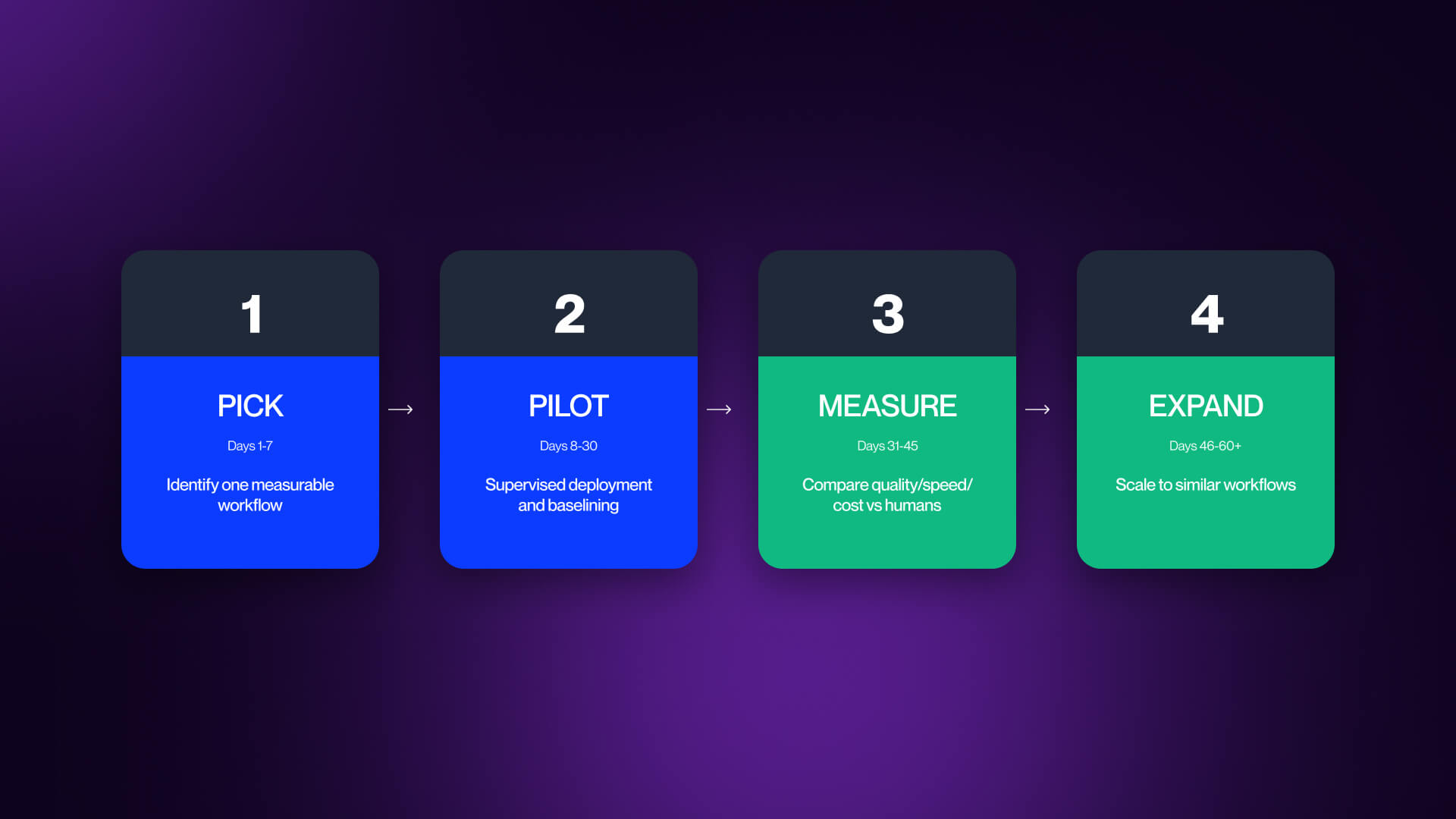
The correct approach here is considerably narrower. You need to start with one workflow that has a clear and repeatable process, has measurable outcomes, and has an existing human baseline. Good examples of this include tier-1 support ticket resolution, SDR follow-up sequencing, or code review for pull requests under 200 lines.
The goal is to prove that agents can improve one specific outcome in practice. Run that workflow for 30 to 60 days, compare it against the existing baseline, and only expand if the agent clears a performance bar. Most teams skip this and wind up scaling failure instead of value.
Governance from Day One
The failure modes covered earlier (hallucinations, cost overruns, etc) are not edge cases, but the default result of ungoverned deployment.
For SMB and mid-market teams, the minimum standard is a simple one: document which agents are deployed, who owns each, and which data or systems each agent is able to access. This alone reduces the risk of untracked agents spreading across teams without accountability.
For enterprise teams, governance needs to be more structured. This is where ideas like an agent registry become essential: a central system for tracking deployed agents, monitoring actions in real time, and maintaining audit logs. Without governance, agents don’t scale cleanly, and they multiply faster than teams can manage them.
Measure What Actually Matters
One of the common mistakes in agent deployment is treating deployment as a success. An agent running in production is not a win, outcome lift is.
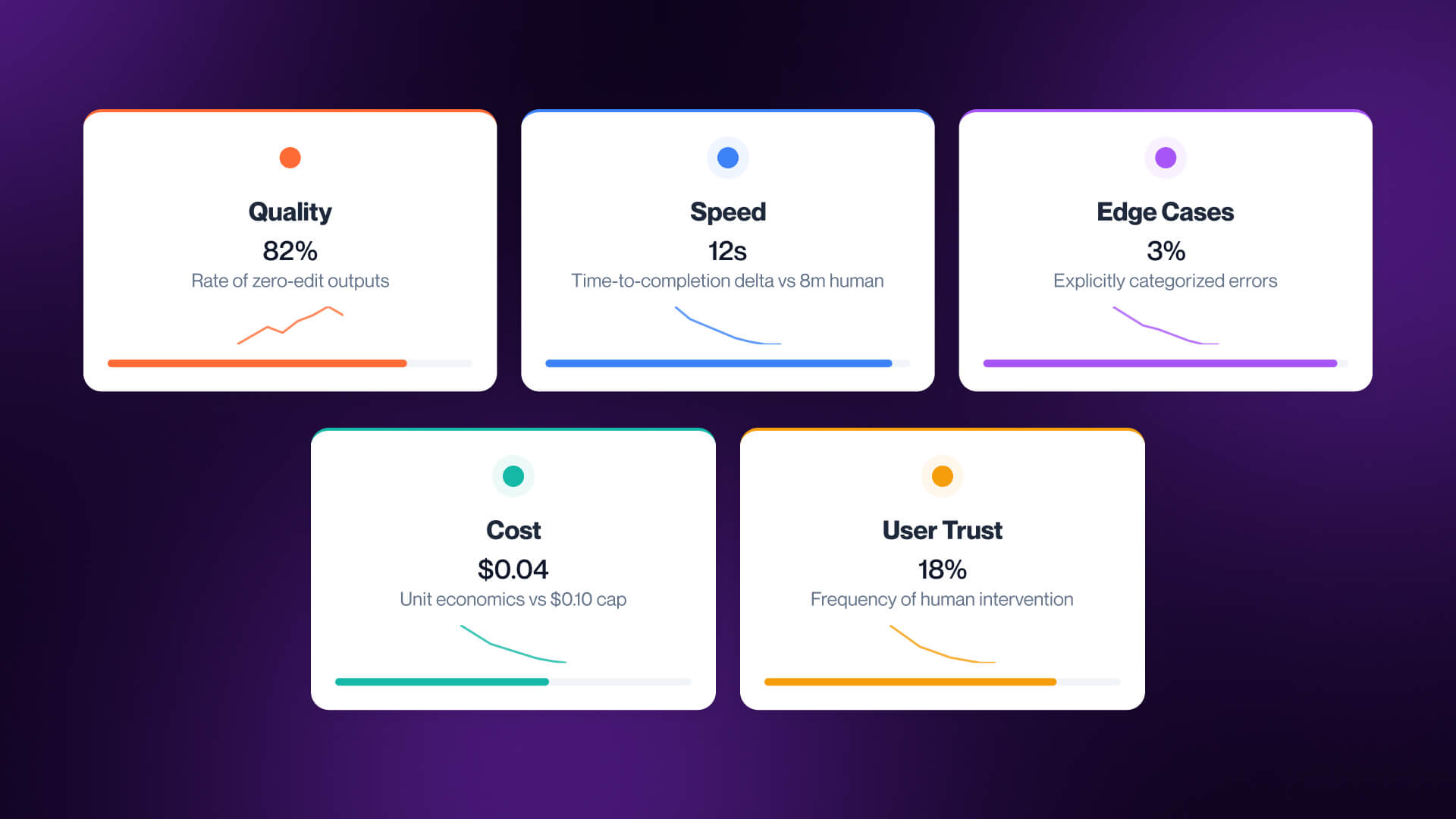
The best way to evaluate an agent is to measure five different elements:
- Quality - how often outputs pass review without edits
- Speed - time-to-completion compared to the human baseline
- Edge Case Handling - failures per 100 runs, including hallucination, timeouts, or incorrect actions
- Cost Per Task - the real unit economics of the workflow
- User Trust - how often humans override or correct the agent
These are the metrics that determine if an agent is helping or simply creating the appearance of progress. Low quality is damaging, regardless of faster execution. If cost per task is too high, automation will not scale, and if override rate climb trust will diminish.
The majority of failed agent deployments failed because the agent launched successfully and never improved a measurable outcome. For a broader view on how these systems fit into an AI adoption strategy, check out our guide to AI industry services.
FAQs
Q1. What is an AI agent?
An AI agent is a system that reasons, plans, uses tools, and takes action across multi-step tasks. Unlike chatbots or workflow scripts that simply respond, AI agents execute.
Q2. What is the best AI agent in 2026?
There is no single best AI agent choice in 2026, and the right choice will depend a lot on the workflow. Claude Code is optimal for coding, Sierra is more fitting to customer service, HubSpot Breeze suits sales, while Anthropic Computer Use fits browser automation.
Q3. What is the difference between an AI agent and a chatbot?
A chatbot responds to prompts inside a conversation. An AI agent goes further: it plans, uses tools, and completes multi-step tasks across systems. Vendors often blur this distinction, so not every agent is truly agentic.
Q4. What breaks when you ship an AI agent to production?
Production failures usually include things like hallucinations, state loss across long workflows, rate limits, cost overruns, and governance gaps. Demos can hide these issues, and production teams can manage them through grounding, validation, and human oversight.
Q5. What is the best AI coding agent?
This depends on the task. Claude Code is strongest for deep reasoning, while Cursor suits developers seeking AI-native IDE, and GitHub Copilot Coding Agent is perfect for GitHub-native teams with enterprise compliance requirements.
Q6. What is a browser agent or computer use agent?
A browser or computer use agent interacts with interfaces in the same way as a human would, by clicking, typing, and navigating pages. It’s essential for systems without APIs, but the category is still early and isn’t consistently production-ready.
Q7. Will AI agents replace SDRs?
Not any time soon. AI agents take charge of search, personalization, and sequencing effectively, but they find things like judgment, timing, and objections a challenge. The best model today is a hybrid model, with AI covering top-of-funnel work, while humans handle qualification.
Q8. How do I deploy my first AI agent without burning trust?
Be sure to start with one workflow, define a baseline, and measure results for 30 to 60 days, while documenting ownership, system access, and review rules. Expand once the agent improves a clear metric without increasing risk.
