.jpeg)
Most “Best AI Video Generation Tools” articles in SERP evaluate tools based on their aesthetic or cinematographic quality. Also, they value how these tools can create consistent characters, and how creators can make the best use of them. None of these characteristics matter when it comes to choosing an AI video creation tool, as part of your B2B SaaS marketing strategy.
HeyGen and Synthesia appear in some “best of” lists, but both are designed specifically for creators. The reasons why each was used as a B2B marketing tool are never discussed. On the other hand, we have Tavus, an AI video generation tool for personalized sales videos which doesn’t appear in any of the top results. The B2B use cases - product demos, sales personalization, training video, webinar repurposing, marketing B-roll - are not organizing categories anywhere in the existing coverage.
About this article
The goal of this article is to fill the coverage gap. We categorize the space of AI video tools by B2B SaaS use case:
- tools that allow users to generate avatars and talking heads for product demos
- training and sales videos
- tools for editing and repurposing longer forms into shorter formats
- generative tools for creating creative marketing content and B-roll
- tools for generating sales video at scale via personalization
Each of the AI video tools covered will be evaluated through our 5-Point B2B evaluation framework, which prioritizes the following over cinematic quality: Use Case Fit, Output Quality at Scale, Integration Friction, Pricing at B2B Scale, and Brand Safety. We will also discuss each of the tools we have tested and determined are no longer needed.
Since the majority of B2B SaaS video is hosted on a marketer’s Webflow site, we will also include information on Webflow embedding/hosting options that all existing SERP coverage has ignored.
Why the Existing AI Video Tool Coverage Misses the B2B Marketing Buyer
When you open up just about any of the top AI video roundups, there's an almost identical set of criteria being evaluated:
- character consistency
- camera control (cinematic)
- photorealism
- dance scenes
For those who create content as part of their job or business (filmmakers/social creators/narrative content producers) these items matter. But, not so much for a B2B SaaS demand-gen lead who needs to:
- deliver a product demonstration video
- develop a sales funnel with personalized intro segments
- break down webinars into 30-second video snippets, or
- produce 10-15 background b-roll images to use in ad variations
The Mismatch: Creator Tools Versus B2B Marketing Workflows
The buying criteria for B2B marketing are different at every level. Scale matters more than cinematic beauty because the team is producing 20-50 videos a month, not hand-crafting one. Integration matters because the video has to fit into existing HubSpot, Salesforce, and Webflow workflows. Pricing has to make sense at realistic production volume, not the starter tier. And brand consistency has to hold across 50 videos produced by three different people, not one carefully prompted showcase.
The existing SERP serves creators well. It does not serve B2B marketing teams. That gap shows up in the same place we see it across best B2B SaaS websites: coverage built for creators gets retrofitted onto B2B buyers, and the fit is poor.
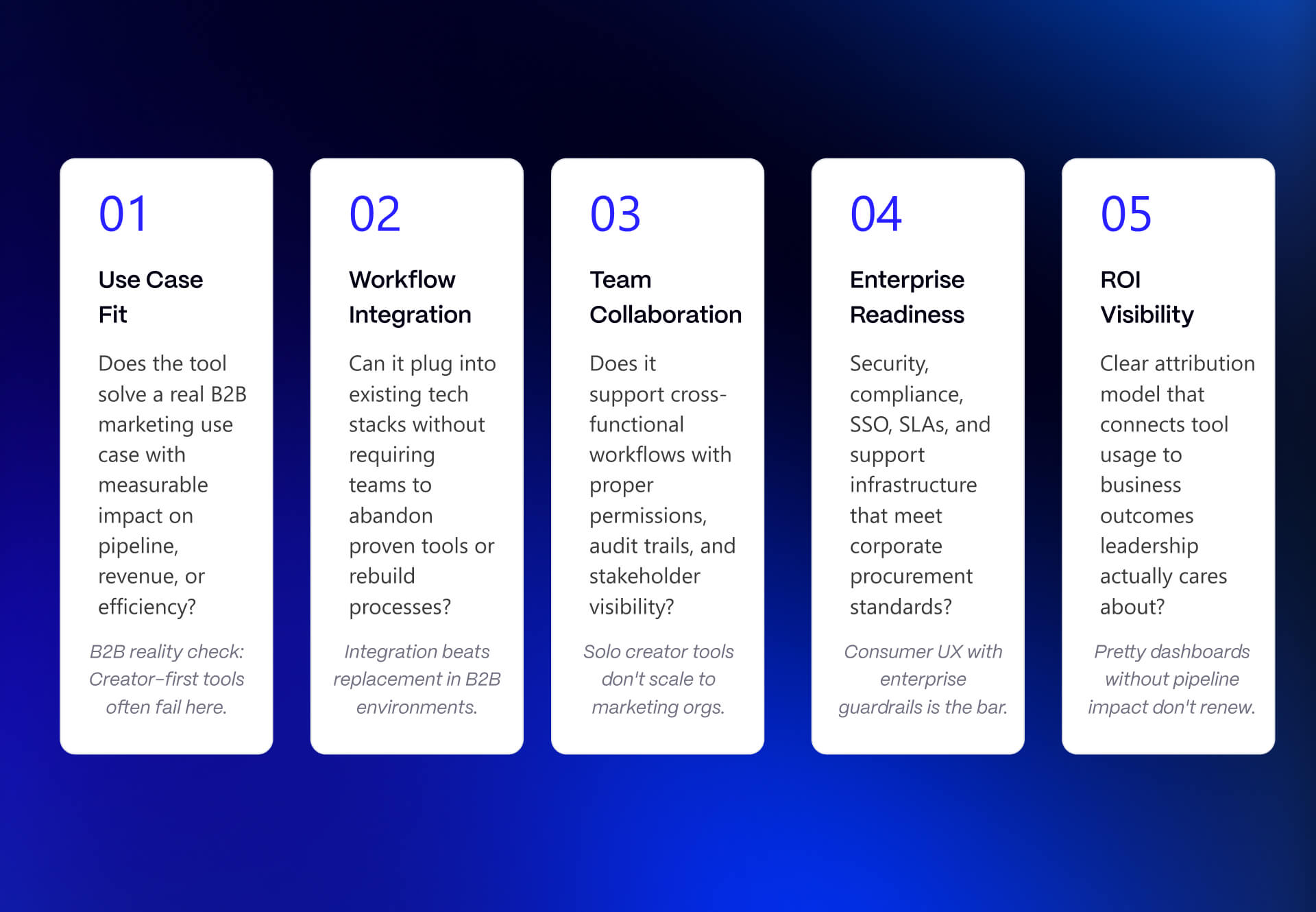
The 5-Point B2B Framework
We evaluate every tool using five criteria. We use these same five criteria to assess internal B2B SaaS marketing tools, and we encourage you to use them before signing an annual contract with any new tool. The same logic we apply to conversion rate optimization decisions on the site side.
1. Use Case Fit - Is there evidence that the tool was created specifically to solve a B2B marketing problem, or did the vendor simply retrofit a B2B pitch onto a creator tool?
2. Output Quality at Scale - While many vendors tout the "quality" of their output in their demo reels, what matters most is whether they can deliver high-quality output consistently for 20-50+ videos produced each month, the typical volume for B2B marketers.
3. Integration Friction - How easily does the tool integrate into other parts of your B2B SaaS marketing technology stack (e.g. Hubspot, Salesforce, Webflow, etc.)?
4. Pricing at B2B Scale - Again, pricing may be very competitive for small businesses/individuals at lower volumes (e.g., $20-$30/mo for 1 video/month). However, the pricing structure may not scale well enough for larger businesses/buyers who require significantly more volume (i.e. 10-30+ videos/month).
5. Brand Safety - Are the outputs generated by the tool consistent with brand standards/guidelines? In cases where auto-generation fails, do the failures produce output that aligns with brand standards?
Our B2B SaaS web design services and Webflow development services apply the same evaluation logic to site decisions: pick criteria that match the actual buyer's job, not the vendor's marketing pitch.
The Four B2B SaaS Use Cases We Organize Around
The AI video category does not consist of a single type of video, but 4 different types, all using their specific tools, processes, and ROI logic.
Tools such as Synthesia and HeyGen can be used to create AI avatars and talking heads in place of live humans presenting products through demo videos, training videos, and sales videos.
Repurpose your long form video (podcasts, webinars, conference presentations) into social media-sized pieces at scale using video editing/repurpose tools like Opus Clip, Descript or Submagic.
Generate B-Roll, abstract motion graphics, and advertising creative variations out of text prompts using generative tools for creating marketing creative such as Runway, Google Veo, OpenAI Sora.
Create personalized video for sales outreach at scale while using the same template to produce hundreds of different versions of the same template using Sales Personalization Tools such as Tavus.
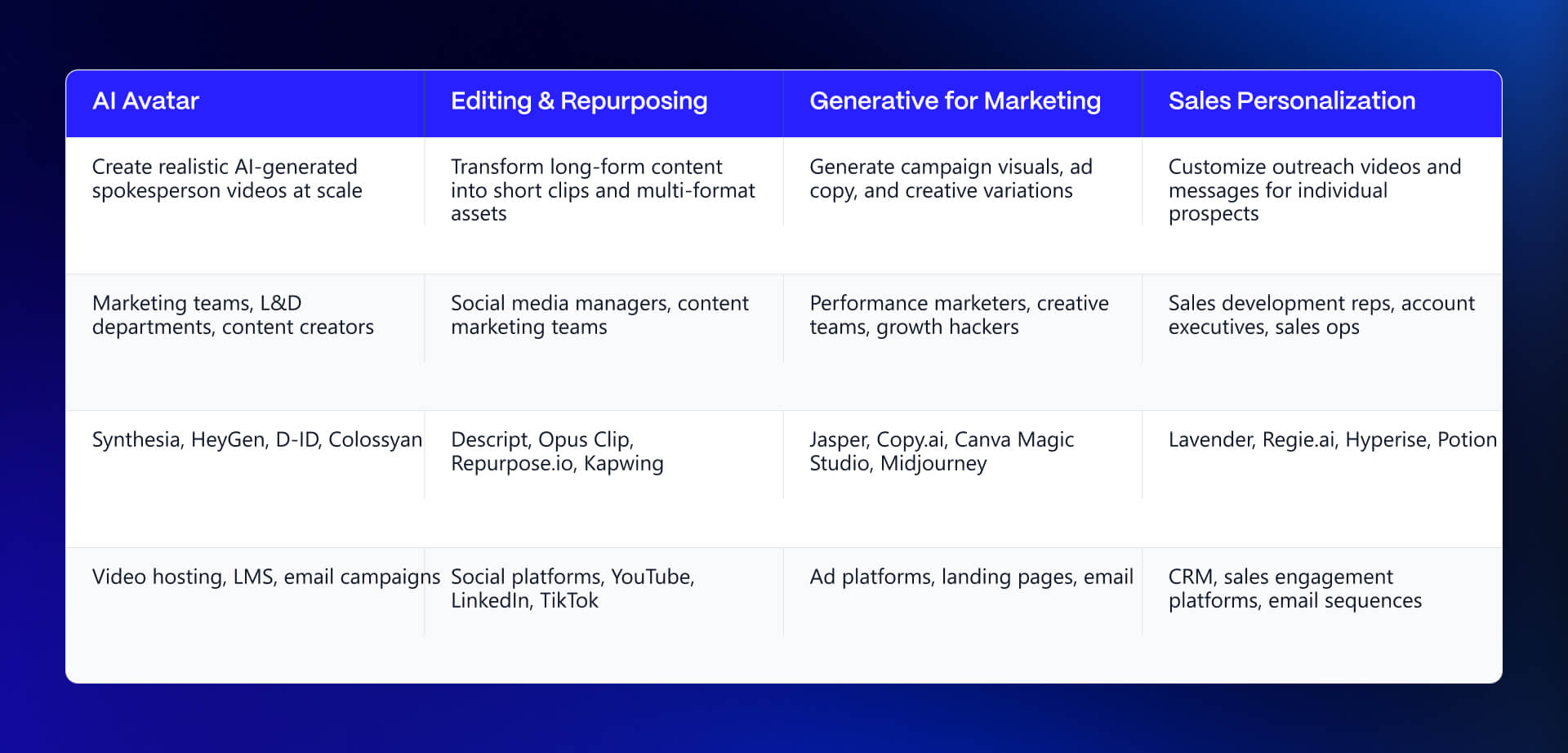
To determine what tool to begin with will depend on where the largest bottleneck exists within your organization in terms of completing a specific use case.
AI Avatar and Talking-Head Tools for B2B Marketing
For the best B2B SaaS websites, training and onboarding videos are increasingly a product differentiator, not just a nice-to-have. You can see our recent work to understand how we approach video in that context, and our SaaS landing page deep dive covers how content architecture decisions, including video, affect conversion.
What AI Avatar Tools Solve for B2B Marketing
Avatar tools replace the recorded human presenter in product demos, training videos, sales explainers, and internal communications. The B2B value proposition is concrete: a five-minute training video used to mean booking a studio, coordinating presenter availability, running a production cycle, and updating the whole thing whenever the product changed. Avatar tools compress that to writing a script and clicking generate.
The output is consistently styled, multilingual with one click, and updatable without re-recording. That last point matters especially for B2B SaaS where product UIs change quarterly and training content goes stale fast.
Common failure modes: avatars that fall into the uncanny valley and undercut viewer trust, scripts written like marketing copy instead of spoken language (the output sounds read, not said), and brand inconsistency when multiple team members are generating videos independently without a shared template.
For the best B2B SaaS websites, training and onboarding video is increasingly a product differentiator, not just a nice-to-have. Avatar tools make that scale of production possible for teams that cannot staff a full video function.
Recommended: Synthesia - The B2B Enterprise Standard for Avatar Video
synthesia.io
Synthesia remains the category-defining tool for B2B avatar video. It is used heavily for training, internal communications, product education, and sales enablement at enterprise scale. The tool was built for business workflows from the start, with SCORM export, SAML/SSO, approval workflows, API access, and strong governance features.
5-Point Score:
- Use Case Fit: 5/5. Built for business, not adapted for it.
- Output Quality at Scale: 4/5. Avatar consistency across many videos is strong. Occasional lip-sync edge cases on complex pronunciation.
- Integration Friction: 4/5. Slack, Microsoft Teams, SCORM for L&D, API for advanced workflows.
- Pricing at B2B Scale: 3/5. Starter $29/mo (10 min video), Creator $89/mo (30 min video). Enterprise is custom pricing (often low five figures annually at production volume). Minute/credit-based scaling adds up at 20-50+ videos per month.
- Brand Safety: 5/5. Avatars are licensed and approved. The governance tooling for enterprise brand consistency is the strongest in the category.
Honest limitation: At high creative ambition - cinematic product launches, emotionally resonant brand storytelling - the avatar style still reads as corporate. Use Synthesia for training, onboarding, internal communications, multilingual scale, and product demos. Do not use it for brand films.
Recommended: HeyGen - Avatar Video for Marketing Teams Without an L&D Department
heygen.com
HeyGen is more marketing-tilted than Synthesia. The learning curve is lower. The activation cost for a marketing team that has never produced avatar video is meaningfully less. For mid-market B2B SaaS marketing teams that need fast turnaround on avatar video without heavy enterprise governance, HeyGen is often the better starting point.
5-Point Score:
- Use Case Fit: 5/5. Designed for marketing teams, not L&D departments.
- Output Quality at Scale: 4/5. Comparable to Synthesia on avatar quality. Consistent enough for marketing production workflows.
- Integration Friction: 4/5. Zapier, API, browser-based workflow.
- Pricing at B2B Scale: 4/5. Creator ~$29/mo ($24 annual). Business ~$149/mo + $20/seat. More affordable starting tiers than Synthesia and scales reasonably for mid-volume usage.
- Brand Safety: 4/5. Strong but with less mature enterprise governance tooling than Synthesia (SAML, advanced approval workflows).
Honest limitation: Feature parity with Synthesia is closing, but teams with strict enterprise SSO and compliance requirements should verify current governance features before committing. For a 50-person B2B SaaS marketing team producing 15 videos a month, this distinction does not matter. For a 5,000-person enterprise with legal review on all external video, it does.
Also Consider: D-ID - Lightweight Avatar for Specific Use Cases
d-id.com
D-ID is a lighter-weight avatar tool, primarily useful for sales-led teams that want an avatar in email or short-form video rather than full training production. The setup is minimal, the browser-based workflow is fast, and the pricing is accessible at low volume.
5-Point Score:
- Use Case Fit: 4/5. Narrower use case than Synthesia or HeyGen, but that use case is well-served.
- Output Quality at Scale: 3/5. Adequate for one-off avatar videos and email-embedded clips. Not strong enough for a full L&D production workflow.
- Integration Friction: 5/5. Browser-based, minimal setup, no engineering required.
- Pricing at B2B Scale: 4/5. Affordable at low to mid volume.
- Brand Safety: 4/5. Adequate for the use case.
Honest limitation: If the use case is multi-video training programs or consistent product demo series, D-ID is not the right tool. It is the right tool for a sales rep who wants an avatar in a prospecting video and does not need Synthesia's production infrastructure.
AI Editing and Repurposing Tools That Cut B2B Long-Form Into Short-Form
What Repurposing Tools Solve for B2B Marketing
B2B marketing teams sit on hours of high-effort video content that gets watched once and dies. Webinars, conference talks, podcast episodes, customer interviews, executive thought leadership - all of it is produced at meaningful cost and then filed away after the live event.
Repurposing tools automatically identify the high-value moments in long-form video and cut them into short-form social and ad content at scale. The math is compelling: a single one-hour webinar becomes 20-30 short-form clips that fuel LinkedIn, YouTube Shorts, sales enablement sequences, and ad creative, all with limited human review time.
Common failure modes: tools that cut clips without understanding context (strong hook, no payoff), output formats that miss B2B platform requirements (LinkedIn aspect ratio, length, captioning requirements), and caption engines that misquote technical B2B terminology in ways that undercut credibility.
This connects directly to a broader content strategy question: if the team is producing video content that does not feed a repurposing workflow, the ROI on that content is lower than it should be. See our SaaS landing page deep dive for how this kind of content architecture thinking applies to the site itself.
Recommended: Opus Clip - Webinar-to-Short-Form for B2B Marketing
opus.pro/clip
Opus Clip was built specifically for the long-form-to-short-form B2B workflow. It ingests a full-length video, identifies the most compelling moments using AI analysis of speech, content structure, and engagement signals, and outputs short-form clips formatted for social platforms.
5-Point Score:
- Use Case Fit: 5/5. Designed for this exact problem. Not retrofitted.
- Output Quality at Scale: 4/5. Clip selection has improved substantially. Occasional context misses still happen - the tool can surface a moment that sounds great in isolation but lacks the setup to land. Always spot-check the outputs.
- Integration Friction: 4/5. Zoom, YouTube, and Vimeo source integrations. Verify current integration list at opus.pro/clip.
- Pricing at B2B Scale: 4/5. The business tier is reasonable for mid-volume usage. Verify current pricing.
- Brand Safety: 4/5. Caption accuracy is generally strong for clear-audio content. Technical jargon is the known weak point.
Honest limitation: Technical terminology and B2B-specific acronyms still trip the caption engine. A clip where the speaker says "CRO" and the caption reads something else is a credibility problem, not just a typo. Build a caption review step into the workflow before any clip goes public.
Recommended: Descript - Text-Based Video Editing for Marketing Teams
descript.com
Descript solves an adjacent problem: editing video by editing the transcript. For marketing teams without a dedicated video editor, this lowers the activation cost of producing polished edited video significantly. Delete a word in the transcript, the word disappears from the video. Cut a paragraph, the corresponding footage is gone. Add an overdub to fix a stumbled word without re-recording.
5-Point Score:
- Use Case Fit: 4/5. Broader than repurposing alone - it is a full editing environment, not just a clip generator. That breadth is a strength for teams that need both.
- Output Quality at Scale: 5/5. Transcript-based editing is faster than timeline-based editing for the medium-stakes B2B content use case it serves best.
- Integration Friction: 4/5. Standard import/export, integrations with recording tools. Verify current state.
- Pricing at B2B Scale: 4/5. Reasonable at mid-volume team usage.
- Brand Safety: 4/5. Output quality depends on input quality and editing skill. The tool does not introduce brand inconsistency on its own.
Honest limitation: Descript is not a replacement for a real video editor on high-stakes content. It is the right tool for podcast snippets, blog-accompanying video, internal updates, and the kind of medium-stakes B2B content where "good enough fast" beats "great in three weeks." For brand films and executive thought leadership, bring in a human editor.
Recommended: Submagic - Short-Form Captioning and Polish for B2B Social
submagic.co
Submagic is focused specifically on adding captions, light B-roll, and polish to short-form video. It is not a clip generator - it is the finishing layer on clips already cut.
The pairing pattern we recommend: Opus Clip generates the cut from the long-form source, Submagic adds the polish. Together they convert a raw webinar recording into a captioned, formatted, B2B-appropriate short-form clip in a workflow that takes minutes per clip rather than hours.
5-Point Score:
- Use Case Fit: 4/5. Narrow scope, well-served. It does one thing and does it better than the all-in-one tools.
- Output Quality at Scale: 5/5. Caption quality is the strongest in the category for this specific use case.
- Integration Friction: 5/5. Drop in a clip, get a finished short. No engineering required.
- Pricing at B2B Scale: 5/5. Accessible pricing at high volume.
- Brand Safety: 4/5. Caption styling can be customized to match brand guidelines.
Honest limitation: Default caption styling in Submagic skews toward high-energy creator aesthetic - big text, kinetic motion, saturated colors. B2B brands need to configure restrained brand presets early and enforce them across anyone generating clips. Left on defaults, the output will look like a creator's TikTok, not a B2B SaaS brand.
AI Generative Video Tools for Marketing B-Roll and Creative
What Generative Video Tools Solve for B2B Marketing
Generative video tools - Runway, Veo, Sora - produce video from text or image prompts. The realistic B2B marketing use case is not feature-length narrative content. It is short B-roll for product pages and case study videos, abstract motion graphics for brand moments, and creative variants for testing at scale.
The practical value: replacing stock footage that looks like stock footage, and reducing the cost of producing multiple creative variants for paid media testing. Instead of one ad creative that runs to exhaustion, generative tools make it feasible to test five visual treatments of the same message.
Common failure modes: trying to use generative tools for narrative or character-driven content (they fail in ways that look obviously AI-generated and amateurish), outputs that look stylistically disconnected from the brand's other assets, and prompt engineering becoming a half-time job for a designer who should be working on other things.
Generative tools require designer skill to make them brand-safe at scale. That is not a knock on the tools - it is an honest statement about where they sit in the production stack right now. They are high-value but not self-serve.
Recommended: Runway - Workflow-Mature Generative Video for Marketing Teams
runwayml.com
Runway (current Gen-4 / Gen-4.5) is the most workflow-mature generative video tool for marketing teams. It has the most developed prompt controls and output consistency for short B-roll and motion graphics.
5-Point Score:
- Use Case Fit: 4/5. Broader than B2B but the workflow tooling serves marketing teams well.
- Output Quality at Scale: 4/5. Improved substantially. Short B-roll and abstract motion are the strongest use cases.
- Integration Friction: 4/5. Browser-based workflow, API available.
- Pricing at B2B Scale: 3/5. Standard ~$12–15/mo, Pro ~$28–35/mo, Unlimited ~$76–95/mo. Credit-based system - costs rise noticeably at high creative volume.
- Brand Safety: 4/5. Style reference controls help maintain brand consistency. More prompting skill required than avatar tools.
Honest limitation: Runway still requires meaningful prompting skill to produce on-brand output reliably. Budget for designer time to learn effective prompting patterns.
Recommended: Google Video - High-Quality Short-Form Generative for Ad Creative
deepmind.google/technologies/veo
Google Video produces high-quality short-form video with strong prompt adherence, suitable for social ad creative and short marketing video. Best inside the Google ecosystem.
5-Point Score:
- Use Case Fit: 4/5. General-purpose generative with strong marketing applications.
- Output Quality at Scale: 5/5. Among the strongest output quality in the generative video category.
- Integration Friction: 3/5. Easiest via Google AI / Vertex AI. Higher friction outside the Google stack.
- Pricing at B2B Scale: 4/5. Accessed via Google AI Pro (~$20/mo, limited) or Ultra (~$250/mo for fuller access). Vertex API is usage-based.
- Brand Safety: 4/5. Comparable to Runway on brand control.
Honest limitation: Workflow integration is still maturing outside the Google ecosystem. For teams already on Google Cloud/Workspace, this is a natural fit.
Recommended: OpenAI Sora - Generative Video Inside the OpenAI Workflow
openai.com
Important 2026 update: The standalone Sora app was discontinued in April 2026. Sora capabilities are now primarily available through ChatGPT subscriptions (Plus/Pro) or API (with API access sunsetting later in 2026).
For B2B marketing teams already running ChatGPT for copywriting and ideation, Sora reduces tool sprawl by keeping video generation inside the same workflow.
5-Point Score:
- Use Case Fit: 4/5. Strong for teams already running ChatGPT at team scale.
- Output Quality at Scale: 4/5. Continuing to evolve.
- Integration Friction: 5/5. Lives inside ChatGPT for most users. Lowest onboarding friction for existing OpenAI teams.
- Pricing at B2B Scale: 4/5. Tied to ChatGPT Plus (~$20) or Pro (higher) tiers.
- Brand Safety: 4/5. Comparable brand control to competitors.
Honest limitation: Governance, admin controls, and centralized logs are limited compared to dedicated enterprise tools. Verify current team/Enterprise capabilities if governance is required.
AI Personalization for Sales Video (Tavus and the Small Category Around It)
What AI Sales Video Personalization Solves
AI sales video personalization tools generate personalized outbound video at scale. The model: a sales rep records one template video, the tool generates hundreds of variants with personalized openings, name pronunciations, and account-specific references. Each prospect receives a video that feels individual.
The B2B value is in the unit economics of outbound. Personalized video consistently outperforms generic email on response rate. The historical problem was that personalized video required recording one video per prospect - which does not scale past 10-20 touches per week. AI personalization breaks that constraint. One rep can send 200 personalized videos a week without 200 hours of recording time.
Common failure modes: personalization that reads as creepy (over-referencing personal data that feels surveilled rather than researched), name pronunciation errors that land as worse than no personalization at all, and deliverability questions about where the video actually lives in the outreach sequence.
This category is genuinely absent from the existing SERP. Tavus does not appear in any of the top results for AI video tool roundups. For outbound-heavy B2B sales and marketing teams, that is the most consequential gap in the existing coverage.
Recommended: Tavus - The Category-Defining Tool for AI Sales Video Personalization
tavus.io
Tavus was built specifically for personalized sales video at scale. A sales rep records a template video; Tavus generates variants per prospect with personalized name, company, and account-specific references.
5-Point Score:
- Use Case Fit: 5/5. Built for this exact B2B problem. Category-defining.
- Output Quality at Scale: 4/5. Lip-sync on personalized variants is generally clean. Occasional artifacts on uncommon names.
- Integration Friction: 4/5. HubSpot, Salesforce, Outreach, Salesloft integrations.
- Pricing at B2B Scale: 3/5. Starter ~$59/mo + usage-based. Growth/Enterprise custom. Cost-per-video math is critical at scale.
- Brand Safety: 4/5. Template-based model keeps main content controlled.
Honest limitation: When name pronunciation goes wrong, it backfires harder than a generic video. Build a review step into the workflow before sending.
The Rest of the Sales Personalization Category
Sendspark and some of HeyGen's sales-focused features compete in this space. The category is small and Tavus is the clear leader for dedicated AI sales video personalization as of writing.
Marketing leaders should track this category actively. The unit economics of personalized video at scale change outbound math meaningfully - when it works, it produces response rates that generic email cannot match, at a cost-per-touch that individual video recording cannot reach. The combination is compelling enough that this category will grow.
Tools That Disappointed, How to Embed Video on Webflow, and Where to Start
The existing SERP is almost entirely celebratory. Vendors rank themselves first. Independent reviewers focus on best-case output. Nobody names the tools that did not survive contact with a real B2B production workflow. That omission is unhelpful.
Tools We Tested and Stopped Using (and Why)
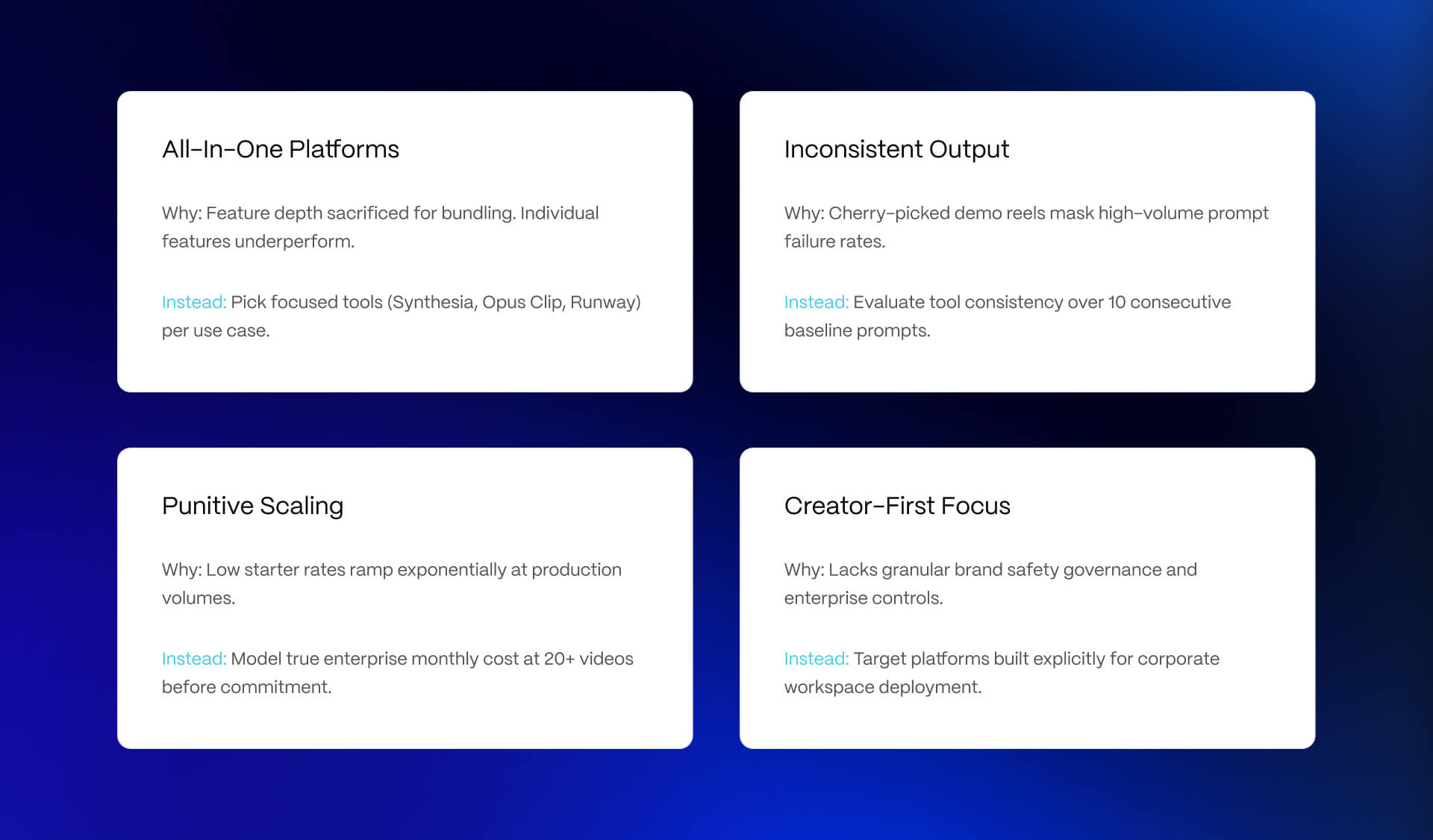
Here are the failure patterns we have encountered:
All-in-one platforms that do everything and nothing well. Several tools in the AI video space market themselves as complete production suites - script, avatar, edit, caption, publish, all in one platform. In practice, each individual feature tends to be weaker than the focused tool in that category. A dedicated repurposing tool outperforms the repurposing module of an all-in-one. A dedicated captioning tool outperforms the captioning layer in an avatar platform. Teams that adopt all-in-ones for workflow simplicity often end up with across-the-board mediocrity instead of category-leading output in each use case.
Creator-first tools with a B2B marketing pitch bolted on. A number of generative video tools claim to serve B2B marketing after being built for filmmakers and social creators. The calls are consistent: no template governance, no brand guidelines controls, no integration with CRM or marketing automation, pricing that assumes low-volume high-craft use rather than high-volume consistent production. The tool categories that belong in B2B marketing stacks were built for those workflows from the start.
Tools where the demo quality did not survive typical prompts. Several generative tools produce showcase output that looks strong in the vendor's demo reel and inconsistent output when typical marketing prompts are applied. The gap between cherry-picked best-case and P50 production output is the number to evaluate. If the vendor cannot show you 20 typical outputs and stand behind them, that is a signal.
Free and low-tier tools with punitive pricing at scale. The tool that looks free or near-free on the pricing page often has a credit system that makes the true per-video cost at B2B production volume significantly higher than the enterprise tool with the contact-sales pricing. Always model the tool's cost at 20-50 videos per month before committing, not the number on the landing page.
Webflow Embed and Hosting Considerations for AI-Generated B2B Video
Generating the video is half the work. The other half is where it lives on the marketing site, and most AI video tool coverage ignores this entirely. For B2B SaaS on Webflow, the practical question is which hosting and embed method matches the use case. Each option involves real tradeoffs.
Here is how we think about it when building B2B sites in Webflow:
YouTube embed - best for top-of-funnel marketing video. YouTube provides the bandwidth, the SEO benefit (video pages with YouTube embeds can surface in both Google Search and YouTube Search), and a functional player. The tradedown: branded player control is constrained and YouTube may surface competitor content in the up-next queue.
Wistia embed - best for gated marketing video where lead capture and analytics matter. Wistia allows email gates, tracks per-viewer engagement, and routes lead data into HubSpot or Salesforce. The tradedown: paid tier required, and the bandwidth costs add up at high traffic volume. For mid-funnel video on a landing page where you want to know who watched what percentage, Wistia is the clear choice.
Vimeo embed - better player control than YouTube, paid tier required, no audience algorithm pushing competitor content. Good middle ground for brand video where the YouTube ecosystem is a concern, but analytics are not the primary need.
Loom embed - best for sales-facing video and product walkthroughs where reply tracking and asynchronous communication matter. Loom is not a marketing video host; it is a sales and CS tool. Using it for a top-of-funnel marketing video is the wrong application.
Native Webflow video upload - appropriate for small files in specific design contexts (background video loops, short explainer clips in hero sections). Webflow's native video is not designed for hosted long-form content. For anything over 30 seconds that is the primary content of a page, use an external host.
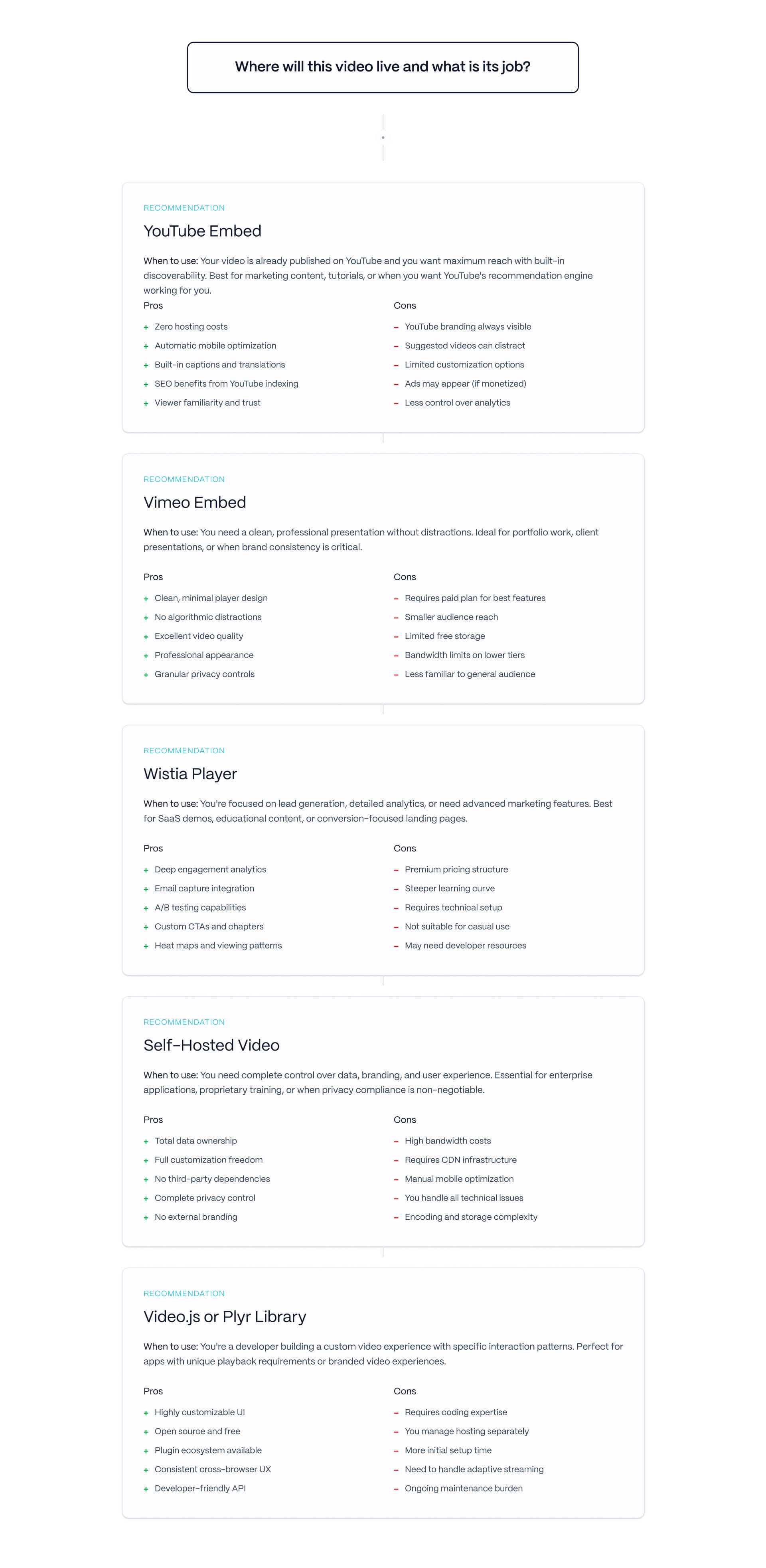
Our standard recommendation: YouTube for top-of-funnel marketing video where SEO matters, Wistia for gated and mid-funnel video where analytics and lead capture matter, Vimeo for brand video where player control matters, Loom for sales and CS video. The choice feeds directly into the B2B SaaS SEO approach, and B2B SaaS SEO services considerations - video placement affects page authority and indexation.
A Practical Starting Plan: Where to Add AI Video to Your B2B Stack First
For most B2B SaaS marketing teams, the highest-ROI starting point is one of three paths. Pick based on where the team's biggest bottleneck is right now.
Path 1 - Training and onboarding video (Synthesia or HeyGen). If the team is spending production time on training video, internal communications, or product demos that need frequent updates, avatar tools produce immediate time savings on a use case the team is already doing. This is the lowest-risk starting point because the success criteria are clear: the training video gets produced faster and updated more easily.
Path 2 - Repurposing the long-form archive (Opus Clip + Submagic). If the team has a library of webinars, conference recordings, or podcast episodes that are not producing ongoing value, repurposing tools produce immediate content velocity from assets that already exist. The starting cost is low and the output feeds social, sales enablement, and ad creative in parallel.
Path 3 - Sales video personalization (Tavus). If outbound is the team's bottleneck and the sales team has the discipline to build and review personalization workflows correctly, Tavus changes the unit economics of video outreach. This is the highest-ceiling path and the one with the most implementation requirements. Reserve it for teams where outbound is already working and the goal is scale, not repair.
Generative tools (Runway, Veo, Sora) are higher-ceiling but require designer skill to produce brand-safe output at scale. Sequence them after the team has built workflow confidence with at least one of the first three paths. Teams that start with generative tools often stall at the prompting-skill bottleneck before they see meaningful production output.
The right AI video tool is the one that fits your B2B use case, not the one that ranks highest on cinematic quality. Pick the right tool category, score against the B2B framework, sequence the rollout to the team's biggest bottleneck first, and embed the output where it actually lives on the marketing site.
We help B2B SaaS marketing teams figure out this stack and build the Webflow site that hosts the video. Talk to our team or see recent client work.
Frequently Asked Questions
What is the best AI video generation tool for B2B marketing?
It depends on the use case. For product demos and training: Synthesia or HeyGen (avatar tools). For repurposing long-form into short-form: Opus Clip + Submagic. For marketing B-roll and ad creative: Runway, Google Veo, or OpenAI Sora. For personalized sales video at scale: Tavus. There is no single best tool because the category is several different tool categories with different B2B jobs.
How is choosing an AI video tool different for B2B marketing teams?
Different criteria. Creator coverage evaluates on cinematic quality, character consistency, and prompt adherence. B2B marketing teams need to evaluate on Use Case Fit, Output Quality at Scale (20-50 videos per month, not cherry-picked demos), Integration Friction (with HubSpot, Salesforce, Webflow, YouTube), Pricing at B2B Scale, and Brand Safety. A tool that scores high for creators can fail B2B on integration or brand consistency.
What is the difference between Synthesia and HeyGen?
Both are AI avatar video tools, but Synthesia is more enterprise-tilted (heavy use in training, L&D, internal communications, with SCORM, SAML, and governance features) while HeyGen is more marketing-team-tilted (templated workflows, faster activation, more affordable starter tiers). Mid-market B2B with an L&D function often picks Synthesia. Mid-market B2B marketing teams without L&D often pick HeyGen. Both produce comparable avatar quality.
What is the best AI tool for repurposing webinars into short-form video?
Opus Clip is the category leader for AI-driven clip selection from long-form video. Pair it with Submagic for caption polish and B-roll. Together they convert a one-hour B2B webinar into 20-30 ready-for-social clips with limited human review. Always review captions before publishing because technical jargon and B2B-specific terminology still trip caption engines.
Can I use generative video tools like Runway or Veo for B2B marketing?
Yes, but realistically only for short B-roll, motion graphics, and creative variants. Generative tools fail at narrative video, character-driven content, and long-form production in ways that look amateurish for B2B brands. The right use cases are 5-15 second visual elements that augment human-produced or avatar-produced video, and add creative variants for testing.
What is Tavus and why does it matter for B2B?
Tavus generates personalized sales videos at scale. A sales rep records one template video; Tavus produces variants for each prospect with personalized name, company, and account-specific references. It is the category-defining tool for AI sales video personalization in B2B. The category is small (Tavus and a few competitors), and it is genuinely missing from most AI video tool roundups. For outbound-heavy B2B teams it changes the unit economics of video outreach.
How much do AI video tools cost for B2B usage?
Pricing varies widely, and the starter tier rarely represents B2B reality. Synthesia Enterprise: contact-sales pricing, typically several thousand per month at production volume. HeyGen: more affordable starter and team tiers, scales reasonably. Opus Clip Business: hundreds per month at mid-volume. Runway Enterprise: thousands per month at high creative volume. Tavus: priced for sales teams. Always quote pricing at realistic usage (20-50 videos per month), not the entry tier.
Where should AI-generated video live on a B2B marketing site?
Depends on the use case. For top-of-funnel SEO content: YouTube embed (best for search visibility and bandwidth). For gated marketing video with lead capture: Wistia embed (best analytics and lead routing). For sales-facing video: Loom embed (best for shareable links and reply tracking). For small embedded clips on landing pages: native Webflow video upload. Avoid auto-playing background videos with sound.
Should B2B marketing teams build AI video in-house or use these tools?
Use the tools. The unit economics of AI video have shifted far enough that even teams with strong in-house video capability use AI tools for the highest-leverage use cases (avatars for training, repurposing for short-form, personalization for sales). Reserve in-house video production for high-stakes content (brand films, executive thought leadership, customer story videos) where craft still differentiates.
What is the biggest mistake B2B teams make with AI video tools?
Trying to use one tool for every use case. The category is several tool categories with different jobs (avatars, repurposing, generative, personalization). A team that picks one tool and tries to force-fit all use cases ends up with mediocre output across all of them. The right approach is to pick one tool per use case the team actually needs, sequenced by where the highest-ROI starting point is for that team.