.jpeg)
While there are many articles about the top twenty AI tools that founders “should” be using, few provide any meaningful guidance on how to choose the right tools for your specific needs.
In 2026, instead of focusing on a long laundry list of the latest and greatest AI tools, we will focus on developing a solid eight-tool stack that addresses all of your foundational needs. This guide changes the conversation around choosing the right AI tools for your business from "how do I create a long list of potential tools?" to "what does my ideal eight-tool stack look like?"
To support this shift, we have developed a five-point evaluation process for evaluating each tool: Time Multiplier, Consolidation Fit, Stage Fit, Learning Curve, Cost Trajectory.
We evaluate 8 tools across four functional layers of your business: Foundation Tools, Workspace and Presentation Tools, Sales and Growth Tools, and Operations and Research Tools.
Finally, we outline the appropriate composition of your eight-tool stack based on your company’s revenue stage. We also offer a ten question quarterly review that will assist you in avoiding unnecessary spending on AI tools and potentially saving $3000-$8000 per year in wasted expense.
Note: this guide is written for solo founders, bootstrapped operators, agency owners, and small business entrepreneurs. If you're a funded startup founder scaling a team, see our companion article on the best AI tools for startups, which covers stage-based stacks from pre-revenue through growth-stage funding rounds.
Why Most AI Tool Lists for Entrepreneurs Mislead
The Sprawl Problem and the Stack Solution
Two separate founders each spend $400/month on AI tools. However, one of these founders has 20 fragmented subscriptions to AI tools; whereas, the second founder operates a cohesive 7-tool stack with each of those being utilized weekly.
The primary reason for this disparity is not the budget. Rather, it is related to selecting a discipline.
Most AI tool roundups don’t aid entrepreneurs in establishing that discipline. Instead, they present lists ranging from 20-30 tools with a single sentence or short paragraph describing each. Their goal is to appear inclusive rather than relevant. Therefore, their approach to selecting tools is as an accumulation: try-everything-and-keep-what-sticks. As an entrepreneur watching every dollar, this is an extremely costly method to learn.
Unlike this common approach, this article will take an alternative perspective. It will identify eight tools, organize them into four functional layers, and explain why each tool earned its respective position. If a tool was omitted from this article, that was an intentional omission, not an oversight.
One more framing note before the stack itself. This article is written for entrepreneurs: solo founders, bootstrapped operators, agency owners, and small business operators who are watching cash carefully. If you're a funded founder scaling a team past 10 to 15 people, the constraints are different, and our companion piece on AI tools for startups covers that terrain in more depth.
Sprawl vs. Stack
The two approaches produce different outcomes across nearly every dimension that matters to a founder watching spending.
Sprawl happens gradually. A founder adds a tool for a one-off task, keeps paying for it out of habit, then adds another for a slightly different task that the first tool could have handled. Multiply that by a year of newsletter recommendations and the bill adds up fast. For a broader look at how this plays out across the wider AI landscape, see our guide to AI agents.
The Five-Point Framework Every Entrepreneur Should Use
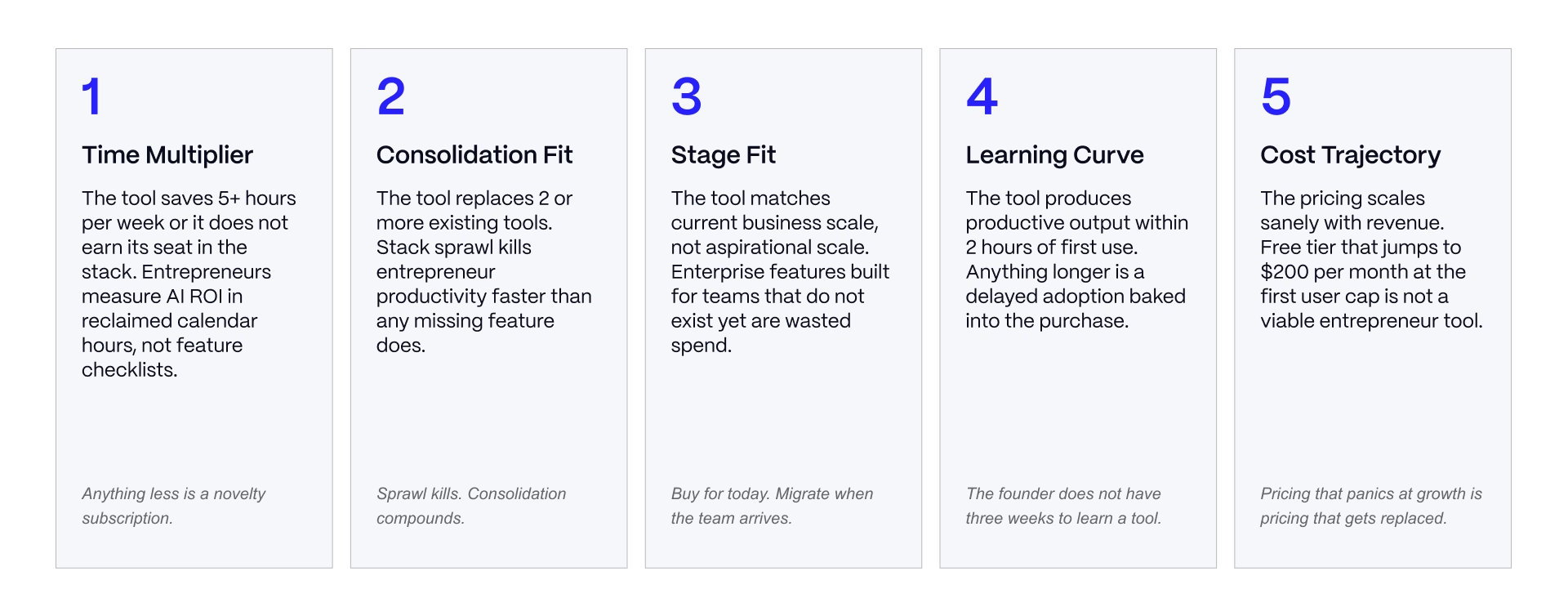
Before adding any AI tool, and again during a quarterly review, run it through five checks.
Time Multiplier. Does the tool save 5 or more hours a week once it's set up? If the honest answer is "maybe an hour," it's not stack-worthy yet.
Consolidation Fit. Does it replace 2 or more tools currently in the stack? A tool that adds a new capability without removing anything is a candidate for sprawl, not consolidation.
Stage Fit. Does it match the business's current scale? A pre-revenue founder buying enterprise marketing automation is paying for capacity that won't be used for a year or more.
Learning Curve. Can the founder or team become productive with it in under 2 hours? Tools that require a week of onboarding rarely get adopted at entrepreneur scale.
Cost Trajectory. Does pricing scale sanely as revenue grows? Some tools jump from an affordable entry tier to a steep team price the moment a second seat gets added.
A tool that fails 3 or more of these gets cancelled, or never added in the first place. Run this check before every purchase and again during the quarterly audit covered later in this guide.
If AI tool selection is one piece of a larger growth marketing decision for your B2B SaaS business, talk to our team about the strategy layer that sits on top of the tool stack.
Foundation Layer: ChatGPT and Claude
Every entrepreneur stack starts here. These two tools cover the broadest range of daily work: writing, planning, research, coding help, and analysis.
Pricing below reflects both companies' published rates as of July 2026, though both have changed tiers multiple times this year, so confirm current numbers before you subscribe.
ChatGPT: Universal AI Utility
ChatGPT is the entrepreneur's default starting point because it covers the widest range of daily jobs from a single interface: writing, brainstorming, coding help, planning, and general research.
The free tier is genuinely usable, not a crippled trial. It gives access to a capable model with a message cap that resets every few hours, enough for most early-stage founders testing the waters. Plus, at $20 a month, removes the ads that now appear on the free tier in the US, raises usage limits substantially, and adds features like Deep Research sessions, image generation, and voice mode.
Where it constrains: the free tier's context window is small enough that long documents get truncated, and heavy users report hitting even the Plus tier's Deep Research cap (10 sessions a month) within the first few weeks of adopting it into a real workflow.
Honest framing: ChatGPT is the universal starter, not the specialist. It's the tool most entrepreneurs reach for first, and the one that's hardest to replace because it does a bit of everything reasonably well.
Claude: Deeper Thinking and Technical Work
Claude earns a separate seat in the stack for the work ChatGPT handles less well: long documents, technical analysis, code review, and reasoning tasks where getting the details right matters more than getting an answer fast.
Claude's free tier includes a meaningful daily allowance on current models, and Pro at $20 a month adds higher usage limits, a longer context window for large documents, and access to Claude Code for developers who want an AI pair programmer in their terminal.
Where it constrains: Claude has a smaller plugin and connector ecosystem than ChatGPT, and its voice features are less developed. It's not the tool to reach for when you need a quick image generated or a fast back-and-forth chat on your phone between meetings.
Honest framing: Claude is the second brain for technical and analytical work. It's the tool many founders keep open in a second tab specifically for the moments when precision matters more than speed.
When to Use Both
Most successful entrepreneurs run both, not one or the other. ChatGPT covers daily universal utility: quick writing, brainstorming, and the small tasks that come up throughout the day. Claude handles the technical and analytical work: reviewing a contract clause by clause, analyzing a long customer research document, or reasoning through a pricing model.
Free tiers of both cover the pre-revenue stage completely. There's little reason to pay for either until usage volume starts hitting daily caps, which typically happens once a founder is using AI tools as a standing part of the workday rather than for occasional questions. At that point, paying $40 a month combined for both tools is often cheaper than the time lost working around free-tier limits.
Workspace and Presentations Layer: Notion AI and Gamma
This layer covers where an entrepreneur's documents, plans, and decks live, and how fast those materials get produced.
Notion AI: Documents, Wiki, PRDs, SOPs
Notion is a strong candidate for the entrepreneur's internal documentation system: product requirements, standard operating procedures, meeting notes, and the informal wiki that every growing team eventually needs.
Here's the pricing detail worth flagging clearly, because it changed significantly and most 2025-era guides still get it wrong. Notion no longer sells AI as a standalone $10-per-seat add-on. As of mid-2025, full AI features (the in-editor Notion Agent, workspace-wide Q&A, and database autofill) were folded into the Business tier only, priced at $20 per user per month billed annually ($24 monthly). Free and Plus users get a limited AI trial with a capped number of prompts, not ongoing access.
In practice, that means a solo founder who wants real AI capability inside Notion is looking at a $20-per-seat monthly cost, not the $10 add-on that older articles describe.
What Notion AI does well once you're on the right tier: it writes inside the same workspace where your documents already live, so there's no copy-pasting between a chat window and your notes. It's strong at summarizing long pages and answering questions across your existing content.
Where it constrains: it's not useful as a standalone tool. If your team isn't already using Notion as its documentation system, paying $20 a seat just for the AI layer is a poor trade against ChatGPT or Claude, both of which cost the same and do more.
Honest framing: worth it if the team is already on Notion and hits the free trial's ceiling. Don't buy a Notion workspace just to get the AI features.
Gamma: Decks, One-Pagers, Websites
Gamma turns a prompt or outline into a formatted deck, one-pager, or simple web page in under a minute, and it has become the fastest way most entrepreneurs put together a pitch deck or client-facing document.
The free plan gives 400 AI credits at signup, enough for roughly 10 full presentations, but that allocation doesn't refresh monthly. Once it's used, the options are referring a friend for more credits or upgrading. Plus runs $8 a month billed annually ($10 monthly) and removes Gamma's branding while adding 1,000 credits a month, enough for most individual founders. Pro runs $15 a month annually ($20 monthly) with unlimited generation and stronger branding controls.
What Gamma does well: it produces a genuinely presentable first draft fast, with design defaults that look considered rather than generic. It exports to PowerPoint and Google Slides, so a deck doesn't have to live only in Gamma.
Where it constrains: the customization ceiling is lower than a dedicated tool like Figma or Keynote for pixel-level control, and the free plan's one-time credit allocation catches new users off guard.
Honest framing: this is the entrepreneur's deck tool. Every founder creates decks, whether for investors, clients, or internal planning, and Gamma cuts the time that takes by a wide margin.
The Workspace Consolidation Question
Workspace tools tend to multiply quietly. A founder starts in Google Docs, adds Notion for a specific project, tries Coda for a team experiment, and ends up maintaining 3 or more overlapping systems with content scattered across all of them.
Consolidating into one workspace tool (usually Notion at entrepreneur scale, given its documentation and database strength) plus one presentation tool (Gamma) covers this layer for most stages. The migration cost of moving years of scattered docs into one system is real, but it tends to pay for itself within a few months once the team stops asking "where is that document again?"
Sales and Growth Layer: HubSpot and Copy.ai
This layer covers customer relationship management and the marketing content that fills the top of the pipeline.
HubSpot: Free CRM Tier With AI
HubSpot's free CRM remains one of the most generous entry points in the category: unlimited users, up to 1 million contacts, contact and deal records, email tracking, forms, and live chat, all at no cost. For an entrepreneur managing early customer conversations, that free tier alone often covers the first year or two of sales operations.
AI capability sits on top of this foundation through what HubSpot calls Breeze: AI-assisted lead scoring, drafting, and data enrichment woven through the platform. Some of these features are available on the free tier, with deeper AI functionality gated to paid tiers, and usage-based credits layered on top for AI-heavy actions. Paid tiers start with Starter around $15 to $20 a seat monthly and scale up steeply from there. Professional tiers can run into the hundreds per month, so the jump from free to paid is worth planning for rather than discovering at checkout.
What HubSpot does well: the free tier is comprehensive enough that many entrepreneurs never need to pay for a CRM in their first year, and the platform scales into marketing automation and reporting without switching systems later. For a deeper look at sales-specific tooling, see our guide to AI sales tools.
Where it constrains: feature gating between tiers can push costs up faster than expected once automation and reporting needs grow, and the learning curve for the full suite is steeper than a lightweight CRM built for solo use.
Honest framing: the pragmatic CRM and marketing automation combo for entrepreneurs who need to grow revenue systematically without building a sales stack from a dozen point tools.
Copy.ai: Marketing Content Generation
Copy.ai handles marketing copy at volume: landing pages, ad variations, email sequences, and social posts, generated from templates or a workflow that walks through multiple steps at once.
This is a tool where pricing has shifted more than most in the category, and the picture is genuinely mixed across current sources, which is worth flagging rather than glossing over.
The free plan remains stable: 2,000 words a month, access to a broad template library, no credit card required. Above that, Copy.ai has repositioned itself over the past year from an individual writing tool toward a go-to-market platform aimed at teams, and pricing structures differ depending on when and where you check.
Some current listings show an entry paid tier around $29 to $49 a month for individual and small-team use; others show Copy.ai's own pricing page has moved toward a $29-a-month Chat tier (covering up to 5 users) with a much steeper jump, around $1,000 a month, to the workflow-automation Growth tier built for larger go-to-market teams. Confirm the live figure on copy.ai/prices before budgeting, since this is one of the tools most likely to have moved again by the time you read this.
What Copy.ai does well: the workflow templates handle repetitive content generation cleanly, and Brand Voice training keeps output consistent with a company's existing tone once it's set up.
Where it constrains: output quality still depends heavily on prompt discipline, and some templates read as formulaic without editing. For adjacent tooling on the customer-facing side, see our guide to AI chatbots and customer support tools.
Honest framing: a volume marketing content engine for entrepreneurs producing content at scale. Test the free tier first given how much the paid structure has moved, and confirm the current entry price applies to your team size before committing.
When to Add Specialized Marketing Tools
HubSpot and Copy.ai cover the sales and growth layer for most entrepreneur stages. As a business scales past $100,000 in annual revenue, specialized tools start earning their place alongside this core layer: dedicated content platforms for long-form work, ecommerce-specific email tools, or standalone SEO platforms.
The rule of thumb is to add a specialized tool only when the core layer's generalist version has become a genuine bottleneck, not because a newsletter mentioned something new. For strategic context on how this layer fits together, see our guide to AI marketing strategy.
Operations and Research Layer: Zapier and Perplexity
This is the layer entrepreneurs most often under-invest in, and the one with the clearest compounding return once it's set up.
Zapier: Automation Across the Stack
Zapier connects the other tools in the stack so information moves between them without manual re-entry: a new lead in a form automatically creates a CRM record, a signed contract automatically triggers an onboarding email.
The free plan gives 100 tasks a month, down from the more generous allowance Zapier offered in past years, and it's limited to simple 2-step automations (one trigger, one action). That's enough to test the platform but not enough to run real business workflows on.
Professional starts around $20 to $30 a month for 750 tasks and unlocks multi-step Zaps; pricing then scales with task volume, and a workflow with several steps can burn through an allowance faster than expected, since every action in a multi-step Zap counts as a separate task.
What Zapier does well: it connects to more apps than any competing platform, AI-assisted setup lets you describe a workflow in plain language rather than building it manually, and it remains the easiest automation tool for a non-technical founder to pick up. For adjacent tooling, see our guide to AI project management tools.
Where it constrains: task-based pricing means costs can rise faster than expected as a workflow's step count or run frequency grows, and complex branching logic pushes you toward higher tiers quickly.
Honest framing: automation is the layer most entrepreneurs under-invest in relative to its return. Even a modest Zapier setup, connecting a form to a CRM and a notification, removes hours of manual data entry a month.
Perplexity: Research and Knowledge
Perplexity functions as a research layer that complements ChatGPT and Claude rather than replacing either: it's built around cited, source-backed answers rather than open-ended conversation.
The free tier supports unlimited basic searches with a capped number of deeper "Pro Search" queries per day, roughly five. Pro, at $20 a month, removes that daily cap, adds a larger allowance of Deep Research queries, and includes access to multiple frontier models through a single interface.
What Perplexity does well: every answer comes with inline source citations, which matters for anything where you need to verify a claim rather than take the model's word for it. It's a stronger fit than a general chat tool for competitive research, market sizing, or fact-checking a claim before it goes into a client deliverable.
Where it constrains: it's less useful for open-ended writing or brainstorming, where ChatGPT and Claude are the stronger fit, and some narrow vertical searches still come back thin.
Honest framing: the entrepreneur's research layer, and a stronger fit than a general chat tool for anything where citation-required accuracy matters.
The Automation ROI Question
Zapier and Perplexity are consistently the layer entrepreneurs skip first, because writing tools and CRMs feel obviously necessary while automation and research infrastructure feel optional. That's backward. Automation and research produce compounding returns precisely because they require upfront setup discipline that most founders postpone.
Run the math on your own time. If automation saves 5 hours a week and research infrastructure saves another 3, that's 8 hours a week reclaimed. At a founder's time value of $100 an hour or more, that's over $3,000 a month in time returned to the business, against a combined tool cost that rarely exceeds $50 a month at entrepreneur scale.
If automation and growth marketing operations are strategic layers you're still building out, see how Veza Digital approaches AI marketing strategy for B2B SaaS entrepreneurs.
Audit, Anti-Patterns, and Decision by Revenue Stage
The 10-Question Quarterly Stack Audit
A stack that was well-chosen 6 months ago isn't automatically still well-chosen today. Business needs shift, and tools quietly become dead weight. Run every tool in the stack through these 10 questions once a quarter
Tools that fail 3 or more of these questions get cancelled. Tools that fail 1 or 2 get flagged for a follow-up review next quarter. Tools that pass all 10 stay. Run this discipline consistently and it's realistic to save $3,000 to $8,000 a year in tool waste that was never producing proportional value.
Anti-Patterns and Better Approaches
Three failure patterns account for most of the sprawl entrepreneurs accumulate.
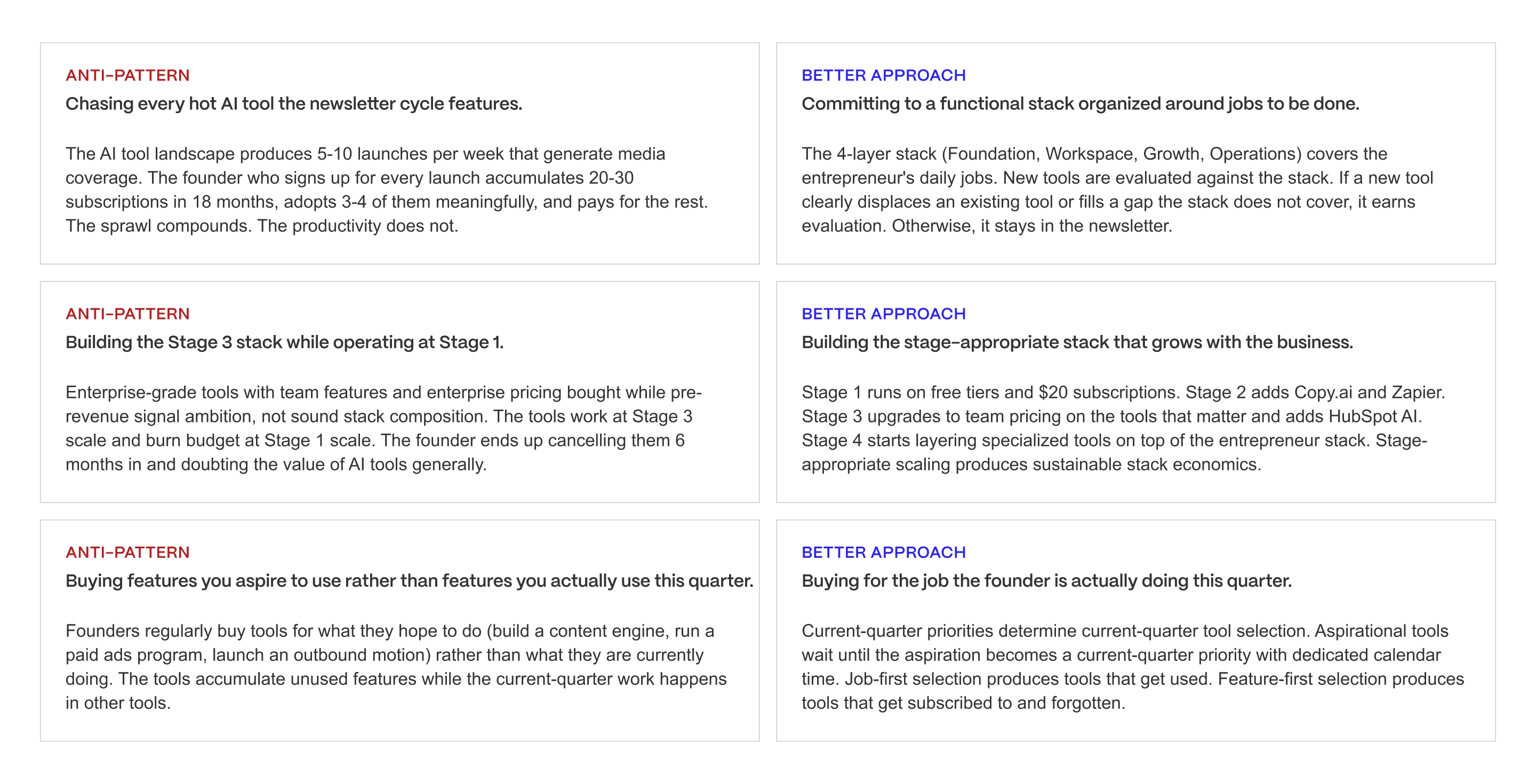
Chasing every hot AI tool vs. committing to a functional stack. The newsletter cycle rewards novelty, and it's tempting to try whatever tool is getting attention this week. The better approach is committing to the 8-tool stack above and treating new tool discovery as something to note, not act on immediately. Add a new tool only after it passes the five-point framework.
Buying a Stage 3 stack at Stage 1 vs. a stage-appropriate stack. A pre-revenue founder buying enterprise marketing automation is paying now for capacity that won't be used for a year or more. The better approach is matching stack composition to current revenue stage, covered in the next section, and upgrading deliberately as the business grows into the next tier.
Aspirational feature purchases vs. current-quarter job selection. It's easy to buy a tool for the business you hope to have in a year rather than the one you're running today. The better approach is asking what job needs doing this quarter, not what capability might matter eventually.
Each of these persists because the newsletter cycle and the fear of missing out both push toward accumulation. Naming the pattern is often enough to interrupt it the next time a tempting subscription shows up in your inbox.
Decision by Revenue Stage
Stack composition should shift as revenue grows. Below are 4 stages with rough monthly cost projections for the core stack described above.
.avif)
Pre-Revenue Validation ($0 to $40/month). Free tiers of ChatGPT and Claude cover most daily work. Add HubSpot's free CRM once conversations with prospects begin, and Zapier's free tier for light automation. Skip paid Notion, Gamma Plus, and Copy.ai until usage volume justifies the spend.
Finding PMF ($80 to $150/month). Paid ChatGPT Plus and Claude Pro ($40 combined) become worthwhile once daily usage hits free-tier caps. Add Gamma Plus for cleaner client and investor materials, and Copy.ai's free or entry tier for early content volume. HubSpot's free CRM usually still covers pipeline needs at this stage.
Early Scale ($200 to $450/month). The full 8-tool stack comes into play. Notion Business becomes worthwhile once documentation needs outgrow scattered docs. HubSpot's paid Starter tier adds marketing automation as contact volume grows. Zapier Professional replaces the free tier once real workflows are running.
Growth Scale ($500 to $1,500/month). The foundation stack stays, but specialized tools start layering on: HubSpot Professional for reporting and attribution, Zapier Team plans for cross-departmental automation, and industry-specific tools where a generalist no longer fits.
A note for agency and services-based entrepreneurs: delivery-capacity constraints shift these numbers. Agencies typically need HubSpot or a comparable CRM earlier than a product-led business, since client pipeline management starts mattering from day one, and often need multiple Copy.ai or Gamma seats sooner to keep pace with client deliverable volume.
A note for technical founders at pre-revenue: Claude's coding capability (through Claude Code) often earns a paid seat earlier than the rest of this stack, even before Claude Pro would otherwise be justified for general use, because development velocity compounds differently than marketing or documentation work does.
DECISION BY REVENUE STAGE
Use this as a starting point, not a binding answer. The five-point framework
(Asset 1) is the real evaluation. The revenue stage recommendation gets the
entrepreneur to the right starting stack.
STAGE 1: PRE-REVENUE VALIDATION (0 PAYING CUSTOMERS)
- Profile: solo founder testing ideas, discovering market fit, no
validated revenue yet
- Top constraints: cost minimization, discovery speed, no team overhead
- Priority jobs: research, ideation, planning documents, early landing
pages, first pitch materials
- Recommended starting stack: ChatGPT free, Claude free, Notion free,
Gamma free tier, Perplexity free tier
- Monthly stack cost: $0-$40
- Why: every free tier maxed before any paid subscription starts. The
founder needs to prove revenue before spending on AI infrastructure.
Free tiers cover ideation, research, planning, and first-draft
content production adequately at this stage.
The verdict: do not pay for anything until free tiers hit hard limits or
revenue arrives. Discovery stage does not require paid AI infrastructure.
STAGE 2: FINDING PMF ($0-$100K ARR)
- Profile: first paying customers, product iterating rapidly, content
and customer conversation dominating the calendar
- Top constraints: hours per week, first-hire timing, budget scaling
with revenue
- Priority jobs: content production, customer support scaling, first
automation, sales research
- Recommended stack: ChatGPT Plus, Claude Pro, Notion AI, Copy.ai
Starter, Zapier free tier, Gamma Plus
- Monthly stack cost: $80-$150
- Why: at Stage 2 the founder's time constraint dominates. AI tools
that reclaim 5+ hours per week justify their cost easily. The upgrade
from free to paid tiers happens on the tools the founder uses daily.
The verdict: pay for the tools the founder uses daily. Keep the rest on
free tier. Add Zapier and Copy.ai when specific workflows demand them,
not preemptively.
STAGE 3: EARLY SCALE ($100K-$1M ARR)
- Profile: first hires arrived, workflow coordination becomes real,
sales and customer support workloads scale
- Top constraints: workflow coherence across a small team, cost of
stack sprawl becoming material
- Priority jobs: team documentation, CRM implementation, sales
motion, marketing automation, integration across tools
- Recommended stack: full 8-tool stack with team tiers where relevant,
HubSpot AI upgrade, Zapier paid tier
- Monthly stack cost: $200-$450
- Why: Stage 3 is where the entrepreneur stack starts to look like a
small-team system. Team tiers on the tools that matter, integrations
activated, workflows documented across the team.
The verdict: activate team tiers on ChatGPT, Notion AI, and HubSpot AI.
Formalize the stack in team documentation. Cancel any tools not passing
the 10-question audit.
STAGE 4: GROWTH SCALE ($1M-$5M ARR)
- Profile: team scaling to 5-15 people, specialized roles arriving,
generic entrepreneur stack starting to hit ceilings on the highest-
leverage functions
- Top constraints: specialized capability gaps, integration depth
across tools, team-scale procurement complexity
- Priority jobs: specialized function scaling, integration architecture,
tool procurement as an operating discipline
- Recommended posture: entrepreneur stack becomes foundation,
specialized tools layer on top for growth-critical functions (see
companion articles on Best AI Tools for Product Managers, Best AI
Tools for Sales Prospecting, Best AI Tools for B2B Marketing)
- Monthly stack cost: $500-$1,500 for foundation, plus specialized
tool spend
- Why: at Stage 4 the founder is transitioning from generalist tool
stack to specialized function stacks. The entrepreneur stack does not
go away. It provides the foundation the specialized tools plug into.
The verdict: keep the entrepreneur stack as foundation. Layer
specialized tools on top for the 2-3 highest-leverage functions the
business is scaling. Do not abandon the foundation stack even if
specialized tools appear to duplicate some capability.
CROSS-STAGE: AGENCY AND SERVICES BUSINESSES
- Profile: any stage above where the business is services delivery
rather than product/SaaS
- Top constraint: client work delivery capacity as the binding revenue
lever
- Adjustment to standard recommendation: add tools that scale services
delivery capacity (Descript for content clients, Cursor for technical
services, Gamma for client pitch materials) earlier than the standard
stage timeline suggests
The verdict: services businesses should over-invest in delivery-
capacity tools relative to the standard entrepreneur timeline. The ROI
on delivery-capacity tools scales with billable hours, not with
subscription cost.
PRINCIPLE
The AI tool buying decision for entrepreneurs in 2026 is not which tools
have AI features. Almost all tools do. The decision is which tools fit
the revenue stage and functional layer where AI leverage matters most
right now. The five-point framework, the 4-layer stack, and the revenue-
stage decision framework are the instruments that produce a coherent
stack. Everything else is sprawl.
If you're a funded startup founder rather than a bootstrapped entrepreneur, our companion article on the best AI tools for startups covers team-scaling context that this guide doesn't, including startup-specific resources built around funded-team constraints.
The entrepreneur AI tool problem isn't scarcity. It's sprawl. Stack, not sprawl. Curation, not accumulation.
Every founder can name 20 hot AI tools they should try. Few can name 8 they actually use daily. The strategic move in 2026 is a consolidated 8-tool stack organized by function: Foundation (ChatGPT, Claude), Workspace and Presentations (Notion AI, Gamma), Sales and Growth (HubSpot, Copy.ai), Operations and Research (Zapier, Perplexity). The five-point framework, revenue-stage composition, and quarterly audit are the discipline that separates a coherent stack from newsletter-cycle sprawl.
Veza Digital works with entrepreneur-led B2B SaaS businesses across the stages that follow. If you're scoping the growth marketing operating system that layers on top of this AI stack, we should talk.
See how Veza scales entrepreneur-led SaaS
Pricing and feature availability for AI tools change often, and several tools covered here (notably Notion AI, Copy.ai, and Zapier) have restructured pricing within the past year. The figures above reflect published rates as of July 2026. Confirm current pricing directly on each vendor's site before subscribing or budgeting.