.jpeg)
All current Project Management tools claim to be powered by AI. However, many simply have a chatbot in the sidebar. As a result, teams are wasting time reviewing more than 20 different AI project management tools, most of which offer similar features but perform significantly differently in practice.
Abstract
This guide will clarify which tools are the best choice for your team. We tested 12+ project management tools. Based on our testing and review, we provide recommendations based on four use cases:
- Scheduling and Time Management using AI
- Collaboration & Status Automation using AI
- Enterprise Portfolio and Resource Planning using AI
- Lightweight Planning for Small Teams using AI
In addition, we identify three additional tools that we reviewed but do not recommend. For each tool, we cover what the AI does - not what the marketing page says - honest limitations, and real pricing.
What AI Actually Does in Project Management (and What It Does Not)
The AI-Washing Problem in Project Management Software
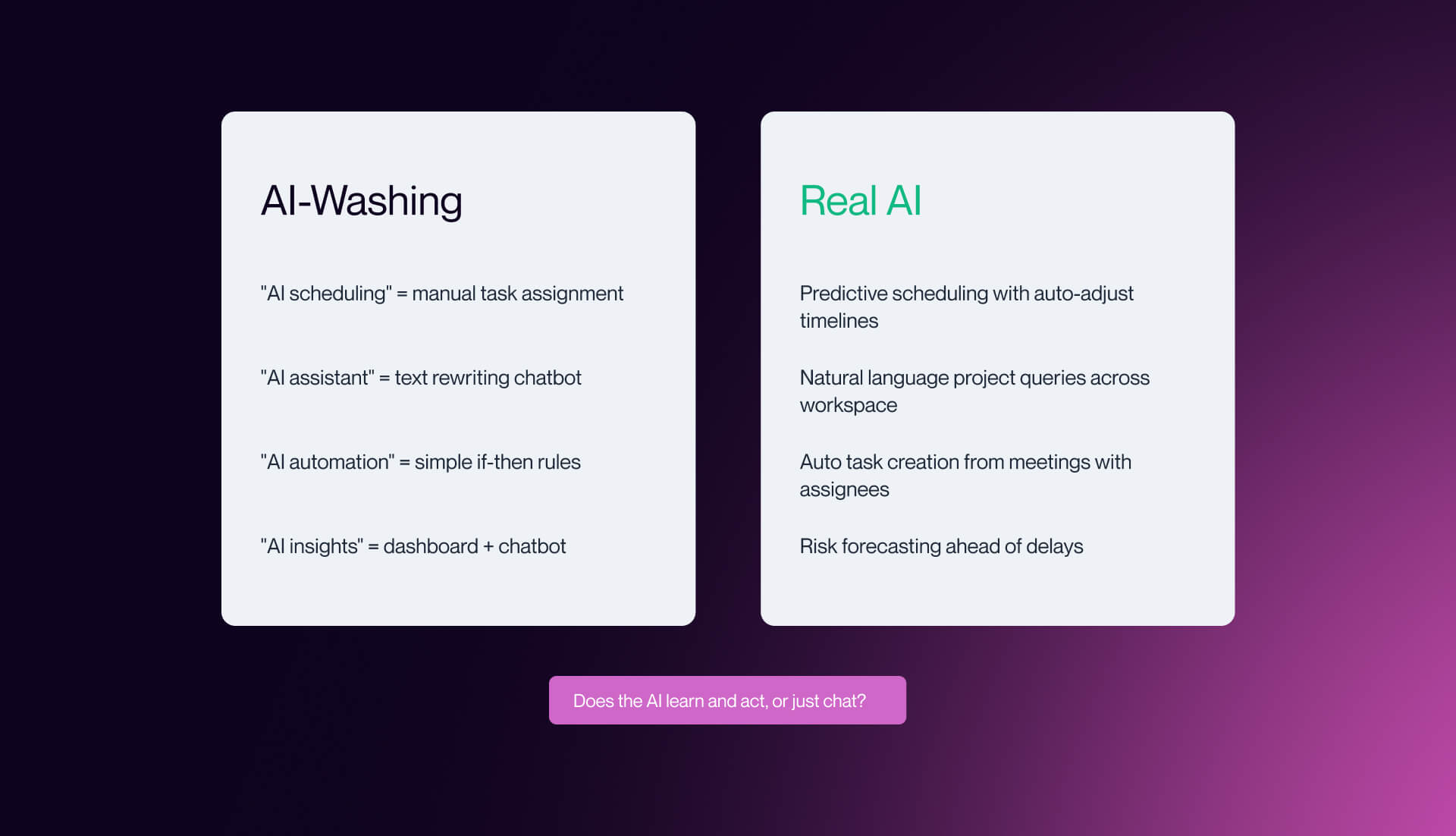
If you have spent any time evaluating project management software in the last 18 months, you have noticed the pattern:
Nearly every project management software platform has an "AI-Powered" label attached.
Click through to the feature page and you will find a chatbot in the sidebar, a button that rewrites your task descriptions, and a workflow builder that calls its if-then rules intelligent automation.
This isn't AI project management. This is rebranded automation.
True AI Project Management entails several things:
- Predictive Scheduling that uses team capacity and velocity history to predict how long a project will take
- Risk Forecasting that identifies potentially slipping timelines prior to them slipping
- Autonomously created tasks from meeting transcripts and conversation
- Natural Language Queries to identify key project metrics without having to create a custom report first (similar to how modern AI chatbots for B2B websites).
These are capabilities that learn from your data over time, rather than executing pre-defined rules. The same pattern shows up across the broader AI stack, which we break down in our guide to AI search engines and the broader SEO, GEO, AEO and LLM guide.
Why does this matter?
When evaluating a new tool, teams often lack the necessary details to assess features like "AI-Powered Scheduling" accurately. It's difficult to know if the feature genuinely adapts to the team's scheduling patterns or simply automates task assignment based on a manually input priority field. We made sure to test for this.
Each tool we reviewed in this guide was tested for:
- Whether their AI capabilities are truly predictive
- Are there real learning capabilities, or just a thin layer of automation
We used three tests:
- Does the tool output change in response to conditions, without additional manual input?
- Does it surface information the user did not know to ask for? Does its behavior improve as it learns your team's patterns?
- As the tool learns about the patterns of your team, does its behavior become better?
Note: In practice, the value of many project management tools depends on how well they connect with the rest of your stack, from design workflows to marketing systems. That’s where Webflow integrations and tools in areas like AI tools for UX design start to matter.
Where AI Genuinely Helps in PM - and Where It Does Not
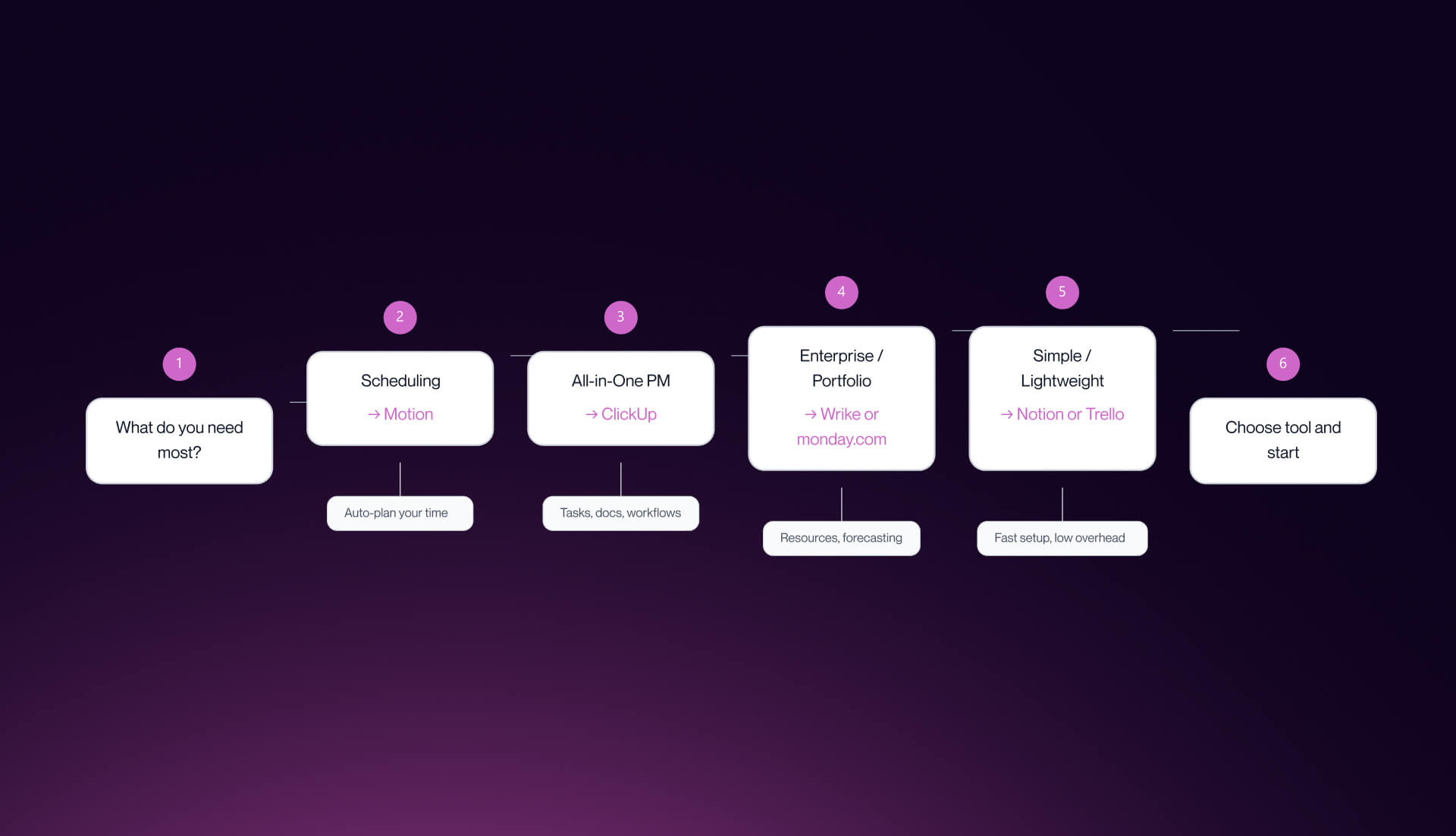
The ability for AI to add measurable value in project management comes in four ways.
Scheduling and time-blocking
As an example, tools such as Motion and Reclaim can create a calendar around your priority task list (once you have one) and adjust it on the fly if/when a task takes longer than expected.
Status Summarization
Tools, including ClickUp Brain and Notion AI, can review the content of your Project Space (tasks, comments, documents, etc.) and provide you with a status update on demand. This way you save 30 to 60 minutes each week.
Resource and Capacity Forecasting
Tools, including Wrike and Monday.com, utilize past data to alert you to potential issues with resource allocation before you miss the deadline.
Risk Flagging
Wrike’s Copilot and Smartsheet’s AI can recognize trends where projects are likely to be delivered late by utilizing patterns, rather than solely relying upon mathematical deadlines.
However, AI has been applied to the parts of project management that require judgment, relationship context, and organizational awareness.
AI does not help with:
- Decisions regarding strategy (what to build first, second, third, fourth; at what cost).
- Relationship building, negotiating scope, managing vendors, and motivating a team.
Tools that attempt to automate every aspect of project management generally fall short across the entire spectrum. On the other hand, tools that employ AI to address identified friction points (scheduling; reporting; risk) demonstrate tangible value.
The same shift is happening in AI analytics tools for B2B and AI presentation tools where reporting is moving from manual dashboards to generated insights.
The best mental model: AI is a great project coordinator. It keeps track of items, identifies trends/patterns, provides summaries, and gets work moved through established pipelines.
The Four Use Cases This Guide Covers
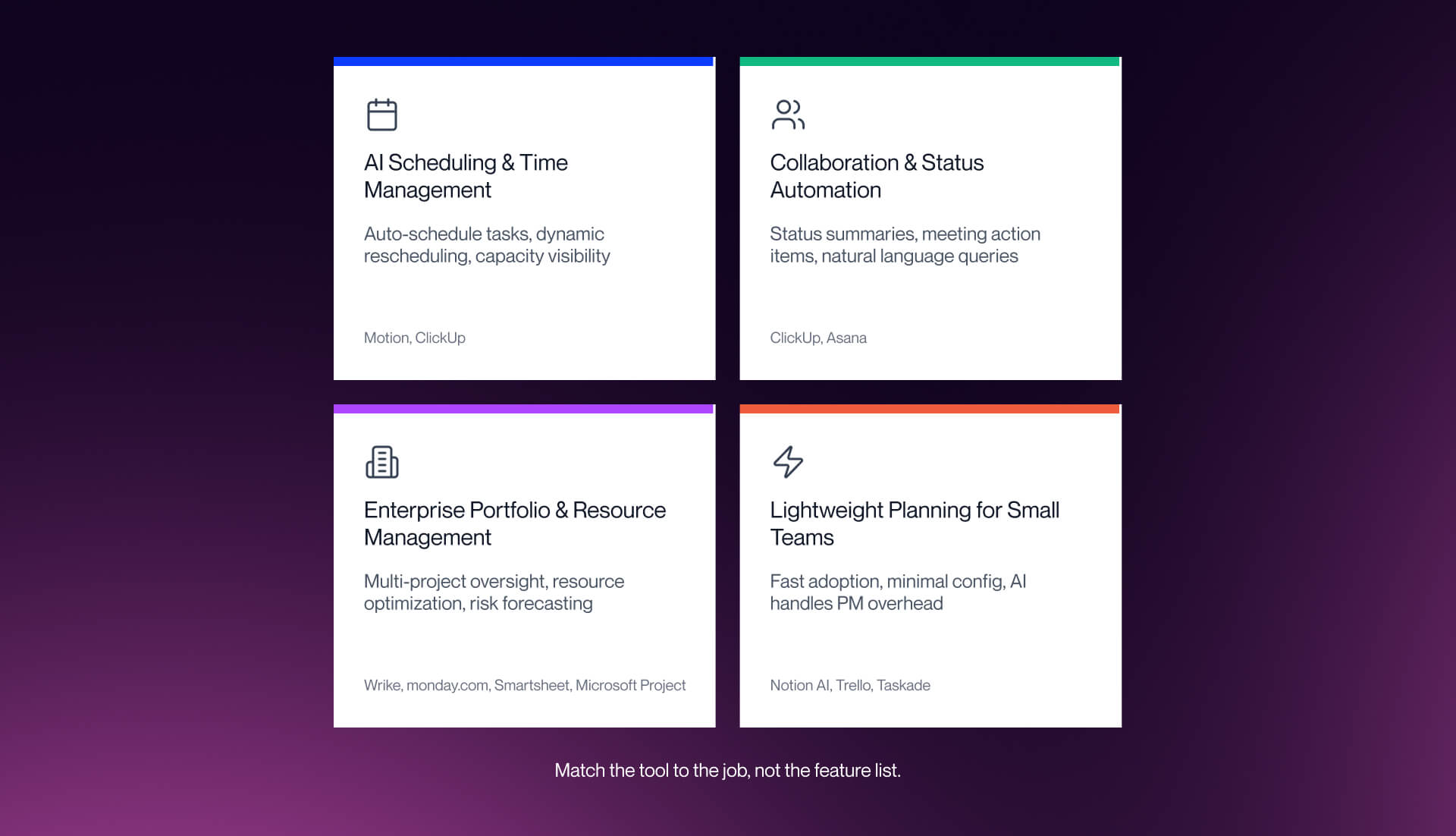
Rather than ranking all 8 tools in a single list, we organize recommendations by the problem you are trying to solve.
The four use cases:
- AI Scheduling and Time Management: tools that auto-schedule tasks into calendars and dynamically reschedule when plans change. Best for teams whose primary friction is figuring out when work gets done.
- Collaboration and Status Automation: tools that summarize project status, extract action items from meeting transcripts, and reduce manual update overhead. Best for teams whose primary friction is communication and reporting.
- Enterprise Portfolio and Resource Management: tools for PMO directors managing multiple simultaneous projects, allocating resources across teams, and forecasting capacity. Best for teams whose primary friction is visibility and resource conflicts at scale.
- Lightweight AI Planning for Small Teams: tools for startups and small teams without dedicated project managers who need AI to handle basic PM overhead without weeks of configuration.
Reminder: Project management tools don’t operate in isolation, they sit alongside AI SEO tools, analytics platforms, and CRO tools as part of a complete operating stack.
All 8 Recommended Tools at a Glance
Best AI Project Management Tools for Scheduling and Team Collaboration
AI scheduling solves the most pervasive daily friction in project management: figuring out when work gets done. Not when it is due - every tool handles deadlines - but when it gets scheduled into a calendar given real constraints:
who is working on what, how long tasks realistically take, and what happens when a meeting eats three hours of a Tuesday you had planned as deep work.
What Teams Need from AI Scheduling
The key question to ask any tool claiming AI scheduling: does the tool schedule for you, or does it show you a calendar view of tasks you scheduled manually? The first is predictive.
The second is a Gantt chart with a new skin. Most tools in the current market offer the second while marketing it as the first. Real AI scheduling tools maintain a continuously updated model of your team's availability and backlog.
When a task runs over, they re-plan downstream work automatically. When you add a new high-priority task, they find room for it without requiring you to manually shift everything else. That is the standard we held tools to in this section.
Motion - Best for AI Auto-Scheduling and Team Capacity
Motion is the most genuinely AI-first scheduling tool on the market. It ingests your task list - including priority, estimated duration, deadline, and dependencies - and builds a daily calendar automatically.
When a meeting runs long, when a task takes twice as long as estimated, or when a new urgent task lands in the queue, Motion re-plans the rest of your day and week without any manual input. Team mode extends this to the whole team, giving managers a real-time view of who has capacity and who is overloaded before assignments are made.
- Pricing: Individual $19/month, Team $12/user/month - verify current pricing at usemotion.com before committing.:
- Best for: Teams of 3 to 20 who want AI to own the scheduling layer entirely and are willing to hand over calendar control.
- Honest limitation: Motion's rigidity is a real adoption risk. Once the system takes over your calendar, manual changes feel clunky - the tool is optimized for letting AI manage the schedule, not for humans who want to micromanage individual time blocks. If even one or two team members resist automated scheduling, adoption friction will undermine the whole thing. It is also relatively expensive per user at scale.
ClickUp - Best All-in-One AI for Projects, Docs, and Status Automation
ClickUp Brain is the most comprehensive AI layer currently available in a project management platform. It connects tasks, documents, team members, and goals in a single queryable AI model.
Ask it what is at risk this sprint, what a team member is working on, or what decisions were made in the last two weeks, and it surfaces answers from across your workspace without requiring you to know where to look.
ClickUp Brain also generates project plans from natural language descriptions, writes and summarizes status updates, and automates repetitive workflow triggers that would otherwise require manual rule configuration.
- Pricing: Free tier; Unlimited $7/user/month; Business $12/user/month; Enterprise custom. AI features require an add-on in some tiers - verify the current structure at clickup.com.:
- Best for: Teams of 10 to 100 who want a single platform for tasks, documents, goals, and AI-assisted reporting. ClickUp is the strongest all-in-one option for teams that have outgrown simple task managers but are not yet at the enterprise scale where Wrike or dedicated portfolio tools are necessary.:
- Honest limitation: ClickUp has a real feature bloat problem. The learning curve is steep - most teams report that it takes meaningful setup time before ClickUp Brain starts delivering strong results, because the AI is only as useful as the underlying workspace structure. If your team is not willing to invest in initial configuration, you will not get the AI benefits. For teams who only need scheduling, it is significant overkill.
Asana - Also Consider: Best for AI Goal Setting and Project Creation
Asana's AI is best understood as a knowledgeable project structuring assistant rather than an autonomous agent.
Describe what you want to achieve in plain language and Asana breaks it down into tasks, milestones, and dependencies. Its workflow builder automates handoff processes.
Where Asana genuinely stands out is in helping teams at the beginning of a project - structuring work, setting goals, creating templates - rather than in the ongoing execution layer.
- Pricing: Basic free; Premium $10.99/user/month; Business $24.99/user/month - verify at asana.com.
- Best for: Teams who need AI to help structure and kick off projects well, not teams looking for autonomous scheduling or execution.
- Honest limitation: Asana's AI does not schedule or manage projects for you. It organizes and structures the work you define. If your primary friction is scheduling and capacity planning, look at Motion or ClickUp instead.
Best AI Project Management Tools for Enterprise Portfolios and Resource Planning
Enterprise project management is a fundamentally different problem from team-level PM. A team lead managing one sprint needs different AI than a PMO director overseeing 30 simultaneous projects across four departments, each competing for the same engineers and designers.
What Enterprise Teams Need from AI Project Management
At enterprise scale, AI's value shifts from scheduling individual tasks to forecasting portfolio-level risk, optimizing resource allocation across projects that share talent pools, predicting capacity constraints before they cause delivery failures, and generating executive-ready reporting automatically.
The tools in this section are evaluated against that standard. Features that are genuinely useful at team scale - task management, kanban boards, basic automations - are table stakes here, not differentiators.
Wrike - Best for AI-Driven Workflows and Risk Prediction
Wrike has the deepest enterprise AI integration of any tool we tested. Wrike Copilot answers natural language questions about project status, surfaces projects with risk signals, and generates briefings that pull from across the portfolio.
Its AI agent builder lets teams create custom agents for task routing, scoring incoming requests against capacity, and automating approval workflows. Risk prediction is Wrike's standout capability: it identifies projects trending toward late delivery based on completion patterns and team capacity data, not just deadline proximity.
- Pricing: Free tier; Team $10/user/month; Business $24.80/user/month; Enterprise custom - verify at wrike.com.
- Best for: Mid-size to enterprise teams of 50 or more in marketing operations, professional services, and tech organizations managing complex multi-project portfolios where resource conflicts and delivery risk are the primary management problems.
- Honest limitation: Wrike tries to accommodate every use case, and this breadth creates real setup complexity. Teams report that the configuration overhead to get Wrike delivering strong AI results is significant - it is not a tool you can stand up in an afternoon. If your portfolio is straightforward or your team is under 30 people, that setup cost is hard to justify. Start with ClickUp or monday.com.
monday.com - Best for Resource Planning and Visual Dashboards
monday.com's AI handles resource planning, basic risk assessment, and visual project dashboards well. Its AI generates workflow automations, surfaces project insights in a visual format that is genuinely accessible to non-technical stakeholders, and provides portfolio-level
summaries.
The dashboard builder is significantly more intuitive than Wrike's, making monday.com the better choice for teams where executive reporting and stakeholder visibility are the primary AI use case.
- Pricing: Individual free; Basic $9/seat/month; Standard $12/seat/month; Pro $19/seat/month - verify at monday.com.:
- Best for: Teams of 20 to 200 who need strong visual dashboards and resource planning without Wrike-level configuration complexity. monday.com is the better option for organizations where visual communication of project status matters more than deep predictive intelligence.:
- Honest limitation: monday.com's AI is useful but shallower than Wrike on predictive capabilities. Risk forecasting and autonomous workflow adjustment are more limited. For teams whose primary need is portfolio-level risk management, Wrike is the stronger choice.:
Also Consider: Smartsheet and Microsoft Project
Smartsheet delivers solid AI-powered project insights with agentic capabilities and is the natural choice for organizations already using spreadsheet-based project tracking at scale. It handles AI-based insight generation well and has a familiar interface that reduces adoption friction for teams coming from Excel-based PM workflows.
Microsoft Project is the right answer for large organizations already standardized on Microsoft 365 who need enterprise PM with Copilot AI integration baked in. The scheduling engine is robust, the integration with Teams, SharePoint, and Power BI is deep, and for organizations where the Microsoft ecosystem is non-negotiable, it is the default choice.
For teams without that existing Microsoft commitment, the flexibility of Wrike or monday.com generally wins.
Best AI Project Management Tools for Small Teams and Startups
Small teams - roughly 2 to 15 people - have a different PM problem than enterprises. The issue is rarely portfolio visibility or resource optimization.
The issue is overhead: someone has to turn conversations into tasks, someone has to track whether things are done, and in a small team that person is usually also doing the actual work.
What Small Teams Need from AI Project Management
AI for small teams should handle the administrative layer - creating tasks from conversations, scheduling work into calendars, summarizing what happened and what is next - without requiring a dedicated project manager to configure and maintain the system.
The evaluation standard here: fast adoption (under 30 minutes to useful), low ongoing maintenance, and pricing that makes sense at 2 to 15 users.
Notion AI - Best for Flexible AI-Powered Workspace
Notion AI turns what is already a popular all-in-one workspace into a genuinely AI-enhanced productivity system.
It generates project plans from descriptions, summarizes meeting notes and documents, searches across your entire workspace using natural language, and automates recurring documentation.
For small teams that already live in Notion - or want a single place for tasks, docs, knowledge base, and team wiki - the AI layer adds meaningful value on top of an already capable platform.
- Pricing: Free tier; Plus $10/user/month; Business $18/user/month - verify at notion.so.:
- Best for: Small teams who want everything in one place and are willing to invest setup time to configure a workspace that fits their workflow.:
- Honest limitation: Notion's flexibility is both its strength and its trap. The tool can become a procrastination engine: teams spend more time building dashboards and templates than doing actual work. Reddit consensus and independent reviews consistently surface this pattern. Notion is also slower than purpose-built task managers and lacks offline mode. If your team wants a focused, fast task management experience rather than a flexible workspace, Trello or ClickUp will serve you better.:
Trello with Atlassian Intelligence - Best for Visual Kanban with AI
Trello with Atlassian Intelligence brings AI to a kanban workflow that is already one of the fastest to adopt in the market.
AI features cover summarization of card content and conversations, content generation for descriptions and updates, and basic communication automation. The result is a visual, low-overhead task management system that small teams can be using productively within an hour.
- Pricing: Free tier; Standard $5/user/month; Premium $10/user/month; Enterprise custom - verify at trello.com.
- Best for: Visual thinkers and small teams who want simple, fast task management with AI enhancement and minimal configuration. Trello is particularly strong for teams who have tried heavier tools and found them overkill.
- Honest limitation: Trello lacks advanced project management features. There is no native Gantt view, resource planning is limited, and the AI capabilities are shallower than ClickUp or Notion. Teams with complex dependencies or more than 15 people will outgrow it. It is the right tool for simple workflows, not complex ones.:
Taskade - Also Consider: Best for Real-Time AI Collaboration
Taskade is a real-time collaboration workspace with AI agents built into the core experience. AI handles task generation from conversations, brainstorming, and workflow automation.
It is particularly well-suited to remote teams who want the AI to facilitate collaboration - generating agendas, summarizing async discussions, creating follow-up tasks from meeting notes - rather than just managing a task list.
- Pricing: Free tier; Pro $8/user/month - verify at taskade.com.
- Best for: Remote teams of 2 to 10 who prioritize real-time collaboration and want AI built into the communication layer, not bolted on as a sidebar.:
- Honest limitation: Taskade is less mature than Notion or ClickUp. The feature set is still developing, and for teams that need structured project management rigor - dependencies, resource planning, reporting - it will feel thin. It is excellent for collaboration-first teams, not process-heavy ones.
Tools We Tested and Did Not Recommend, Plus Reference Stacks by Team Size
Publishing what we tested and did not recommend is as important as the positive recommendations.
Tools We Tested and Did Not Recommend
Three tools did not earn a place in this guide:
Forecast PSA
Forecast positions itself as AI-native and is genuinely strong on resource management and project financials. The problem is that it is built for professional services firms billing by the hour - a PSA (Professional Services Automation) tool with project management features, not the other way around.
For B2B SaaS product teams, the PSA model adds structural complexity that does not match how software teams work. If you are running a consulting firm and need to track utilization and client billing alongside project management, evaluate Forecast.
For everyone else, Wrike or monday.com delivers the same resource management capability without the PSA overhead.
Morgen (as a PM tool)
Morgen is an excellent individual scheduling tool. It connects your calendars and task managers, applies intelligent time-blocking, and gives a single view of your day across multiple sources.
For individual productivity, it is genuinely good. But it is not a project management platform. Team features are limited, there is no native project structure, and it works best as a personal layer on top of an existing task manager rather than as a standalone PM solution.
If you need individual scheduling alongside your PM tool, Morgen is worth considering as a complement. Do not use it as a PM replacement.
Cosmetic AI Tools (Unnamed)
Several tools we evaluated added "AI" to their marketing without meaningful AI capabilities.
For marketing teams specifically, this overlaps heavily with tools covered in our AI tools for B2B marketing guide, where project management and campaign execution start to merge.
The tell: the only AI feature is a text editor that rewrites task descriptions, a chatbot that answers questions about the tool's own documentation, or a template library described as "AI-generated." These are not AI project management tools.
We excluded them from this guide entirely.
Reference Stacks by Team Size
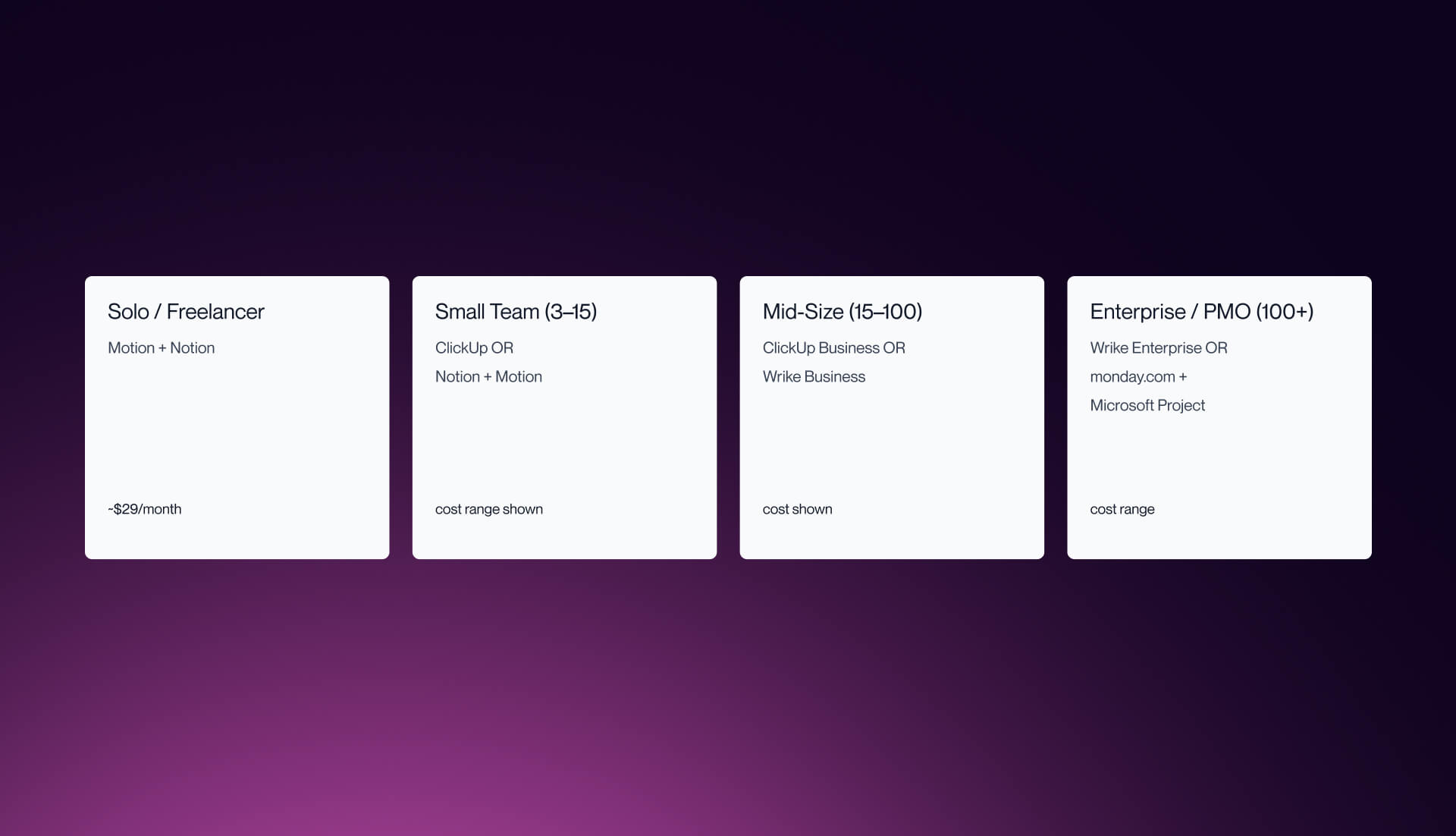
The goal of this section is simple: if you tell us your team size and context, we can tell you which stack to start with. These are starting points, not prescriptions.
Solo / Freelancer
Motion (AI scheduling) + Notion (workspace) = approximately $29/month. Motion handles the calendar layer and ensures work gets scheduled; Notion handles tasks, docs, and knowledge base. This stack covers scheduling, task management, documentation, and knowledge management without overlap.
Small Team (3-15 people)
ClickUp (all-in-one PM + AI) at $7-12/user/month is the default recommendation. It covers tasks, docs, goals, and reporting in one platform and the AI layer is strong enough to replace several single-purpose tools.
Alternative: Notion + Motion if your team prefers to keep the scheduling and workspace layers separate and is willing to manage two tools.
Mid-Size Team (15-100 people)
ClickUp Business ($12/user/month) if you want a single platform with strong AI across tasks, docs, and reporting. Wrike Business ($24.80/user/month) if your primary need is deeper AI risk prediction, enterprise reporting, or multi-project portfolio management.
The decision point: if you are managing complex, interdependent projects across multiple teams with competing resource demands, Wrike's predictive capabilities justify the cost and setup investment. For everything else, ClickUp.
Enterprise / PMO (100+ people)
Wrike Enterprise or monday.com Enterprise for portfolio and resource management, plus Microsoft Project for Microsoft 365 integration where required. Budget $20-40/user/month depending on tier and add-ons. At this scale, the evaluation should include IT security review, SSO requirements, and integration depth with your existing tooling - not just the AI feature list.
Frequently Asked Questions
What is the best AI project management tool in 2026?
There is no single best. It depends on the use case. Motion leads for AI scheduling. ClickUp leads for all-in-one project management. Wrike leads for enterprise portfolio management. Notion leads for flexible workspaces. Trello leads for simple visual task management. The best tool is the one that removes the most friction from how your team already works.
Can AI replace project managers?
No. AI handles scheduling, status reporting, risk flagging, and administrative overhead. Project managers handle strategic decisions, stakeholder relationships, scope negotiation, and team leadership. AI improves efficiency by removing low-value tasks. It does not replace judgment.
What is the difference between AI and regular PM tools?
Regular PM tools organize tasks, deadlines, and assignments. AI PM tools add predictive scheduling that learns from patterns, autonomous task creation from meetings, risk forecasting that flags issues before they escalate, and natural language queries that retrieve project insights without custom report building.
What is AI-washing in project management software?
AI-washing is when project management tools rebrand existing automation, such as if-then rules, templates, or simple GPT wrappers, as AI-powered features. Real AI involves predictive capabilities that learn from historical data, such as forecasting timelines, optimizing resource allocation, and autonomously adjusting schedules. If the only AI feature rewrites text, it is not true AI project management.
How much do AI project management tools cost?
Free tiers exist with tools like ClickUp, Notion, Trello, and Asana. Mid-range pricing is typically 7 to 20 dollars per user per month. Enterprise plans range from 20 to 40 dollars or more per user per month. Most teams spend around 10 to 15 dollars per user per month for useful AI features. Some platforms charge separately for AI add-ons, so pricing pages should be checked carefully.
What is the best free AI project management tool?
ClickUp Free offers the most AI-related functionality at no cost. Notion Free is strong for workspace and documentation with limited AI. Trello Free works well for simple kanban boards. For meaningful predictive AI such as scheduling or risk forecasting, paid plans are required across all platforms.
What is the best AI project management tool for small teams?
ClickUp works well as an all-in-one solution. Notion is strong for flexible workspaces. Trello is best for simple visual task tracking. Motion provides advanced AI scheduling but comes at a higher cost per user. Taskade is a good fit for real-time collaboration with built-in AI. Small teams should prioritize fast adoption and low setup overhead.
Do these tools integrate with Slack and other apps?
Yes. ClickUp, Asana, Wrike, monday.com, and Notion integrate with Slack, Google Workspace, Microsoft 365, and many other tools. Motion integrates with Google Calendar, Outlook, and Zoom. Integration depth varies, so vendor integration pages should be reviewed before choosing a tool.
What AI features should I prioritize?
Focus on predictive scheduling that learns from usage patterns, natural language queries for project status, automated summaries and meeting action items, risk and bottleneck forecasting, and resource capacity planning. Lower priority features include generic AI text generation, simple chatbot assistants, and superficial AI labeling.
ClickUp or monday.com - which is better for AI project management?
ClickUp has deeper AI integration across tasks, documents, and goals. monday.com offers stronger visual dashboards and resource planning tools.
For an all-in-one AI project management system, ClickUp is the better choice. For visual resource management, monday.com is stronger. For large-scale multi-project environments, Wrike is a better alternative than either.
The best project management tool is the one your team actually uses. Same goes for your website.
AI project management tools save time on scheduling, reporting, and status updates. But the system only works when every piece of your operations is built to scale.
Veza Digital builds Webflow websites and marketing systems for B2B SaaS teams who are done patching together tools that do not talk to each other.