.jpeg)
Most AI design tool roundups assess 15-40 tools, but no working designer has time to review that many. We tested over 25 tools across B2B SaaS work and recommend 8 that have earned a place in our production workflow. We will also list 4 tools we tested but elected not to adopt, with clear reasons as to why.
Our goal is simple: Stop trying everything, and begin using only those that really do work.
Abstract
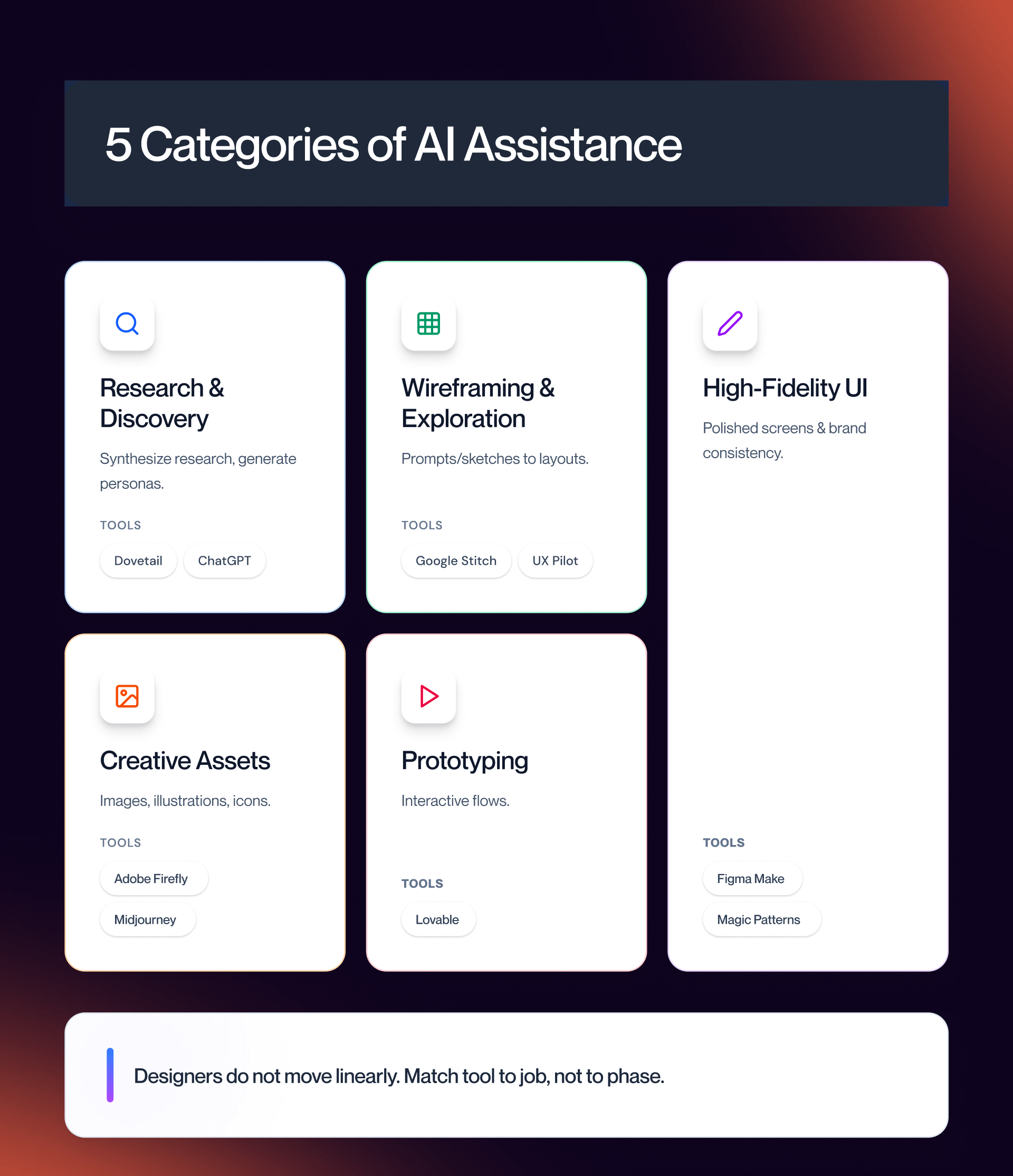
The eight design tools reviewed fall into five different categories of AI support:
- Research and discovery (Dovetail AI)
- Wireframing and exploration (UX Pilot, Google Stitch)
- High-fidelity UI creation (Galileo AI, Figma Make, Magic Patterns)
- Creative asset creation (Adobe Firefly)
-Prototyping (Lovable).
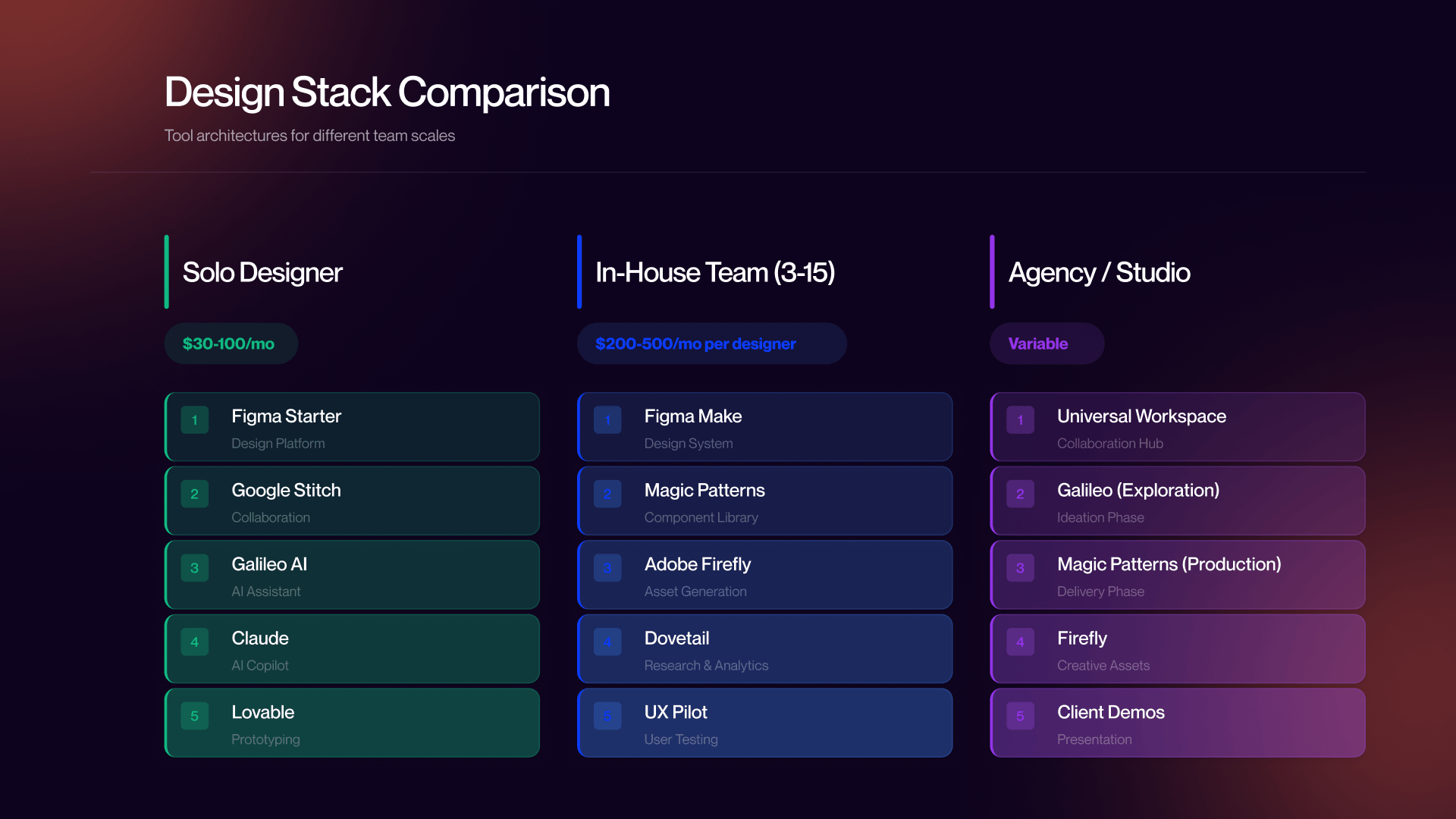
Each tool is reviewed with a focus on what it does, current pricing, best use cases, and limitations. At the end, we also provide three reference stacks for solo designers, in-house design teams, and design agencies.
Why Most AI Design Tools Fail (and the 8 That Did Not)
We start this section from an honest place - skepticism.
Designer Skepticism Is Right
All AI tools seem to be solutions in search of problems. The independent roundup at Toools.design frames it well “AI augments designer judgment rather than replacing it”. This point is valid and should be said out loud before we recommend anything.
There was a massive wave of new AI Design Tools released in 2024-2025, and the majority of those tools were very disappointing as far as getting work done. A lot of tools that looked really good in their demos turned into a mess when we used them in projects.
There were some consistencies in how many of these tools failed. For example:
- The output was always generic
- There was never any reference to our company’s design system
- The responsive layout was either broken or completely missing
- Accessibility was simply ignored
- The exported code needed to be extensively cleaned up just to make it
For context on where AI design is heading beyond individual tools, see our companion piece on AI in UX/UI design trends.
5 Categories of AI Assistance (Not 5 Phases)
One mistake common to AI design tool roundups - including some of our own earlier drafts - is organizing tools by workflow phase: research, wireframe, UI, prototype, handoff.
UX work rarely happens linearly. Designers do not follow the same progression through the traditional UX phases. In fact, most designers have moved away from this linear approach to design several years ago. Designers use AI tools based on what type of help they need at each point in their design process (not necessarily by order of phase). Therefore, we will categorize AI tools for designers by category rather than by phase of a designer’s process:
- Research/Discovery - collecting & synthesizing qualitative data, creating personas, developing surveys, etc. and transcribing audio recordings.
- Wireframing and Early Exploration - rapidly converting rough sketches, or phrases into a structure that can be used to create a mock-up quickly enough to make it useful.
- High-Fidelity UI Generation - generating fully styled screens with all the correct hierarchies, branding, and proper spacing.
- Creative Assets - images, illustrations, Mood Board Elements, Custom Visuals, etc. that would typically require a trip to the Stock Library.
- Prototyping - creating working prototypes to allow for User Testing and Stakeholder Validation.
In addition to pulling AI tools from one category per day, designers may also draw from multiple categories throughout their daily work.
The Selectivity Bar
Why eight tools and not fifteen? Or forty?
The reason is that a 40-tool list would be useless to a working designer. It will take an hour to read. Weeks to evaluate. By the time you finished evaluating all the tools, three had pivoted. Two had increased pricing, and one was out of business.
Designers that can use AI design tools the best are not necessarily the designers that have looked at the greatest number of options. They are the ones that selected a small set of tools. Learned how to use them. Got fast.
A recommendation was given to a tool based on three factors:
1. Multiple credible, independent sources recommend (endorse) it as being used in production environments.
2. Teams are using these tools in production on actual shipped products.
3. We tested them ourselves on actual client projects and they worked.
We also have a section that includes other tools that were evaluated but were not recommended. These tools receive their own section with true statements as to why they were not placed in the top tier.
Before running confidential client files through any tool on this list, read its privacy policy and - if you work in-house - run it by your security or legal team. This is not paranoia; it is professional practice.
AI for UX Research and Discovery
Research is where designers most frequently overestimate AI and underestimate the gap between capability and usefulness.
What AI Actually Helps With in Research
Here is what AI genuinely helps with: synthesizing large volumes of qualitative data, drafting initial personas from research inputs, generating survey question frameworks, and processing interview transcripts into themes. These are real time savings on tasks that are genuinely tedious.
Here is what AI does not help with: conducting actual user research, judging the quality of the research you have, or interpreting nuanced behavioral signals. AI cannot tell you whether your interview questions were leading, whether your sample was representative, or whether a behavioral pattern in your data is meaningful or noise. Those judgments are still entirely human.
For teams doing serious research at volume, AI assistance with synthesis is genuinely valuable. For solo designers doing occasional research, the bar for a dedicated tool is lower.
Our creative design services inform this reality daily - great design decisions still require a human reading actual user behavior.
Recommended: Dovetail AI
What it does: Dovetail is a research repository with AI synthesis built in. It auto-tags interview transcripts, surfaces recurring themes across sessions, generates highlight reels from video interviews, and makes previously scattered research searchable and actionable.
Pricing: Subscription tiers - verify current pricing at dovetail.com, as it changes with plan structure.
Best for: In-house research teams managing high volumes of qualitative data across multiple studies. If your team runs 20+ interviews per quarter and struggles to synthesize findings before the next sprint, Dovetail earns its cost quickly.
Honest limitation: Dovetail works best when you already have research. It is a synthesis and organization tool, not a research-conducting tool. If you are running three interviews per project, a shared Notion doc and manual affinity mapping may serve you just as well for less money.
For solo designers and small teams: A paid tier of ChatGPT or Claude ($20-30/month - verify current pricing) handles persona drafting and research synthesis adequately. The workflow is less structured, but so is most small-team research. One important rule: do not paste confidential user data into consumer LLM tiers. Enterprise tiers with data processing agreements exist for that reason.
AI for Wireframing and Early-Stage Exploration
Wireframing is where AI starts genuinely saving meaningful time, and where most designers report the clearest before/after.
What AI Actually Helps With in Wireframing
The core value is speed of exploration. AI wireframing tools convert a text prompt or rough sketch into a structured layout in seconds. That changes what is possible in an early-stage session. Instead of spending 45 minutes drawing boxes to communicate a concept you want to test, you spend 5 minutes prompting, review what comes back, and use the next 40 minutes actually thinking about structure, hierarchy, and flow.
The output is rarely production-ready. It should not be evaluated as such. Evaluate it as raw material for thinking - a starting point that is faster than a blank canvas and often more interesting than your first instinct.
Recommended: Google Stitch and UX Pilot
Google Stitch
Google Stitch is a free Google Labs product that generates wireframes from text prompts and voice input. It works on an infinite canvas with full canvas awareness, which means it can maintain consistency across multiple screens in the same session - a meaningful capability for flows rather than single-screen exploration. A March 2026 update from Toools noted the multi-screen consistency as a standout feature.
Pricing: Free during the Google Labs beta, with monthly limits (350 standard + 200 pro generations - verify current limits at stitch.withgoogle.com).
Best for: Rapid early-stage exploration, especially for designers working with zero budget or those who want to pressure-test a concept before committing time to higher-fidelity work.
Honest limitation: This is a Google Labs product, which means there are no long-term pricing or availability guarantees. It also lacks the customization depth of paid alternatives. Use it for exploration; do not build your studio workflow around a free beta.
UX Pilot
UX Pilot generates structured wireframes across a range of fidelities - from rough low-fidelity layouts to relatively detailed mid-fidelity screens - from text prompts or uploaded sketches. Its strength is UX hierarchy: the outputs tend to reflect real information architecture thinking, not just visual arrangement.
Pricing: Subscription with a free tier - verify current plan pricing at uxpilot.ai.
Best for: Rapid wireframe iteration and early concept validation, particularly for complex SaaS interfaces with multiple states and user types.
Honest limitation: UX Pilot is a vendor that publishes its own design tool roundups and prominently features itself. That does not disqualify it - the tool itself has independent endorsements - but approach their own marketing materials with appropriate skepticism. Output quality scales directly with prompt clarity.
For reference on what good wireframes should be targeting in SaaS contexts, our collections of SaaS homepage design examples and SaaS landing page examples illustrate the structural decisions that wireframes need to get right before high-fidelity work begins.
AI for High-Fidelity UI Generation
High-fidelity UI generation is the hottest category in AI design tooling in 2026, and for good reason: this is where the productivity gap between AI-assisted and traditional workflows is largest and most measurable.
What AI Actually Helps With in UI Generation
UI generation tools turn text prompts into polished screens - with hierarchy, spacing, color, and increasingly, design system awareness. Toools.design put a number on it: what once took designers 3-4 hours to wireframe now happens in minutes with the right tool. That estimate is directionally accurate in our experience. The caveat, as Muzli correctly notes, is that these tools work best when you give them structure to work from, not blank-canvas chaos. The quality of the prompt determines the quality of the output more than any underlying capability difference between tools.
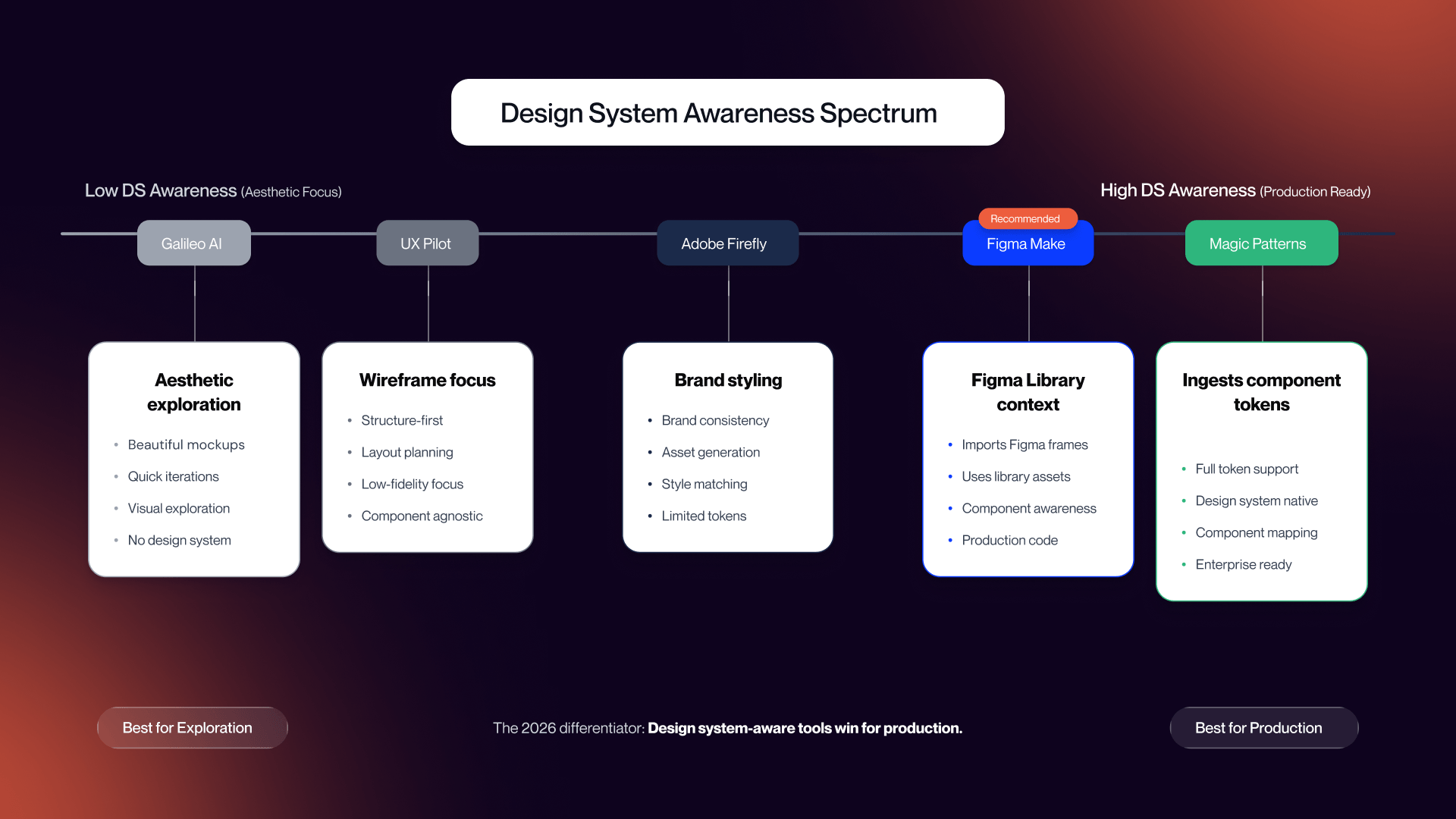
The 2026 differentiator that matters more than generation quality is design system awareness. A tool that produces beautiful output that bears no relationship to your component library is less useful in production than a tool that produces slightly less beautiful output that actually maps to your tokens, spacing scale, and component vocabulary.
Recommended: Figma Make, Magic Patterns, Galileo AI
Figma Make
Figma Make is Figma's native AI feature - prompt-to-design and prompt-to-code generation inside your existing Figma workspace, with integration into your design library.
Pricing: Included in Figma plans - verify current tier availability at figma.com.
Best for: Existing Figma users who want AI assistance inside their design system without switching tools or exporting between environments. If your team already lives in Figma, Make is the lowest-friction entry point for AI generation.
Honest limitation: Per UX Pilot's comparative review, Figma Make performs stronger when working from an existing design foundation than from a blank prompt. If you have an established component library, it will leverage it well. If you are starting from scratch on a new project with no design system, it may underperform alternatives built for exploration.
Magic Patterns
Magic Patterns is the most design-system-aware UI generation tool we tested. The core workflow is upload your component library - spacing tokens, typography, color tokens - and the tool generates new screens that extend rather than contradict your existing system.
Pricing: Subscription - verify current pricing at magicpatterns.com.
Best for: Design teams with established design systems who want AI to extend their work, not produce something beautiful but incompatible. This is a production tool, not an exploration tool. Use it when you know what your system looks like and need to generate new surfaces that stay within it.
Honest limitation: Magic Patterns is a smaller player that is still maturing. The design system ingestion is strong; the generation for edge cases and complex states is still catching up. Worth monitoring quarterly.
Galileo AI
Galileo AI generates high-fidelity UI screens with strong aesthetic quality. It operates in Figma-first mode, exporting directly as editable layers. It handles persona-aware variations - generating different layouts for different user types from the same prompt.
Pricing: Subscription - verify current pricing at usegalileo.ai.
Best for: SaaS dashboards, mobile screens, and marketing interfaces where aesthetic quality matters for early stakeholder alignment. Excellent for generating exploration options to present in a design review before committing to a direction.
Honest limitation: Galileo's aesthetic quality is high, but its customization depth is limited compared to designing from scratch. The outputs require translation work before they align with a production design system. Use it for exploration and client presentations; use Magic Patterns or Figma Make for production extension.
The Design System Awareness Differentiator
The practical decision tree for 2026 is straightforward:
- Need to extend a production design system - Figma Make or Magic Patterns
- Need to explore new directions or generate client-facing concepts fast - Galileo AI
- Using both for different project stages - the most common agency pattern
Tools that generate beautiful but off-system output require designer translation work before anything reaches production. For small design teams and agencies, that translation time can erase the speed advantage. Design system integration is not a nice-to-have in 2026 - it is the difference between a tool that saves time in production and one that only saves time in decks.
AI for Creative Assets and Prototyping (Two Different Categories)
Creative Asset Generation: Adobe Firefly
Adobe Firefly deserves more than a passing mention, which is what it got in earlier versions of this article. In 2026, Firefly is a multi-modal generation suite covering images, video, audio, and design assets - and for teams already in the Adobe ecosystem, it is the most seamlessly integrated creative AI tool available.
UX designers specifically use Firefly for mockup imagery, mood board development, layout alternatives with custom illustrations, and generating visual assets without waiting on stock searches or briefing a visual designer for something that is ultimately placeholder material. The Photoshop and Illustrator integration means generation happens inside tools designers already have open, without context switching.
Pricing: Bundled with Adobe Creative Cloud tiers - verify current plan access at adobe.com.
Best for: Teams already operating in the Adobe ecosystem. The integration value is the core argument. Firefly outside of Photoshop and Illustrator is a less compelling proposition.
Honest limitation: For teams not using Adobe Creative Cloud, Firefly's value drops significantly. Midjourney, DALL-E (via ChatGPT), or Google's Imagen remain strong alternatives for creative asset generation without the Adobe dependency.
For adjacent context on AI-assisted production tooling, see our roundup of top AI website builders.
Prototyping: Lovable
Prototyping and code handoff are different problems. We separate them here because v2 of this article conflated them, and that conflation led to tool recommendations that did not fit either job well.
Prototyping tools generate working, interactive prototypes that designers can put in front of real users. The 2026 shift is that the best prototyping tools generate functional prototypes - with real frontends, real backends, real data - not just clickable mockups.
Lovable
Lovable is a full-stack AI app generator. Describe what you want to build in plain language and it generates a working web or mobile application - frontend plus backend - with no code required.
Pricing: Subscription tiers - verify current pricing at lovable.dev.
Best for: Founders, product designers, and non-developers who need functional prototypes for user testing or stakeholder validation. When you need to test whether a flow works - not whether it looks like it works - Lovable generates something you can actually click through with real data.
Honest limitation: Lovable is optimized for building prototypes, not iterating on visual design. If your goal is to refine UI details across multiple rounds, a traditional Figma prototype is still faster. Lovable wins when you need to test functional behavior; Figma wins when you need to test visual hierarchy and interaction patterns. See our Webflow agency work for context on how functional prototyping connects to production builds.
Brief alternatives: Bolt and Emergent operate in similar "vibe coding" territory. All three are viable; we recommend picking one based on existing infrastructure rather than evaluating all three. Lovable earned our recommendation for independent endorsement volume and consistency of output.
Code Handoff (Separate from Prototyping)
Code handoff is a different job: taking an existing, finalized design and exporting production-ready code so development teams have less translation work. It is not the same as prototyping, which is about generating something to test.
For most teams, the two tools already covered handle this adequately. Magic Patterns generates code aligned to your design system. Figma Make connects designs to development workflows through its code generation features. For dedicated code-export-only workflows, no additional tool is necessary.
The 2026 ideal is design system awareness throughout the entire chain - from generation through handoff - so the code a developer receives matches the components they are actually using in production. That chain is not fully automated yet, but it is closer than it was a year ago.
Tools We Considered and Rejected, Plus Reference Stacks
Tools We Considered and Did Not Recommend
Publishing a list of tools we rejected is something almost no design tool roundup does. We think that is a mistake. A list of only positive recommendations does not tell you what the author actually thinks about the full landscape - just what they are willing to say about it.
Moonchild AI
Moonchild's contextual understanding impressed at least one Muzli writer, and we do not dismiss that signal. The reason we did not include it: a single major source signal is not enough for a production recommendation. One enthusiastic review is how you end up adopting a tool that 11 other designers quietly abandoned. We recommend revisiting Moonchild in 6-12 months if independent adoption broadens. It may earn a slot. It has not earned one yet.
Uizard
Uizard converts hand-drawn sketches into digital designs. The concept is legitimate and useful. The reason for not recommending: Microsoft Sketch2Code does essentially the same thing for free. Uizard's Pro tier at approximately $12/month does not justify displacing a free alternative for the same core use case. If sketch-to-digital is your specific workflow, try Sketch2Code before paying for Uizard.
Relume AI
Relume generates marketing site sitemaps and wireframes specifically for web marketing workflows. We do not think it is a bad tool - it is a good tool for a specific job. That specific job is not broad enough to earn a slot in a general UX design roundup. If your practice is heavily weighted toward marketing sites and you are not using it, it is worth evaluating separately. It did not fit the scope of this article.
Emergent
Emergent is a full-stack vibe coding tool with a multi-agent architecture. Our reason for not recommending it here is simple: Lovable covers essentially the same ground, and recommending two tools in the same category creates choice paralysis without proportionate benefit. Emergent may outperform Lovable in specific infrastructure configurations. If you have already evaluated Lovable and found it lacking, Emergent is the natural next stop.
One more time, for clarity: "did not recommend" means did not earn a top-tier slot in this particular roundup. These are not tools to avoid - they are tools that did not meet our threshold, for reasons that may not apply to your specific workflow.
Solo Designer Stack
For freelance and independent designers working on B2B SaaS projects without enterprise budgets.
Core stack:
- Figma (workspace - free or Starter tier)
- Google Stitch (free wireframing and exploration)
- Galileo AI or Magic Patterns (UI generation - subscription, pick based on whether you have an established design system)
- ChatGPT or Claude ($20-30/month - research synthesis, persona drafting, copy generation)
- Lovable (functional prototypes when user testing demands something real)
Total cost: Roughly $30-100/month depending on which UI generation tool and plan tier, plus Figma. Focus on tools with strong free tiers. Solo designers are often subsidizing their own tooling; spending $300/month on AI tools before they demonstrably save more than that in billable hours is not a sound business decision.
In-House Team Stack
For B2B SaaS in-house design teams with 3-15 designers, established design systems, and IT/security oversight.
Core stack:
- Figma + Figma Make (workspace, design system, and AI generation consolidated)
- Magic Patterns (design system-aware UI generation for production surfaces)
- Adobe Firefly (creative assets - particularly for teams already on Creative Cloud)
- Dovetail AI (research synthesis for teams running regular qualitative research)
- UX Pilot (rapid wireframing and early exploration)
- Lovable (functional prototyping for user testing)
Privacy note: Before deploying any tool that handles user research data or client design files, get IT and security approval. This is not bureaucracy - it is protection. Enterprise tiers of most major tools include data processing agreements that consumer tiers do not.
Total cost: Roughly $200-500/month per designer depending on plan tiers and team size. More than the solo stack, but the ROI case is clearer when multiple designers are sharing amortized subscriptions and the tools connect to an established design system.
For teams that want professional production execution to complement their internal tooling, our SaaS web design services are built on this stack.
Agency and Studio Stack
For agencies working across multiple client projects with different brand systems, design constraints, and stakeholder expectations.
Core stack:
- Figma (universal client workspace - client-specific libraries per project)
- Galileo AI (high-fidelity exploration for client presentations - produces aesthetically strong output fast)
- Magic Patterns (design system-aware production work - used once a client's design system is established)
- Adobe Firefly (brand asset generation, particularly for visual exploration and mood board phases)
- Lovable (functional prototype demos for client validation before development scope is finalized)
Agency-specific considerations: Rigorous version control and strict separation of client brand systems are non-negotiable. AI tools accelerate output; they do not reduce the need for brand discipline. One cross-contaminated generation that imports the wrong component vocabulary into a client project creates rework that erases any speed advantage.
This is the stack we run as a Webflow agency building production SaaS sites. If you want to see what that output looks like in practice, our work covers a range of B2B SaaS projects.
When you are ready to take AI-assisted design into production, talk to our team.
Frequently Asked Questions
What are the best AI tools for UX design in 2026?
Eight tools earned a recommendation: Figma Make, Magic Patterns, and Galileo AI for UI generation; Google Stitch and UX Pilot for wireframing; Adobe Firefly for creative asset generation; Lovable for prototyping; and Dovetail AI for research synthesis. Most designers run 4-6 of these across categories. Tools we considered and explicitly rejected - with reasons - include Moonchild AI, Uizard, Relume AI, and Emergent.
Will AI replace UX designers?
No. AI augments; it does not replace. AI handles mechanical work: generating wireframes from prompts, converting sketches to digital layouts, exporting code, generating placeholder copy. Humans handle strategic work: interpreting actual user research, making hierarchy decisions, applying brand voice, enforcing accessibility, navigating stakeholder dynamics. Designers who learn to use AI tools ship faster. The judgment driving outcomes is still entirely human.
What is the best AI tool for UI generation?
It depends on what you need. Figma Make wins for existing Figma users who want AI inside their design system. Magic Patterns wins for teams with established design systems who need design system-aware generation. Galileo AI wins for aesthetic quality during exploration. The decision comes down to whether you need design system consistency (Figma Make, Magic Patterns) or fast, high-quality exploration (Galileo).
What is the best free AI tool for UX design?
Google Stitch is the best free wireframing and exploration tool, with monthly generation limits but no cost. Microsoft Sketch2Code is free for hand-drawn-to-digital conversion. Figma's free tier covers most solo designer workspace needs. ChatGPT's free tier handles basic research synthesis and copy generation adequately. Most paid tools also offer free trials worth running before committing to subscriptions.
Do AI design tools train on my work?
Some do, some do not. Most enterprise tools - Figma, Adobe, Dovetail - explicitly protect your IP and do not train on your content. Newer consumer tools may train on public data and, in some configurations, usage data. Always review the privacy policy before running confidential client work through any tool. For solo designers and freelancers: assume nothing is private unless the terms of service explicitly state otherwise.
Can AI design tools handle accessibility?
Inconsistently. Figma AI can identify some accessibility issues. UX Pilot includes accessibility audit features. Some tools generate reasonably accessible code when prompted for it. None of them automatically make your design accessible - accessibility is still the designer's responsibility to enforce and verify. Prompt for it explicitly, then check the output. Do not assume it happened because you did not receive a warning.
What is the best AI tool for Figma users?
Figma Make is the obvious answer for native AI inside Figma. Magic Patterns integrates via design system upload and works well alongside Figma. Galileo AI exports directly to Figma as editable layers. The best choice depends on what you need: Figma Make and Magic Patterns for production and design system work; Galileo for exploration and client-facing concept development.
How do I add AI tools to my UX workflow without disrupting it?
Pick one tool for one specific category. Use it for two weeks on real projects - not contrived test cases. Compare your time-to-output against your previous approach. If it saves time without degrading quality, integrate it permanently. If it does not, cut it. Most designers who have been using AI tools for a year run 4-6 tools and have dropped twice that many. Start with skepticism. Let evidence change your mind.