.jpg)
Abstract
Webflow and Prismic are both strong platforms for developing B2B SaaS websites. However, each solves a very different operational problem, and choosing the wrong one creates friction that is compounded over time. Marketing teams wind up locked out of their own site, developers find themselves overwhelmed by content update tickets, and CMS architectures become more challenging to scale as the content model grows.
Webflow functions as an all-in-one visual platform that combines web design, CMS, and hosting in a single user-friendly environment. Alternatively, Prismic is a headless CMS that separates content from the front end, delivering structured content via API into a developer-built framework.
The decision here is about ownership. Specifically, who controls the site on a daily basis, as well as who publishes content, and how much developer involvement your team can reasonably sustain right now.
In this guide, we break down the way both platforms function, where each excels and fails, as well as which structure best fits with which architecture.
What Webflow and Prismic Actually Are (and What They Are Not)
Many CMS comparisons treat Webflow and Prismic as interchangeable tools with a different list of features, but this is not what they are. These are platforms built and developed around different architectural assumptions, ownership models, and levels of involvement. This is a distinction that matters a lot more than a simple checklist.
The Platform Architecture Nobody Explains Clearly
Webflow is an all-in-one visual web platform, with the design environment, CMS, and hosting all existing inside the same product. This means marketers, designers, and developers need to work within a shared system. The relationship between design and editing is a direct one.
Webflow’s “Designer” functions as the visual development ecosystem. The “Editor” provides non-technical team members with a basic and simple interface for direct content updates. The CMS is structured around Collections, which are reusable content types that come with defined fields for blog posts, case studies, team pages, and other repeatable content structures.
The architecture is coupled. Design, CMS, and hosting are managed within the same platform. This is the broader model that is discussed in Webflow vs Contentful and Webflow vs WordPress, showing operational simplicity and direct marketing ownership.
As a headless CMS that stores structured content separately from the front end, Prismic functions differently. Content is delivered via REST or GraphQL APIs, and into a developer-built framework, most typically Next.js, SvelteKit, or Nuxt.
The core concept of Prismic is known as “Slices.” These are reusable, developer-defined page sections that editors can populate with content within the Prismic dashboard. Editors are responsible for overseeing fields and content relationships, while developers take charge of rendering and layout behaviour inside the front end. This decouples design and content, deploying each system independently.

This architectural distinction matters because it determines who can do what without the need for support.
In Webflow, marketers are able to update content, publish CMS items, and work within pre-built page structures directly inside the Editor. Conversely, Prismic allows editors to publish content independently only within the Slice system that already exists.
Both platforms reduce developer involvement for routine publishing, with the difference lying at where the boundaries are set.
Why This is a Team Ownership Decision, Not a Features Comparison
The majority of Webflow vs Prismic articles feature side by side comparisons, and conclude with statements like “...it depends.” These might be technically sound, but operationally they are useless.
What matters is ownership, specifically:
- Who controls the website day-to-day?
- Who publishes and updates content?
- How much developer involvement can the team sustain?
Webflow is the better option for marketing-focused teams, as it works most effectively when marketing owns the website roadmap and needs to launch pages, update messaging, and iterate quickly without needing developer changes.
Prismic is better suited to developer-led teams. It’s stronger and easier to use when engineering owns the stack, and it’s necessary for content to scale across numerous channels or structured content relationships that can’t be supported by a more basic CMS model.
A Series A SaaS company that’s launching a new campaign page during the working week will require speed and editorial independence. In Webflow, marketing works to assemble that page through the use of existing sections. Prismic depends on developers having built the Slices and page structures in advance.
These reflect different structures, with neither approach being inherently right or wrong.
For this reason, platforms such as Webflow vs Storyblok exist in the same category as Prismic, providing developer-first, structured-content systems that are designed around component architecture.
How Webflow and Prismic Handle Content: What Your Team Actually Does
Drawing an architectural distinction between Webflow and Prismic is important because of what it impacts in an operational sense. Specifically, this relates to who publishes content, who changes layouts, and where developer involvement starts. The majority of SaaS teams wind up failing because workflow doesn’t suit the team using it.
Content Workflows in Webflow: The Coupled Design-and-Edit Model
Webflow CMS Collections function as the structured content engine behind the site. A standard blog Collection includes the fields for a title, slug, author, rich text body, featured image, tags, SEO metadata, and publish date. Editors create new CMS items, populate the fields, and publish. Collection templates handle rendering automatically utilising the structure in place during the build. This means no developer involvement is needed for routine publishing.
Webflow uses the Editor when it comes to page-level editing. This is an in-page visual editing layer that exists directly on top of the live page preview. Marketing teams will be able to update hero copy. Testimonials, feature descriptions, pricing text, and CMS-driven content directly inside the interface. This allows editors to click into the content zone, make their changes, and publish immediately.
The boundary here is important. Editors are able to modify content, but they cannot impact structure. New layouts, sections, animation logic, CMS schema changes, and navigation restructuring need Designer access, not to mention someone comfortable operating inside Webflow’s visual development environment.
This separation typically works well for marketing-led SaaS teams. The Editor can create a safe publishing layer for daily operations without the risk of exposing the structural elements of the site that might break the design system.
Webflow provides operational simplicity that gives it a huge advantage versus plugin-dependent environments like Webflow vs WordPress. Design, CMS, and hosting remain inside a single ecosystem, reducing deployment overhead, and simplifying the marketing and development handoff.
Scale is the main constraint here. Webflow CMS limits are meaningful as content architecture grows in complexity. Current CMS plan limits are 20,000 Collection items on supported plans (increased from 10,000 in May 2026).
Content Workflows in Prismic: The Structured Slices Model
Prismic approaches content management in a very different way, due to the fact that editorial workflow is built around things like developer-defined structures from the beginning.
The core system here is Slice Machine. This is where developers create reusable page sections locally inside a Nuxt, Next.js, or SvelteKit project, define the right content fields, and push those definitions into Prismic via the CLI. Once pushed, editors can assemble pages using those predefined Slice components.
A developer may create a “Feature Grid” Slice with sections for headline, icon, supporting copy, and CTA text. Editors are able to populate fields freely, but issues like rendering logic and layout behavior are controlled by engineering.
The key here is the distinction between coupled and decoupled systems. Webflow’s CMS and front end are tightly connected, while Prismic’s content is separated entirely.
Prismic boasts a cleaner and highly structured editorial interface, where editors are allowed to work inside document views containing text fields, rich text blocks, image selectors, content references, and Slice sections. Live preview allows editors to see content that is rendered inside the production front end while editing.
Teams that have formal publishing operations can use this model as it’s operationally cleaner than Webflow. Draft states, scheduled publishing, version history, and structured approval workflows are available on paid plans.
Flexibility is the tradeoff here. Editors can use structures that developers have already built. Being able to add a new layout pattern, content relationship, or section type requires developer involvement first.
What the Editorial Experience Feels Like in Practice
Both systems are usable for non-technical teams seeking routine publishing. Publishing a blog post, updating homepage copy, adding a case study, or swapping a testimonial is simple across both platforms.
The operational difference here is found when the team moves past routine editing. In Webflow, marketing teams are able to work within existing page systems visually. A marketer is able to assemble landing pages through the use of pre-built sections, and publish quickly without relying on engineering involvement.
Prismic only provides layout flexibility if the Slice system supports it already. Editors are unable to improvise beyond the component architecture that developers create.
Another difference comes with content scale. Once the content model becomes deeply structured, Prismic grows materially stronger as a result. Its document model is designed for content architecture in a way that Webflow CMS isn’t.
For most B2B SaaS teams publishing landing pages, blog content, and case studies, both platforms work well operationally. When it comes to things like marketing speed and visual control, Webflow emerges as the better choice. When it comes to developer ownership, multi-surface delivery, or structured content complexity, Prismic is definitely the stand out option.
This is an important distinction for teams building high-volume content programs, and publishing SaaS landing page examples across numerous campaigns and regions.
Team Ownership: The Decision Every Platform Comparison Gets Wrong
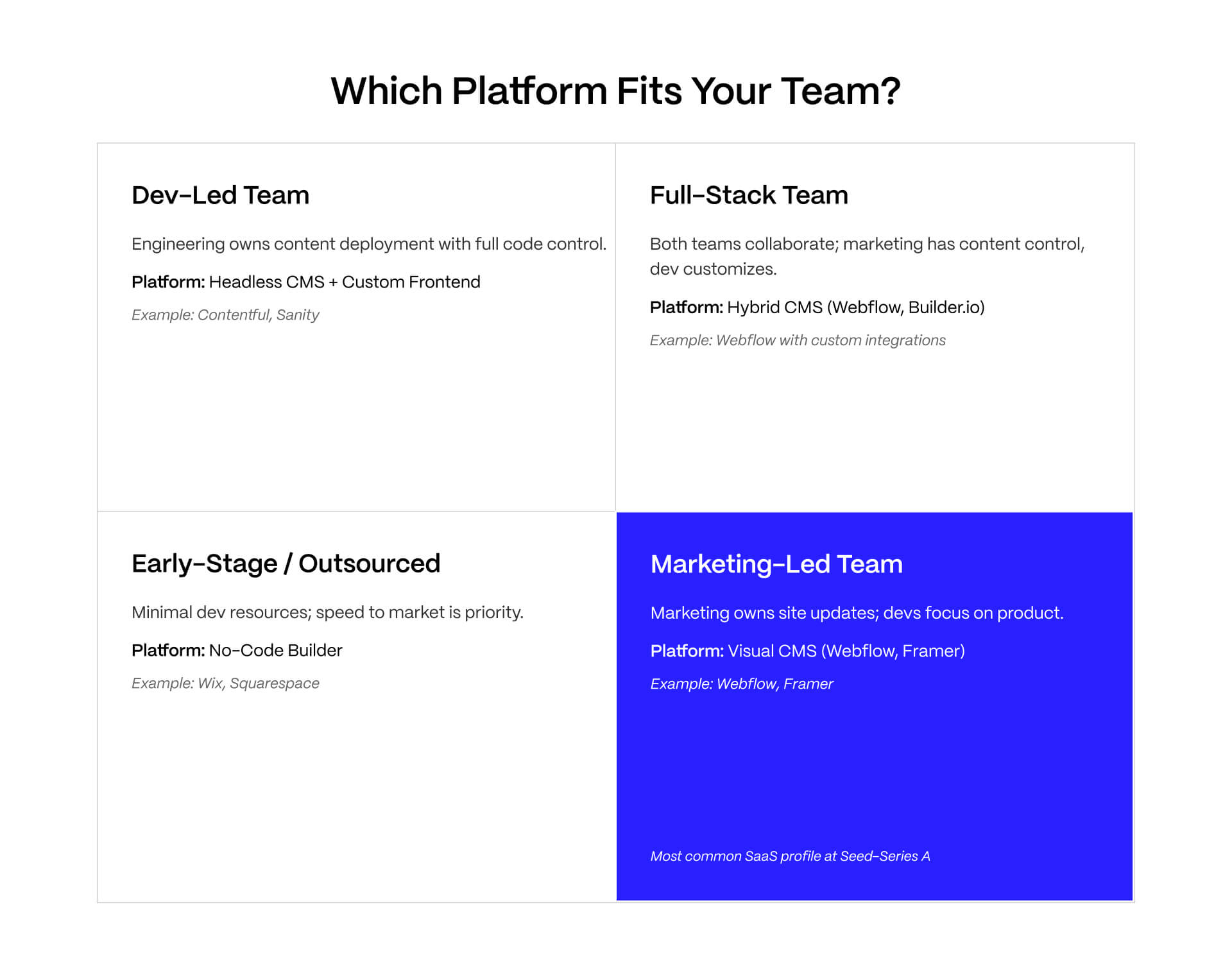
The majority of Webflow vs Prismic comparisons tend to collapse because they treat platform selection like a feature checklist. The decision is operational. The correct CMS is the one that best suits the way your team operates.
Marketing-Led SaaS Teams: Why Webflow Fits the Ownership Model
Marketing-led SaaS teams are those where marketing owns the website roadmap, performance metrics, campaign execution, and publishing cadence. Developer agencies can still support the site, but not every update or landing page iteration needs engineering involvement.
This is the dominant SaaS profile from seed through Series A, and it is the ownership structure Webflow fits best.
Inside Webflow, marketing teams can update copy directly in the Editor, publish blog posts and case studies through CMS Collections, manage SEO metadata, add redirects, update CMS-driven content, and build landing pages via pre-built sections without touching code.
It is important to make the distinction that Webflow separates content operations from structural control. Marketing owns the publishing surface, but developers still own the underlying system architecture.
Tasks such as creating new CMS Collection types, building custom interactions, restructuring navigation systems, or modifying reusable sections still need Designer access, as well as someone comfortable working inside Webflow.
The boundary is typically operationally healthy. Marketing teams move quickly without risking structural inconsistencies across your site.
At this stage, Webflow reduces the risk of operational dependency. Webflow projects are simpler to maintain and hand off than custom headless stacks that are built around a specific front-end framework.
Seed through Series A SaaS businesses, this is essential. Many don’t have a permanent front-end engineering team that is dedicated to maintaining your marketing website. They require a system that marketing can operate independently without accumulating bottleneck.
This is the same operational evaluation a lot of teams make when they compare Webflow vs HubSpot or reviewing SaaS landing page examples built around marketing-led publishing workflows.
Dev-Led SaaS Teams: When Prismic’s API-First Approach Pays Off
Dev-led SaaS teams work differently, with engineering owning the website stack, developers maintaining the rendering layer, and marketing operating within an organized editorial system.
This profile is more common Series B and above, especially for developer-tool companies, API products, infrastructure platforms, and SaaS businesses distributing content across a variety of surfaces simultaneously.
For these teams, Prismic’s architecture is the best option.
Developers can help build in Nuxt, Next.js, and SvelteKit without working around the constraints of a visual design system. Components are version-controlled alongside the front-end codebase, rendering logic remains fully customizable, and content delivery flows through REST or GraphQL APIs into whatever framework architecture that the engineering team prefers.
The workflow is structured around Slice Machine:
- Developers define Slice types locally.
- Slice schemas are pushed into the Prismic dashboard through the CLI.
- Editors assemble pages using approved Slice components.
- Content is delivered through the API into the production front end,
This creates a controlled environment where engineering owns rendering logic while marketing owns content population.
That separation is crucial for teams managing complex content relationships, localization systems, shared content models, or multi-surface publishing requirements.
This also aligns perfectly for developer-first businesses where marketing websites function as components within a broader product ecosystem as opposed to standalone marketing property.
For companies looking to evaluate multiple headless architectures, this is the same category that’s discussed in Webflow vs Storyblok, and other developer-first CMS comparisons.
The Hybrid Setup: Webflow for Design, Prismic as the Content Layer
A lot of SaaS teams run hybrid architecture where Webflow takes charge of the visual front end, while Prismic supplies structured content through API delivery.
In this model, Webflow seeks to manage the design system, hosting, navigation structure, and visual experience. Prismic manages large-scale or highly structured content types such as blog libraries, resource hubs, documentation systems, or multi-region content repositories.
Typical implementations might utilize Webflow for static marketing pages, as well as dynamically pulling blog posts or structured records via Prismic through JavaScript API calls within the Webflow environment.
This architecture combines Webflow’s design precision and marketing usability with Prismic’s strong and structured content models.
The tradeoff here is complexity. The debugging surface here grows immediately. The API integration layer is another dependency that needs to be maintained. Deployment workflows are more complicated. Your team winds up more dependent on Webflow reliably rendering content that is externally sourced.
This setup only makes sense for a narrow team profile:
- A design-forward SaaS brand
- A large or rapidly growing structured content library
- A dedicated developer available for ongoing maintenance
- A marketing team that already operates inside structured editorial workflows
Below that threshold, the hybrid model typically creates more operational overhead than value. For the majority of B2B SaaS companies, selecting a single platform and operating it correctly is the most sustainable long-term choice.
Building a scalable SaaS design system in Webflow? Veza Digital works closely with SaaS companies to build marketing sites designed for long-term operational ownership via a dedicated Webflow agency model.
When Webflow Wins, When Prismic Wins, and What Neither Does Well
At this stage, drawing a distinction between Webflow and Prismic should be easier than ever. It’s important to understand that these platforms are not solving the same problems. One optimizes for marketing speed and ownership, while the other optimizes for structured content infrastructure and developer control. Making the right choice depends less on features, and more on understanding what causes operational friction six to twelve months after launch.
Webflow Wins: Marketing Speed, Visual Fidelity, and Fast Time-to-Launch
Webflow is the better choice when it comes to marketing teams that need to operate independently without engineering dependency.
It’s at this stage that Webflow consistently outperforms headless CMS alternatives. Marketing teams are able to launch campaign pages, update messaging, manage SEO metadata, publish blog posts, and maintain day-to-day site operations within the platform. The Editor creates a controlled environment that supports rapid iteration, without exposing the structural system underneath.
Webflow is also the stand out when it comes to visual fidelity. Design systems built in Webflow have a direct relationship between designer layout and production site. Teams don’t translate designs through separate front-end rendering layers or rebuilding layouts inside a framework after approval.
Migration speed brings another major advantage, with teams moving away from WordPress, Squarespace, and other custom CMS platforms, in order to launch faster in Webflow. A professional Webflow agency is able to deliver a production-ready SaaS marketing site in just four to eight weeks, while a Prismic build is typically unable to.
This is crucial at Seed through Series A, where developer availability remains inconsistent, and marketing has to be able to move faster than engineering bandwidth allows.
Webflow has many operational strengths which compound over time, including:
- Hosting and CDN delivery managed within the same platform
- Built-in SSL and semantic HTML output
- Editable SEO controls
- Fast publishing workflows
- Reduced maintenance overhead compared to plugin-heavy CMS systems
This is why many of the strongest modern B2B SaaS marketing sites operate on Webflow-first architectures. See these examples of best B2B SaaS websites for reference.
Prismic Wins: Content at Scale, Multi-Channel Delivery, Developer Control
Prismic becomes the stronger architectural choice once content complexity exceeds what a marketing-led CMS is designed to handle cleanly.
This usually happens in developer-led organizations where the website operates as part of a larger product ecosystem, as opposed to standalone marketing property.
Prismic’s API-first model is built for teams that rely on structured content that is delivered across multiple surfaces:
- Marketing website
- Mobile apps
- Partner portals
- Documentation systems
- In-product knowledge bases
- Localized regional experiences
These are environments where content is treated as infrastructure as opposed to page-level publishing.
Prismic takes care of complex content relationships more effectively than Webflow. Structured references between products, authors, documentation categories, integrations, feature sets, and localization systems fit naturally into Prismic’s document model. Webflow CMS is able to support similar structures, but can struggle when content architecture deepens.
Developer control is another major advantage. Engineering teams are able to build directly in Nuxt, Next.js, or SvelteKit without being shackled by the constraints of a visual builder. Slice Machine integrates into standard front-end workflows, while components remain version-controlled, and rendering logic stays fully customizable.
This architecture fits:
- Series B+ SaaS companies
- Developer-tool businesses
- API-first platforms
- High-volume content operations
- Multi-language publishing environments
The tradeoff here comes in the form of operational complexity. Prismic’s workflow features are more robust than Webflow’s native publishing model. Content volumes exceed Webflow’s CMS plan limits within 12-24 months.
Production-grade Prismic setup is a real engineering project, and teams need to realistically budget for 6-12 weeks for framework setup, Slice library creation, rendering architecture, deployment configuration, and implementation of editorial workflow.
What Neither Platform Does Well
Neither platform is universally perfect for every use case.
Webflow has weaknesses, with the main one being complex ecommerce. Organizations that need advanced inventory management, multi-variant products, subscription logic, custom checkout flows, or enterprise commerce infrastructure will quickly find their needs outgrowing Webflow Ecommerce. These use cases typically belong on a Shopify commerce platform, and you can see Webflow vs Shopify for a deeper comparison.
Webflow has structural CMS limitations as well, and these become more noticeable as content architecture grows. Multi-reference depth limits, Collection constraints, and lack of deeply nested relational models can wind up providing operational bottlenecks for larger-scale content systems.
Prismic’s weakness is quite the opposite; implementation overhead. This means Prismic is not a viable option for teams with no dedicated developer capacity. What’s more, before editors can publish anything, engineering needs to:
- Configure the framework
- Build the rendering layer
- Define Slice structures
- Connect APIs
- Configure deployment infrastructure
- Establish editorial workflows
That is a considerable investment in engineering, regardless of how approachable the marketing layer might appear in demos.
Prismic also has a less intuitive editing experience than genuine visual editing systems. Despite improving the Page Builder experience in recent product updates, editors continue to operate primarily via structured field-entry interfaces, instead of fully visual page editing. Marketing teams that are used to direct WYSIWYG control, that adjustment can cause even more post-onboarding friction.
Choosing the Right Platform: A 4-Question Decision Framework
Most SaaS teams will not benefit from a complex CMS evaluation framework. Instead, they want a faster way of being able to determine whether their operational reality is aligned with market-led platforms or developer-led content architectures.
START
│
├── Do you have a dedicated front-end developer?
│
│ ├── NO → WEBFLOW
│ │ Marketing speed + easy editing
│ │
│ └── YES
│
├── Do you need content across multiple platforms?
│ (website, app, help center, portal)
│
│ ├── YES → PRISMIC
│ │ API-first structured content
│ │
│ └── NO
│
├── Does marketing need to create pages without developers?
│
│ ├── YES → WEBFLOW
│ │ Fast marketing ownership
│ │
│ └── NO
│
└── Will content complexity grow significantly?
(multi-language, large content library)
├── YES → PRISMIC
│ Scalable content architecture
│
└── NO → HYBRID
Webflow + Prismic
The 4-Question Checklist for Webflow vs Prismic
Q1: Does your team have a dedicated front-end developer available for ongoing website maintenance and new feature builds?
If the answer is no, the immediate choice should be Webflow.
The majority of Seed through Series A SaaS companies don’t have permanent front-end engineering resources that are dedicated to the marketing site. Webflow was tailor-made for this, with marketing teams owning publishing and iteration without relying on engineering for updates.
If the answer is yes, move to Q2.
Q2: Does your website need to push the same content to more than one digital surface website, mobile app, in-product help, or partner portal?
This includes:
- Marketing website
- Mobile apps
- Documentation systems
- Partner portals
- In-product help centers
- Localized content environments
If the answer is yes, Prismic emerges as the optimal solution. Its API-first structure is specifically designed for multi-surface content delivery. This is the area where headless CMS architecture justifies its engineering complexity.
If the answer is no, continue to Q3.
Q3: Does your marketing team need to build new page layouts, add new section types, and make structural site changes without waiting for a developer?
If the answer is yes, then Webflow is a better choice and fit.
The combination of Editor and Designer provides marketing teams with considerably greater control over page assembly than Prismic’s Slice model. This flexibility compounds with high-velocity SaaS environments where positioning, campaigns, and messaging continue to evolve.
Q4. Will your content library require multi-language support across more than three locales, advanced content relationships, or will it exceed 10,000 structured items within 24 months?
Examples include:
- Multi-language publishing
- Advanced relational content models
- Large documentation libraries
- Localization systems
- 10,000+ structured content items
- Shared content across multiple products or regions
If the answer is yes, Prismic is more than likely the best choice long-term.
If the answer is no, Webflow is the more user-friendly and operationally sustainable platform. Teams that have strong developer support and high design requirements need to evaluate a Webflow/Prismic architectural hybrid.
The overall pattern here is consistency. Many Seed through Series A B2B SaaS companies find themselves switching to Webflow very quickly due to their operational bottleneck being found in marketing velocity.
Platform Recommendations by SaaS Company Stage
For a Seed to Series A, marketing-led team: Webflow
The priority here is speed, iteration, and independent publishing without the need for engineering dependency.
For a Series B+, dev-led team with dedicated front-end engineering: Prismic or hybrid
The content architecture and operational complexities that come with it are typically large enough in scale to be able to justify a headless setup.
For a platform or enterprise SaaS distributing content across multiple surfaces: Prismic
Multi-channel delivery provides the core advantage of API-first CMS infrastructure.
For a design-forward SaaS with high content volume and developer support: Hybrid setup
Webflow takes control of the visual layer here, while Prismic is in charge of structured content delivery.
For a pre-seed or non-technical founding team: Webflow with an experienced Webflow agency
A maintainable Webflow setup is far more achievable and realistic than a custom headless architecture that’s lacking in engineering resources.
Picking the right platform is only the first decision.
Whether your team is moving to Webflow, evaluating a headless CMS setup, or still deciding between the two, the platform choice shapes your marketing team's speed, your developer overhead, and your website's architectural ceiling for the next two to three years. VezaDigital builds Webflow websites for B2B SaaS companies and has worked through this decision with teams at every growth stage. If your SaaS website needs clearer positioning, cleaner architecture, or a platform strategy built for where you are going next, we can help map the move.
FAQs
What is the main difference between Webflow and Prismic?
Webflow is an all-in-one visual web platform: design, CMS, and hosting are one product, coupled together. Prismic is a headless CMS: it stores and delivers content via API, requires a developer-built front end, and decouples content management from the rendering layer. Webflow gives marketing teams direct control over design and content. Prismic gives developer teams a structured content API they fully own. The choice turns on who owns and maintains the website, not on which platform has more features.
Is Prismic better than Webflow?
Neither platform is better they are built for different teams. Prismic is better for dev-led teams building on modern frameworks, managing complex content models, or pushing content to multiple digital surfaces. Webflow is better for marketing-led teams that need to publish and iterate independently without developer dependencies on every update. The right choice depends on team structure and company stage, not platform capability comparisons.
Can you use Webflow and Prismic together?
Yes. Some teams use Webflow for the design layer and hosting, and connect Prismic as the content source for specific high-volume content types via JavaScript API calls in custom code. This hybrid setup adds infrastructure complexity and requires ongoing developer maintenance, but combines Webflow's design flexibility with Prismic's content modeling strength. It fits a narrow team profile design-forward SaaS with 500+ structured documents and a developer available to maintain the integration.
Is Webflow or Prismic better for SEO?
Webflow has strong built-in SEO controls: editable meta tags, canonical tags, clean semantic HTML output, and fast performance on its Fastly CDN. Prismic depends on the developer to implement SEO correctly in the front-end framework. A well-built Next.js and Prismic implementation can be highly performant. A poorly built one will have SEO gaps. For teams without dedicated developer support, Webflow provides more reliable SEO control out of the box VENDOR-CLAIMED, verify with independent performance benchmarks.
Does Prismic require a developer?
Yes, to launch. Prismic requires a developer to set up the front-end framework, build Slice Machine components, configure the API integration, and deploy the site. Once the Slice library is built, non-technical editors can publish and update content independently. But initial setup and any new Slice types or page structures always require developer involvement first. Teams without developer support should not start with Prismic.
What is Prismic Slice Machine?
Slice Machine is the Prismic developer tool for defining page components (Slices) locally in the front-end codebase. A developer creates a Slice type with defined content fields and pushes the Slice definition to the Prismic dashboard via CLI. Editors then see the Slice available when building page documents and populate the defined fields. Design is locked at the Slice definition level; editors control content only. This is what gives Prismic design consistency at editorial scale VENDOR-CLAIMED.
How much does Prismic cost compared to Webflow?
Prismic's free plan supports one user. Paid plans begin at approximately $7-9 per month for solo users and scale with seats, environments, and features. Webflow site plans start at approximately $23 per month for the CMS plan. Enterprise tiers exist for both platforms. Pricing changes frequently verify current rates at prismic.io/pricing and webflow.com/pricing before publishing. VENDOR-CLAIMED.
Can Webflow work as a headless CMS?
Webflow supports headless delivery via its CMS REST API on paid plans, allowing content to be queried by external front ends. However, headless Webflow is not its primary use case and the API has limitations compared to purpose-built headless platforms like Prismic or Contentful. For most B2B SaaS teams, using Webflow in standard coupled mode gives the best balance of design control and content management. Teams with genuine multi-channel API delivery needs should evaluate Prismic instead VENDOR-CLAIMED, verify current Webflow API documentation.
Is Prismic good for B2B SaaS websites?
Prismic works well for B2B SaaS companies with a dedicated front-end developer, a complex content model, or multi-channel delivery requirements. It is not a good fit for teams that need marketing speed without developer overhead. For seed through Series A SaaS where marketing owns the website, Webflow is usually the better match. For Series B and above with developer capacity and a complex content library, Prismic's structured content model and API delivery become genuine architectural advantages.
How do I choose between Webflow and Prismic for my SaaS company?
Start with team structure, not features. Q1: Do you have a dedicated front-end developer? If no: Webflow. Q2: Does content need to reach more than one digital surface? If yes: Prismic. Q3: Does marketing need to make layout changes without a developer? If yes: Webflow. Q4: Will content require multi-language, complex relationships, or 10,000+ items within 24 months? If yes: Prismic. Most seed through Series A SaaS companies land on Webflow. Most platform companies and dev-led Series B teams land on Prismic or the hybrid setup.