.jpeg)
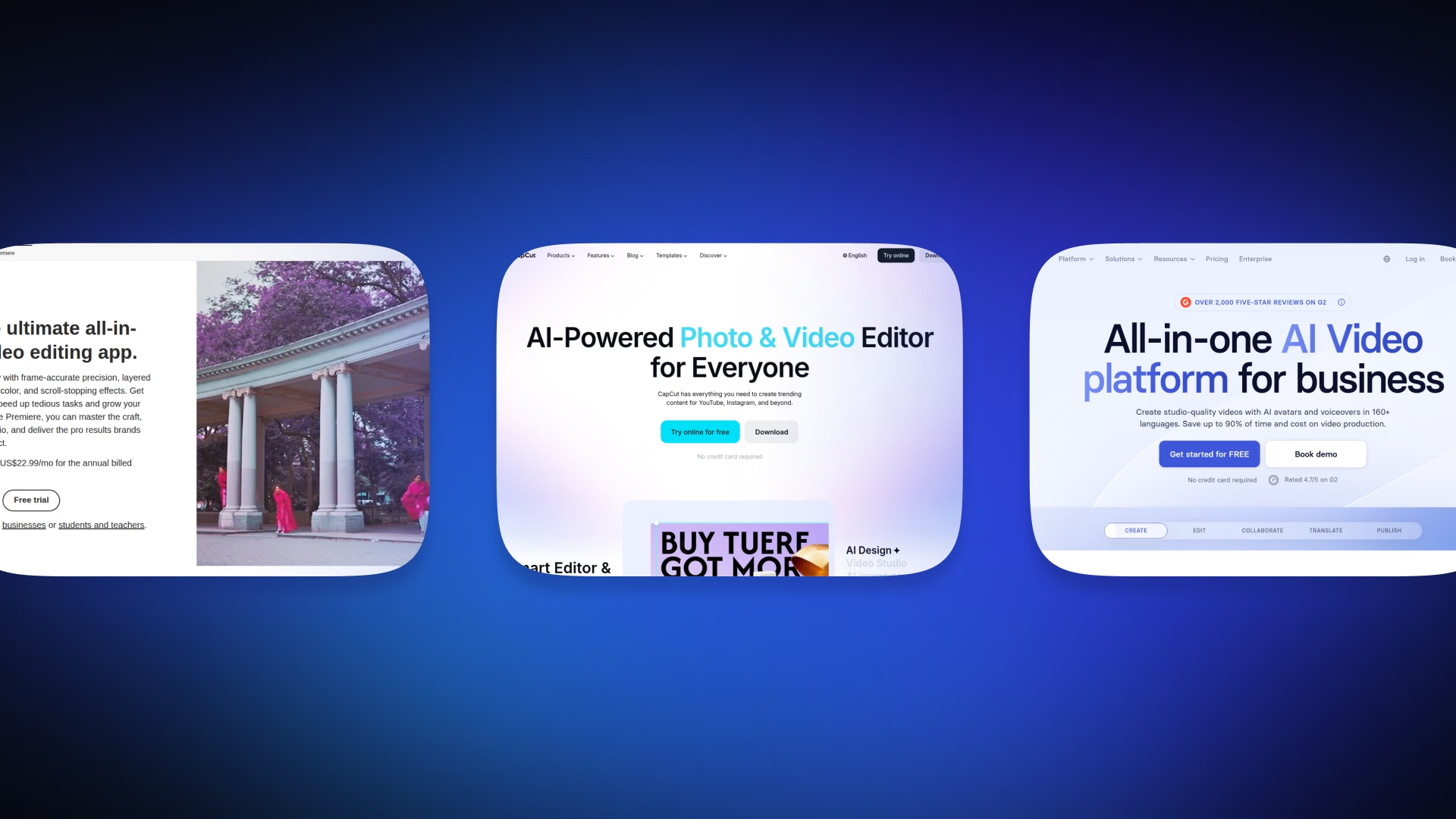
There are two types of AI video editors:
- Volume and scale-oriented editors that prioritize fast workflows (CapCut Pro, OpusClip, Descript, and Synthesia)
- Professional editors focusing on quality and enhancements (Adobe Premiere Pro, DaVinci Resolve's Neural Engine, RunwayML, and TopazVideoAI)
While users often evaluate AI video editors based on the fancy features, there is a better way. What you want to evaluate is the type of production your team needs. The main criteria in this case should be content velocity, quality expectations, and your current workflows.
In this guide, we reframe AI video tool selection around the two different paths mentioned above. Path A is better for speed and social output. Path B wins on production quality and precision. However, neither of the paths is universally better. We apply a five-point evaluation framework and walk you through eight tools building decision logic for solo content creators, marketing teams, professionals and filmmakers.
If the specific goal of this research is AI video generation (Sora, Kling, Hey Gen, and similar tools for generating videos from text or avatars) the AI video generation companion article will have a deeper dive into that area. As generation and editing can be used to solve very different types of problems, the two guides are created to work together as complementary content.
Volume Path vs Professional Path, Side by Side
The two paths share vocabulary. Both talk about AI editing, automation, and templates. They differ in nearly every essential workflow decision. For the AI video generation, we covered the best tools in our AI video generation companion article.
Picking a tool from the wrong path doesn’t mean a slightly worse fit. It means using a tool to solve something that wasn’t meant to be solved with that particular tool. For example, if the marketing team is using Adobe Premiere Pro, they are paying for precision. But tools like CapCut can be a better fit for customizing and daily use.
The AI video creation and AI and website design, have a common vocabulary, both refer to AI editing, templates, and automation.
The Five-Point Framework Every Creator Should Use
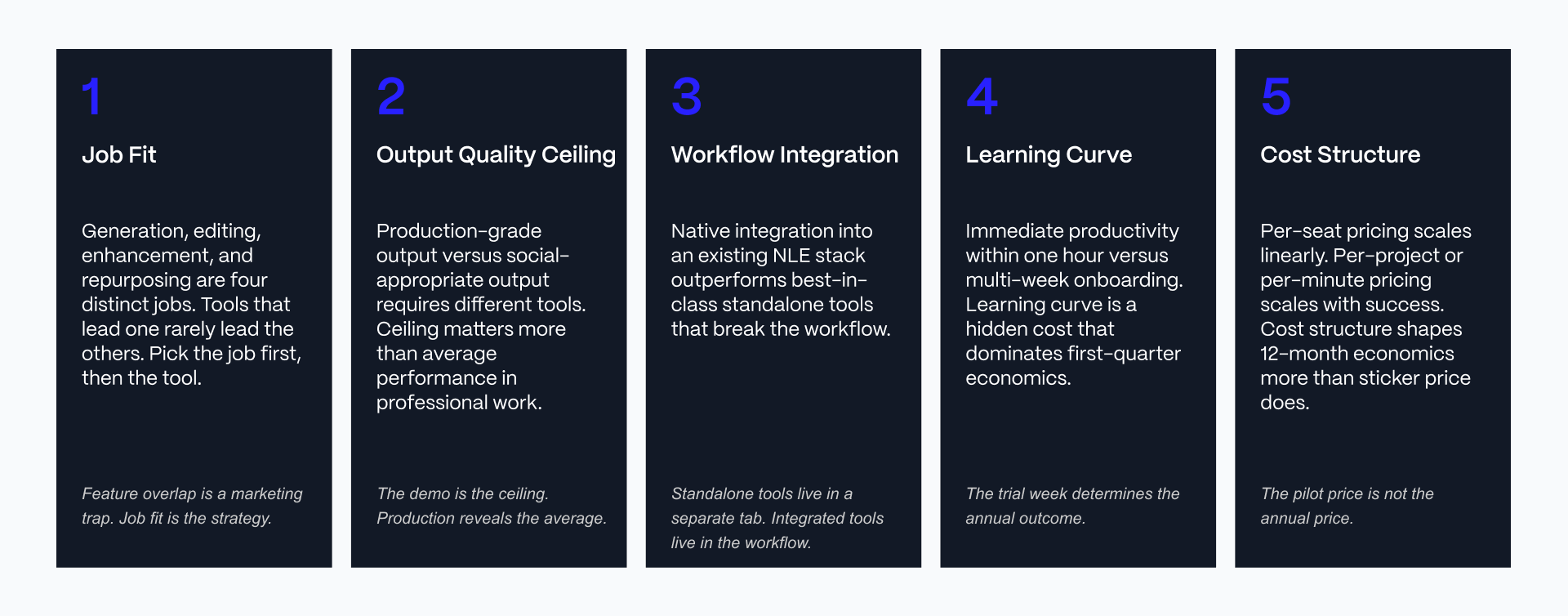
Before you pick any individual tool, run it through five questions. We didn’t focus on the “which AI feature is the most impressive” but on where your team stands currently.
Job Fit
What will the tool produce? How much will it produce? How often? If you build a tool that was intended to do something else, no matter what great features it has, it will be a failure.
Output Quality Ceiling
Can this tool produce its highest quality possible output? Rate the tool based upon the highest possible quality of output, rather than an average.
Workflow Integration
Will the tool work in your current workflow, or will you have to create a new workflow because of it? Costs related to integration are just as important as the cost of subscribing to a service.
Learning Curve
How long does it take to get someone up and running on the tool? This impacts how well the tool grows along with the team.
Cost Structure
What is your real team usage Cost for the tool? Not the starting price advertised. Credit limits, seat limits, and export limits may increase your actual cost.
Every tool profile below gets scored against these five points. Job fit and cost structure carry the most weight for Path A tools. Output quality ceiling and workflow integration carry the most weight for Path B.
Selecting an AI video tool is a part of the broader content operations. Veza Digital’s approach to top AI tools for marketing success covers how video tooling fits into the wider stack.
Path A: Social-First Workflow
CapCut Pro: Short-Form Social Editing Dominant
CapCut Pro is the leading app for creating social edits for creators, marketing teams, and small business owners who create large volumes of content for TikTok, Instagram Reels, and YouTube Shorts.
The primary source of the AI is through three key areas, including auto captions, background removal, an AI clip generator, along with a comprehensive template library. These features allow users to take raw footage and produce a complete social edit quickly.
What CapCut Pro does well: It runs across mobile, desktop, and web with genuine cross-platform continuity, its template library covers most short-form formats out of the box, auto captions and background removal are fast and accurate on typical smartphone footage, and the whole workflow is built around TikTok-native editing patterns rather than adapted from a professional NLE.
Where it constrains: The ceiling on customizing videos is significantly lower than what would be possible with a professional NLE. Export options for certain AI features vary depending on tier level and were dramatically altered in late 2025/early 2026.
Pricing:
- Free: Core editing features, 1080p export, no watermarks.
- Standard: $9.99 a month (mobile-focused).
- Pro: $19.99 a month or $179.99 annually (adds full AI tools, 4K export, and expanded cloud storage).
- Team: $24.99 a month per seat.
Honest framing: CapCut Pro is the category leader for volume social content and remains the strongest free-tier video editor on the market. It is not built for high-production work, and teams evaluating it purely on template polish should test it against their own messiest footage before committing budget.
OpusClip: Long-to-Short Repurposing
OpusClip helps YouTube creators, podcasters and social media managers convert their 1 hour recordings to batches of fully ready content using the most efficient method possible - no tedious timeline scrubbing!
OpusClip uses AI to automatically detect highlights, score your clips, generate auto captions, and resize them to fit your preferred vertically formatted platforms. All of this from content you have already created.
What OpusClip does well: OpusClip provides the quickest repurposing solution available today. Its clip-scoring algorithm gives a genuine signal on which segments are worth publishing first, auto captions run at high accuracy, and output is pre-optimized for the aspect ratios each social platform expects.
Where it constrains: Output quality depends entirely on the quality of the source footage, manual editing control after generation is limited, and pricing scales with processing volume in a way that can surprise high-output teams.
Pricing:
- Free: 60 processing minutes a month (watermarked, temporary exports).
- Starter: $15 a month for 150 processing minutes.
- Pro: $29 a month or $14.50 a month billed annually for 300 processing minutes (adds team collaboration, full aspect ratios, and scheduling).
- Business: Custom pricing for higher volumes and additional seats.
Honest framing: OpusClip is the specialist for long-form-to-short-form repurposing specifically. It is not a primary editing tool and works best paired with a primary editor like CapCut or Descript rather than as a standalone production pipeline.
When Path A Social-First Wins
Path A social-first tooling wins under a specific set of conditions. Volume drives the content calendar, meaning weekly output count matters more than per-video polish. Social platform outputs dominate the distribution mix (TikTok, Instagram Reels, YouTube Shorts). The audience consumes primarily on mobile. And the creator's or team's time, not budget, is the binding constraint.
Solo creators and marketing teams building social-first content programs typically fit this profile most cleanly. For B2B marketing teams weighing where AI video tools fit into a broader content stack, AI tools shaping B2B marketing covers the adjacent tooling decisions.
Path A: Corporate and Text-Based Workflow
Descript: Text-Based AI Video Editing
Descript centers on a transcription-first workflow: the video is transcribed, and editing the transcript edits the video. Podcasters, educators, marketers, and remote teams producing talking-head and interview-heavy content are the core users.
The AI value includes strong transcription accuracy, Overdub voice cloning for correcting mispoken lines, automatic filler-word removal, and auto captions, all built around the unique premise that editing text is faster than editing a timeline for spoken-word content.
What Descript does well: The text-editing-drives-video-editing workflow has no direct equivalent at any price point, collaboration features support real-time multi-editor review, transcription accuracy is strong across accents and audio conditions, and filler-word removal produces clean cuts without the jarring jump cuts that plagued earlier tools in this category.
Where it constrains: advanced visual editing and generative video work sit outside its core competency, and editors accustomed to timeline-based tools face a genuine learning curve adjusting to text-based editing logic.
Pricing:
- Free: 60 media minutes a month, 100 one-time AI credits, and 720p watermarked exports. Hobbyist: $16 a month (billed annually) or $24 month-to-month. Includes 10 media hours and 400 monthly AI credits.
- Creator: $24 a month (billed annually) or $35 month-to-month. Includes 30 media hours, 800 monthly AI credits, and 4K export.
- Business: $50 a month (billed annually) or $65 month-to-month. Includes 40 media hours, 1,500 monthly AI credits, and team features.
- Enterprise: Custom contract pricing.
Honest framing: Descript is the category leader for talking-head content, podcasts, and interview-heavy work specifically. Teams whose primary need is transcript editing, silence removal, and captions, without the rest of the AI toolkit, may find the full-featured tiers priced above what they will actually use.
Synthesia: Avatar-Based Corporate Video Generation
Synthesia generates AI avatar video for corporate training, sales enablement, multilingual content, and internal communications, without requiring a camera, a studio, or an on-camera presenter.
The AI value is in realistic AI avatars, voice synthesis, and multilingual video generation from a single script, at a scale that would be impractical to shoot conventionally.
What Synthesia does well: It eliminates shoot logistics entirely, it generates multilingual versions of the same training video from one source script, its enterprise governance and compliance features are genuinely strong, and its avatar library continues to expand in realism and range.
Where it constrains: Creative flexibility is limited compared to filmed or edited content, the format leans corporate by design, and several features that mid-market teams consider essential, including SCORM export and one-click translation, sit behind the Enterprise tier rather than self-serve plans.
Pricing:
- Free (Basic): 10 minutes of watermarked video a month, 1 editor seat, and 9 stock avatars.
- Starter: $29 a month (or around $18 a month billed annually). Includes 10 minutes of video a month and removes the Synthesia logo.
- Creator: $89 a month (or around $64 a month billed annually). Includes 30 minutes of video a month, multiple avatars per scene, and API access.
- Enterprise: Custom contract pricing for unlimited minutes and advanced team features.
For teams also evaluating slide-based content generation alongside avatar video, AI presentation tools covers the adjacent category.
Honest framing: Synthesia is the strongest enterprise avatar-based tool in the category. It is not built for creative work, and teams expecting cinematic flexibility from an avatar tool are evaluating it against the wrong job.
When Path A Corporate Rapid Workflow Wins
Corporate rapid workflow wins when the primary output is corporate training, sales enablement, internal communications, or multilingual content produced at scale. Descript's text-first workflow accelerates iteration on spoken-word content. Synthesia's avatar generation eliminates shoot logistics for scripted corporate formats entirely. Together, the two tools cover the corporate volume layer for marketing and training teams that need to move fast without sacrificing consistency.
Path B: Professional NLE with AI
Adobe Premiere Pro with AI (Sensei and Firefly)
Premiere Pro remains the industry-standard professional non-linear editor, and its AI layer, built on Adobe Sensei and Firefly, adds auto reframe, scene edit detection, voice isolation, and generative extend directly into a timeline-based professional workflow.
The AI value comes from how tightly these features integrate into an existing professional pipeline rather than replacing it: auto reframe for multi-format delivery, scene detection that speeds up rough cuts on long-form footage, and generative extend for filling gaps without a reshoot.
What Premiere with AI does well: It integrates natively with the rest of Adobe Creative Cloud (After Effects, Audition, Photoshop, Frame.io), its output quality ceiling is genuinely professional-grade, its AI features are layered onto an established professional workflow rather than replacing it, and its collaboration tooling remains an industry standard for teams working across roles.
Where it constrains: The subscription cost adds up quickly across a team, system requirements for smooth 4K performance are substantial (Adobe recommends 32GB RAM and a dedicated GPU with at least 4GB VRAM), and the learning curve for advanced techniques runs 15 to 30 hours of guided practice before an editor is comfortable on a complex multicam or color-heavy timeline.
Pricing:
- Premiere Pro Single App: $22.99 a month (billed annually) or $34.99 month-to-month. Includes 25 monthly generative credits.
- Creative Cloud Standard: $54.99 a month (billed annually) or $82.49 month-to-month. Includes standard creative apps without advanced video/audio AI features.
- Creative Cloud Pro: $69.99 a month (billed annually) or $104.99 month-to-month. Replaces the old All Apps tier, bundling 20+ apps with 4,000 monthly generative credits.
- Generative AI Add-ons: Separate Firefly plans start at $9.99 a month for light top-ups and scale to $199.99 a month for studio-scale use
For creative professionals evaluating adjacent AI-assisted design tooling, AI tools for UX design covers a parallel category with a similar professional-versus-volume framing.
Honest framing: Premiere with AI is the industry standard for professional video with AI layered on top. It requires an existing professional workflow to justify its cost. Teams without that workflow already in place are paying for depth they will not use.
DaVinci Resolve with the Neural Engine
DaVinci Resolve is the industry-standard color grading and finishing platform, and its Neural Engine adds AI-powered object removal, Magic Mask, super-resolution upscaling, voice isolation, and subject tracking to what is already a full professional NLE, VFX compositor (Fusion), and audio suite (Fairlight) in one application.
The AI value centers on features that would otherwise require separate specialized software: object removal without manual rotoscoping, automatic subject tracking for effects and masks, and AI-assisted noise reduction that holds up on archival and low-light footage.
What DaVinci Resolve does well: It remains the industry standard for film-grade color grading, its AI features are embedded directly into a professional finishing workflow rather than bolted on, the free version is genuinely production-viable for a large share of workflows, and the Studio tier is a one-time purchase rather than a recurring subscription.
Where it constrains: The learning curve is the steepest in this category, particularly for editors coming from timeline-only tools, and hardware requirements for smooth 4K-and-above grading are substantial.
Pricing:
- Free: Full editing, color correction, and audio tools, with no watermark and no time limit (supports up to 4K resolution at 60fps).
- DaVinci Resolve Studio: $295 (one-time purchase). Unlocks the DaVinci Neural Engine AI tools, multi-GPU acceleration, advanced noise reduction, HDR grading, and resolutions above 4K.
This is a genuinely unusual pricing model in a category dominated by subscriptions, and it has held steady even as most of the rest of this category moved toward metered or subscription pricing.
Honest framing: DaVinci Resolve is the industry standard for film and commercial finishing work. The free version alone delivers extraordinary value for creators not yet ready to invest in Studio, and the Studio tier's AI features are worth the one-time cost for anyone doing regular professional color and restoration work.
When Path B Professional NLE Wins
Professional NLE tooling wins when output quality ceiling matters more than production speed, as in film, commercial work, and high-end brand content. It wins when the team already operates inside a professional post-production workflow rather than building one from scratch.
It wins when integration with the broader Adobe Creative Cloud or Blackmagic ecosystem is a genuine operational requirement rather than a nice-to-have. It wins when client deliverables demand production-grade output as a baseline, not an aspiration.
Marketing and corporate teams shipping premium content, not just volume content, sit inside this profile alongside dedicated post-production professionals.
Path B: Specialized Professional
Runway ML: Generative AI for Professional Work
Runway ML has repositioned significantly since its earlier reputation as primarily a generation tool. In this article, it sits in the professional editing category because its strongest current use case for editors is generative editing capability layered onto professional workflows: video-to-video transformation, motion tracking, and generative extend applied to existing footage rather than pure text-to-video generation.
This is a deliberate shift from how Runway is covered elsewhere. Readers researching Runway purely as a generation tool, alongside Sora, Kling, and similar platforms, should see the AI video generation companion article for that framing specifically.
The AI value for professional editors: Strong generative video quality within a professional tier, video-to-video generation for creative transformation of existing footage, motion tracking, and generative extend for filling gaps in a shot without a reshoot.
What Runway does well: Its generative video quality is best-in-class among professional-tier tools, development moves fast with frequent model updates, its orientation toward professional workflow (rather than pure social generation) sets it apart from consumer-facing generators, and video-to-video generation opens creative editing options a traditional NLE cannot match.
Where it constrains: Pricing scales with usage in ways that require active credit management, rendering speed for generative work lags behind traditional editing operations, and the learning curve for effective generative prompting is real, distinct from timeline editing skill.
Pricing:
- Free: 125 one-time credits with watermarked exports.
- Standard: $12/month (annual billing) or ~$15/month. Includes monthly credits for light use and testing.
- Pro: $28–35/month. More monthly credits, commercial usage rights, and access to advanced features.
- Unlimited / Max: $76–95/month. Unlimited generation on standard models plus a large monthly credit allowance for flagship models.
- Enterprise: Custom pricing (reported starting around $800/month for small teams). Includes team management, enterprise security, and dedicated support.
Honest framing: Runway ML is worth the cost for professional editors handling briefs that genuinely require generative work: video-to-video transformation, motion graphics assistance, or generative extend. It is not the first tool for pure editing workflows where Premiere or DaVinci Resolve deliver more comprehensive core editing capability. Runway sits alongside a primary NLE as a specialized generative layer rather than replacing one.
Topaz Video AI: Enhancement and Upscaling
Topaz Video AI is a specialized enhancement tool for AI-powered upscaling, denoising, motion interpolation, and restoration, used heavily in archival work, professional post-production finishing, and content refresh projects where source footage quality needs to improve without a reshoot.
The AI value is concentrated: Best-in-class upscaling to 4K and above, denoising that holds up on genuinely degraded source material, motion interpolation for smoothing frame rate conversions, and restoration models purpose-built for archival and low-quality footage.
What Topaz Video AI does well: Its video quality enhancement remains industry-leading among dedicated tools, it runs locally on the user's own hardware rather than requiring cloud rendering for every job, and it integrates as a plugin directly into DaVinci Resolve, Premiere Pro, and After Effects rather than forcing a standalone workflow.
Where it constrains: It is a specialized enhancement layer, not a full editing workflow, so it requires source footage to have something to work with, and processing time for high-resolution restoration work can be substantial even on capable hardware.
Pricing:
- Topaz Video AI: ~$299/year. Includes the latest AI video enhancement tools and ongoing updates.
- Topaz Studio: ~$399/year. Includes Topaz Video AI, Photo AI, Gigapixel AI, and other Topaz creative tools.
- Topaz Studio Pro: ~$799/year. Adds expanded commercial rights and additional cloud credits for professional teams.
Honest framing: Topaz Video AI remains the specialist for the enhancement layer specifically, not a primary editing tool. It is a strong complement to a primary NLE like DaVinci Resolve or Premiere, and the shift to subscription pricing changes its cost profile enough that it deserves a fresh look even from teams that evaluated it under the old one-time model.
When Combining Paths Wins
Full-stack creative teams frequently benefit from running tools from both paths in parallel rather than committing entirely to one. Marketing teams shipping both social volume content and premium brand content run Path A tools for the social calendar and Path B tools for flagship deliverables. Post-production professionals often use a Path B primary NLE with an occasional Path A tool for social-format deliverables cut down from a longer production.
The key question is when paradigm flexibility outperforms paradigm uniformity. For most teams producing more than one type of content at meaningfully different quality bars, the answer is that some combination beats forcing every deliverable through one tool. For teams thinking through this at a broader operational level, including how tooling flexibility maps to team structure, AI tools for entrepreneurs covers adjacent decisions around building a flexible content stack from the ground up.
Full-stack creative operations planning sits inside the broader content strategy work Veza Digital does with content-driven B2B SaaS teams. If that is the scoping conversation underway, talk to Veza Digital about the operating layer that surrounds these tool decisions.
Audit, Anti-Patterns, and Decision by Creator Profile
The 10-Question Pre-Purchase Evaluation
Trial-phase discipline separates strategic tool selection from expensive guesswork. Before committing budget to any tool in this roundup, run it through these ten questions during the trial period, and test on the team's messiest actual footage, not vendor demo footage.
Questions 2, 3, and 7 are the ones most teams skip, and they are the ones most likely to surface a problem after the contract is signed rather than before.
Anti-Patterns and Better Approaches
Three failure patterns recur across AI video tool selection, each with a clear better-approach alternative.
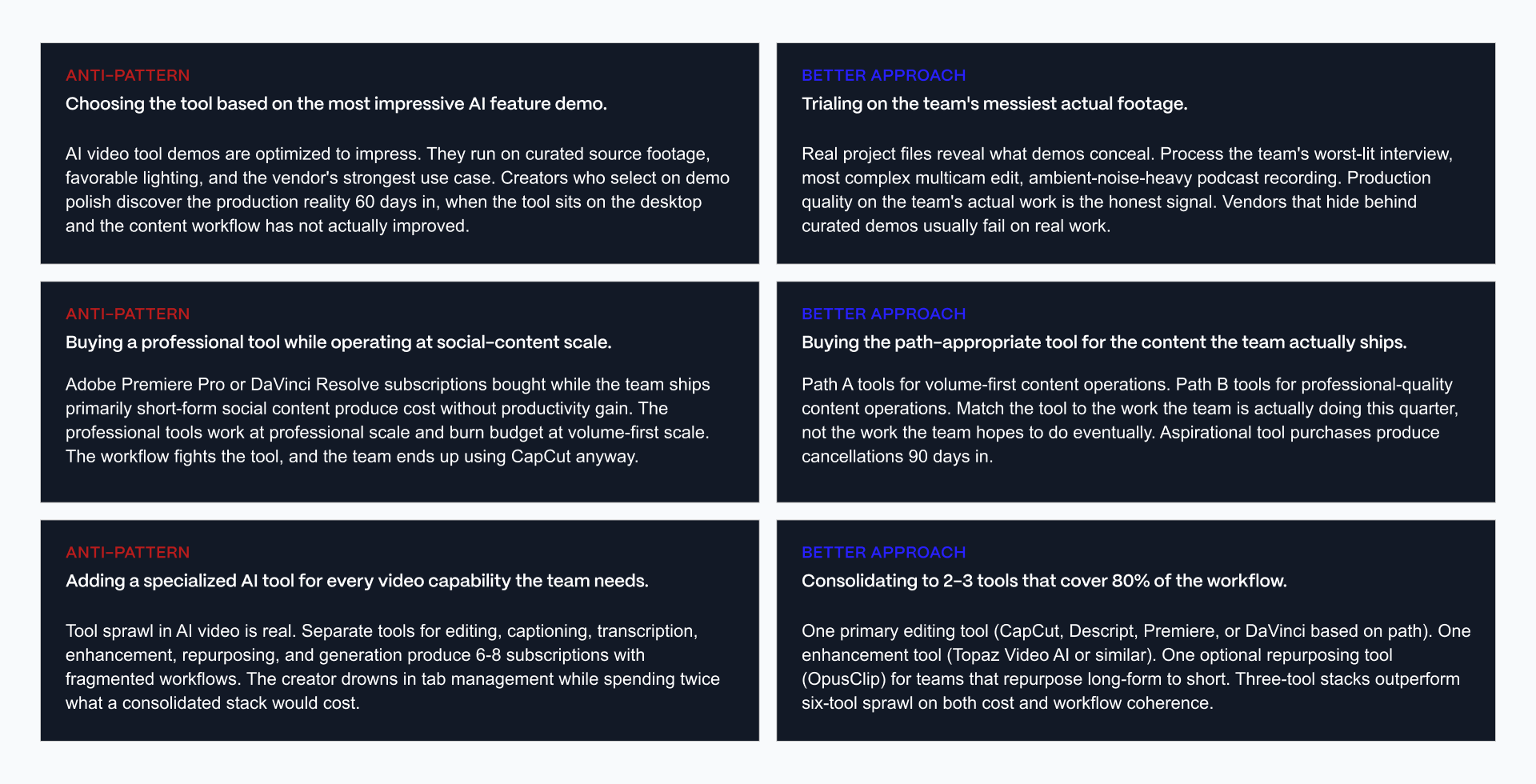
Demo-polish selection versus trial on messiest actual footage. Vendor demos run on curated footage shot and lit for the demo. Production footage is messier: inconsistent lighting, imperfect audio, real-world camera shake. The anti-pattern persists because vendor marketing pressure and aspirational purchase logic push evaluators toward the most impressive-looking output rather than the most representative one.
The better approach: Run every serious candidate against the team's actual worst recent footage before committing budget, not the best.
Professional tool at social-content scale versus path-appropriate tool selection. Teams sometimes default to the most powerful tool available, assuming more capability is always better. It is not, when the workflow overhead of a professional NLE outpaces the actual quality requirement of a social content calendar.
The better approach: Match tool capability to the actual output quality ceiling the content needs, not the ceiling the team could theoretically reach.
Specialized-tool sprawl versus consolidation to 2-3 tools covering 80 percent of workflow. The AI video tool market moves fast, and new specialized tools launch monthly, each solving one narrow problem well. Teams that chase every new specialist tool end up managing a sprawling, hard-to-maintain stack.
The better approach: Consolidate around two to three tools that cover the large majority of the actual workflow, and evaluate new specialist tools only when they solve a problem the current stack genuinely cannot.
Decision by Creator Profile
Four creator archetypes map cleanly to path fit, with one common transition pattern worth naming separately
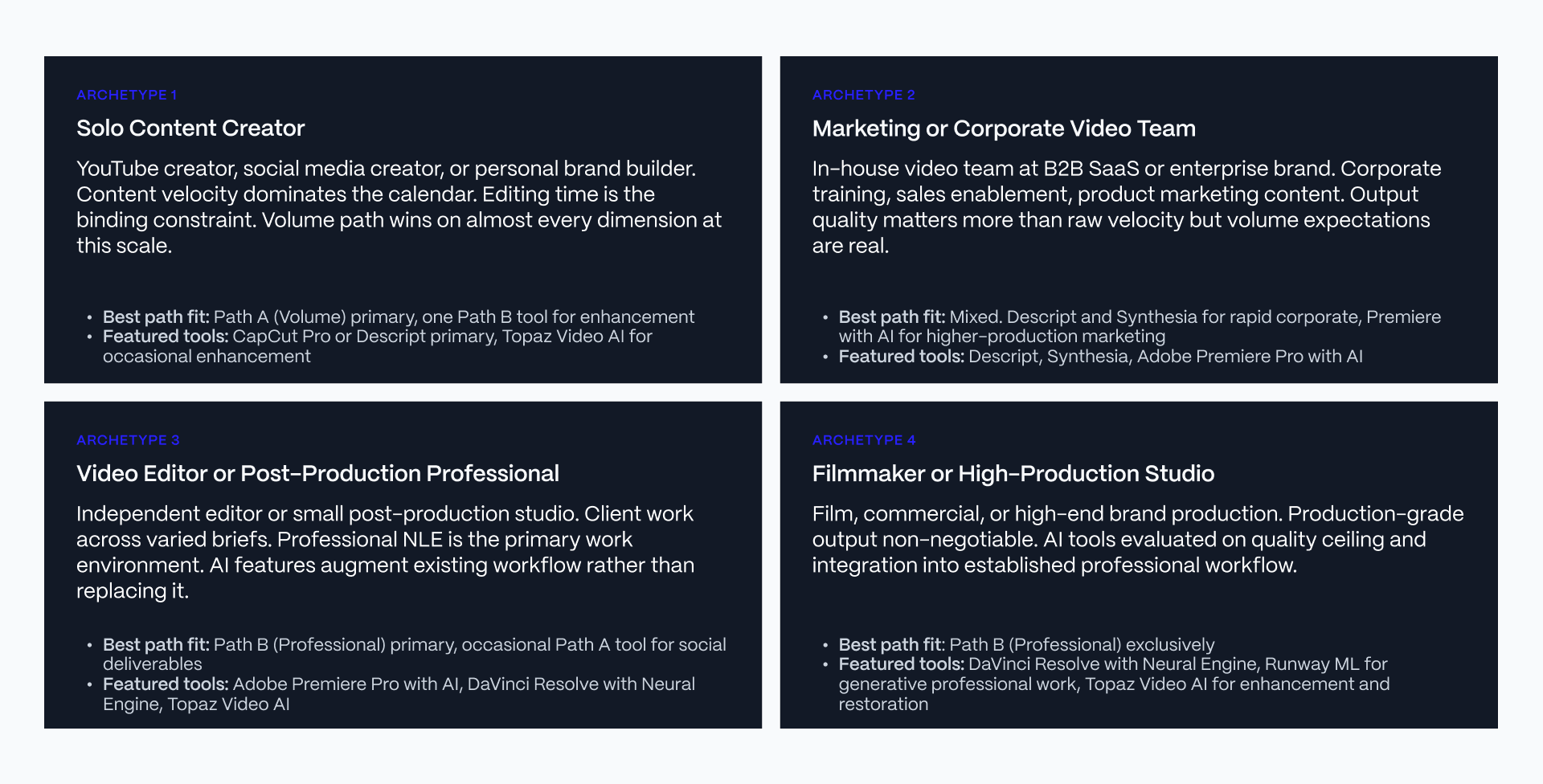
Solo Content Creator. Path A primary. CapCut Pro for short-form social editing, or Descript if the content is talking-head, interview, or podcast-driven. Add OpusClip if repurposing long-form recordings into short clips is a regular part of the workflow.
Marketing or Corporate Video Team. Mixed-path stack. Descript for rapid corporate content (training, sales enablement, executive video), Synthesia for multilingual training and internal communications without shoot logistics, and Adobe Premiere Pro with AI for premium marketing content that requires professional post-production polish.
Video Editor or Post-Production Professional. Path B primary. Adobe Premiere Pro with AI or DaVinci Resolve as the core NLE, with Topaz Video AI layered in for the enhancement and restoration layer on projects that need it.
Filmmaker or High-Production Studio. Path B exclusively. DaVinci Resolve as the finishing and color platform, Runway ML for generative editing work where the brief calls for it, and Topaz Video AI for enhancement and archival restoration.
Cross-profile note: Creators transitioning from Volume to Professional (a growing channel that has outgrown CapCut's ceiling, for instance) typically do not need to abandon Path A tools entirely. They add a Path B tool for flagship content while keeping Path A tools running for the ongoing social calendar. This is a common evolution, not a wholesale replacement decision.
For teams thinking about this transition at the broader operations level, both AI tools for startups and AI tools for entrepreneurs cover adjacent tooling decisions that tend to come up at the same growth stage.
Full-stack creative operations planning is a conversation Veza Digital has regularly with content-driven B2B SaaS teams. If that scoping work is underway, talk to Veza Digital's team about the operating layer around these decisions.
Final word
AI video tool selection in 2026 is not a demo polish competition. It is a path decision. Volume workflow or Professional editing. Choose based on path fit, not vendor marketing.
Volume path tools (CapCut Pro, OpusClip, Descript, Synthesia) win on speed, social output, and rapid corporate content. Professional path tools (Adobe Premiere with AI, DaVinci Resolve, Runway ML, Topaz Video AI) win on production quality, precision, and premium output ceiling. Neither path is universally better. The path question sits upstream of the tool question.
Solo creators and social-first marketing teams frequently choose Path A. Post-production professionals and filmmakers frequently choose Path B. Marketing teams shipping mixed content frequently combine both.
Veza Digital works with content-driven B2B SaaS on the strategic operating layer that surrounds AI video tool decisions. If the broader content operations strategy is what's being scoped, talk to our team.
See also: How Veza works with content-driven B2B SaaS.
Disclaimer: Every pricing figure in this article was checked against each vendor's official pricing page and multiple independent sources on the day of publication. AI video tool pricing changes frequently, and several vendors featured here have significantly updated their plans within the past year. Feature availability, plan names, credit allowances, model access, regional pricing, annual billing discounts, taxes, and promotional offers may change without notice. Treat every price in this article as a general reference rather than a guaranteed quote, and verify the latest pricing and plan details on each vendor's official website before making a purchasing decision.