.jpeg)
Drupal is still a relevant platform. Large government agencies, universities, and publishers still use it because it can handle complex websites.
However, there is an issue with Drupal.
Since Drupal 9 was released, the complexity and cost of maintaining a Drupal-based website has increased significantly. At the same time, many organizations now have fewer resources and limited budget allocations. The key question for organizations in 2026 is not "Is Drupal good?", but, "Do we have enough developers, time, and patience to manage a platform as demanding as Drupal?"
Most articles about Drupal alternatives don't help answer that. What we see in these article is that they outline several platforms and then provide their own ranking of the best platform available.
For organizations, there’s a much less complicated assessment:
1) Who will be responsible for updating my website?
2) Who will be responsible for updating my website's content daily?
3) How much ongoing technical/developer support can I afford to provide over the long-term?
These three questions are more important than comparing features.
This article evaluates Drupal alternatives by identifying the different types of teams. It covers four common team setups, recommends platforms that fit each one, points out popular options that are often poor choices, and includes a simple four-question framework to help you decide whether staying on Drupal or moving elsewhere makes the most sense.
If your team is planning a Drupal migration in the next two quarters, Veza Digital can help map the right platform path for your team profile. Get in touch.
Why B2B SaaS and Marketing Teams Are Leaving Drupal in 2026
The Four Real Reasons Teams Leave Drupal (Not the Generic Ones)
There’s nothing wrong with using Drupal. It's a platform that now makes sense for a smaller group of organizations than it did ten years ago.
There are certain issues you may see when your organization moves away from Drupal in 2026.
1. Finding good Drupal developers is harder than finding other types of developers
There simply aren’t as many Drupal developers out there today as there are WordPress developers, Webflow designers, and JavaScript developers. Replacing a person who leaves your company can be a process that takes from several months to over a year. There is no doubt that salaries and contractor rates have gone up since last year, and the cost to staff has too.
2. Upgrading feels like rebuilding the entire site again
While most organizations think an upgrade will be a routine maintenance project, it frequently becomes a partial or complete rebuild of your site. This means that your team was planning to spend a couple of weeks doing an upgrade and ended up taking several months instead. The end of support for Drupal 7 forced many organizations to face a migration they had been postponing for years.
3. Your marketing team cannot work independently
In many Drupal setups, simple changes still require developer help. Therefore, while a member of the marketing team may want to create a SaaS landing page or update a headline immediately, they can’t do it without submit a request to their IT department. This results in delayed testing, campaigns and content updates.
4. Content must appear in every place possible; not just the website
Most companies today need to distribute their content across multiple platforms (their website, mobile apps, customer portals, product documentation, and in-app help centers). While Drupal allow the creation of APIs for this purpose; it wasn’t developed around this type of content flow. Many platforms today were created for headless and API-first content flow and provide easier workflows for distributing content to each channel.
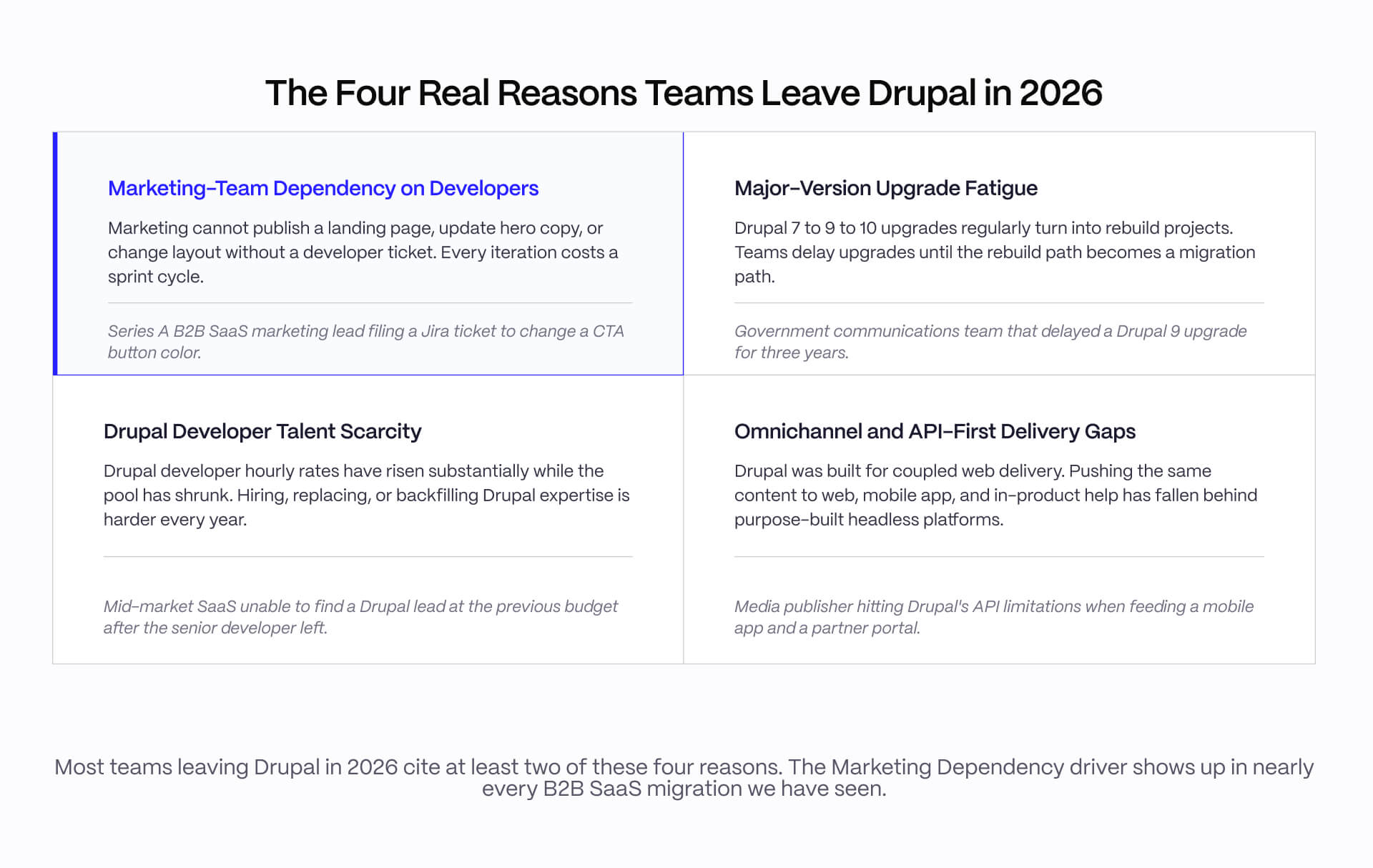
“Most teams leaving Drupal in 2026 cite at least two of these four reasons. The Marketing Dependency driver shows up in nearly every B2B SaaS migration we have seen.”
The important thing is that these problems do not all point to the same solution. A team struggling with developer hiring needs a different platform than a team struggling with content distribution. This is where many migration projects goes wrong.
Companies begin the migration process by selecting a platform. But what they should start with is understand how their team works, then choose the platform that fits that reality.
When Drupal Is Still the Right Call (and You Should Not Migrate)
Drupal remains the correct choice for a specific class of organizations: complex multilingual government sites with twenty or more locales, large university systems with deeply integrated student information systems, regulated industry sites with custom compliance-validated workflows, and organizations with a strong in-house Drupal team they intend to keep.
Drupal still powers Whitehouse.gov, NASA.gov, and a large share of higher-education and federal government sites. For these organizations, the right move is to fund Drupal expertise, not replace it. A forced migration usually destroys more value than it creates.
The rest of this article assumes you have already decided Drupal is the wrong fit and are choosing what comes next.
How to Evaluate Drupal Alternatives: The Team-Ownership Framework
Step 1: Identify the Team That Will Own and Maintain the Next Site
Most Drupal migrations fail at the team-ownership decision, not the platform decision. Before evaluating any specific platform, identify which of four team profiles your organization actually runs.
Marketing-led. Marketing owns the website roadmap, content, and publishing. A developer or agency is available for structural changes but not for daily content work. This is the dominant B2B SaaS profile from seed through Series B.
Dev-led. Engineering owns the stack. A front-end developer builds and maintains the site. Marketing submits content through a structured editorial interface. More common at platform companies, developer-tool SaaS, and Series C and above.
IT/DXP-led. Central IT owns the platform across multiple business units, often with a vendor partnership and on-premises or hybrid hosting. This is the enterprise profile.
Compliance/gov-led. Legal, security, or compliance constraints drive the platform decision. The platform must support validated workflows, audit trails, and certifications.
The team profile is operational reality, not aspiration. The profile that has actually maintained the Drupal site for the past two years is the profile that will own the next site, even if leadership wants something different.
Step 2: Assess Migration Realism (Timeline, TCO, and Talent Risk)
Before any platform comparison, give the team a realistic lift assessment on three variables.
Timeline from kickoff to launch. A Webflow migration from Drupal 9 for a fifty-page B2B SaaS site typically takes 8 to 14 weeks with a qualified agency. A WordPress migration with structured content remap typically takes 12 to 20 weeks. A headless build (Storyblok or Sanity with a Next.js front end) typically takes 16 to 28 weeks. Enterprise DXP migrations (AEM or Sitecore) typically take 9 to 18 months.
Three-year total cost of ownership. This includes platform license or subscription, development and migration cost, hosting, and ongoing maintenance. Ratio comparisons are more useful than precise totals: a Webflow site costs a fraction of a Sitecore implementation in TCO, and a WordPress build sits between them depending on plugin selection and developer overhead.
Talent risk. How hard will it be to staff the platform once the migration team rolls off? Webflow and WordPress have the largest talent pools. Storyblok, Sanity, and Hygraph have smaller but growing developer communities. Sitecore talent has become harder to find since the XM Cloud transition.
Step 3: Match Platform Category to the Specific Drupal Pain Point
Three platform categories exist for Drupal alternatives, and each solves a different pain point.
Visual coupled platforms (Webflow, WordPress with a page builder) solve marketing-team dependency on developers.
Headless CMS platforms (Storyblok, Sanity, Hygraph, Contentful) solve omnichannel delivery gaps and developer experience problems.
Enterprise DXP platforms (AEM, Sitecore, Optimizely) solve IT-led governance and multi-business-unit content management.
Picking the wrong category for your pain point makes everything worse, not better.
A common bad migration: a Series B SaaS marketing team adopts a headless stack to fix a developer-dependency problem and ends up with twice the dependency, because every new page now requires a developer to build the component first. The team needed visual coupled, not headless.
A common good migration: an enterprise organization with central IT and three regional brands moves from Drupal to AEM and consolidates twelve sites onto one platform with shared governance. That team needed enterprise DXP, not Webflow.
For more context on where headless fits against other options, see our Webflow vs Contentful comparison.
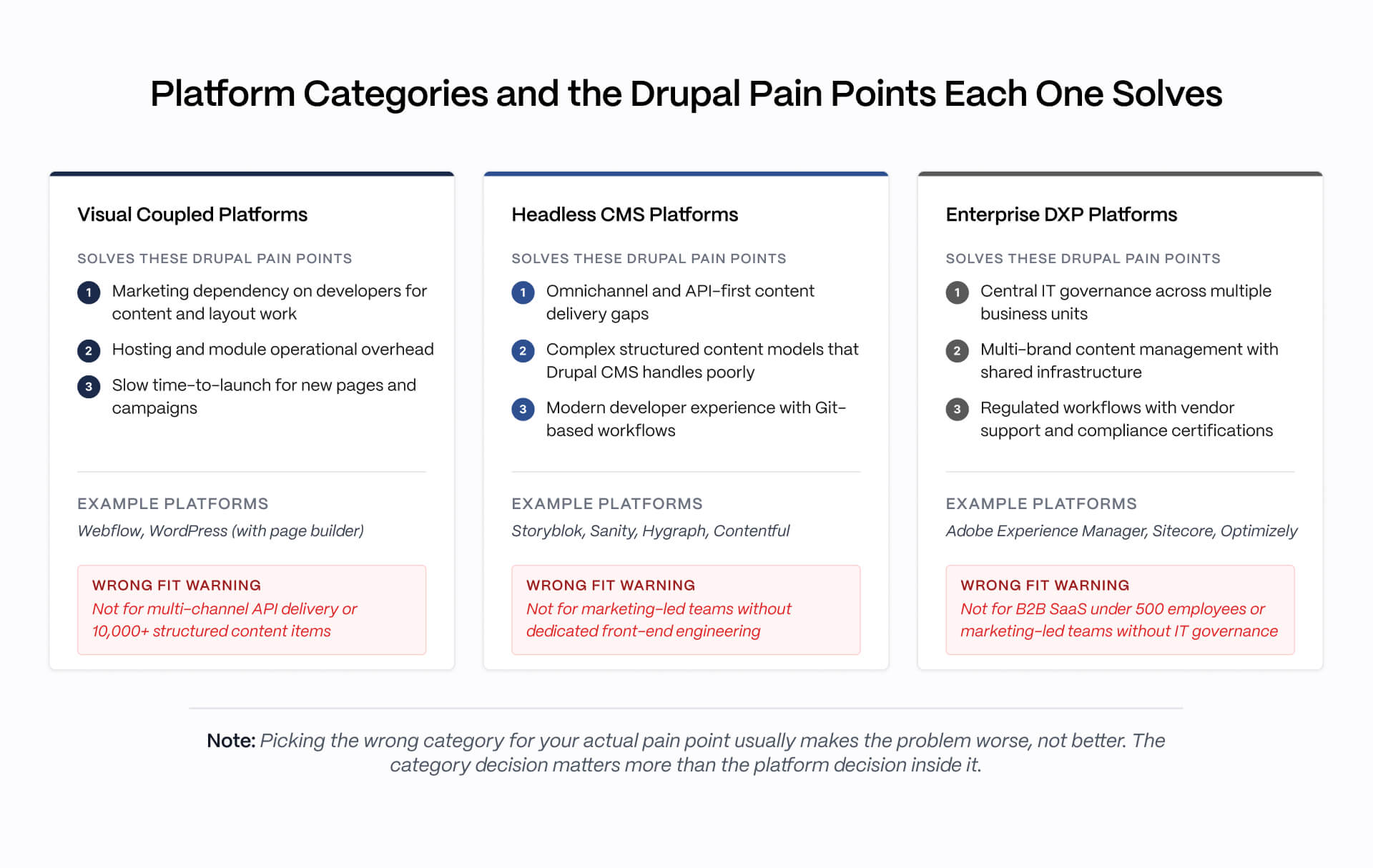
“Picking the wrong category for your actual pain point usually makes the problem worse, not better. The category decision matters more than the platform decision inside it.”
The Best Drupal Alternatives by Team Profile
(Platform Recommendation Matrix: 4-row table with team profile, recommended platform, rationale, key limitation, Veza fit - coded asset)
For Marketing-Led B2B SaaS Teams: Webflow
For marketing-led B2B SaaS teams leaving Drupal, Webflow is the strongest match. Webflow gives marketing direct control over content, layout, and publishing without a developer ticket on every update.
The Editor handles routine content operations (blog posts, copy changes, CMS items, simple page additions) independently. The Designer covers structural changes and new section types with a Webflow-trained developer or agency. Built-in hosting on Webflow's Fastly-powered CDN removes Drupal's hosting and module overhead. Built-in SEO tooling (editable meta tags, canonical tags, semantic HTML, SSL by default) removes the configuration complexity Drupal requires.
Real wins for this profile:
- Time-to-launch with a qualified agency is typically 8 to 14 weeks for a fifty-page B2B SaaS marketing site
- Marketing teams ship and iterate independently from day one
- The Webflow talent pool is large and growing, which reduces handoff risk if the build team rolls off
Honest limitations: Webflow CMS Collection item limits become a constraint at 10,000+ content items (verify current limits at webflow.com/pricing). Native e-commerce is limited to basic catalog and checkout use cases. Complex stores belong on Shopify or a purpose-built platform.
Webflow is not the answer for dev-led platform companies, enterprise DXP replacements, or compliance-led government migrations.
See how Webflow and WordPress compare for this profile in our Webflow vs WordPress breakdown, and browse best B2B SaaS websites for production examples. For teams also evaluating marketing automation platforms, see our Webflow vs HubSpot comparison.
See how VezaDigital builds Webflow sites for B2B SaaS teams replacing Drupal and WordPress.
For Dev-Led Teams Wanting Composable Architecture: Storyblok, Sanity, or Hygraph
For dev-led teams with dedicated front-end engineering capacity, a headless CMS is the right category. Storyblok, Sanity, and Hygraph are the strongest options.
Storyblok offers a visual editor on top of a developer-friendly Slice model, which is the closest a headless platform comes to a marketing-friendly editing experience.
Sanity is developer-first with strong real-time collaboration and portable text. It works well for engineering-led organizations where the website is part of the product's credibility signal.
Hygraph is GraphQL-native with content federation, fitting organizations that syndicate content across many surfaces.
This category requires real engineering capacity. A typical headless build with Next.js or Nuxt takes 16 to 28 weeks before editors can publish, because the developer must build the component library or content model first.
Recommend this category only when the team has at least one dedicated front-end developer, the content model requires structured relationships beyond what a coupled CMS handles, or the same content must render on more than one digital surface (web plus mobile app plus in-product help).
Headless is not a marketing speed fix. It is a developer-experience and multi-channel delivery fix. Recommending headless to a marketing-led team without engineers usually makes the dependency problem worse.
For full platform comparisons, see Webflow vs Storyblok and Webflow vs Sanity.
For Publishing-Heavy and Content-First Sites: WordPress
WordPress is the right answer for publishing-heavy sites, content-first organizations, and teams that need the largest plugin ecosystem available. WordPress holds the largest market share of any CMS, has the deepest plugin ecosystem (60,000+ plugins in the WordPress.org directory), and offers mature editorial workflows that handle complex review and approval cycles.
Acquia, Drupal's largest commercial vendor, has openly positioned WordPress as a Drupal migration target. That signal alone tells you where the gravity is pulling.
Real wins: largest CMS talent pool, mature editorial workflows, and a clear migration path from Drupal that many specialized agencies have built repeatable playbooks for.
Honest limitations: plugin sprawl creates security and maintenance risk that compounds over time. Page builder fragmentation (Elementor, Divi, Bricks, WP Bakery) means picking a page builder is a significant architectural decision that affects portability. Hosting and updates create more operational overhead than Webflow's all-in-one model.
WordPress is not the right answer for marketing-led B2B SaaS teams that prioritize visual control and design precision (Webflow wins that profile), or for dev-led teams pushing content to multiple surfaces (headless wins). See our Webflow vs WordPress comparison for the head-to-head.
For Enterprise DXP Replacements: Adobe Experience Manager, Sitecore, or Optimizely
For enterprise organizations running Drupal as a DXP across multiple business units with custom integrations and central IT governance, the realistic alternatives are Adobe Experience Manager, Sitecore, or Optimizely.
These platforms cost six to seven figures annually, take 9 to 18 months to implement, and require ongoing vendor partnerships. Most B2B SaaS readers will not be in this profile. This section exists to be honest with the readers who are.
AEM is the dominant enterprise DXP for organizations already in the Adobe Experience Cloud (Analytics, Target, Marketo, Campaign).
Sitecore is strong for organizations with existing Sitecore investment, though the XM Cloud transition has created talent scarcity that did not exist five years ago.
Optimizely (formerly Episerver) is the closest of the three to a mid-market enterprise option.
None of these are the right answer for B2B SaaS organizations under 500 employees or marketing-led teams without IT governance and vendor management capacity. Recommending AEM to a Series A SaaS marketing team is malpractice.
Drupal Alternatives We Tested and Did Not Recommend
Honest platform advice without vendor bias. See VezaDigital's recent Webflow migration work.
Backdrop CMS and TYPO3: Why Drupal Forks and Adjacent CMSes Are Not the Answer
Backdrop CMS is a Drupal 7 fork that maintains backward compatibility with the Drupal 7 module ecosystem. It shows up in many Drupal alternatives roundups because it offers a low-friction path for teams already deep in the Drupal 7 codebase.
The problem: Backdrop inherits the developer-heavy operational model that drives most teams to leave Drupal in the first place. For a team migrating because of developer dependency or talent scarcity, Backdrop is not a fix. It is the same class of platform with a smaller community and a smaller talent pool than Drupal itself.
TYPO3 is widely used in German-speaking markets and parts of Europe. It is a capable open-source CMS with mature multilingual support and a strong enterprise feature set. For an organization already running TYPO3-trained developers, it is a reasonable platform.
For a North American B2B SaaS team leaving Drupal, the TYPO3 talent pool is too small to be a viable replacement. Hiring or replacing a TYPO3 developer in North America is harder than hiring a Drupal developer, which defeats the purpose of the migration.
Neither platform is a bad product. Both are wrong-class choices for the migration drivers most teams face.
Wix, Squarespace, and Other Page Builders: Why These Are Not Drupal Replacements
Wix and Squarespace appear in some Drupal alternatives roundups. For B2B SaaS teams leaving Drupal, neither is a legitimate alternative.
They lack the design control, CMS structure, SEO depth, and developer extensibility that any team coming from Drupal will hit within months. Complex content models, structured taxonomies, multi-author editorial workflows, and developer customization are all weak compared to Webflow, WordPress, or any headless platform.
A common bad migration: a Series A SaaS moves from Drupal to Squarespace because it looked easier and cheaper. Within a year the team outgrows Squarespace's CMS, hits SEO limitations, and needs a second migration. The right move was to skip Squarespace and go directly to Webflow or WordPress.
Wix and Squarespace serve a real market (very small businesses, solo founders, personal sites). That market is not the team profile leaving Drupal.
A 4-Question Decision Framework for Choosing Your Drupal Alternative
The 4-Question Checklist
Q1: Does your team have dedicated front-end engineering capacity for the next site, with at least one developer who will own the codebase long-term?
- No: go to Q4 (marketing-led path)
- Yes: go to Q2 (engineering-led path)
Most B2B SaaS marketing-led teams from seed through Series B answer No and reach Webflow via Q4. That is not a default. It is the correct architectural decision for marketing-led teams at this stage.
Q2: Does content need to render on more than one digital surface (web plus mobile app plus in-product help plus partner portal)?
- Yes: choose a headless CMS (Storyblok, Sanity, or Hygraph). API-first multi-channel delivery is the defining capability of this category.
- No: go to Q3
Q3: Is your organization an enterprise with central IT governance, multi-brand requirements, and a budget for vendor partnership and a 9-to-18-month implementation?
- Yes: choose an enterprise DXP (Adobe Experience Manager, Sitecore, or Optimizely)
- No: choose WordPress for publishing-heavy or content-first use cases, or Webflow if visual control is also a requirement
Q4: Will marketing own daily content updates and need to publish without developer involvement?
- Yes: choose Webflow. Marketing-led B2B SaaS teams, design-forward marketing sites, and teams that prioritize speed and design quality land here.
- No: choose WordPress. Most publishing-heavy and content-first sites land here.
The framework produces a clear recommendation. It does not hedge.
(If the framework points to Webflow, VezaDigital has migrated SaaS sites from Drupal and WordPress to Webflow at every growth stage. Talk to our team.)
Migration Roadmap by Drupal Version and Team Profile
Drupal Migration Roadmap
START
│
├── Current Platform: Drupal 7
│ │
│ ├── Team Profile: Marketing-Led
│ │ ├── Recommended Platform: Webflow
│ │ ├── Timeline: 8–14 weeks
│ │ ├── Primary Risk:
│ │ │ • Content migration from Drupal 7 schema
│ │ │ • URL structure and redirect continuity
│ │ └── Veza Fit: Yes
│ │
│ └── Team Profile: Publishing-Heavy
│ ├── Recommended Platform: WordPress
│ ├── Timeline: 12–20 weeks
│ ├── Primary Risk:
│ │ • Plugin selection
│ │ • Editorial workflow remap
│ │ • Content model translation
│ └── Veza Fit: With Support
│
├── Current Platform: Drupal 9
│ │
│ ├── Team Profile: Marketing-Led
│ │ ├── Recommended Platform: Webflow
│ │ ├── Timeline: 10–16 weeks
│ │ ├── Primary Risk:
│ │ │ • Complex content models
│ │ │ • Custom field translation
│ │ └── Veza Fit: Yes
│ │
│ └── Team Profile: Dev-Led with Front-End Capacity
│ ├── Recommended Platform:
│ │ • Storyblok + Next.js
│ │ • Sanity + Next.js
│ ├── Timeline: 16–28 weeks
│ ├── Primary Risk:
│ │ • Slice library build required before publishing
│ │ • Component design system creation
│ └── Veza Fit: With Support
│
├── Current Platform: Drupal 9 or Drupal 10
│ │
│ └── Team Profile: IT/DXP-Led, Multi-Brand
│ ├── Recommended Platform:
│ │ • Adobe Experience Manager
│ │ • Sitecore
│ ├── Timeline: 9–18 months
│ ├── Primary Risk:
│ │ • Vendor selection process
│ │ • Implementation partner selection
│ │ • Compliance and integration validation
│ └── Veza Fit: Advisory Only
│
└── Current Platform: Drupal 10
│
└── Team Profile: Compliance/Gov-Led
├── Recommended Platform:
│ • Stay on Drupal
│ • Adobe Experience Manager
├── Timeline: Maintenance only
├── Primary Risk:
│ • Custom-validated workflows are expensive to rebuild
│ • Migration business case is often weaker than maintenance
└── Veza Fit: Advisory Only
Timeline Adjustments
• Add 30% for multi-language sites.
• Add 50% if the content model is being restructured during migration.
Note
Veza Fit reflects Veza Digital's primary delivery model. Timelines assume a single primary domain with structured content under 500 pages. Multi-language and multi-brand projects extend timelines.
Once the platform decision is made, the next decision is migration sequence. The roadmap differs by your current Drupal version.
Drupal 7 to Webflow (marketing-led): 8 to 14 weeks with a qualified agency. Primary risks are content migration from the Drupal 7 schema and URL structure continuity (redirects, canonical tags, SEO equity preservation).
Drupal 7 to WordPress (publishing-heavy): 12 to 20 weeks. Primary risks are plugin selection and editorial workflow remap.
Drupal 9 to Webflow (marketing-led): 10 to 16 weeks, slightly longer than Drupal 7 because the content model is usually more complex.
Drupal 9 to headless (dev-led): 16 to 28 weeks with Storyblok or Sanity plus Next.js. The component library or content model build is the long pole.
Drupal 9/10 to AEM or Sitecore (IT/DXP-led): 9 to 18 months. Vendor selection, implementation partner selection, and compliance validation are the timeline risks.
When to Call a Webflow Agency (and When Not To)
A Webflow agency makes sense when the framework points to Webflow and the team needs a production-quality launch within 8 to 16 weeks. The agency handles design system build, Webflow Designer development, CMS Collection setup, content migration from Drupal, redirect mapping, SEO continuity, and team training so marketing can take over editorial work on day one.
Veza Digital has migrated Drupal sites to Webflow for B2B SaaS marketing-led teams from Series A through Series C. If that is your team profile, we work through this exact engagement.
Our Work | Talk To Our Team
A Webflow agency does not make sense for dev-led teams choosing a headless stack (call a Next.js or Nuxt agency instead), for enterprise IT-led DXP migrations (call an Adobe or Sitecore implementation partner), or for compliance-led government migrations (most of which should not migrate at all). If Webflow is not the right answer for your team, calling a Webflow agency wastes your time and ours.
FAQ Section
What is the best alternative to Drupal in 2026?
There is no single best alternative because the right Drupal alternative depends on which team will own the next site. For marketing-led B2B SaaS teams, Webflow is the strongest match. For publishing-heavy sites and content-first organizations, WordPress. For dev-led teams with front-end engineering capacity, a headless CMS like Storyblok, Sanity, or Hygraph. For enterprise DXP replacements, Adobe Experience Manager, Sitecore, or Optimizely. The platform choice should follow the team profile, not the other way around.
Is Drupal still relevant in 2026?
Yes, for a narrower team profile than it used to fit. Drupal remains a strong choice for complex multilingual government sites, large university systems, regulated industry sites with custom validated workflows, and organizations with a strong in-house Drupal team they intend to retain. It has become a difficult choice for marketing-led B2B SaaS teams because of talent scarcity, upgrade complexity, and the developer dependency Drupal genuinely requires for daily operations.
Why are teams leaving Drupal?
Four real reasons drive most Drupal migrations in 2026. First, Drupal developer talent is scarce and hourly rates have risen substantially. Second, major-version upgrades from Drupal 7 to 9 to 10 frequently turn into rebuild projects. Third, marketing teams cannot publish landing pages or update layouts without filing developer tickets. Fourth, Drupal's API and omnichannel delivery model has fallen behind purpose-built headless platforms. Most migrating teams cite at least two of these four.
Is WordPress a good alternative to Drupal?
Yes, for publishing-heavy sites and content-first organizations with large editorial teams. WordPress holds the largest market share of any CMS, has the deepest plugin ecosystem, and offers mature editorial workflows. Acquia, Drupal's largest commercial vendor, has openly positioned WordPress as a Drupal migration target. WordPress is not the right answer for marketing-led B2B SaaS teams that need visual control or for dev-led teams pushing content to multiple digital surfaces.
What is the best headless CMS to replace Drupal?
For dev-led teams with dedicated front-end engineering capacity, Storyblok, Sanity, and Hygraph are the strongest headless alternatives to Drupal. Storyblok offers a visual editor on top of a developer-friendly Slice model. Sanity is developer-first with strong real-time collaboration and portable text. Hygraph is GraphQL-native with content federation. All three require real engineering capacity and are not good fits for marketing-led teams without front-end developers.
Can Webflow replace Drupal?
For marketing-led B2B SaaS teams, yes. Webflow gives marketing direct control over content, layout, and publishing without developer dependency, has built-in hosting and SEO that removes Drupal's operational overhead, and launches faster with a qualified agency. Webflow does not replace Drupal for enterprise DXP use cases, multi-business-unit content models, complex multilingual government sites, or organizations with central IT governance models that require vendor partnerships and on-premises deployment.
How long does a Drupal migration take?
Migration timelines vary substantially by target platform and team profile. A Drupal to Webflow migration for a fifty-page B2B SaaS site typically takes 8 to 14 weeks with a qualified agency. A WordPress migration with content remap typically takes 12 to 20 weeks. A headless build (Storyblok or Sanity plus Next.js) typically takes 16 to 28 weeks. Enterprise DXP migrations (AEM, Sitecore) typically take 9 to 18 months. NEEDS SOURCING for industry-specific ranges.
Is Drupal 7 still supported in 2026?
Drupal 7 reached community end-of-life in January 2025. Paid extended support is available through specific Drupal vendors for organizations that cannot complete a migration on the original timeline. Most teams running Drupal 7 in 2026 are paying for extended support while planning a migration. Continuing on Drupal 7 indefinitely is not recommended because the security and compatibility risks compound over time. VERIFY with drupal.org official EOL documentation.
Should I migrate from Drupal to WordPress or Webflow?
The decision depends on what is driving the migration. If marketing speed and developer independence are the priority and the site is under 5,000 content items, Webflow is the stronger match. If publishing volume is high, the editorial team needs the full WordPress plugin ecosystem, or content depth requires custom post types and complex taxonomies, WordPress is the stronger match. For most B2B SaaS marketing teams under 100 employees, Webflow wins on time-to-launch and ongoing operational simplicity.
What are the real costs of leaving Drupal?
Real migration costs include platform license or subscription fees on the new system, agency or internal development time for the migration itself (typically the largest cost), content migration and remap effort, redirect and SEO continuity work, and parallel hosting during cutover. For B2B SaaS marketing sites migrating to Webflow, total project costs typically fall in the mid five to low six figures with a qualified agency. Enterprise DXP migrations run substantially higher. NEEDS SOURCING for precise ranges.