
TL;DR
You are asking, “How do I get my business on ChatGPT?” OpenAI has launched Business Hub, which allows business owners and their authorized representatives to add their business and manage its online listing. Businesses can be verified through a business phone number, email address, DNS record on the website, or Shopify login. Business owners can edit their online business listing and find out how many times ChatGPT has mentioned their website and how many clicks their website received over the past 28 days. Claiming is separate from ads and from Business Agents, and OpenAI says it does not guarantee more visibility or recommendations. The real value for B2B businesses is having control over their online listing, making sure the information is accurate and preventing someone else from claiming ownership of their business. We claimed our own business, Veza Digital, and two of our other brands, Shadow Digital and Hedrick, using DNS. There is one thing to watch out for when adding a TXT record host, specifically if you use a service like Namecheap to manage your domain. In this case, you only need to add "openai-business-profile," and the domain will be added for you. In this guide, we will walk through the online process in detail, compare it to Google Business Profile and discuss how it can aid your B2B online visibility.
Businesses in ChatGPT: what a listing is, and what it is not
Every business has a page that can be edited by its owner. This is part of a new feature - Businesses in ChatGPT. OpenAI announced this new feature in their article Introducing businesses in ChatGPT on November 10, 2026.
People may refer to this business page as a directory entry or business profile; again, these are interchangeable. OpenAI states that 1.2 billion people engage with ChatGPT each week. This is a large figure. What is not relevant is that this is not digital advertising, nor does it influence your position within search results.
Also, this is not a Business Agent, and it won’t replace your website. OpenAI has explicitly stated that a business profile does not improve your visibility within ChatGPT. Within this area, you can edit and fill in key information related to your business, including your website, summary, type of business and logo. If you already work on answer engine optimization, consider this directory entry a way to provide accurate information about your company. As this is a prototype, there may be variations in both the buttons available and the procedures to follow. The information within this guide has been drawn from OpenAI's support article, ‘Setting up your business on ChatGPT’.
Who can claim a business on ChatGPT?
People who own something or have permission can make a claim. OpenAI checks and approves each claim to make sure it's real. They have more info about this in a help article.
To use this, your company needs to be located somewhere that ChatGPT is available and where they can verify your account. This does include Australia.
- Businesses can get listed by claiming an existing profile or, if they run an eligible online business, they may see an option to add one.
- Local shops and eateries can only take ownership of a US listing that already exists.
- Big companies and advertisers can get help by contacting their OpenAI person.
- You don't need to have an Ads account or any special deal with ChatGPT Enterprise.
Companies can handle the work for you, but they need your okay to act on your behalf. This is also how Google handles Business Profiles.
How to get your business on ChatGPT, step by step
Plan for one working session, plus however long OpenAI takes to review your claim. OpenAI does not publish a review time, so do not schedule a launch around it. The process has five stages, shown below, and the DNS step gets the most space because it is where claims stall.
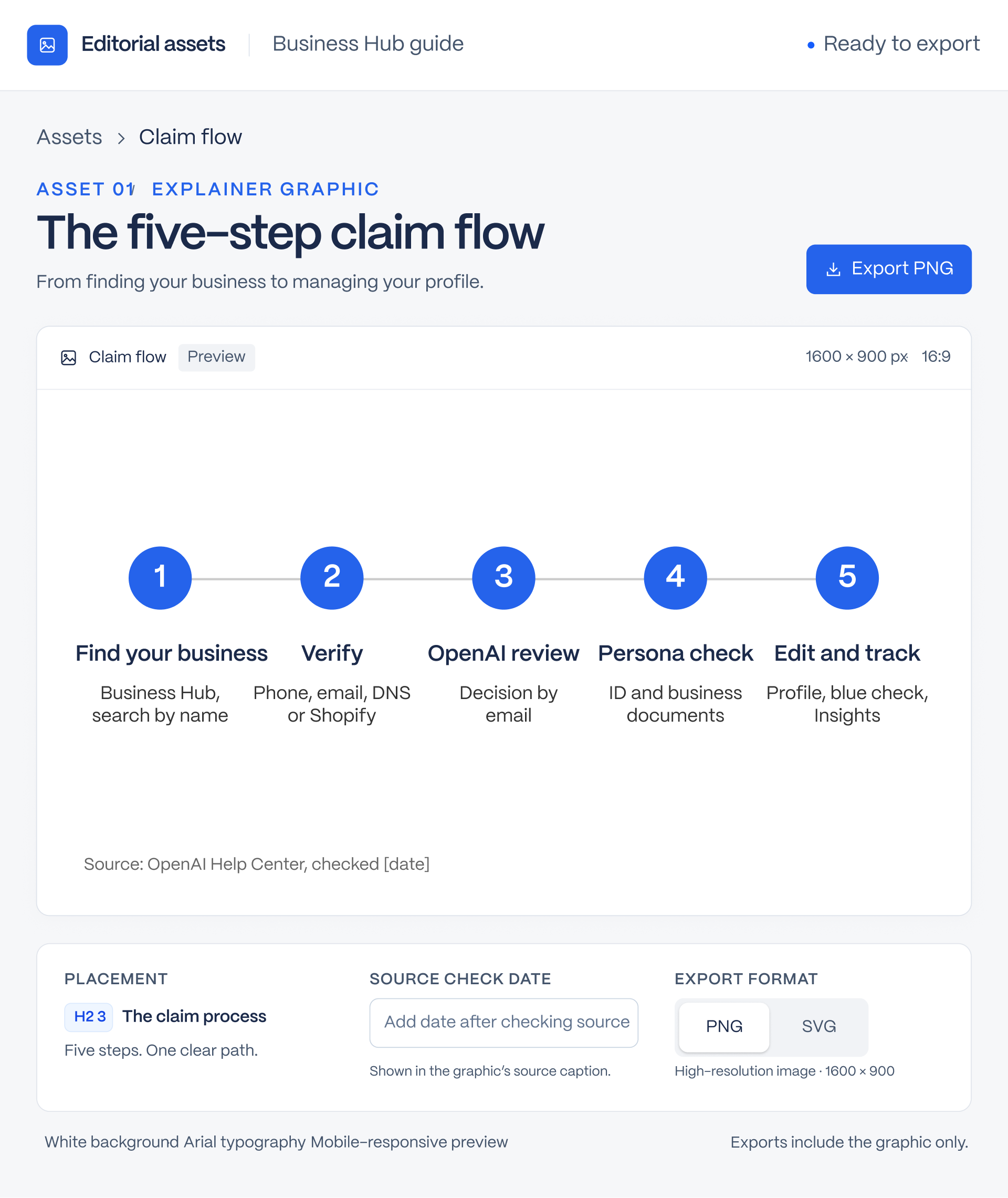
Find and claim your business in Business Hub
To get started, sign in to ChatGPT on the web. Then, open Business Hub from the sidebar. Next, search for your business by its name, choose the correct listing, and pick the ChatGPT account that will be in charge of it.
Use a company account, not your own personal one. This is because the admin who sets up the business will be the one to add team members or give an agency permission later on.
To get started, you'll need a few things. First, have your official business name ready. You'll also need your website and a brief description of what you do. Additionally, make sure you have the contact info that will be used to verify your account.
Choose a verification method
When it comes to verifying your business, OpenAI gives you four options to choose from, and the ones you see will depend on the type of business you have. If you're a B2B software company and don't have a public phone number, verifying your domain is probably the simplest way to go. We used it for three of our brands.
This method also helps link your claim to the website associated with your profile. Another option is to use your business email, as long as you can receive emails at an address linked to your company domain. There's also a special option for Shopify merchants.
If you prefer to use your phone, don't worry, the verification call or SMS will go to your business line, not your personal mobile phone
Verify your website domain with a DNS TXT record
Here is the sequence:
- Select Website domain.
- Copy the type, name or host, and value exactly as ChatGPT shows them.
- Add the record in your DNS panel.
- Wait for DNS to update.
- Select Verify domain.
When setting up our own brands, we ran into an issue at step 3. The problem was with the Host field on Namecheap. It only accepts "openai-business-profile" because Namecheap automatically adds your domain. If you enter the full name, it creates a record that can't be found, such as "openai-business-profile.example.com.example.com".
This is something to watch for when using DNS panels. Double-check the host field before clicking Verify.
To make sure everything is set up correctly, you can use a public DNS lookup tool like Google Admin Toolbox Dig to look up the TXT record.
Don't worry about what other guides say - just use what ChatGPT tells you. If someone else controls your DNS, like IT or a registrar, give them the exact details. OpenAI says it's best to ask the person in charge of your domain to set up the record for you.
Pass OpenAI's review and the Persona identity check
OpenAI looks at each claim and then sends an email with their decision. If you need to start fresh, you can cancel a claim that's still pending. So you want to make changes, check Insights, or connect a product feed?
First, Persona needs to verify your identity. They might ask for a government ID, business registration papers, and proof that you're authorized to make changes. If your company and brand have different names, be ready to show documents that link them together. Once the required checks are complete, you can access the relevant Business Hub features.
What you can edit on your ChatGPT business profile
The help article lists these editable fields: website, business description, product or service category, logo, delivery policy, return policy and cover photo. OpenAI reviews and publishes each change, and ChatGPT may still draw on other sources. That means your description should match your website and your profiles elsewhere.
For B2B, write the description in the words your buyers use for the problem they have, not in tagline language. "Project management software for construction firms" tells ChatGPT and a reader more than a line about transforming how teams work.
Business Agents: the chat assistant option
A Business Agent is separate from the profile. It is a chat assistant in ChatGPT that answers customer questions for an eligible business.
OpenAI limits agents to eligible ecommerce and online service businesses in the US that have a website, under its Business Agents Policy. You need the Persona check first, then you preview the agent and publish it. An agent cannot complete purchases, bookings or order checks.
Business Hub Insights: mentions, website clicks and discovery topics
Insights shows aggregate activity over the past 28 days, and you need the Persona check to see it. It reports three things.
A mention counts only when ChatGPT references your website. Your brand name appearing in an answer does not add to the number. So for a B2B company, the mentions figure works as a citation counter. Website clicks show how often ChatGPT sent someone to your site. Discovery topics show the themes of conversations where you appear, which is useful input for content planning. If a topic you did not expect shows up, look at which of your pages ChatGPT could be citing for it.
The limits are worth knowing before you promise anyone a report. Insights covers 28 days at a time, it is aggregate only, and businesses never see prompts or conversations. OpenAI also says a blank metric can mean activity has not reached the reporting threshold. A smaller B2B brand may see empty fields that do not mean zero.
Pair Insights with analytics on your own site. GA4 has an AI Assistant channel, which Google defines by a referrer matching a list of AI assistants. It excludes AI Overviews and AI Mode. Our guide on how to track AI traffic in GA4 shows the setup.
ChatGPT business profile vs Google Business Profile
Start with the B2B point. A software company that does not meet customers in person does not qualify for a Google Business Profile. Google requires in-person contact with customers during stated hours and lists online-only businesses as ineligible. The same company can claim a ChatGPT profile as an online business with a website.
The sharpest contrast is about visibility. Google says verifying a profile makes it more likely to show up in search results, though nobody can pay for a better local ranking. OpenAI says claiming doesn't change visibility in ChatGPT. The two profiles do different jobs, and you should not assume one behaves like the other.
If you qualify for both, keep both, and keep the facts identical: name, description, category and website. Google's details come from its Business Profile eligibility page.
Is a ChatGPT business listing worth it for B2B companies?
Yes, claim it. It costs an afternoon and some documents, and OpenAI lists no fee. You do not need an Ads account or an Enterprise agreement to claim.
What you gain:
- Control of the basic facts ChatGPT can show about your company.
- Protection. If someone else holds your listing, winning it back takes a dispute.
- A citation counter and discovery topics you cannot get elsewhere for free.
What you should not expect:
- A visibility guarantee. OpenAI says there is none.
- Reliable data for smaller brands, because thresholds can blank the metrics.
- A parent profile. Each of our three brands has its own.
- A sales assistant. Business Agents are limited to US ecommerce and online service businesses, and they cannot book or sell.
To see how marketing teams already use the tool, read how marketing teams use ChatGPT.
Want to know what ChatGPT says about you today? Start with an AI visibility audit.
Claiming is not ranking: what gets you recommended
A claimed profile does not decide whether ChatGPT recommends you.
Recommendations depend on whether ChatGPT can crawl your site, what trusted third-party sources say about you, and whether your pages give answers that are easy to quote.
Claiming takes an afternoon. Being recommended takes a plan.
We help B2B teams get found, cited and recommended in ChatGPT and other AI answers. Talk to our AEO team.
FAQ
Is a ChatGPT business listing free?
OpenAI lists no fee, and you do not need an Ads account or an Enterprise agreement to claim. The real cost is your time and the documents you may need for the Persona check. Advertising and Business Agents are separate features, and ads are handled separately from the claim.
Does claiming my business help me get recommended by ChatGPT?
OpenAI says claiming "doesn't guarantee increased visibility or give you direct control over ChatGPT's independent recommendations." Claiming gives you control of your profile details and access to Insights.
How long does ChatGPT business verification take?
OpenAI does not publish a time. If you verify by DNS, the record can take a while to update before Verify works. After that, OpenAI reviews your claim and emails its decision. Persona is a separate check that comes after approval, so plan for both.
What if someone else already claimed my business, or I see "Contact support"?
If someone else holds the listing, open the three dots menu and choose Dispute ownership, which runs through Persona. If you see Contact support instead of a claim button, the listing is locked.
Can my agency manage our ChatGPT business profile?
Yes. The admin who claimed the business can add teammates in Business Hub and grant an agency access to manage the business or its agent. Each person uses their own ChatGPT account. Do not forward claim invitations, and an agency should have the client's consent before claiming anything.
We have several brands. Can we manage them in one place?
Partly. One authorized admin can manage several business profiles, but each brand has its own profile, and there is no single parent profile that manages every brand or claims its locations. We claimed three brands this way.
What counts as a mention in Business Hub Insights?
For an online business, a mention counts when ChatGPT references the business's website. The brand name alone does not count. For a local business, a mention counts when ChatGPT shows a result for that location.
Why are my ChatGPT Insights blank?
A blank metric can mean activity has not reached the reporting threshold. It does not mean zero. Insights also covers only the past 28 days and requires the Persona check, so confirm that check is complete before assuming nothing is happening.
Can a B2B company use ChatGPT Business Agents?
Only if it counts as an eligible ecommerce or online service business in the US, with a website, under the Business Agents Policy. Agents cannot complete purchases, bookings or order checks. Read the policy before you plan around one.
How do I get my products listed on ChatGPT?
Connect a product feed to your profile: a CSV that follows OpenAI's specification, a hosted URL, or a Shopify connection. You need the Persona check first. OpenAI does not guarantee that a feed leads to recommendations, so treat it as a way to supply accurate product data.
Can I delete my ChatGPT business profile?
Only unpublished drafts can be deleted. Support cannot delete, unpublish or hide a published profile, so check your details before you publish.
