.jpeg)
In 2026, in the field of cybersecurity, we may be able to say that in terms of design, there is no real distinction between the back-end system and the front-end interface. Designing for cybersecurity has gone well past just providing a technical safeguard to a total necessity. Given that web-based applications account for nearly one-fourth of all data breaches around the world, what used to be an application's user interface (or UI) has now become the most important barrier to preventing threats to your company.
While the problems currently facing cybersecurity companies have largely moved from technology-related issues to human error, many of those human errors are the result of poor design decision-making as follows:
- Users do not fully comprehend their access rights.
- Authentication workflows are poorly designed.
- Users get very little feedback about their actions.
This guide examines how today’s design choices directly impact future security outcomes.
Abstract
Data breaches globally now cost on average $4.88M. In the United States, it is a much higher price at $10.22M. These organizations have been attacked almost daily (more than 1900 times weekly), increasing by 18 percent each year. As such, the focus for companies has shifted from looking at security as a 'back-end' or technology-based issue to looking at it as a 'core' aspect of their business model. This report will explain this structural transition, which brings together Security and Usability. We will be exploring how high-growth B2B SaaS companies are using Zero Trust Authentication, Artificial Intelligence-driven Risk Adaptation and Privacy-First Architecture to decrease organizational risk and create improved conversions and increased User Confidence.
Security-Driven Design Principles That Are Reshaping Web Design in 2026
In 2026, we no longer think about security as a layer of technology, but as the core of User Experience. For B2B SaaS companies, designing for security means translating big-picture defense strategies into usable, visual representations of authority.
Zero Trust Architecture as a Web Design Foundation
In a Zero Trust model, there is never a time when we don't question everything. Therefore, frontend development is transitioning from static login pages to a dynamic process of continuous adaptation of identity and verification. A well-implemented Zero Trust model reduces breaches by approximately $1.76M. As a result, Zero Trust is both a technical strategy and a fiscal responsibility. Platforms that support these models out of the box, through Webflow Enterprise security features, make implementation significantly more reliable.
Design Patterns for Zero Trust:
- Continuous Identity Verification: Develop simple status indicators that indicate the user whether their session is still active and secure without requiring them to constantly re-authenticate.
- Visual Trust Boundaries: Indicate which parts of your application are "public" and which are "sensitive" through differentiating border treatments or background colors to communicate to the user that they have entered a high-security area.
- Contextually Based Navigation: Hide or disable navigation elements dynamically depending upon the users current verification level or device posture.
- Useful Session Timeout Messages: Instead of abruptly logging out users, implement "Extend Session" modal windows triggered by biometric authentication methods (i.e., FaceID, TouchID) to maintain workflow continuity.
The tension lies in friction. If a company wants to remain competitive while providing a seamless experience, then they need to develop invisible verification techniques. Some of them include device fingerprinting and behavioral biometrics under layers of familiar design patterns from today's most common web design trends.
Privacy-by-Design as a Core UX Strategy
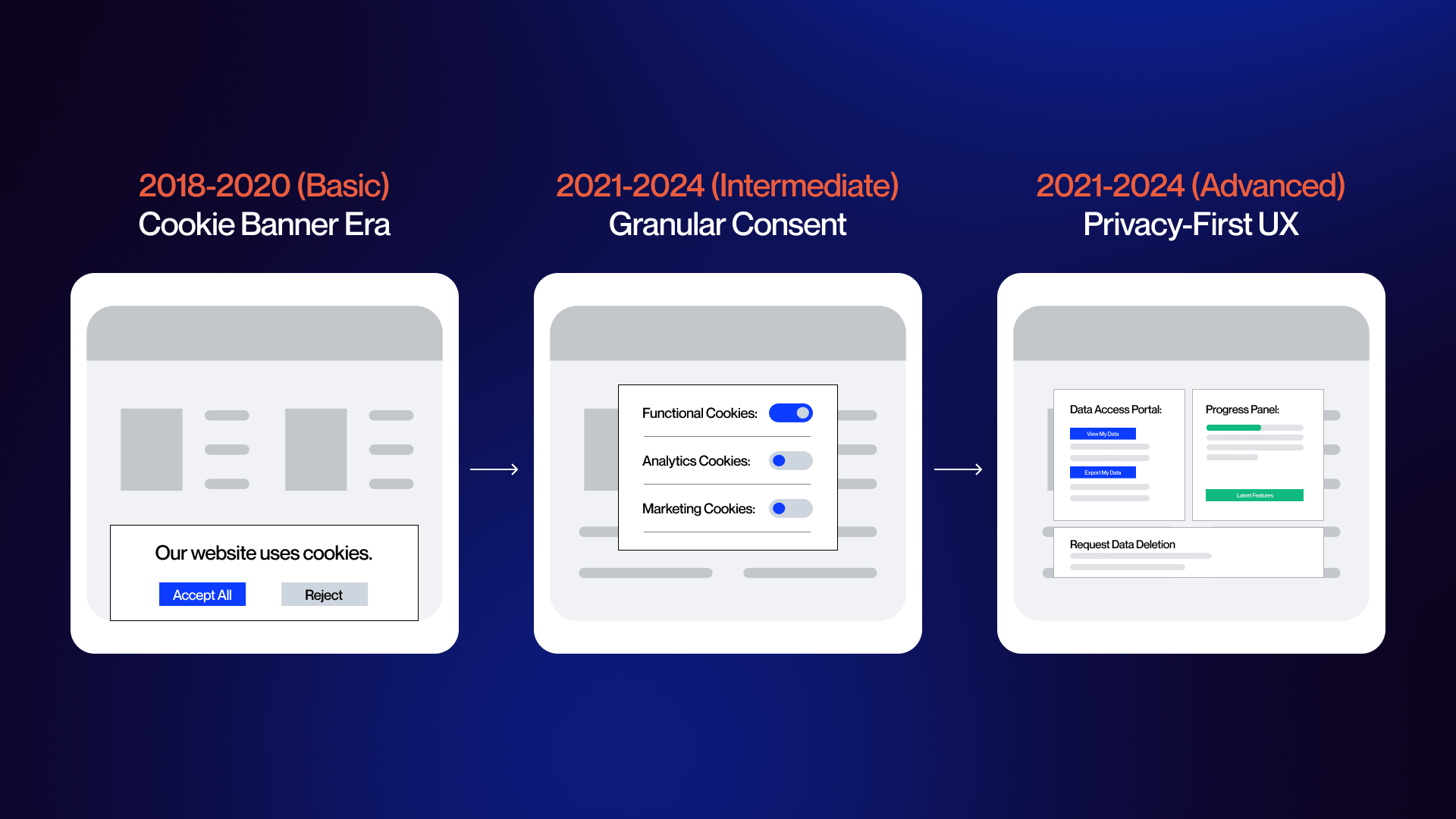
Privacy is no longer just a footnote on a website. Privacy is becoming a part of the visible design language.
The expansion of 2026's consent requirements and the tightening of secondary data collection limitations make compliance an integral part of UX. Organizations must transition away from the traditional "Accept All" banner toward granular control panels that enable users to opt-in/opt-out of individual pieces of data.
- Progressive Data Collection: Collect data only at the point of use for a particular feature or function versus collecting a large amount of data via a lengthy onboarding process.
- Transparency Dashboards: Create a dedicated "Data Home" within your SaaS application where users can view exactly how much data has been collected and delete/revoke access to those datasets with one-click functionality.
- Toggle-Based Consent: Provide clear, high-contrast switches for different types/categories (i.e., analytics, personalization, third-party) instead of using buried text links.
With growth-based architecture, these complex permission sets can be centrally managed at the CMS level, preventing users' perceptions of being surveilled through personalization.
Secure Design Systems and Component Libraries
A Secure Design System is similar to having a modern building code; every new page created in your application already includes safety features due to the blueprints enforcing them. By integrating security into your design systems' libraries, you reduce the risk of developers accidentally utilizing non validated input fields during rapid development sprint cycles.
- Secure Form Fields: Each input field should display visual indications for data sanitation as well as rate limiting indicator (e.g., "Too Many Attempts") that align with the brand aesthetics.
- Error Concealment: Standardize your error messaging so that you provide sufficient information for the user to correct the problem themselves without revealing additional metadata related to the system that may be exploitable by attackers.
- Auditing Tokens: Utilize design tokens to track versioning and modifications, thereby enabling clear auditing capabilities around who modified a secure component and when that modification was made.
Security-Conscious Accessibility and Responsive Design
Most of your site visitors (79%-83%) are using their mobile device to visit your website. As such, you must have an equally strong presence for security at every breakpoint to avoid violating WCAG guidelines.
To meet both needs, replace those very visually dependent CAPTCHA with alternative methods that use accessibility, i.e., honeypot fields or logic based puzzle's that screen readers can access. When designing for mobile, the emphasis should be on tightening the front-end against attacks that may come through assistive technologies.
At the same time, “Autofill” features need stronger safeguards. Require biometric verification before autofilling any fields that contain sensitive information.
Authentication UX, Trust Signals, and Security That Converts
With security being the main factor in user trust, the biggest shift for B2B SaaS teams in 2026 will be replacing friction-based password systems with the seamless identity verification process.
Next-Generation Authentication and Identity Verification Design
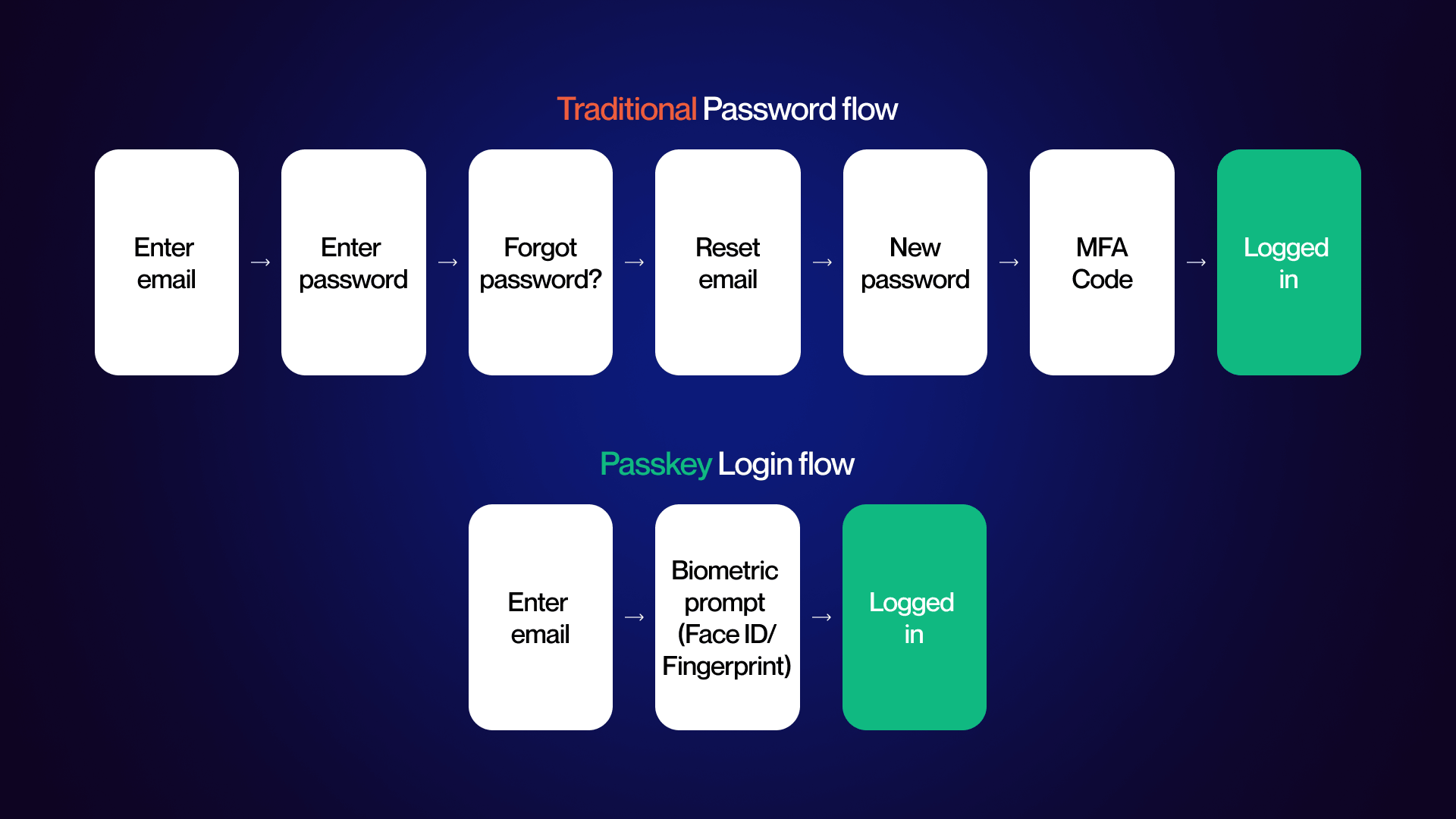
With modern MFA providing better than 99% prevention against phishing-resistant attacks using passkey and biometric methods, SaaS platforms are missing out on a major opportunity to improve their UX of implementation of modern MFA.
Given that the average time to resolve credential-based breaches is 292 days, moving users to use passkeys is not only a safer option, but also a method to retain them.
Strategies for Modern Identity:
Passkey-Based Onboarding
In the enrollment process, present the “Create Passkey” call-to-action (CTA) above the field(s) that allow a password to be entered. Use an easy-to-use single-step biometric prompt (such as Face ID/Touch ID) to associate the passkey with the user’s device.
Passkey-Based Progressive Escalation of User Authentication
Users can view and take action in basic functions using just email-based authentication. Biometric prompts are used only after the user accesses high-security features such as payment information, API Keys, and User Permissions.
MFA UI Resistant to Phishing
Eliminate requiring a user to enter a 6-digit number received via a different application by allowing them to match digits selected within the Number Matching method, the numbers that appear on their mobile push notification.
When it comes to developing both secure and conversion-rate optimized experiences for software-as-a-service (SaaS), we strive to create a secure experience that is also the easiest option. This balance is a core principle behind modern CRO strategies for SaaS platforms.
Designing Trust Signals for Security-Conscious Audiences
Enterprise buyers look for visual proof of stability. In 2026, trust is communicated through a specific aesthetic: confident neutrals. High-contrast palettes and dark themes align with the cybersecurity mental model, but the key is avoiding "hacker" tropes.
Strategic accent colors like teal or forest green signal that security is a solved, calm infrastructure rather than a constant crisis.
- Verified Compliance Clusters: Group SOC 2 Type II, ISO 27001, and GDPR badges in a dedicated "Trust Gallery" near high-conversion points (e.g., the final step of a pricing table).
- Infrastructure Transparency: Use high-fidelity diagrams of your server architecture or real photos of your security operations team. This humanizes the "black box" of SaaS security.
- Data-Driven Proof Points: Include specific uptime stats and "last audited" timestamps directly in the footer to show real-time accountability.
Encryption Indicators and Secure Data Transmission
Frontend design must visually "prove" that data is safe the moment it leaves the user's cursor. This is particularly critical in form design. Input-Level Lock Icons: Use micro-interactions, such as a lock icon that appears within a form field once a valid, encrypted input is detected.
- Connection State Awareness: Leverage the fact that Webflow provides automatic SSL provisioning by emphasizing "Bank-Level Encryption" in micro-copy near submit buttons.
- Certificate Transparency: Beyond the browser s lock icon, include a "Security Status" hover-state in the header that confirms HTTPS/TLS 1.3 status.
This directly impacts Webflow SEO and SSL performance and overall site authority.
Compliance-Driven Design Innovation for 2026 Regulatory Landscapes
The regulatory landscape, driven by the EU s NIS2 Directive and the AI Act, now requires board-level accountability for digital interfaces.
Compliance is no longer a checkbox; it is a design requirement that demands "Audit-Ready" interfaces. Many teams address this shift by adopting enterprise Webflow solutions that align infrastructure with regulatory requirements from the start.
Granular Consent Centers: Move beyond "Accept All" cookie banners. Design a persistent "Privacy Preference" icon (typically bottom-left) that allows users to toggle specific data categories like "AI Training Data" or "Behavioral Analytics."
- Breach Notification UI: Design "Ghost Components" pre-built, inactive notification banners that can be activated instantly to meet the shorter breach notification timelines required by 2026 laws.
- User Data Access Portals: Provide a self-service "Right to be Forgotten" dashboard that lets users download their data or request deletion without contacting support, reducing administrative overhead.
AI-Driven Security, Emerging Threats, and Performance-Optimized Design
Today, AI has changed how web interfaces are attacked and defended. Security-conscious design is no longer a static shield; it is a dynamic, performance-aware system that adapts to threats in real-time.
AI Integration in Security-Conscious Web Design
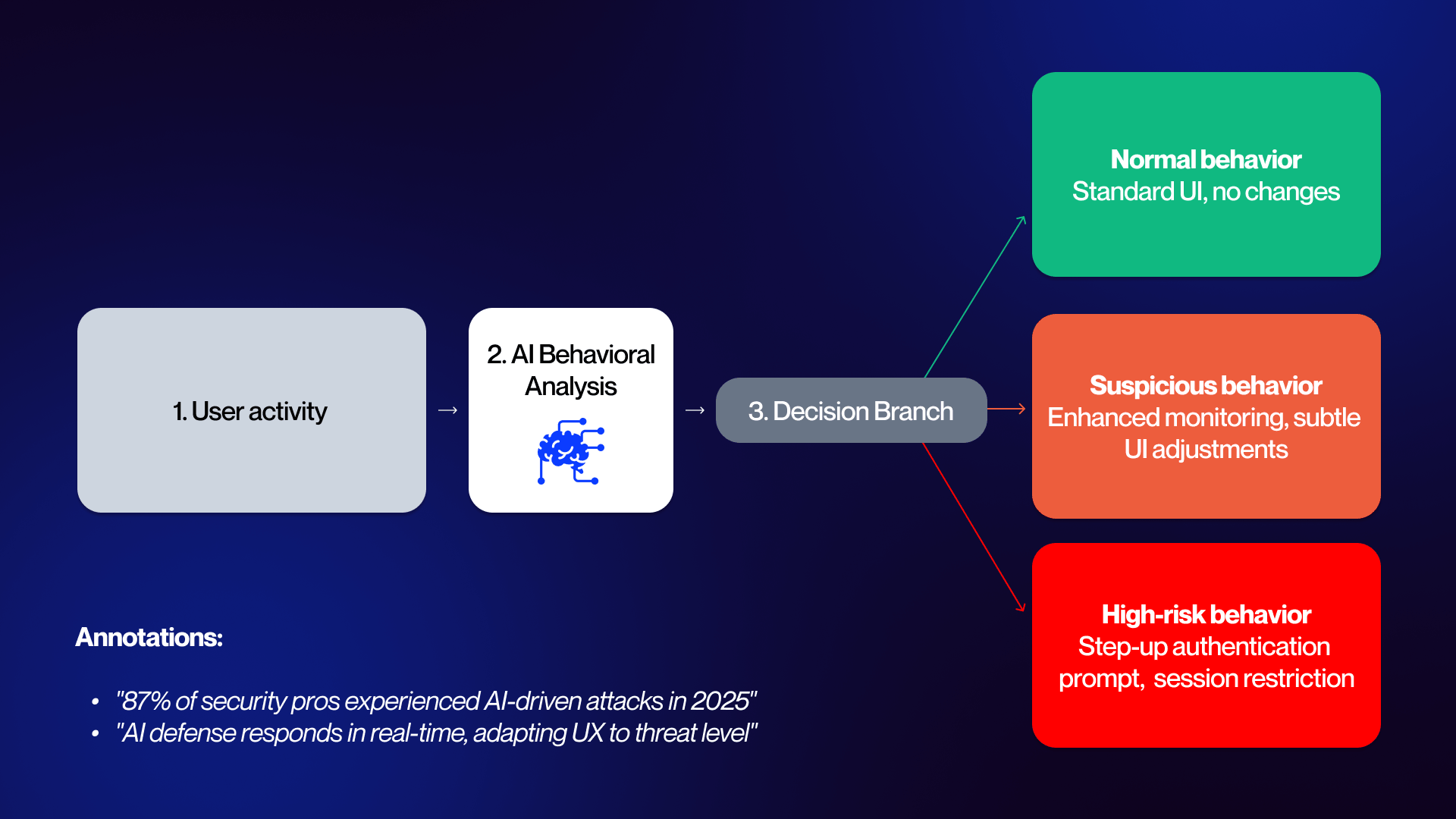
The dual-use nature of AI is the defining challenge of 2026. While AI-driven phishing has increased click-through rates by up to 54%, defense-side AI is now the primary tool for mitigating these risks at the UI layer.
With 87% of security professionals reporting AI-driven attacks in 2025, design teams must move toward "Adaptive User Interfaces."
AI-Driven Design Patterns:
- Anomaly-Triggered UI States: When backend AI detects a high-risk session (e.g., impossible travel or unusual navigation patterns), the UI should automatically transition into a "restricted" mode, ghosting sensitive data or disabling bulk export buttons.
- Context-Aware Step-up Authentication: Rather than blanket MFA, use AI to trigger verification only when behavioral biometrics deviate from the user's established baseline.
- Real-time Exploit Visuals: Product teams now use AI-powered analytics to identify which specific form fields or user flows are being targeted by automated bots, allowing for immediate design pivots to those components.
This evolution requires balancing AI personalization with strict privacy. Security-conscious design must ensure that the data used for threat detection is processed on-device or through anonymized edge computing to remain compliant.
Designing Against Evolving Threat Vectors Targeting Web Interfaces
Web application attacks account for 26% of all breaches, with the average website facing 94 attacks daily. For SaaS companies, the frontend is the most exposed surface area. Beyond traditional malware, which currently affects over 4.1 million website,s designers must now defend against sophisticated UI redressing and deepfake-driven social engineering.
Defensive Design Decisions:
Hardening Against UI Redressing: Implement strict Content Security Policy (CSP) headers and "frame-busting" scripts to prevent clickjacking. Visually, ensure your site s identity is reinforced through custom, non-standard typography and unique brand elements that are difficult for spoofing scripts to replicate accurately.
Deepfake Mitigation:
With AI-generated fakes becoming nearly impossible to spot, designers need to step up. To help users tell a real website apart from a "phished" clone, they should use tools like Verified Source indicators, browser security alerts, and digital signatures that prove content is authentic.
Secure Error Logic:
Traditional error messages often leak system metadata. Designing secure error handling means replacing "User not found" or "Database timeout" with generic, brand-aligned messaging that provides no technical breadcrumbs for attackers.
Plugin Hygiene:
Given that 97% of WordPress breaches exploit plugins, today’s design standards favor platforms like Webflow that offer built-in security features, reducing the dependency on third-party code that creates "Swiss cheese" security profiles.
Security Performance Optimization: Speed vs. Protection
A critical tension exists between security and speed: a one-second delay in mobile load time can reduce conversions by up to 20%. Heavy encryption overhead, bot protection, and complex MFA flows can bloat the Document Object Model (DOM) and increase Time to Interactive (TTI).
Performance-Optimized Security Patterns:
- Secure Lazy Loading: Prioritize the loading of core security scripts (like bot detection) while lazy-loading non-critical assets. This ensures the perimeter is set before the user begins interacting.
- Edge-Side Security (CDN): Move heavy security processing such as SSL termination and DDoS mitigation to the edge. This reduces the computational load on the user s device and the origin server.
- Dual-Purpose Caching: Use secure caching strategies that store encrypted static assets locally, reducing the need for repeated high-latency handshakes.
- Serverless Security Tokens: Implement serverless frontend patterns where authentication tokens are validated at the CDN level, ensuring that unauthenticated requests never even reach your application's core infrastructure.
For enterprise-scale SaaS, leveraging Webflow Enterprise's infrastructure allows design teams to deploy global CDN caching and DDoS protection - without the performance penalties associated with third-party security layers. This ensures that the protection of the user's data never comes at the cost of the user's experience.
Embedding Security Into Design Workflows, Tools, and Team Culture
In 2026, the barrier between "creative" and "technical" has dissolved. High-growth B2B SaaS companies no longer treat security as a final audit; they embed it into the DNA of the design workflow. This cultural shift ensures that security is a byproduct of the design process, not a hurdle to it.
Automation in Secure Web Design Workflows
Manual security checks are too slow for the current release cycle. Modern design-to-development pipelines now utilize automation to enforce security best practices at the code and asset level.
By integrating automated vulnerability scanning into CI/CD (Continuous Integration/Continuous Deployment) workflows, teams can catch insecure patterns such as hardcoded credentials or unvalidated inputs before they ever reach a staging environment.
Key Automation Pillars:
- Automated Compliance Auditing: For enterprise clients managing multi-site portfolios, automated scripts scan for drift in privacy settings or outdated security headers across all subdomains.
- Component Sanitization: Automation tools verify that every UI component pulled from a shared library meets the latest security versioning, blocking the use of deprecated or vulnerable code blocks.
- Performance-Security Benchmarking: Automated tools run simultaneous checks to ensure that security scripts (like bot protection) aren't degrading page load times beyond acceptable thresholds.
Maintaining this level of rigor requires proactive ongoing security maintenance and continuous auditing to ensure that automated systems are calibrated to the latest threat intelligence.
The Shift-Left Security Design Mindset
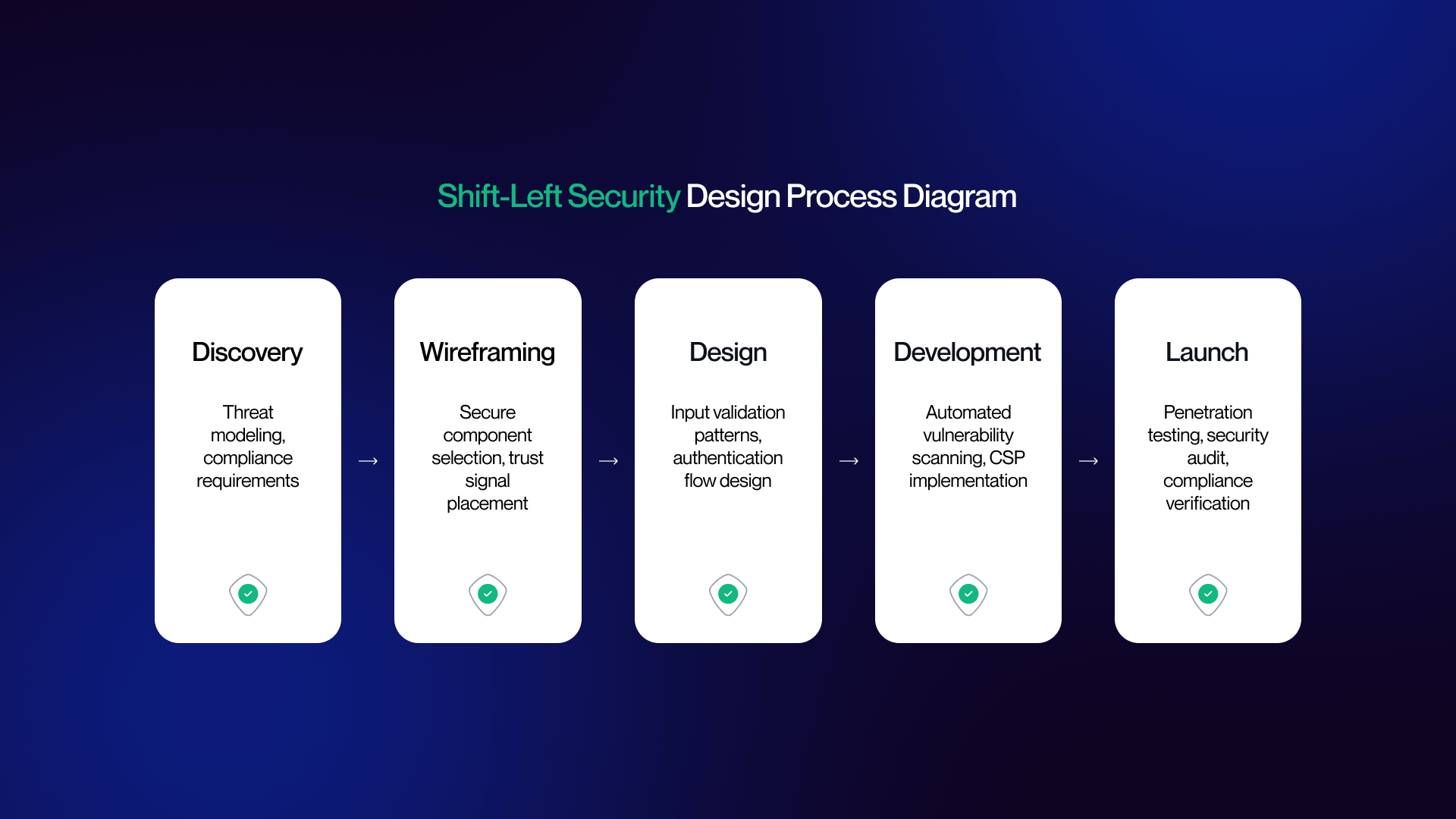
The "Shift Left" philosophy moves security from the end of the production line to the very beginning. When security engineers and UX/UI designers collaborate during the wireframing stage, the result is a product that is inherently resilient rather than retrofitted with patches.
Security Checkpoints in the Design Lifecycle:
- Threat Modeling (Wireframing): During initial layout, designers and security leads identify "High-Value Interaction Points" (e.g., password resets or data exports) and map out potential abuse cases.
- Secure Component Selection (Prototyping): Designers choose pre-validated, secure components from a library rather than creating bespoke, unvetted elements for every new feature.
- Pre-Launch Penetration Testing: The final design undergoes a "Red Team" assessment where security pros attempt to exploit the UI to gain unauthorized access, ensuring the frontend logic is airtight.
This collaborative framework is being codified into new educational standards for designers, where security literacy is viewed as a fundamental skill alongside typography and color theory.
The Future of Cybersecurity-Integrated Web Design
With global cybersecurity spending reaching $240B in 2026, a 12.5% YoY increase, security literacy has become a non-negotiable core competency for creative agencies and in-house SaaS teams. The market no longer rewards "pretty" design; it rewards design that protects the user and the bottom line.
Predictions for Post-2026 Design:
The Death of the Password
Passwordless authentication will become the default requirement for all B2B SaaS onboarding, with legacy "Username/Password" fields viewed as a major red flag for enterprise buyers.
Hyper-Adaptive Interfaces
AI will move beyond simple threat detection to real-time UI reconstruction, where the interface physically changes its layout and accessibility based on the verified risk level of the user s environment.
Privacy as the Ultimate Value Proposition
In an era of AI-driven data harvesting, websites that prioritize radical data transparency and granular user control will outperform competitors on conversion and brand loyalty. Security-conscious design isn't about building a fortress that keeps people out; it's about building an invisible layer of protection that invites people in.
By integrating these principles, SaaS brands transform security from a cost center into a competitive advantage. To build a website that balances high-performance aesthetics with 2026 security standards, explore our web design services or get in touch with our team for a security-first design audit.
You can review similar implementations in our portfolio.
FAQ
What is cybersecurity web design?
It is the practice of integrating high-level security principles directly into the visual design, UX patterns, and frontend architecture. Rather than treating security as a backend afterthought, it focuses on authentication flows, privacy-compliant consent interfaces, secure form design, and encryption indicators. The goal is to protect users and data through design decisions that maintain a seamless experience.
Why does web design matter for cybersecurity?
Design is often the first line of defense. Statistics show that 26% of all breaches involve web application attacks, and 88% of cyber incidents can be traced back to human error errors often provoked by confusing or poorly mapped interfaces. Security-conscious design reduces the "attack surface" by guiding users toward safe behaviors, such as using passkeys or recognizing phishing attempts.
What is Zero Trust web design?
Zero Trust design applies the "never trust, always verify" philosophy to the frontend. In practice, this means every user interaction is authenticated without creating visible friction. Design patterns include progressive authentication (escalating security only when needed), sophisticated session management UX, and contextual access controls that hide or show features based on the user's verified identity level.
How does Privacy-by-Design affect web UX?
In 2026, privacy is a visible design feature rather than a legal checkbox. Privacy-by-Design embeds GDPR, CCPA, and emerging frameworks into the UI from inception. This results in granular consent interfaces, transparent data transparency dashboards, and self-service portals where users can manage or delete their data, moving far beyond the simple cookie banners of the past.
What are passkeys and how do they affect web design?
Passkeys replace traditional passwords with device-based biometric (FaceID/TouchID) or PIN authentication. For designers, this means a total shift in login and sign-up flows: removing password fields entirely and designing intuitive enrollment UX to link devices. This eliminates credential-based breaches, which currently take an average of 292 days to resolve.
How does AI impact cybersecurity web design in 2026?
AI is the primary driver of "Adaptive Interfaces." With 87% of security professionals facing AI-driven attacks in 2025, defensive AI is now used to detect anomalous user behavior in real-time. From a design perspective, this means the UI can dynamically trigger step-up verification or restrict access if suspicious activity is detected, balancing high-level protection with personalized UX.
What security features should a cybersecurity website have?
A modern, secure B2B site must include: SSL/HTTPS and automatic certificate transparency. Advanced DDoS protection and Content Security Policy (CSP) headers. Secure forms with built-in input validation and rate-limiting. MFA-ready authentication (Passkeys/TOTP). Visible compliance badges (SOC 2, ISO 27001) and granular consent management.
How do security measures affect website performance?
Security layers like encryption and bot protection can add overhead. Since a one-second mobile load delay can cut conversions by 20%, performance-informed design is critical. Solutions include using lazy loading for security scripts, edge-side security via CDNs, and choosing platforms like Webflow Enterprise that handle these infrastructure requirements without performance penalties.
What is "Shift-Left" security in web design?
"Shift-Left" refers to moving security checkpoints to the very beginning of the design lifecycle during wireframing and prototyping rather than waiting for a post-deployment audit. This involves threat modeling during design sprints and using pre-validated secure component libraries, which significantly reduces the cost and risk of fixing vulnerabilities later.
How should cybersecurity companies design their websites?
Focus on confident neutrals and clarity. While dark themes and high-contrast palettes align with industry expectations, it is vital to avoid fear-based visuals. Instead, use calm, structured layouts with strategic accent colors like teal or green to convey control. Prominent compliance clusters, real team photography, and clear data-driven proof points are essential for building enterprise trust.
What visual design trends work for cybersecurity in 2026?
The dominant trend is Functional Minimalism. This includes dark mode as a default, high-fidelity product UI screenshots (showing the actual tool), and infrastructure imagery that humanizes the technology. Clean information architecture and minimalist layouts signal competence and transparency, which are the two most valued traits in the 2026 security market.
Is Webflow secure enough for cybersecurity websites?
Yes. Webflow Enterprise is built for high-security environments, offering SOC 2 Type II compliance, advanced DDoS protection, SSO, and enterprise-grade hosting. It allows design teams to maintain full creative control while the platform manages the underlying security infrastructure natively.