.jpeg)
The most common starting point for comparisons between Claude and Gemini is performance: which system generates better responses?
While this provides some value, it ultimately doesn't determine which systems a company will end up using.
For example, let's say that everyone on your team uses Google Workspace.
All documents are stored in Google Drive. Everyone writes in Google Docs; sends email via Gmail; participates in meetings via Google Meet; and creates spreadsheets with Google Sheets. Because Gemini is native to the environment you've already established, adopting the service will involve little friction. This could potentially mean more to your organization than a benchmark indicating that an alternative model produced marginally superior content.
On the other hand, there are certainly areas in which Claude will outperform.
If writing, analytical support, or programming make up a large portion of your team members' tasks, these advantages could make the additional cost of maintaining a second application.
As mentioned previously, this would be a very different calculation.
The core question comes down to this: "Does the boost in quality justify the added cost of integrating another tool into your workflow?"
If your organization does not currently use Google Workspace to accomplish day-to-day work tasks, then one of Gemini's greatest selling points is eliminated. In such cases, it becomes easier to make a direct comparison between the two applications.
The Decision Is Usually Already Made
What Changed in 2026
So, where do we go from here? Many of the articles comparing Claude and Gemini were written before they reached this point. So, where do we go from here?
On Feburary 19th, 2016, Google released their new flagship version of Gemini 3.1 Pro. This was done as part of the Gemini 3 family which also included Flash and Flash-Lite. At this same time, Anthropic announced their current product line-up; including Haiku 4.5, Sonnet 5, Opus 5, and Fabl 5.
If you search online today, you will still find many articles that compare and contrast Gemini 2.5 or even Gemini 1.5. These articles were created before the market had evolved into what we know today.
Both companies frequently change the names of their models and tiers. Articles that compare products may not always reflect the latest updates. An article may remain active for months after the products being compared have been updated. In addition, if the article does not include a specific release date for each of the products it compares, then its findings may need to be viewed with skepticism.
Also, there is more to choosing whether to use Claude vs Gemini than simply comparing one tool against another. As mentioned above, your choice of either Claude or Gemini is just one of several choices you will make while using AI and software within your business.
If you are also weighing ChatGPT, our Grok and ChatGPT comparison covers the half of that question this article does not, and AI tools for B2B marketing positions this decision inside the broader stack a marketing team is assembling.
Veza works across the AI companies shaping this stack, which is part of why this article argues the ecosystem case as plainly as it does.
The Ecosystem Split
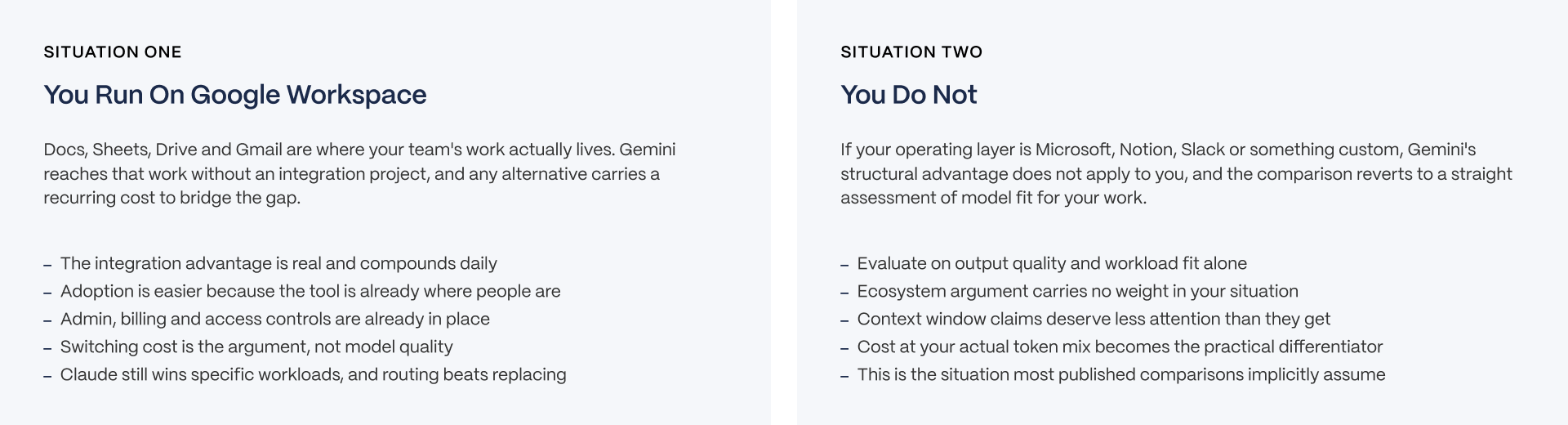
The main point of this article is simple. There are two situations, and the better choice depends on which one you are in.
Situation one: you run Google Workspace. Gemini has been integrated with all of the common tools used by your team. This means your documents are already located where you need them. Your administrative group is managing Gemini for you through the administration of Google Workspace. There is no additional integration project required to allow Gemini to function within your workflow.
However, using another AI tool would require adding another process. That could mean copying data from one application to another. It could also mean creating an integration. Or, it could simply be about opening another application window and moving back and forth among applications. While none of those processes are expensive when looked at individually, collectively they become part of the workflow.
Situation two: you don't use Google Workspace. In that case, Gemini's best structural benefit is lost. Gemini is as directly connected to your current tools as Claude is. At that point, the decision comes down to a head-to-head comparison of the capabilities of each model to meet the requirements needed by your team.
If you are in situation one, the Workspace section is likely to matter most. If you are in situation two, spend more time on the capability comparison.
The Five Questions That Decide It
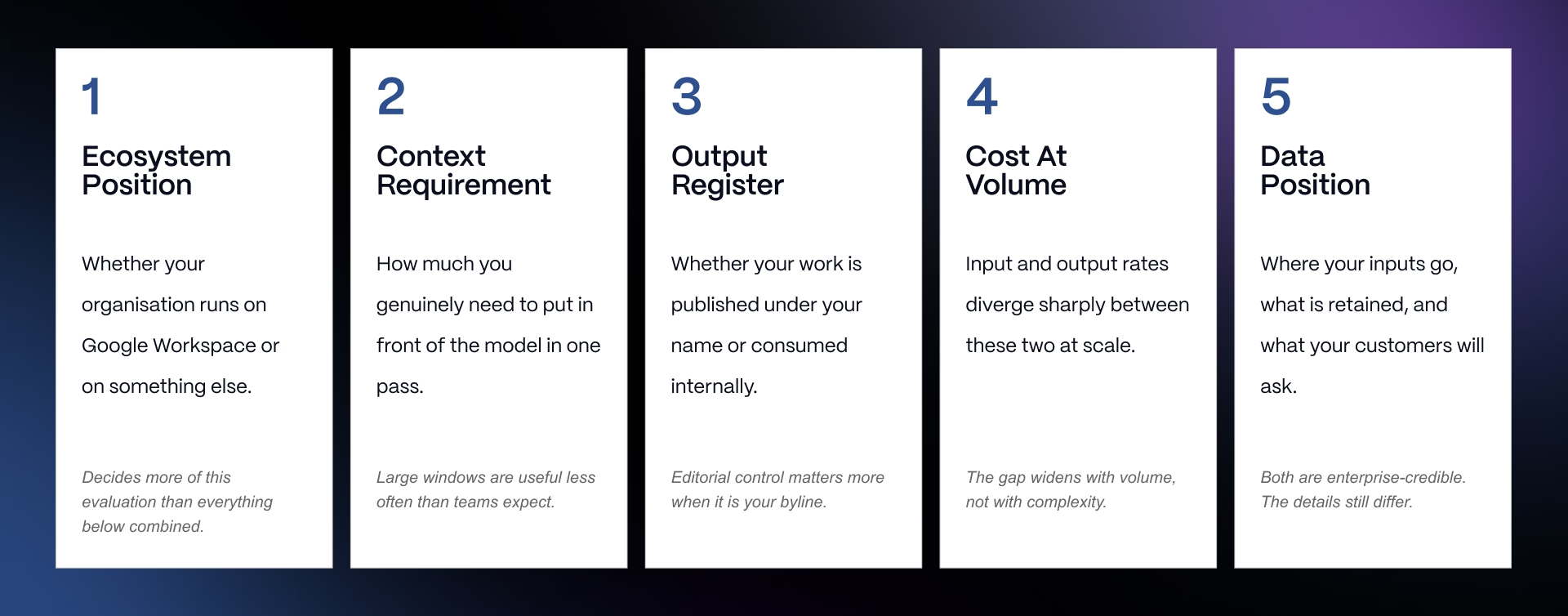
Most decisions can be resolved by answering the next five questions:
- Ecosystem position - Are you using Google Workspace? That was the last section’s question and has the greatest impact on your choice.
- Context requirement - Does your work need a large amount of information in a single prompt, or is it better served by pulling in only what is relevant to the task at hand?
- Output register - Does your work require polished, consistent writing over a long document, especially if the final output goes out under your company’s name?
- Cost at volume - What does this actually cost at the volume your team will really use it, not the volume shown in a sales demo?
- Data position - Where does your organization's data already sit, and who already has access controls set up over it?
The first question is unique from the remaining four. The first question does not relate to Claude or Gemini but to your company’s current environment. In many cases, it will determine more of your decision than all of the other questions combined.
Current Lineup and What Each Is For
Google's Gemini 3 Family
Gemini 3.1 Pro is the flagship model, with a context window of one million tokens. Flash and Flash-Lite sit below it as the price-performance tiers, built for lower cost and faster response at large scale rather than for the largest, most demanding tasks.
Gemini is natively multimodal across text, image, video, audio, and code, which is genuinely broader than Claude's range. If your work regularly involves video or audio alongside text, that breadth is a real and meaningful advantage, not a marketing claim.
Some Google enterprise documentation references a context window of up to two million tokens for large-context configurations. That figure is specific to certain enterprise setups, not the standard headline number, and it should be treated that way rather than repeated as a general claim about what Gemini offers everyone.
The right way to think about the three tiers is by job, not by spec sheet. Gemini 3.1 Pro is for work that needs the strongest reasoning. Flash is for high-volume, everyday tasks where speed and cost matter more than squeezing out the last bit of quality. Flash-Lite is for the highest-volume, lowest-stakes tasks, where the two considerations that matter most are cost per request and response time.
Anthropic's Claude Models
Anthropic's current lineup is Fable 5, Opus 5, Sonnet 5, and Haiku 4.5. Sonnet and Opus reach a context window of one million tokens. Haiku sits at 200,000 tokens, smaller than the others but faster and cheaper, aimed at high-volume, lower-complexity work.
Claude uses adaptive thinking rather than a fixed reasoning budget set in advance. In practice, that means the model adjusts how much it works through a problem based on how hard the problem actually is, rather than applying the same fixed process to every request regardless of difficulty.
Claude accepts image input, so it can read and reason about images you provide, but it does not generate images natively the way Gemini does. If image generation is part of your workflow, that is a real gap to plan around rather than a detail to gloss over.
This section is deliberately shorter than the one covering Gemini's lineup. That is because Gemini's naming and tiering is where most published comparisons get confused and out of date, so it is the area where a reader needs the clearest, most current information.
Head-to-Head Reference
Placed here as a standalone reference visual, this asset lines up both lineups side by side: model, vendor, context window, input and output rates per million tokens, cached input rates where published, and modality support.
All figures need to be checked against each vendor's documentation before publication and re-verified before you rely on them for a purchase decision, since both companies change pricing and tiering often.
Gemini 3.1 Pro leads on native multimodal range, reaching text, image, video, audio, and code, with a context window of one million tokens. Claude Opus 5 and Sonnet 5 match that context window and add adaptive thinking, meaning the model adjusts how hard it works based on how hard the problem actually is. Claude Haiku 4.5 sits at 200,000 tokens, the smallest window of the group, but is the fastest and cheapest Claude tier.
One packaging fact matters before you compare a single figure to another, and it is important enough that the next full section is dedicated to it: Google and Anthropic do not sell these products the same way, and comparing their list prices side by side without accounting for that will lead you to the wrong conclusion.
Why Tier-to-Tier Pricing Misleads
Google Bundles, Anthropic Does Not
Google sells Gemini as part of its wider subscription stack, not as a standalone assistant you buy on its own. The tiers are Free, Google AI Plus at around $5, Google AI Pro at around $20, and Google AI Ultra at $100 to $200.
Each paid tier bundles cloud storage and other Google services along with the assistant itself, so the subscription is doing more than one job at once.
Claude sells the assistant on its own, with nothing else bundled in. The tiers are Free, Pro at $17 to $20, and Max at $100 to $200.
At the $20 price point, you are comparing an assistant plus multiple terabytes of storage plus Workspace-adjacent features against an assistant sold by itself, with no storage or productivity suite attached. The list prices match almost exactly. The products behind those prices do not. A tier-by-tier price table would suggest these are directly comparable purchases when they are not, which is why this article does not include one.
If you need to compare cost, compare it on what each product actually includes for your team, not on the number printed on the pricing page.
API Pricing and a Worked Example
Here is what each model actually costs per million tokens through the API, which is the more useful comparison for teams building on top of these models rather than using the consumer chat interface.
- Gemini 3.1 Pro charges $2 for input and $12 for output on prompts under 200,000 tokens, with cached input priced around $0.20.
- Gemini's Flash tiers charge roughly $1.50 for input, with output priced between $7.50 and $9.
- Flash-Lite runs well below that, built for the highest-volume, most cost-sensitive use cases.
- Claude Sonnet 5 charges $2 for input and $10 for output, putting it close to Gemini 3.1 Pro on input and slightly cheaper on output.
Now the worked example, using a volume that reflects real B2B usage rather than a light demo.
At 30 million input tokens and 6 million output tokens in a month, the monthly bill comes to roughly $132 for Gemini 3.1 Pro, around $90 for a Flash tier, and $120 for Claude Sonnet 5.
The takeaway is that the vendors are closer together than the marketing from either side suggests. The tier you choose inside a vendor's lineup moves your bill more than which vendor you choose in the first place.
A team that picks the wrong tier for its actual workload will overspend more than a team that picks the wrong vendor. A closer look at the hidden costs of AI covers more of what typically gets missed in these calculations, including costs that do not show up on a per-token rate card at all.
The Long-Context Premium
There is one detail with real budget consequences that most comparisons skip entirely. Above 200,000 tokens in a single prompt, Gemini 3.1 Pro's input price doubles to $4 and its output price rises to $18. That roughly doubles your bill on any workload that regularly sends long prompts past that threshold.
That is a concrete, specific reason to break large documents into smaller pieces or use retrieval instead of stuffing everything into one prompt, rather than an abstract argument about efficiency. If your team is running long documents or large codebases through Gemini regularly, this threshold is worth checking against your actual usage pattern, because it can change your monthly bill significantly.
This point matters again later in this article, when the discussion turns to whether a large context window is actually worth using in the first place.
The Workspace Question
What Gemini Actually Does Inside Workspace
It is worth being specific here rather than general, because specificity is what makes the ecosystem argument credible rather than just a talking point.
Gemini drafts and summarizes inside Docs and Gmail, so it can write a first draft of an email or condense a long document without you leaving the app. It helps with formulas and analysis inside Sheets, which matters for teams that build models and reports in spreadsheets every week.
It generates content inside Slides, so a first draft of a presentation can start from a prompt rather than a blank deck. It retrieves information across Drive, pulling relevant files into an answer without you having to search for them manually. It takes notes and produces summaries inside Meet, turning a call directly into a written record.
It is available to Workspace customers and to Google AI Pro and Ultra subscribers. The value here is not any single one of these features on its own. It is that the assistant sits inside the tools where the work already happens, reaching your organization's data under the admin controls your team already runs.
There is no copy-paste bridge between a chat window and your documents, and no separate decision to make about sharing your data with a new, unfamiliar tool, because the data was already inside Google's systems to begin with.
Google's position here is worth naming directly: it is both the search engine most content gets found through and the company building the assistant increasingly used to answer questions instead of searching for them. That dual role has implications for how your content gets found at all, which is the subject of SEO, GEO, AEO and LLM optimisation.
What Claude's Integration Path Looks Like
It is worth giving the other side of this comparison the same level of detail.
Claude reaches Microsoft 365 through Claude for Microsoft 365, a dedicated integration for teams working inside Microsoft's productivity suite. It connects to Google Workspace through connectors, which are available even on the free tier, meaning a team that runs on Workspace but prefers Claude is not locked out of connecting the two.
The honest way to describe the difference between the two approaches: Claude is an assistant that connects to your tools. Gemini is an assistant that lives inside them. That is a real difference in kind, not just a difference in degree of convenience, and it deserves to be stated plainly, without exaggerating how much it matters and without brushing past it as a minor detail.
What Is Real And What Is Marketing
What is real is distribution and data adjacency. Gemini shows up in the tools you already have open, and it reaches data that is already inside Google's systems, and both of those facts compound every single day your team uses the product.
What is not established is that living inside your tools automatically produces better output than a tool that connects to them from outside. Google's own marketing tends to blur those two things together, presenting proximity to your work as if it were the same thing as quality of output.
Claude still holds a genuine edge on writing quality and on the engineering work covered in the next section of this article. Making this distinction clearly is what lets this article argue the Workspace case seriously, without the whole piece reading like an advertisement for Google.
If your organization is weighing this decision at the enterprise delivery level, or thinking about how it touches answer engine optimization, the same distinction applies there too: distribution is not the same thing as quality, and a good decision accounts for both separately rather than treating one as proof of the other.
Capability Where It Still Matters
Writing and Editorial
This is the area where Claude holds a genuine edge, and it is worth saying plainly even while this article is making the case for taking the Workspace argument seriously.
The difference does not show up in how good the first paragraph of a response looks. It shows up in consistency across a full document, the kind of writing that has to hold together in tone and structure for pages at a time. That is exactly why this edge rarely appears in short benchmark comparisons, which tend to judge single short responses rather than long-form output.
Here is the practical implication for a company weighing this decision.
If your organization runs on Workspace but your content team publishes work under the company name, the right answer for the organization as a whole may still be Gemini broadly, with a documented exception carved out for that one team. That team can use Claude for the writing itself while the rest of the company runs on the tool that fits its existing stack.
Veza's work in AI content strategy deals with exactly this kind of split, where different teams inside one organization need different tools rather than a single company-wide answer.
Coding and Agents
This is the section that answers the specific question of which tool is better for coding, a question that comes up often enough to deserve its own space.
Claude Code is an agentic terminal tool included on paid Claude plans, built to work directly inside a developer's existing workflow. Gemini has its own agent tooling and support for working across a repository, aimed at a similar kind of task from Google's side.
Both are credible options, and the honest answer is that published comparisons in this area are thin, and neither vendor's own reported numbers should be trusted to settle the question for you, since both companies have an obvious reason to present their own tool favorably.
The better approach is to test both on your own codebase with a real task drawn from your actual backlog, rather than trusting a synthetic benchmark from either vendor. Veza's best AI coding tools article goes deeper on this specific comparison and is worth reading alongside this section.
The agent question extends beyond coding. Both companies are building tools that act on multi-step tasks rather than just answering a single prompt, and that broader category is covered in AI agents.
Context Window, And Whether Bigger Helps
Both models reach one million tokens at their top tier, so on paper it is a tie, and neither vendor can claim a meaningful lead on this specific number. The more useful question, and the one most comparisons skip, is whether a bigger window actually helps in practice.
The honest answer, backed by both practitioner experience and vendor guidance, is that very large context windows rarely deliver value in proportion to their size. Cost scales directly with however many tokens you process, whether or not those tokens were actually useful to the final answer.
Gemini's pricing penalizes prompts above 200,000 tokens specifically, as covered earlier in this article. And pulling in only the relevant material through retrieval tends to ground an answer more accurately than diluting the model's attention across a huge prompt filled with material that has nothing to do with the actual question.
The practical rule to apply here: use a large context window for tasks that genuinely need to see everything at once, like reasoning across an entire codebase to understand how its pieces connect, or pulling insight out of a long archive of documents. For everything else, the better default is retrieving only what is relevant to the specific question being asked, rather than reaching for the largest window available simply because it exists.
Freshness is a related but separate question
Claude includes web search on every tier, including free, so it can reach current information rather than relying only on what it learned during training. Gemini's grounding in Google Search runs deeper by nature of the company that builds it, which matters most for work that depends on knowing what happened recently.
If freshness is a regular requirement for your team, AI search engines compared is worth reading alongside this section.
Making The Decision
Decision Criteria Checklist
Before you commit your team to either tool, run through the five questions introduced earlier in this article as an actual checklist, not just a framing device to read past.
- Do we run Google Workspace across the organization, or not?
- Does our work regularly require a large amount of context in a single prompt, or is scoped, relevant material usually enough to get a good answer?
- Does the work call for polished, consistent writing across long documents, especially work that goes out publicly under our company's name?
- What does this cost at the volume our team will realistically use it, calculated from real usage rather than a demo?
- Where does our data already sit, and who already controls access to it today?
The first question resolves most of this list on its own. If you answer it honestly and completely, you can move quickly through several of the others, because the ecosystem answer tends to narrow the field before cost or context even come into play.
Common Decision Mistakes
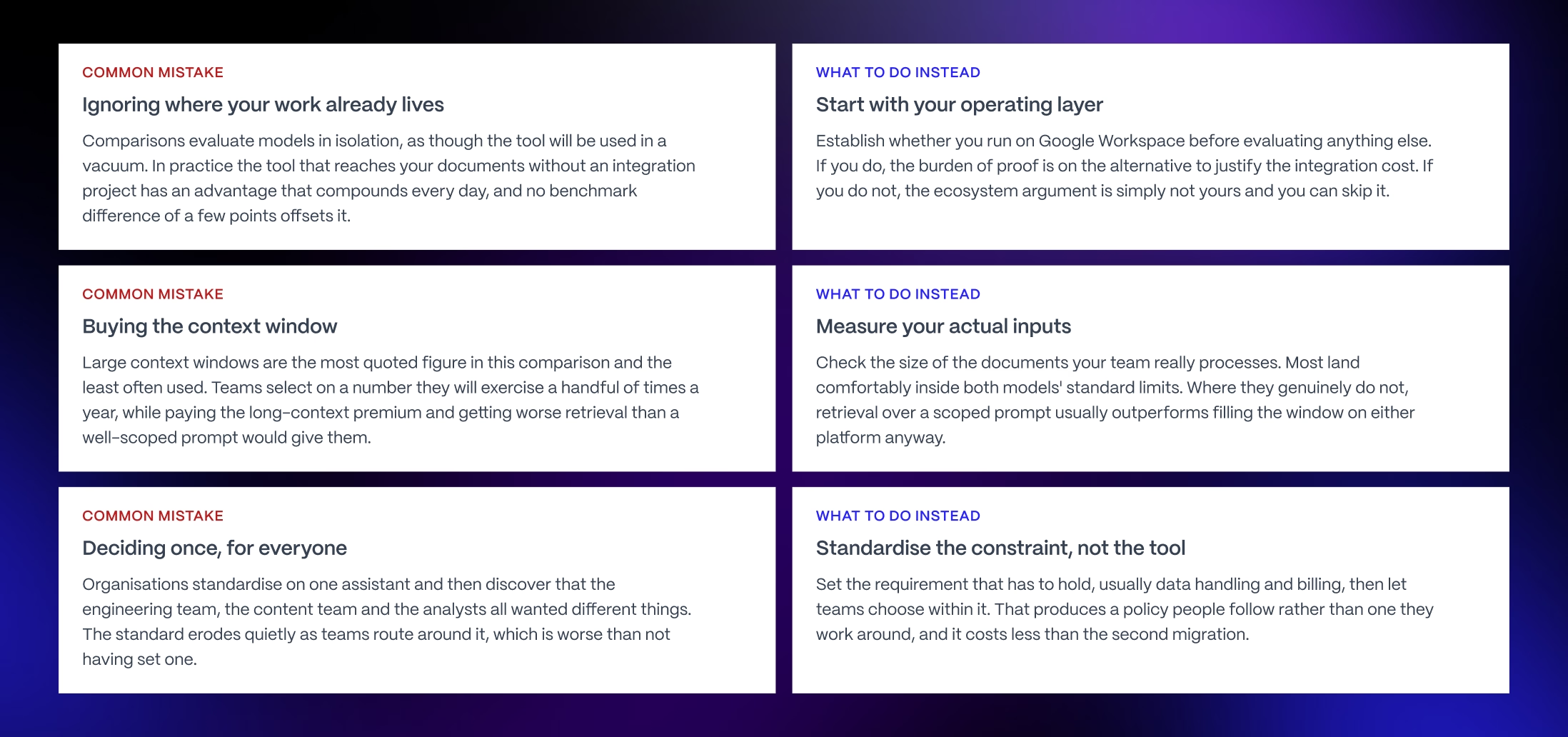
Three mistakes show up again and again when companies make this choice, and naming them plainly is part of what makes this article more useful than a standard comparison.
The first is ignoring where the work already happens. Choosing a model based purely on a feature comparison, without asking whether it reaches the tools your team already opens every single day, is the single biggest reason most published comparisons in this category turn out to be less useful in practice than they look on the page.
The second is buying the context window. A bigger number on a spec sheet does not automatically mean better output for your actual work, and as covered earlier, it often just means a bigger bill at the end of the month, with no equivalent improvement in quality to show for it.
The third is deciding once for everyone. Different teams inside the same company can have genuinely different needs, as the writing and editorial section of this article showed. A single company-wide choice, made without checking whether it actually fits every team that has to use it, tends to quietly break down over the following year as teams work around it or ignore it.
Decision by Situation
DECISION BY SITUATION
Use this as a starting point, not a binding answer. The five-point framework is the real evaluation tool. Your situation determines which parts of it carry weight.
SITUATION 1: GOOGLE WORKSPACE ORGANISATION, GENERAL PRODUCTIVITY
- Profile: Docs, Sheets, Drive and Gmail are the operating layer, use case is broad daily work
- Top constraints: adoption, integration cost, admin overhead
- Recommended starting point: Gemini
- Why: the tool reaches the work without a project, adoption is easier because it is already where people are, and admin and billing are already in place. None of that is a model property and all of it is real.
The verdict: the ecosystem argument is strongest here and it is sufficient on its own.
SITUATION 2: GOOGLE WORKSPACE ORGANISATION, PUBLISHED CONTENT
- Profile: as above, but the primary workload is writing that goes out under the company name
- Top constraints: editorial consistency, tone control, revision burden
- Recommended starting point: Gemini as the default, Claude for the content team specifically
- Why: this is the clearest case for routing rather than standardising. The ecosystem advantage still applies to the organisation, and the editorial gap still applies to the team producing published work. Both can be true.
The verdict: standardise broadly, exempt narrowly, and be explicit about the exemption rather than letting it happen informally.
SITUATION 3: NON-GOOGLE ORGANISATION
- Profile: Microsoft, Notion, Slack or a custom stack as the operating layer
- Top constraints: model fit for the dominant workload, cost at volume
- Recommended starting point: evaluate on output quality alone
- Why: Gemini's structural advantage does not apply to you, which removes the thing that decides most of these evaluations. What remains is a straight assessment of which model handles your work better, and that is a question your own testing answers better than any article.
The verdict: the ecosystem sections of every comparison, including this one, are not written for you. Skip to workload fit.
SITUATION 4: HIGH-VOLUME API WORKLOAD
- Profile: production integration rather than team licences
- Top constraints: cost at your token mix, latency, throughput
- Recommended starting point: model the arithmetic before anything else
- Why: input and output rates diverge meaningfully between these two and the gap widens with volume rather than complexity. An output-heavy workload and an input-heavy workload can produce opposite answers from the same pricing table.
The verdict: this is the one situation where the spreadsheet decides and the ecosystem argument is irrelevant.
SITUATION 5: LARGE DOCUMENT PROCESSING
- Profile: legal review, research synthesis, codebase analysis at scale
- Top constraints: context window, long-context pricing, retrieval quality
- Recommended starting point: measure your real inputs before assuming this is you
- Why: most teams who believe they need the largest available window are comfortably inside both models' standard limits. Where the requirement is genuine, compare the long-context pricing rather than the headline capacity, because that is where the cost lands.
The verdict: a real situation, claimed far more often than it applies.
PRINCIPLE
This comparison is unusual because the deciding factor is not a property of either model. It is a procurement decision your organisation made years ago about which productivity suite to run. If you are a Google organisation, Gemini starts ahead for reasons that have nothing to do with benchmarks and everything to do with where your documents live. If you are not, that advantage evaporates and you are left with a straightforward question of model fit. Working out which of those you are is the entire decision, and it takes about ten seconds.
Here is how this decision plays out across five common situations. Find the one closest to your own before you commit to a tool.
If you are deciding this for a larger organization rather than a single team, the situational guidance here connects directly to how enterprise teams typically approach this kind of rollout.
Workspace organization, general productivity needs
Gemini is the stronger default here. It reaches Docs, Sheets, Drive, and Gmail without an integration project, and for everyday knowledge work, that distribution advantage outweighs Claude's edge in writing quality for most day-to-day tasks.
Workspace organization, published content
The right answer is Gemini broadly across the company, with a documented exception for the team that publishes writing under the company name. That specific team should use Claude for its editorial consistency, even while the rest of the organization runs on Gemini for everything else.
Non-Google organization
The Workspace advantage described throughout this article does not apply to you at all. The decision reverts fully to model fit: writing quality favors Claude, while native multimodal range and Google Search grounding favor Gemini.
High-volume API workload
Run the worked cost example from earlier in this article against your own real volume, not the volume shown in a vendor's demo. As shown in that section, the tier you pick inside a vendor's lineup moves your bill more than which vendor you pick in the first place.
Large document processing
Do not choose based on the size of the context window alone, for the reasons covered in the capability section above. Test whether retrieval over scoped, relevant material outperforms filling the full window for your specific documents, and remember that Gemini's pricing specifically penalizes prompts above 200,000 tokens.
The deciding factor across all five of these situations is not a property of either model. It is a procurement decision your organization most likely already made, possibly years before this specific question ever came up. Working out which situation applies to you takes about ten seconds, and it settles most of the rest of this question before you have to weigh a single benchmark score.
The best model is the one your team will actually open
Tooling decisions get made on capability and unmade on adoption. A model that scores two points higher on a benchmark, but sits one extra click away from where the work happens, loses to the one already open in the document.
We work with B2B SaaS teams on the layer underneath the tool choice: how it fits the stack you already run, what it costs at your real volume, and whether anyone will still be using it in month three. If you are making this decision now, talk to us.
Before you act on this article
Verify everything. We checked all model names, release dates, pricing, and features against vendor pages at the time of writing (August 2026), but this category changes often, so before you act on this article or make a purchase decision, verify the details yourself directly with the vendor.
This article is based on independent research and is meant to be informative, giving you a new perspective on the topic rather than a final recommendation. It is not a substitute for your own evaluation, pilot testing, or procurement review before you commit your team to a tool.
FAQs
Which is better, Claude or Gemini?
It depends more on your operating stack than on the models. If your organisation runs Google Workspace, Gemini reaches your work natively inside Docs, Sheets, Drive and Gmail, which usually outweighs Claude's edge in writing quality for everyday work. If you do not run Workspace, that advantage disappears and the comparison reverts to model fit.
Does Gemini come free with Google Workspace?
Gemini is included with Workspace and with Google AI Pro and Ultra subscriptions rather than sold as a standalone assistant. Which Workspace tiers include which Gemini capabilities has changed during 2026, so verify against Google's current Workspace documentation rather than a comparison article.
Is Gemini cheaper than Claude?
On the API they are closer than the marketing suggests. Gemini 3.1 Pro runs two dollars input and twelve output per million tokens; Claude Sonnet 5 runs two and ten. Gemini's Flash tiers undercut both. The tier you choose moves the bill more than the vendor you choose.
Why can I not compare the twenty dollar tiers directly?
Because they are not the same product. Google AI Pro at around twenty dollars bundles the assistant with multi-terabyte cloud storage and other Google services. Claude Pro at twenty sells the assistant alone. The list prices match and the packages do not, so a like-for-like tier table misleads.
Which has the bigger context window?
Both reach one million tokens, so it is effectively a tie. Some Google enterprise configurations reference two million, which is configuration-specific rather than standard. More usefully, very large windows rarely deliver proportional value, and Gemini's pricing roughly doubles above 200,000 tokens per prompt.
Should I use the full context window or retrieval?
Retrieval, for most work. Filling a large window costs more, dilutes attention across irrelevant material and triggers long-context pricing. Reserve large context for genuinely holistic tasks such as whole-codebase reasoning or long-archive synthesis, and use scoped prompts or retrieval for everything else.
Which is better for coding?
Both are credible and the published comparisons are thin. Claude Code is included on paid Claude plans as an agentic terminal tool; Gemini has its own agent tooling and repository support. Neither vendor's self-reported figures should settle it. Test on your own codebase with a real task.
Which is better for coding?
Both are credible and the published comparisons are thin. Claude Code is included on paid Claude plans as an agentic terminal tool; Gemini has its own agent tooling and repository support. Neither vendor's self-reported figures should settle it. Test on your own codebase with a real task.
Can Claude access live web data?
Yes. Claude includes web search, available even on the free tier, so the older claim that Claude cannot reach current information is out of date. Gemini's grounding in Google Search is deeper by nature of the company that builds it, which matters for freshness-sensitive workloads.
Is Gemini safe for enterprise use?
Yes. Gemini for Workspace inherits Google Cloud's compliance envelope including SOC 2 and ISO certifications, data residency and no-training defaults for Workspace customers, and it is administered through the console your team already uses. Claude Enterprise offers SSO, SCIM, audit logs and custom retention. Both clear the bar.
Can we run both?
Yes, and for many organisations it is the right answer. A common pattern is Gemini as the ambient assistant across Workspace for everyday knowledge work, with Claude reserved for high-stakes writing and engineering. Decide the split deliberately rather than letting teams arrive at it informally over eighteen months.