.jpeg)
Almost all lists comparing AI design-to-code tools are just feature comparisons. All of the same seven tools, placed in the same order, are listed using identical bullet-point descriptions of what each tool does. Not a single list asks what you will be left with after you stop paying for the tool.
What you are left with when you stop paying for the tool has far greater implications than a feature comparison. A "download" button is not the same as an operational project that you can continue to support long-term.
Some of these tools give you code that you can place into your own GitHub repository and keep forever. Other tools lock your work into their own hosted application, and if you cancel your subscription, it stops working. In this article, we show the difference between the two options based on the primary criteria for evaluation, not secondary information.
This article is for engineering managers, marketing managers, and growth operations managers at scale and enterprise B2B SaaS companies. You likely have used one or more of these tools before. Now the question is which product your company's development team should continue using.
Two Categories, One Confused Market
Design-First and Code-First Are Different Products
Two different categories of tools exist, and they often get mixed up.
Design-first tools start with a prompt or a visual design and convert it into an operational user interface. These include V0, Lovable, Bolt, Framer, Figma Make, and FlowStep.
Code-first assistants operate within your existing codebase. These include Cursor, Copilot, Claude Code, and Windsurf.
Each type of tool has a different starting point, a different set of customers, and will fail differently. Although these types of tools are now crossing over (for example, Bolt added Claude Code and Codex in September 2025, and Figma made their MCP server open to other tools such as Cursor & Claude), there is still a difference between who buys which. Many times that is why companies pick the wrong tool when evaluating the same criteria.
This category sits inside a wider stack of decisions. If you are also evaluating AI tools for B2B marketing teams, the same ownership question applies there too. And when generated output eventually needs a real, production-grade front end, that is web design work, not a prompt away.
The Category Split at a Glance
The table below outlines the five differentiators of each category.
The failure mode row shows the biggest difference between the two categories.
Design-first tools can look done even when they aren't ready for real use. Code-first tools make whatever has already been written in your codebase happen faster, whether good or bad.
As a result of either category, there will still be a security obstacle to a review before any code goes live.
The Five-Point Ownership Framework
Instead of simply counting how many features are included with each software tool, we identified five criteria for comparison.
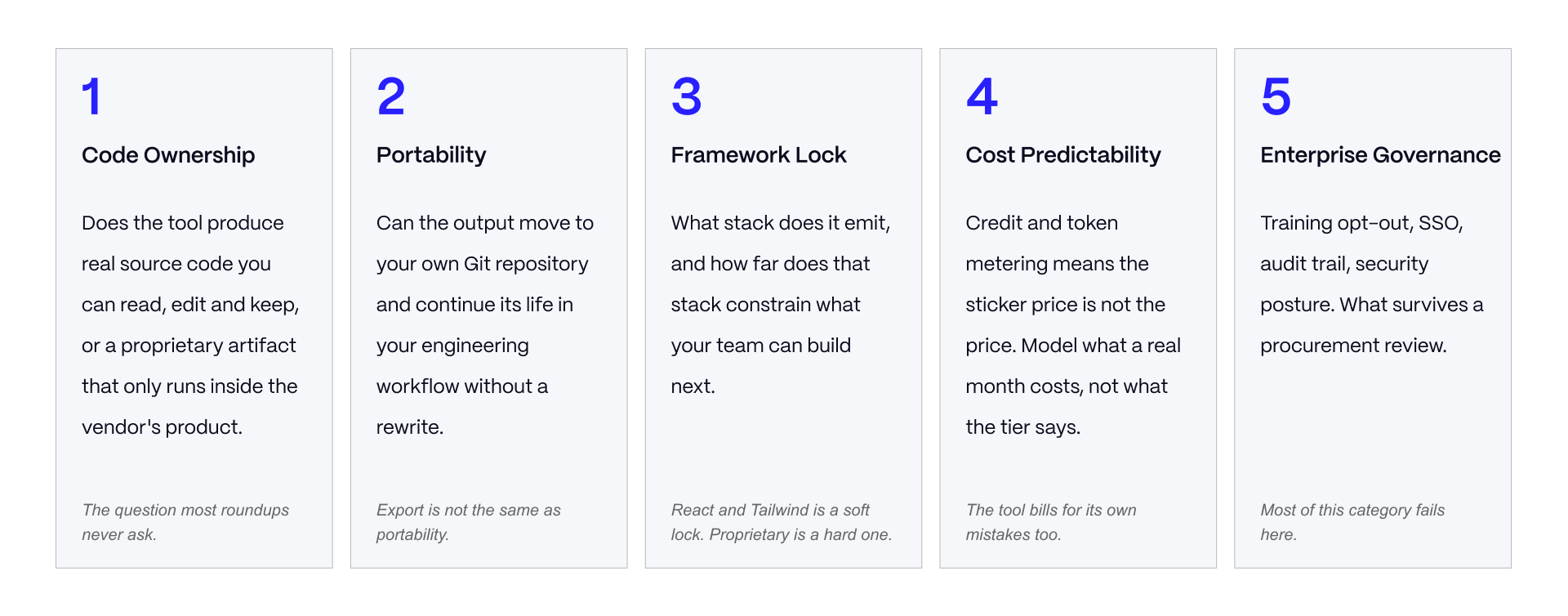
- Code ownership - Are you provided actual usable source code or just a "black box" output that is tied to a single platform?
- Portability - Will the generated code be able to integrate into your existing workflow and repository?
- Framework lock - Is the produced code using a commonly used framework or a proprietary framework only supported by that vendor?
- Cost predictability - Can you determine what this will cost you month-to-month?
- Enterprise governance - Does the tool meet all of the requirements set forth by your organization's Security and procurement teams?
This framework has been built so that ownership, not features, are the primary focus. Features within these categories have changed every couple of months. Whether a tool hands you code you can maintain is a structural fact about the product, and it rarely changes.
The Tools, Compared on What You Keep
All Tools at a Glance
Read the ownership columns in the table above before you read anything else. That is what determines if a tool fits your team.
Two things to flag before you read further. Several currently ranked articles list v0's paid entry tier at $20 a month. The vendor's own pricing page shows $30 per user per month, with $30 of included credits. Flowstep's paid tiers could not be confirmed against a vendor pricing page during research, so treat any number you see for Flowstep with caution until you verify it yourself.
The Code-Output Tools
v0 produces React, Next.js, and Tailwind code in shadcn conventions, with GitHub sync. It leans toward Vercel hosting, but that is a preference the tool nudges you toward, not a lock you cannot leave.
Lovable gives you two-way GitHub sync on every tier, including the entry-level plan. The trade-off is that it depends on a Supabase backend.
Bolt shows you the code while it generates and exports straight to a repository. This makes it easy to see what you are getting before you commit to it.
Replit is Git-based and the code is portable. The dependency here is on Replit's own hosting for running the project.
The Hosted-Output Tools
This is where the ownership question matters most, and where most comparisons stay quiet.
Framer has no real way to export source code, and the site only runs on Framer's hosting. That is a fair trade if the site itself is the entire deliverable. It becomes a serious problem the moment you need the code to live somewhere else.
Figma Make lets you download a React ZIP file, but there is no clean Git workflow, and regenerating the design can overwrite edits your team already made by hand. That makes it a tool for prototyping, not a path to a finished product.
Flowstep exports React, TypeScript, and Tailwind code, plus Figma copy-paste. It is built as a step between design and handoff, not as a hosting platform.
None of these three tools are bad products. They are good tools being used for the wrong job, by teams who were never told the difference between "you can see the design" and "you own the code."
If a hosted site is genuinely the right fit for what you need, that is a legitimate choice, and it is the same territory covered by Webflow agency services.
What These Tools Actually Generate
Stack and Framework Output
React, Next.js, and Tailwind are the common output across the code-output tools. Most B2B SaaS teams already build in this stack, so this is a light restriction rather than a hard one. A proprietary format that only one vendor supports is a much harder restriction.
Most of the code-output tools use shadcn conventions. That is a convenience if your team's design system already follows shadcn, and a source of friction if it does not.
Production Readiness in Practice
Every vendor in this category markets its output as ready for production. Practitioners who actually use these tools describe something different: a strong starting point that still needs review, not a finished product.
Figma's own documentation backs this up. It describes Figma Make's React output as a strong starting point for development, not a final, drop-in solution. That is the vendor conceding the point.
Design-import quality is only as good as the Figma file feeding it. And no matter which tool you use, the output still needs deployment work, a security review, and ongoing maintenance.
This matters most on the pages your buyers actually see. Generated marketing pages should still hold up against real SaaS landing page patterns and real SaaS homepage design, not just look finished in a first pass.
What Survives the Second Iteration
The most useful thing to know before you pick a tool: the first output from any of these tools looks good. That is because a first prompt runs against a blank project with no existing rules or conventions to respect.
The real differences show up on the second try. Some tools keep the manual edits your team made after the first pass. Others overwrite them the moment you regenerate.
Test this yourself before you commit to a tool. Generate something. Edit it by hand the way your team actually would. Regenerate it. See what survives.
The Cost Model Nobody Publishes
Credit and Token Metering Explained
Every tool in this category charges by credits or tokens, not a flat monthly fee. The sticker price you see on the pricing page is a floor, not the real cost.
Here is the part that catches teams off guard: the meter keeps running while the tool corrects its own mistakes. You are billed for the model's errors, not just for the work it gets right the first time. Teams regularly find that a $25 tier covers far less real work than they assumed.
Verified Pricing and the Figures Circulating
These figures were checked against each vendor's own pricing page during research for this article in August 2026.
- v0: Plus and Team tiers are $30 per user per month, including $30 of credits, with $2 in additional daily use. Business is $100.
- Lovable: Pro is $25 for 100 credits. Business is $50.
- Bolt: Pro is $25 for 10 million tokens.
- Replit: Core is $20, including $25 of credits.
- Framer: Basic is $10. Pro is $30 a year, plus $20 per editor seat.
- Figma: Professional is $16 a year.
- Flowstep: Pricing could not be confirmed on the vendor's live pricing page. Treat any figure you see for Flowstep as unverified until you check it directly.
The v0 figure needed correcting specifically because multiple currently ranking articles list it at $20 a month, when the vendor page shows $30. This kind of error spreads because roundup articles copy numbers from each other instead of checking the source.
Modelling a Real Month
Do not trust a pricing page to tell you what a real month will cost. Run two weeks of actual work on the free or entry tier. Take that number and double it.
Doubling is not being overly cautious. A pilot project is cleaner than real production work, and the correction cycles that burn through credits get worse as a project gets more complex.
Credit-based pricing makes annual budgeting genuinely hard in this category. Tell your finance team that up front, before they find out on their own.
Enterprise Governance
Training Opt-Out and Data Handling
This is the first question procurement will ask. v0 Business opts out of training data use by default, and v0 Enterprise states outright that your data is never used for training. Lovable gates SSO and training opt-out behind its Business tier and above. Bolt added a Microsoft Azure procurement path for enterprise buyers in May 2026.
The tier your team wants to use and the tier procurement will actually approve are often not the same tier. The governance tier is the real price you should be comparing.
Security Review and Licence Provenance
Generated code needs the same static analysis and review process as code a person wrote. No vendor removes that requirement, no matter what the marketing says.
The licence provenance of generated code is genuinely unclear, and vendors rarely offer a warranty on it. There is also a throughput problem worth naming directly: as the amount of code you generate goes up, your review capacity does not automatically go up with it. If review becomes the bottleneck, any speed you gained from the tool disappears.
This is where a second set of eyes helps. Veza's creative services cover exactly this layer, taking generated output through the review and polish it needs before it reaches production.
Attribution of Generated Contributions
Attribution is weak across the design-first tools. If you cannot tell which part of your code came from a generated tool and which was written by hand, you cannot answer a provenance question later, and you cannot show what the AI actually contributed when someone asks.
Do not wait for a vendor to solve this. Build attribution into your commit conventions and enforce it as a team standard. If your organization needs enterprise Webflow delivery with the same level of process discipline applied to generated work, that is a capability worth having in place before you scale usage of these tools.
Choosing The Right Tool
Pre-Purchase Evaluation Checklist
Before you commit budget to any of these tools, run a real checklist, not a demo. Most of the useful questions can only be answered by using the tool on your team's actual work, not a vendor's sample project. A short pilot answers questions a sales call never will.
Anti-Patterns
Three mistakes show up again and again when teams pick a tool in this category.
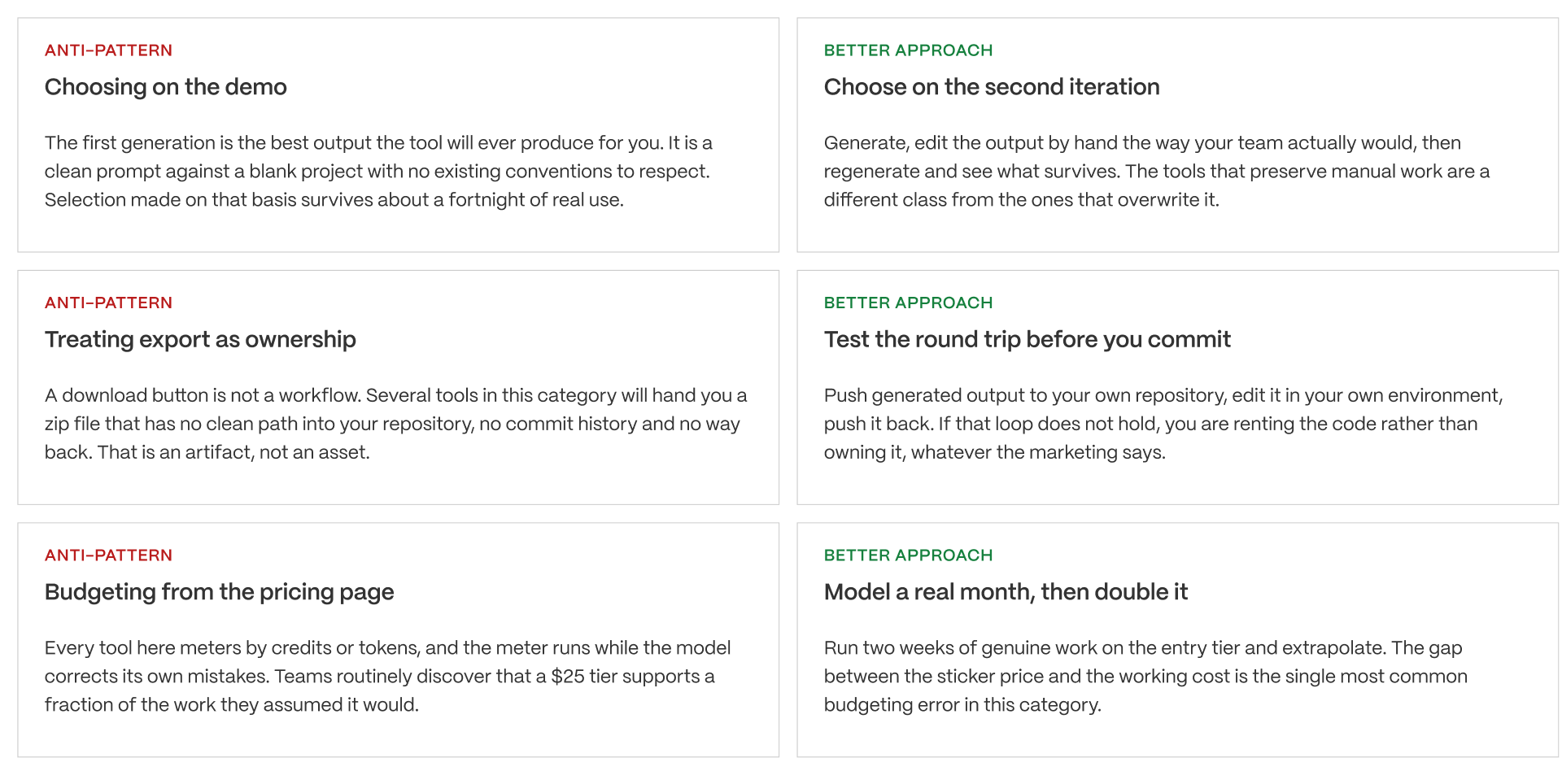
The first is choosing based on the demo. A demo is built to succeed on a clean, simple example, which tells you nothing about how the tool handles your actual codebase or design system.
The second is treating export as ownership. Being able to download a file is not the same as being able to maintain it in your own repository with your own workflow.
The third is budgeting from the pricing page. The sticker price is not the real cost once credit metering and correction cycles are added in.
All three mistakes are avoidable inside a two-week pilot. That makes the pilot the highest-value two weeks in the entire selection process.
Decision by Buyer Type
The right tool depends on what your team actually needs to walk away with.
DECISION BY BUYER TYPE
Use this as a starting point, not a binding answer. The five-point ownership framework is the real evaluation tool. The buyer type gets you to the right shortlist.
BUYER TYPE 1: THE FRONTEND ENGINEER
- Profile: builds in React, owns a design system, needs components that match existing conventions
- Top constraints: output must match house patterns, must land in the repository cleanly
- Top use cases: component generation, rapid page scaffolding, design system extension
- Recommended starting tool: v0
- Why: it emits React, Next.js and Tailwind in shadcn conventions, syncs to GitHub, and the output is closer to production-shaped than most of this category. The Vercel gravity is real but it is a pull, not a lock.
The verdict: strongest option when the code has to live alongside code your team already wrote.
BUYER TYPE 2: THE FOUNDER OR PRODUCT LEAD VALIDATING
- Profile: needs a working product in front of users this month, engineering capacity is thin
- Top constraints: speed to something usable, no dependency on scarce engineering time
- Top use cases: MVP, prototype with a real backend, investor or customer demo
- Recommended starting tool: Lovable
- Why: full-stack scaffolding with Supabase, bi-directional GitHub sync on every tier including entry, and standard React that an engineer can pick up later without a rewrite. The credit meter is the constraint to watch.
The verdict: fastest honest path from idea to something a user can actually use.
BUYER TYPE 3: THE TEAM THAT WANTS TO EDIT AS IT BUILDS
- Profile: technical enough to read the code, wants to intervene mid-generation rather than accept output
- Top constraints: code visibility during generation, model choice, clean export
- Top use cases: iterative full-stack builds, teams with opinions about implementation
- Recommended starting tool: Bolt
- Why: the browser workspace shows the code as it generates, model switching is available, and export to a repository is direct. Token burn is the recurring complaint and should be modelled before committing.
The verdict: the right choice when accepting a black-box output is not acceptable.
BUYER TYPE 4: THE MARKETING TEAM SHIPPING SITES
- Profile: needs hosted marketing pages live quickly, no engineering involvement expected or wanted
- Top constraints: time to publish, CMS the team can operate, no developer dependency
- Top use cases: campaign sites, landing pages, marketing site refresh
- Recommended starting tool: Framer
- Why: prompt to published site with hosting, CMS and animation included. Understand the trade clearly: there is no true source export and the hosting lock is total. You are buying a hosted product, not code.
The verdict: correct when the site is the deliverable and portability genuinely does not matter. Wrong the moment it might.
CROSS-TYPE: THE ENTERPRISE EVALUATION
- Profile: any of the above inside an organisation with procurement, security review and compliance obligations
- Top constraints: training opt-out, SSO, SOC 2 posture, attribution of generated contributions
- Top use cases: all of them, filtered through governance
- Recommended starting position: v0 or Figma Make on enterprise tiers, with Lovable acceptable at Business tier
- Why: enterprise posture in this category is thin and tier-dependent. Training opt-out in particular is often gated above the tier a team would otherwise buy. Budget for the tier procurement will actually approve, not the one the team wants.
The verdict: the governance tier is the real price. Price the decision there.
PRINCIPLE
The tools in this category are converging on capability and diverging on ownership. Within a year most of them will generate comparable interfaces from comparable prompts. What will still separate them is what you hold when the relationship ends: a repository your engineers can maintain, or a hosted artifact that stops existing when the invoice does. Select for the exit, not the demo. That single reframe is worth more than any feature comparison in this article.
If your team must keep the generated work inside your own repository and workflow, that requirement alone rules out the hosted-output tools, no matter how good their first draft looks. Agree on the ownership requirement before you compare anything else.
These tools are converging on what they can do and diverging on what you get to keep. Choose based on the exit, not the demo. That one shift in thinking is worth more than any feature comparison in this category.
The tool matters less than what you are left holding
Generated interfaces are getting good enough that the real question has shifted. It is no longer whether the output looks right. It is whether your team can maintain it in twelve months, and whether your security review will approve it at all.
We work with B2B SaaS teams on that layer: the architecture the generated work lands in, and the standards that keep it maintainable. If you are choosing a tool your team will build on, talk to us before you commit.
Work With Veza See Our Case Studies
FAQs
What is the best AI design-to-code tool in 2026?
It depends on whether you need code you own or a hosted site. For portable React that lands in your repository, Lovable and Bolt lead. For production components in an existing React codebase, v0. For hosted marketing sites with no engineering involvement, Framer. There is no single answer and any article giving one is selling something.
Do these tools produce production-ready code?
They produce strong starting points, not drop-in production code. Figma's own documentation describes its React generation that way. Generated output still needs security review, deployment work and maintenance, and design-import quality is only as good as the source file behind it.
Which AI design tools let me export real source code?
Lovable, Bolt, v0 and Replit all produce real exportable code with Git integration. Flowstep exports React, TypeScript and Tailwind. Framer offers no true source export. Figma Make offers a React ZIP but no clean Git workflow, so it is a prototyping path rather than a production one.
How much do AI coding tools cost?
Entry paid tiers cluster between $20 and $30 per month, but every tool meters by credits or tokens so the sticker price is a floor rather than a cost. v0 Plus is $30 per user monthly with $30 of credits. Model two weeks of real work before committing.
What happens to my project if I stop paying?
It depends entirely on the tool. Code-output tools leave you with a repository you already synced. Hosted-output tools take the artifact with them, and a Framer site goes offline. This is the single most important question in the category and almost no comparison asks it.
Are AI coding tools and AI design-to-code tools the same thing?
No, though they are converging. Design-first tools start from a prompt or visual and produce an interface. Code-first assistants work inside an existing repository. Different buyers, different entry points. Evaluating them on one checklist is the most common reason tool selections go wrong.
Is AI-generated code safe to put into production?
Only after the same review you would apply to code a human wrote. Generated code carries unclear licence provenance, vendors rarely warrant it, and generation volume rises faster than review capacity. Plan for the review bottleneck before it appears.
Which tools have enterprise controls?
v0 and Figma have the most credible posture, with SSO, role-based access and training opt-out. Lovable adds SSO and opt-out at Business tier and above. Bolt added an Azure procurement path in 2026. Check which tier gates the controls you need, because it is often above the tier your team would otherwise buy.
Can I use these tools with my existing design system?
The code-output tools emit React and Tailwind in shadcn conventions, which aligns cleanly if your system already does and creates friction if it does not. Test with your actual components rather than a blank project, because first-pass output on an empty project tells you nothing about integration.
Should our team standardise on one tool?
Standardise on the ownership requirement first, then let teams choose within it. If generated work must live in your repository, that rules out the hosted-output tools regardless of which produces the nicer first draft. Get that constraint agreed before evaluating anything.
Before you act on this article
Verify everything. We checked all pricing and features against vendor pages at the time of writing (August 2026), but this category changes often, so before you act on this article or purchase any tool, verify the details yourself directly with the vendor. This article is based on independent research and is meant to be informative, giving you a new perspective on the topic rather than a final recommendation. It is not a substitute for your own evaluation, pilot testing, or legal and procurement review before you commit your team to a tool.