.jpg)
A B2B SaaS website redesign can solve structural problems, but it can also put working traffic, rankings, and pipeline at risk. Before you rebuild anything, you must identify the outcome you need to change and ask whether a smaller intervention could get you there first.
Should You Redesign At All?
A website redesign is one of the biggest interventions a marketing team can make. It can change your positioning, architecture, CMS, content, and web design at the same time.
That makes the first question surprisingly simple: do you actually need one?
The Conflict of Interest in Every Other Guide
Look at the articles ranking for website design terms and there is an obvious pattern. They’re published by agencies and platforms that sell website redesigns.
That does not make their advice wrong. It does help explain why so many guides begin with “Signs you need a redesign” before moving straight into discovery, design, development, and launch. The decision to redesign has effectively been made before the article begins.
Veza Digital has the same conflict of interest. We build B2B SaaS websites, so there is a clear commercial upside when a company is looking to rebuild. But sometimes the best recommendation is not to.
Redesigns introduce cost, disruption, migration risk, and months of work. If the underlying problem can be solved via messaging, SEO, or conversion rate optimization, rebuilding the entire website turns a relatively contained problem into a much larger one.
So this guide starts where the redesign process should start: by making the rebuild justify itself.
When a Rebuild is Justified, and When It is Not
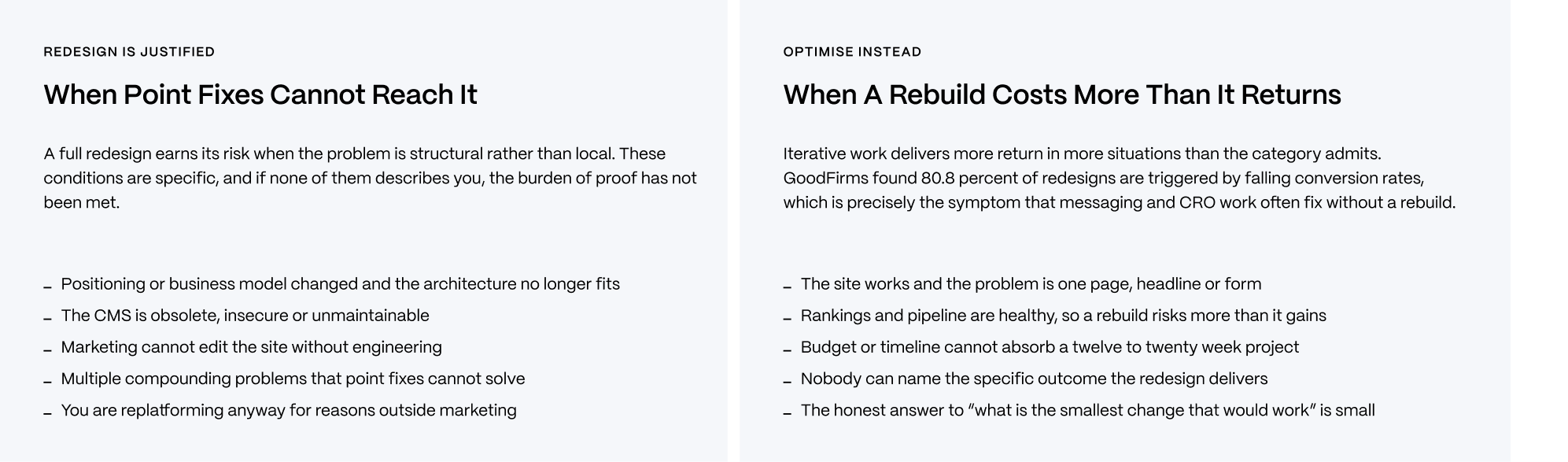
Some website problems genuinely are structural. If your positioning or business model has changed so significantly that the existing architecture represents a company that no longer exists, a redesign makes sense. The same applies when the CMS is obsolete or unmaintainable, marketing cannot publish without engineering support, or several interconnected problems have accumulated beyond the reach of individual fixes.
Those are problems a new homepage headline cannot solve.
But falling conversion rates alone are a much weaker case. GoodFirms found that 80.8% of website redesigns are triggered by low conversion rates. That makes conversion one of the most common reasons companies rebuild, but it can also be the wrong intervention.
If traffic and rankings stay healthy while visitors fail to convert, the problem may sit in the offer, messaging, page structure, forms, or funnel. Testing CRO strategies for SaaS preserves the parts of the website that are already working, while isolating what isn’t.
Similarly, if no one can identify the business outcome the redesign is supposed to improve, there is no meaningful way of determining whether it succeeds.
The Test That Settles It
Before approving a redesign, put one question in front of the team:
What is the smallest change that could meaningfully move the number we care about?
If conversion is the problem and the answer is rewriting the homepage, test the homepage. If demo requests collapse at the form, fix the form. If a pricing page is confusing buyers, start there.
A focused intervention can take days or weeks. A full B2B SaaS website redesign can consume months, involve numerous teams, and expose parts of the business that were already performing to unnecessary risk.
If nobody in the meeting can name the number that needs to move, or the smallest plausible intervention that could move it, the company is not ready for a redesign. “The website feels dated” might be a comment that justifies brand investment, but it’s not a measurable performance case.
The default position should therefore be optimization.
Make the redesign carry the burden of proof. If smaller interventions cannot solve the problem because it is genuinely structural, you have your case for a rebuild. If they can, you might have saved months of work and a substantial amount of money.
What Actually Goes Wrong
The risk in a website redesign is that something which worked before the redesign stops working afterwards.
Organic traffic disappears. The problem remains unnoticed. The project stalls before launch. Or, everything ships on time and the business metrics barely move. These are not edge cases worth burying in a launch checklist. They’re reasons to define what can go wrong before the project begins.
The Traffic Does Not Come Back
The most consequential redesign risk is also one of the easiest to underestimate.
Dan Taylor and 10 Spurs analyzed 892 website migrations using data collected in October 2024. Their research, published by Search Engine Journal in January 2025, found that the average domain took 523 days to return to its previous organic traffic level. Even after 1,000 days, 17% had still not recovered.
Interestingly, that marks an improvement on Taylor’s earlier research. The previous study covered 171 migrations and found an average recovery time of 229 days, with 42% never returning to their previous traffic levels. These samples and methodology mean those figures shouldn’t be treated as a clean longitudinal comparison, but the newer dataset at least suggests fewer migrations are struggling to recover altogether.
The important point is what causes the losses.
They are typically problems with execution rather than design. Incomplete 301 redirects, URLs changed without one-to-one mappings, lost content parity on ranking pages, incorrect canonicals, staging noindex directives reaching production, JavaScript-dependent content without server-side rendering, and internal links that continue pointing toward old URLs.
None of those problems requires a bad-looking website.
They are the reason the SEO risks of a Webflow migration need to be considered before design and development decisions are locked in. By the time the new website reaches staging, some of the most consequential migration decisions have already been made.
Nobody Notices for Months
Losing organic traffic is bad. Losing it and failing to notice is worse.
Migration problems are often visible in Google Search Console within the first week after launch. However, practitioner post-mortems document teams discovering losses three months later, seven months later, or even more than a year after migration.
The diagnosis was available. Nobody was looking at it.
The reasons are remarkably mundane. There was no pre-launch baseline against which to compare performance. Nobody owned a weekly Search Console review. The initial decline was attributed to seasonality or temporary post-migration volatility. By the time somebody investigated properly, the agency had finished the engagement and the internal team had moved on.
The preventative measure costs virtually nothing.
Before launch, export and date your Search Console, analytics, ranking, and conversion data. After launch, give one named person responsibility for reviewing performance every week throughout the first quarter.
Do not agree to simply keep an eye on the issue. Put the review in someone’s calendar.
A redesign can create complicated technical problems. Discovering them early is largely a governance problem, and one of the easiest in the entire project to solve.
It Ships and Nothing Improves
There is another version of redesign failure that is harder to see because nothing appears broken.
The website launches. Everybody likes the new design. Traffic remains stable. But pipeline, conversion, engagement, or whatever metric justified the project stays exactly where it was.
SoftwareReviews reported in 2023 that 80% of website redesigns fail to achieve their maximum potential. That wording matters. It doesn’t mean 80% fail outright. It means the majority fall short of what they could have delivered.
The common cause is often visible in the original brief: “Make the website look modern.”
This is a design instruction as opposed to a business objective. If there was no baseline before the project, and nobody defined which metric the redesign should move, a visually successful launch can still leave the underlying strategic problem untouched.
Then there are the redesigns that never reach launch at all. Content delivery is consistently cited by practitioners as one of the biggest project bottlenecks, while expanding scope can turn a defined engagement into something dramatically larger.
Michael Lynch documented an extreme example from TinyPilot. A website project initially quoted at $5,000 to $7,000 over four weeks ultimately cost $46,000 and took eight months, with scope creep, the removal of the project manager, and delayed time reporting contributing to the overrun.
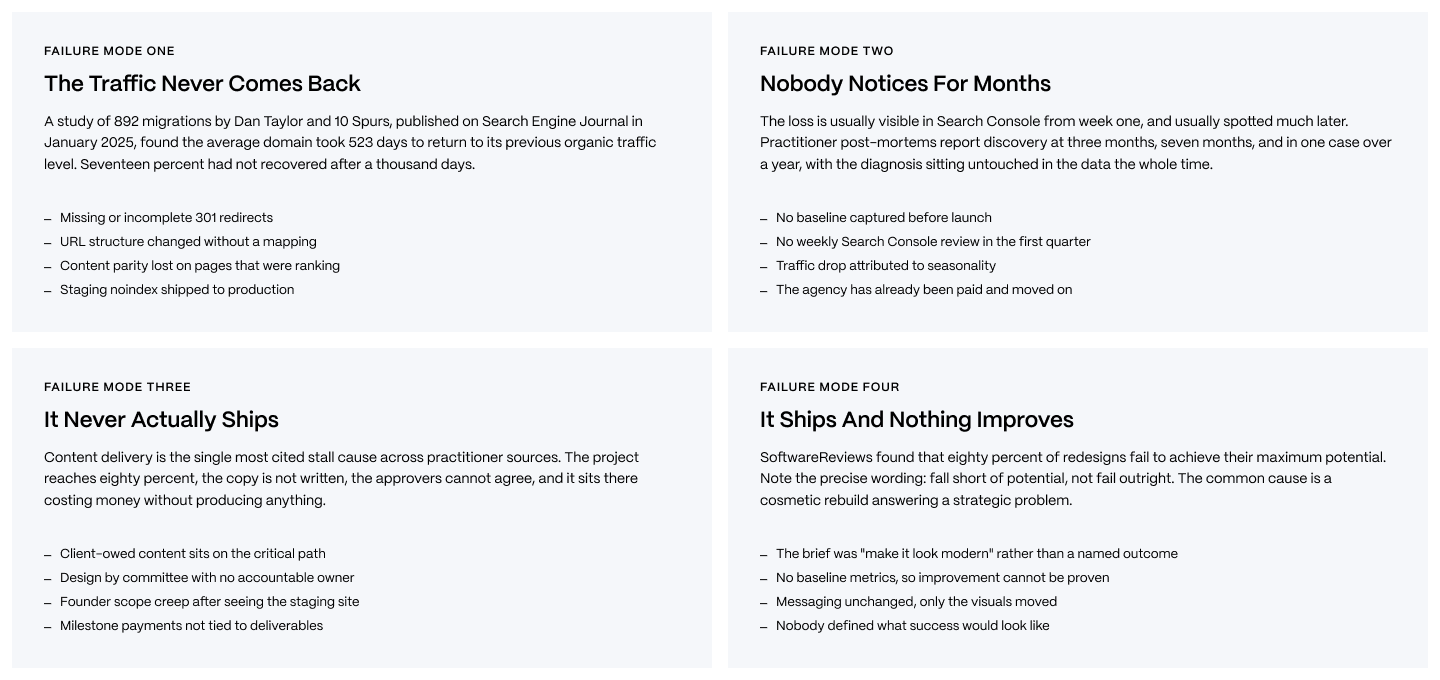
The lesson across all four failure modes is the same. Redesign risk rarely comes from whether a designer can produce a good website. It comes from migration discipline, measurement, scope, content, and governance around the work.
What It Costs and How Long It Takes
Website redesign pricing varies enormously, which makes a single average almost useless. A visual refresh and an enterprise replatforming project might both be described as a redesign despite having entirely different scopes, risks, and delivery requirements.
The more useful question is what a redesign costs at your level of complexity, and what makes that number move.
Real Ranges by Scope
For a B2B SaaS company, a realistic redesign budget can start at around $10,000 and climb to over $350,000. The difference lies in what is actually being rebuilt.
At the lower end, a visual refresh typically costs $10,000 to $30,000 and can take anything from 6 to 10 weeks. This often means retaining the existing CMS, architecture, and most content while updating the visual system and selected page templates.
A full custom B2B SaaS redesign typically falls between $30,000 and $75,000, with a timeline of roughly 14 to 20 weeks. This is where strategy, UX, custom design, content restructuring, development, and more substantial changes to the website begin to enter the scope.
Combine the redesign with a platform migration and the range rises to around $75,000 to $150,000+, with projects commonly taking 16 to 24 weeks.
At enterprise level, particularly with multiple sites, complex integrations, localization, extensive stakeholder groups, or significant governance requirements, projects can reach $150,000 to $350,000+ and take 6 to 12 months.
These are agency-published ranges, not independent industry benchmarks. Reliable independent pricing data specifically for B2B SaaS website redesigns barely exist. Treat the figures as useful planning ranges rather than market averages.
The same caveat applies whenever you research what a website actually costs. The headline number matters less than understanding exactly what is included in it.
What Actually Drives the Variance
Page count is often treated as the obvious predictor of website cost. In practice, it is rarely the biggest source of variance. Scope is.
A 50-page website with a clear design system, finished content, and one decisive approver can be considerably easier to deliver than a 20-page website whose positioning is changing during the project, content has no owner, and every decision requires approval from six stakeholders.
Content readiness and approval speed are particularly expensive sources of delay. Clique reports that projects can extend by 30% to 50% when stakeholder decisions are delayed or content is not ready. GoodFirms estimates that scope creep typically adds 10% to 25% to project costs.
The practical response is not a more detailed estimate. It’s a tighter operating discipline.
Make sure you define what is inside and outside scope before you start work. Give content a named internal owner and a real deadline. Then appoint one accountable approver with authority to make decisions.
Those three decisions make a redesign estimate considerably more likely to remain an estimate rather than become a starting point.
When the Estimate Falls Apart
TinyPilot provides an unusually transparent example of what happens when the original estimate and eventual project diverge.
Michael Lynch documented a website redesign that was initially quoted at $5,000 to $7,000 over four weeks. By completion, the project had taken eight months and cost $46,000. His post-mortem identified expanding scope, the removal of the project manager, and lagging time reports among the factors behind the overrun.
The value of the example is not that every website redesign risks becoming a TinyPilot-sized overrun. It is that the underlying failure is structural.
A fixed-scope quote only creates certainty when the scope itself is sufficiently defined. If requirements continue changing after work begins, the original number becomes progressively less meaningful.
Milestone payments tied to concrete deliverables provide one defence. They create natural checkpoints where both sides can assess what has been completed, what remains, and whether new requests represent additional scope before costs accumulate unnoticed.
The best estimate is therefore not necessarily the most detailed one. It is the one built around a defined scope, visible milestones, and clear ownership of the decisions capable of changing it.
The Process, and Where the Standard Version is Wrong
Most website redesign processes look sensible on paper: discovery, strategy, design, development, testing, and launch.
The problem is less to do with which stages appear on the project plan, and more about the order in which the consequential changes occur. Redesigns are far harder to control when there are multiple variables changing at the same time, or when content and SEO decisions arrive after the work they were meant to inform.
Change One Thing at a Time
A redesign does not have to be a single launch event.
Google Search Central suggests making gradual, deliberate alterations, changing one thing at a time. For larger websites, Google also recommends moving the site in sections, starting with a part that changes less often, and isn’t significantly impacted by unpredictable events.
This guidance directly opposes the temptation to make a grand reveal on launch day. And with good reason. Imagine changing your CMS, URL structure, content, internal linking, visual design, and technical architecture on the same night.
Then organic traffic falls sharply the following week.
What is to blame?
Perhaps nothing. Or perhaps redirects were mapped incorrectly. Maybe important content disappeared. Could be that the new architecture changed internal linking signals, or possibly the new CMS introduced a rendering problem. When every variable changes together, identifying the cause is far more difficult.
The diagnostic work can quickly cost more time than a phased approach would have needed initially.
For projects that need both a replatform and a substantial redesign, the safer approach remains to decouple the changes where it is practical to do so. Complete the platform and URL migration first while also preserving as much else as you can. Confirm that redirects, indexing, rankings, traffic, and conversions remain stable. Then wait.
A stability window of around two to four weeks will give the team time to identify clear migration problems before introducing more variables. Once the new platform is behaving as expected, the visual and content redesign can follow.
It is less dramatic than changing everything overnight. It is considerably easier to diagnose.
Sequencing Corrections
There are three sequencing mistakes that repeatedly make redesigns harder than they need to be.
The first is designing before the content exists.
Placeholder copy will make a layout look complete while also concealing unanswered structural questions. The real headline might need three lines instead of one. A product page may need proof that the template never accommodated. An enterprise buyer may need technical details that will transform the hierarchy completely.
Content is also one of the most common redesign bottlenecks. Treating it as something to fill in after design puts a frequent source of delay directly on the project’s critical path.
The second correction is bringing SEO into discovery rather than staging.
By staging, decisions about navigation, URL architecture, page consolidation, templates, and content have usually been made. SEO then becomes a checklist applied to an existing website instead of an input into how the website is structured.
Migration requirements should influence those decisions before design begins. Existing URLs, ranking pages, internal links, content parity, and organic performance all tell you what the current website has already earned and therefore what the new one needs to protect.
The third correction is to stop treating every page as an independent design exercise.
A design system creates reusable components, patterns, and rules that turn later pages into governed assembly rather than repeated invention. Figma’s own research found that participants with access to a design system completed their objectives around 34% faster than those without one.
That changes far more than design speed. It gives teams a shared framework for decision-making, reduces unnecessary variation, and makes the finished website easier to extend after launch.
The Anti-Patterns
Put those corrections together and three common redesign anti-patterns become obvious.
Changing everything on the same night. A company simultaneously changes its CMS, URLs, content, and design, then has to untangle multiple possible causes when performance moves. Where practical, you should decouple the migration from the redesign and establish stability between them.
Bringing SEO in at the staging. The technical SEO review might be thorough, but it arrives after decisions about architecture and content have already been made. Bring SEO into discovery so preservation requirements become inputs instead of late-stage corrections.
Designing before content exists. Beautiful templates get approved around placeholder copy, only for the real content to explode structural issues at a later stage. Establish the content requirements before locking the design around them.
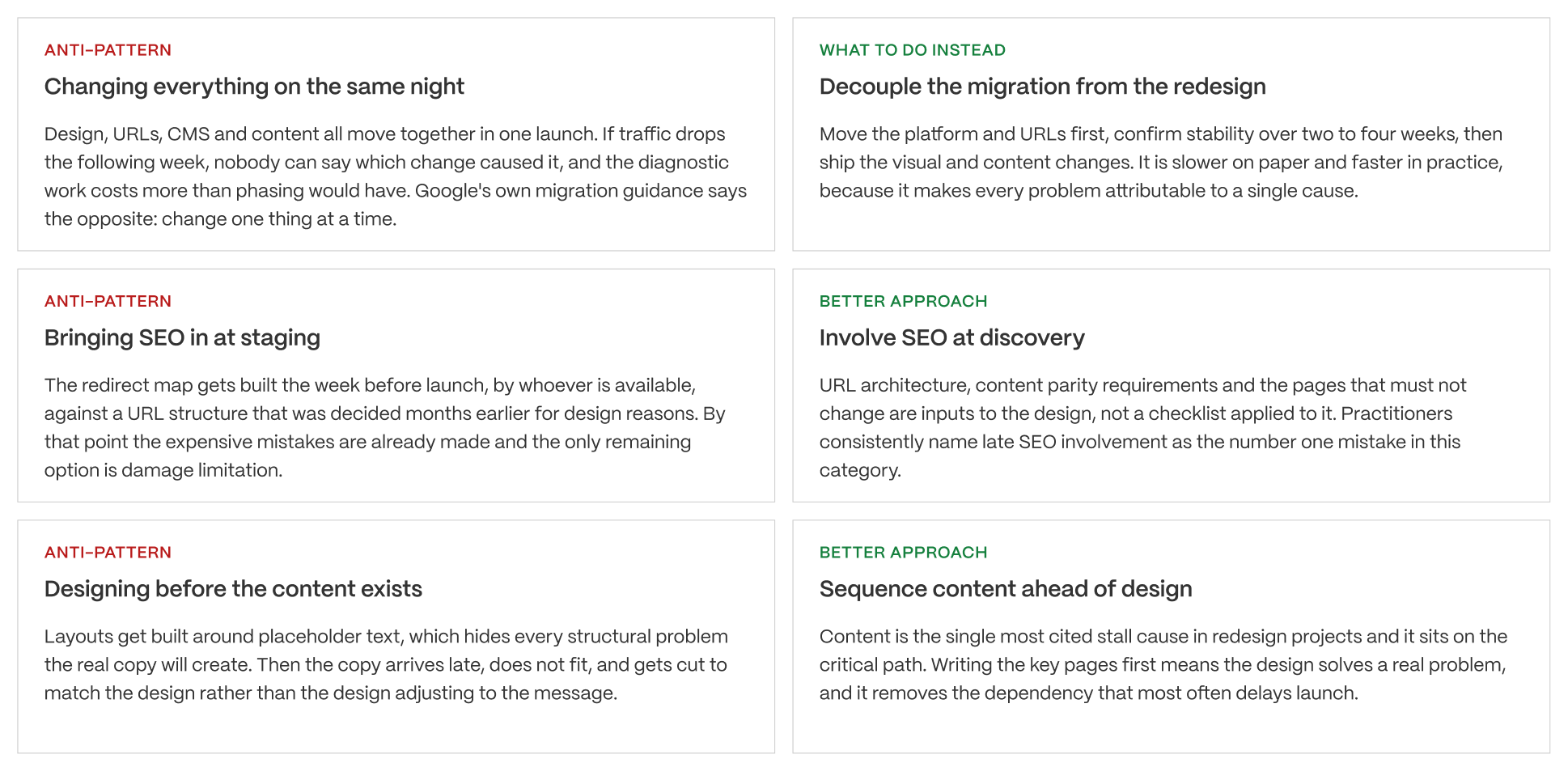
What makes these mistakes interesting is that none of them requires an incompetent team. They’re sequencing errors, not skill errors.
Competent marketers, designers, developers, and agencies can all execute their individual responsibilities well while the project itself is arranged in an order that creates unnecessary risk. That is why “hire people better” isn’t particularly useful advice.
Fix the sequence, and good people have a far better chance of producing a good outcome.
Protecting What You Already Earned
Redesign begins with the assets your site has spent years accumulating. These include backlinks, rankings, indexed URLs, internal authority, traffic, and visibility inside AI-generated answers.
The preservation job comes with identifying these assets before changes occur, and then making sure the new website inherits as many of them as possible.
The Traditional Checklist
Begin with a baseline.
Before you make wholesale changes to content or platforms, ensure you record organic traffic, rankings, conversions, indexed pages, and Search Console performance. Without this crucial information it will be far harder to establish exactly what has changed and where.
Next, build a complete URL inventory. Don’t rely on a single source. Crawl the existing website, export the XML sitemap, pull URLs from Google Search Console and analytics, and check server logs where you can. Each source uncovers URLs the others miss.
Every URL carrying meaningful traffic, rankings, or backlinks should then have a destination. Google recommends permanent server-side redirects such as 301s for site moves, with old URLs mapped directly to their relevant equivalent, as opposed to being funnelled toward the homepage.
Preservation also means you need to maintain content parity on the pages that already rank. Internal links need to point directly to final URLs as opposed to passing through redirects. Staging noindex directives need to be removed as a deliberate launch step, and canonical tags need to be checked again on the live website, rather than assumed correct because they were working in stages.
Redirects aren’t temporary launch housekeeping either. Google’s John Mueller advises to keep redirects associated with a site move in place for at least one year, and longer where possible.
A pre-migration technical SEO audit gives these requirements somewhere to live before development decisions make them harder to change.
The 2026 Addition: AI Citation Risk
Traditional migration planning is focused on Google rankings and organic traffic. But in 2026, there is another visibility layer that needs to be preserved.
AI-generated search experiences increasingly cite external pages as sources, and this means redesigns can impact visibility that conventional rank tracking doesn’t capture.
The underlying citation landscape is also a volatile one.
SE Ranking analyzed 100,000 keywords after Gemini 3 became the default model powering Google’s AI Overviews in January 2026. It found that 42.4% of domains previously receiving citations no longer appeared after the change.
The headline needs context. The churn was concentrated overwhelmingly in the long tail. Among the 500 most-cited domains, only one disappeared, while the overall number of unique cited domains grew by 9.3%.
Ahrefs has documented another substantial shift. The share of AI Overview citations coming from pages that also ranked in Google’s organic top ten fell from 76.1% in July 2025 to 38% in February 2026. However, Ahrefs also notes that improvements to its citation-detection tooling explain part of that decline, so these figures shouldn’t be interpreted as signalling a full change in Google’s behavior.
There’s also evidence that citation visibility matters commercially as well. Seer Interactive found that appearing as a cited source correlated with 35% more organic clicks. Seer explicitly cautions that its analysis can’t establish causation.
What does this mean for your redesign?
Migration specialists argue that AI systems are able to retain or cache source URLs, and that breaking said URLs during the migration process could therefore damage citation visibility. However, that has not yet been established by Google, so should not be presented as an established rule.
But it is still a sensible rule for caution.
If a page currently earns AI citations, it costs relatively little to preserve its destination and redirect path versus discovering an emerging source of visibility that has disappeared after the launch process. In a search environment where citation behavior continues to evolve, migration is not the time to introduce uncertainty.
The Full Preservation Checklist.
The most practical response here is to expand your migration checklist as opposed to reinventing it. Traditional SEO controls still do the lion’s share of the heavy lifting, such as establishing a baseline, running inventory on every relevant URL, creating one-to-one permanent redirects, preserving important content, updating internal links, removing staging directives, verifying canonicals, checking rendering, and monitoring Search Console post-launch.
Two additional steps account for AI visibility. First off, be sure to record which existing pages are earning citations in AI-generated results before migration. If this visibility disappears afterward, you at least have a baseline from which you can investigate.
Second, be sure to keep redirects functioning long enough for external systems to rediscover and re-resolve the content that has been moved. Long-lived redirects are established SEO practice, but their precise impact on AI citation retention is less clear. This is why it’s important to treat this as a precaution rather than a guaranteed preservation mechanism.
Of the twelve checks, items one, three, and ten deserve particular attention. These are establishing the baseline, mapping redirects one-to-one, and recording existing AI citations. None of these change the aesthetics of the new website, which makes them easy to skip.
But they also determine whether you know what was lost, where it’s moved, and whether an emerging source of visibility survived the transition process.
For projects involving site migrations to Webflow, that preservation work needs to begin before the migrations.
Making It Actually Ship
A redesign can have the perfect strategy and technical plan, but might still spend months at only 80% complete.
The final constraint here lies in governance. Someone needs to deliver the content, make the decisions, control the scope, and decide when the website is ready to ship.
Why B2B SaaS Redesigns Stall
The most common bottleneck during the redesign process is that the client has not delivered the content.
Content is where this issue becomes the most noticeable. Imagine final copy is due on Monday but it arrives three weeks behind schedule. Design, development, QA, and launch decisions can all stall because they’re awaiting copy approval.
The second problem here is design by committee. Feedback isn’t the problem. The true problem comes when five stakeholders request changes, and every round becomes a negotiation, decisions that were previously approved reopen, and progress is dependent on consensus not accountability.
Then staging goes live internally. The CEO sees a feature on a competitor’s website and asks whether it needs to be added. Sales wants another integration page. Product positioning has changed. This results in more templates, integrations, negotiations, and approval cycles, which inevitably leads to unexpected scope creep.
The final danger to be aware of is the 80% trap. This is where your website looks almost finished for weeks or months, but nothing is usable because critical dependencies have not been addressed.
Milestone payments tied to concrete deliverables help to prevent this. Discovery is approved. Content is approved. Design is approved. Development is accepted. Every stage of the process has accountability and a definition of done.
This governance becomes more obvious, and important, with enterprise Webflow delivery, where more stakeholders, integrations, and approval requirements create greater opportunities for apparently small decisions to delay the entire project.
Decision by Situation
There is not a single correct intervention for a website that is underperforming. The right response depends on what is actually wrong.
If conversion is falling but traffic, rankings, positioning, and the CMS are otherwise healthy, start with optimization. Diagnose where visitors are dropping out and test the smallest plausible fix before rebuilding a functioning website.
If the company’s positioning has fundamentally changed, then a full redesign is justified. The existing architecture and messaging might be expressing a business that no longer exists, and this makes structural change necessary.
If marketing cannot publish without engineering support, the core problem is operations. Make sure you replatform first. Preserve the existing website as much as is practical during the migration process, establish stability, and treat the visual design as a separate decision.
If the website is old and somebody senior says it looks dated, don’t be afraid to hit the pause button. What they’re describing is a perception and not a measurable business problem. Identify which metric the current design is hurting before you commit to a rebuild.
If you are migrating platforms anyway, resist the temptation to change everything simultaneously. Migrate first and make sure things are stable before you redesign.
DECISION BY SITUATION
Use this as a starting point, not a binding answer. The decision framework at the top of this article is the real tool. Your situation determines which intervention fits.
SITUATION 1: CONVERSION IS FALLING, EVERYTHING ELSE IS FINE
- Profile: traffic is stable, rankings are healthy, the funnel is leaking
- The honest intervention: optimise, do not redesign
- Why: GoodFirms found 80.8 percent of redesigns are triggered by falling conversion rates, which makes it the most common reason and frequently the wrong one. A rebuild puts healthy organic performance at risk to solve a messaging or funnel problem that a homepage rewrite and a form change might fix in a fortnight.
The verdict: run the cheap experiment first. If messaging work moves nothing, you have learned something worth knowing before spending fifty thousand dollars.
SITUATION 2: THE POSITIONING CHANGED
- Profile: new category, new ICP, new pricing model, or a product that no longer matches the site
- The honest intervention: full redesign
- Why: this is the clearest justification there is. When the architecture of the site reflects a company that no longer exists, no amount of page-level work reaches it. The navigation is wrong, the page inventory is wrong, and the messaging is wrong in a way that is structural rather than local.
The verdict: the strongest case for a rebuild, and the one where phasing helps least.
SITUATION 3: MARKETING CANNOT SHIP WITHOUT ENGINEERING
- Profile: every page change is a ticket, the CMS is hostile or absent, campaigns wait on a sprint
- The honest intervention: replatform, which may or may not need a redesign attached
- Why: this is an operations problem wearing a design costume. The cost is not the site, it is the throughput of the team using it. Separating the replatform from the redesign is usually correct here, because the urgent problem is the CMS and the visual work can follow once publishing is unblocked.
The verdict: fix the constraint. The redesign is a separate decision you can make afterwards with better information.
SITUATION 4: THE SITE IS OLD AND SOMEONE SENIOR SAYS IT LOOKS DATED
- Profile: no specific metric is failing, the trigger is aesthetic discomfort
- The honest intervention: pause and find the number
- Why: this is the brief that produces the eighty percent. A cosmetic rebuild answering an unnamed problem cannot be measured, cannot be defended and usually cannot be shown to have worked. Before proceeding, establish what outcome would prove it succeeded.
The verdict: not a reason on its own. Find the business problem underneath it, or accept that this is a brand investment and say so honestly rather than dressing it as performance work.
SITUATION 5: YOU ARE MIGRATING PLATFORMS ANYWAY
- Profile: the CMS decision is already made for reasons outside marketing
- The honest intervention: migrate first, redesign second, deliberately
- Why: this is the highest-risk moment in the whole category and also the best opportunity. Migration is where the 523 day recoveries happen. Doing it cleanly and separately, then redesigning on a stable base, converts one high-variance event into two manageable ones.
The verdict: the sequencing decision matters more than any design decision you will make this year.
PRINCIPLE
The category has an obvious conflict of interest and it shows in what gets published. Every ranking guide is written by someone who profits from the answer being yes, which is why they open with signs you need a redesign rather than with what a redesign costs when it goes wrong. The honest position is that a full redesign is a high-variance intervention that fails to reach its potential most of the time, and that the burden of proof belongs on the rebuild rather than on the alternative. Ask what the smallest change is that would meaningfully move the number. If you cannot answer that, you are not ready to redesign.
Only some of these situations actually warrant a full redesign. Others call for optimization or replatforming, and one might require no intervention at all. The decision needs to follow the problem, and not the other way around.
What to Do This Week
Don’t begin by booking a redesign workshop.
Instead, write down the number you want the website to move and what that number is today. Then answer one question: what is the smallest change that could meaningfully improve it?
Export your current Search Console performance and date the file in order to arrive at your baseline.
Name a single person who has final approval authority.
Decide whether your content will be written before design begins. If this will be the case, be sure to put a deadline against it, and give someone else ownership of delivery.
Then decide whether the evidence you’ve collected actually warrants a website rebuild.
Every guide on this topic, including this one, is written by someone who can profit when the answer is yes. That’s why so many guides begin with signs that you need to have a redesign, and shy away from what a redesign actually costs when it goes wrong.
A full redesign is a high-variance intervention, and most fail to fulfil their potential. Veza Digital provides web design without changing where the burden of proof belongs. Put it on the rebuild.
We will tell you if you should not do this.
We build B2B SaaS websites and we migrate them, so we have an obvious interest in the answer being yes. We also have enough scar tissue to know that a rebuild is a high-variance intervention, that most of them fall short of what they were supposed to deliver, and that a good number of the projects we are asked to quote would produce more return as three weeks of messaging and conversion work. If you are scoping a redesign, the conversation worth having first is whether it is the right intervention. We are happy to have that one even when the answer costs us the project.
FAQs
How much does a B2B SaaS website redesign cost?
Between roughly 10,000 dollars for a visual refresh and 150,000 or more for a platform migration with redesign. A full custom B2B SaaS redesign typically runs 30,000 to 75,000. Note honestly that almost all published figures in this category are agency price lists rather than independent research, and that scope rather than page count drives the number.
How long does a website redesign take?
Six to ten weeks for a visual refresh, ten to sixteen for a mid-market B2B site, fourteen to twenty for a full custom redesign, and six to twelve months for enterprise or multi-site. Projects commonly extend 30 to 50 percent when content is late or approvals are slow, which are the two most reliable predictors of overrun.
Will a redesign hurt my SEO?
It can, badly, and the risk is execution rather than design. A study of 892 migrations found the average domain took 523 days to recover its organic traffic, with 17 percent not recovered after a thousand days. The causes are consistent: missing redirects, changed URLs without a mapping, and lost content parity on pages that were ranking.
Why did my traffic drop after a website redesign?
Almost always one of a short list: incomplete 301 redirects, URL structure changed without mapping, content parity lost on ranking pages, a staging noindex shipped to production, or wrong canonical tags. All are visible in Search Console within a week of launch, which is why the second failure is that nobody looks until month three.
Should I redesign my website or optimise it?
Optimise unless you can name a structural reason not to. GoodFirms found 80.8 percent of redesigns are triggered by falling conversion rates, which is the symptom messaging and CRO work often fix without a rebuild. A full redesign is justified when positioning changed, the CMS is unmaintainable, or marketing cannot ship without engineering.
How often should a B2B SaaS company redesign its website?
Less often than the category suggests. The traditional three to five year cycle is giving way to continuous improvement on a design system, which spreads the risk and the cost. If your site is on a maintainable platform and your team can publish without engineering, incremental work will usually outperform a periodic rebuild.
Will a redesign affect my AI Overview or ChatGPT citations?
Possibly, and this is new enough that the honest answer includes uncertainty. Practitioners report that broken URLs after a migration erode AI citations, which is plausible but not Google-confirmed or independently proven. What is verifiable is that AI citation sets are volatile. Record which pages currently earn citations before you migrate, so you have a baseline.
What is the difference between a redesign and a refresh?
A refresh changes how the site looks while the structure, URLs and content architecture stay. A redesign changes the architecture itself. The distinction matters because almost all of the SEO risk lives in the architecture change, so a refresh is a fundamentally lower-variance intervention.
Should I redesign and replatform at the same time?
Preferably not. Google's own migration guidance advises changing one thing at a time and moving large sites in chunks. If design, URLs, CMS and content all change on the same night and traffic drops, nothing is attributable. Migrate first, confirm stability over two to four weeks, then ship the redesign.
When should SEO get involved in a redesign?
At discovery, not at staging. URL architecture and content parity requirements are inputs to the design rather than a checklist applied to it. Late SEO involvement is consistently named by practitioners as the single most expensive mistake in this category, because by staging the costly decisions are already made.
Why do website redesign projects stall?
Content, most of the time. Client-owed copy is the single most cited stall cause and it sits on the critical path. After that: design by committee with no accountable owner, and scope creep from an executive who sees the staging site and mentions a competitor feature. All three are governance problems, not design problems.
How do I know if the redesign worked?
By comparing it to a baseline you captured before launch, which most teams never take. Decide which number should move and record where it is today. Without that, a redesign cannot be proven to have worked or failed, which is a large part of why 80 percent of them are reported to fall short of their potential.